
Fleet management software · #3 of 77
Fleet Service 365
fleetservice365.com
What it is
Fleet Service 365 combines fleet asset tracking with maintenance, inspections, fuel and meter tracking, work orders and reporting. Preventive maintenance can be scheduled by odometer, engine hours or calendar, with work orders and technician notifications. Mobile DVIR inspections support photos, signatures, GPS, timestamps and offline use; defects can automatically create work orders. The system supports telematics providers ATTI, Geotab, Samsara, Motive and Verizon Connect. Its mobile app is available on iOS and Android, alongside web, API and self-hosted options. Starter is free and limited to 3 assets and 1 user. Standard costs $6 a month per asset when billed annually at $72 per asset; Pro costs $8 a month per asset when billed annually at $96 per asset. A 14-day trial requires no credit card. The maker also describes single-tenant self-hosting in a customer VPC or on-premises Kubernetes. A separate FS365 product brings fleet operations into Microsoft Dynamics 365 Sales, Customer Service and Field Service.
Who it suits. It is aimed at fleet operators, including those in trucking, construction, field service, manufacturing and government. The free tier may suit a small operation with no more than 3 assets and 1 user.
Good to know
- Maintenance schedules use odometer, engine hours or calendar.
- Inspections work offline and can create work orders.
- Supports five named telematics providers.
- 14-day trial requires no credit card.
- Self-hosted deployment is available.
Watch for
- Free Starter is limited to 3 assets and 1 user.
- Standard and Pro prices are billed annually per asset.
- No other limitation is stated in the listed facts.
Fleet Service 365 brings maintenance, inspections and other fleet workflows together, with a free entry tier and paid per-asset plans. Its offline DVIR inspections and self-hosting option may matter to operators with field teams or deployment requirements.
Your product? You can pay for an editorial review of Fleet Service 365; CarCody's editors write the verdict · from $99/mo. How it works →
Plans and prices
Starter
freeup to 3 assets · 1 user · up to 25 customers, vendors, and contacts · 1GB storage · up to 2 custom inspection forms
Tools add-on, 100+
$0.30 a monthPer tool / month
volume pricing for managed tools
Tools add-on, 50–99
$0.40 a monthPer tool / month
volume pricing for managed tools
Tools add-on, 1–49
$0.50 a monthPer tool / month
first 10 tools free on every paid plan
Storage add-on, 100GB
$10 a monthPer 100GB block / month
stackable storage blocks
Storage add-on, 25GB
$3 a monthPer 25GB block / month
stackable storage blocks
Standard
$6 a month$72 / asset / billed annually
unlimited assets · unlimited users · 50GB storage · telematics integration · parts · service entries · service reminders · issue tracking · service tasks with parts and labor
Pro
$8 a month$96 / asset / billed annually
unlimited assets and users · 250GB storage · includes Standard · tire management · work orders · warranty management
From Fleet Service 365's own pricing page, read 19 October 2026. Every plan →
Its site
Overview
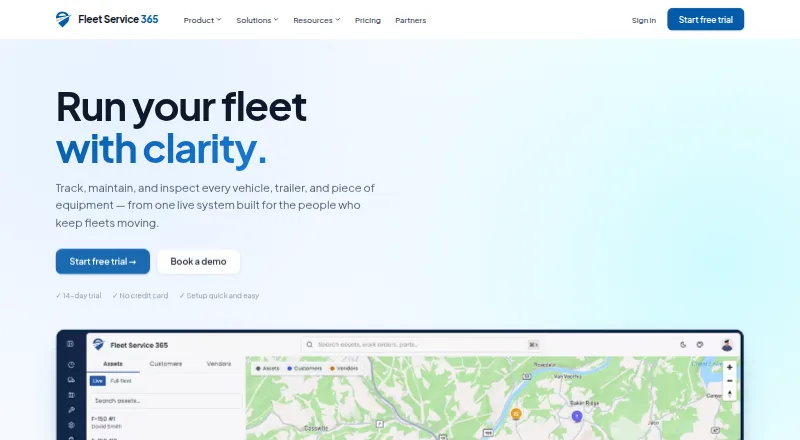
Fleet Service 365 puts asset records, maintenance, inspections, fuel and meter tracking, work orders, and reporting in one fleet system. It suits operators who need to coordinate upkeep and field inspections, especially those whose telematics provider is ATTI, Geotab, Samsara, Motive, or Verizon Connect. A free tier lowers the barrier to trying it, but its three-asset ceiling makes it a pilot rather than a full-fleet option for most businesses.
Founded in 2021 and based in the United States, the company also offers a separate FS365 product that connects fleet operations with Microsoft Dynamics 365 Sales, Customer Service, and Field Service.
Key features
Maintenance and work orders
Preventive maintenance can be scheduled by odometer, engine hours, or calendar, then turned into work orders with technician notifications. That gives fleet managers a way to link service intervals to assigned work; it is most useful where fleets track usage as well as dates.
Mobile inspections
The iOS and Android app supports DVIRs with photos, signatures, GPS and timestamps, and inspections can be completed offline. Defects can automatically generate work orders, a practical bridge from a driver’s report to maintenance follow-up. Offline use is particularly useful for field teams working beyond reliable connectivity.
Fleet records and telematics
Fuel and meter tracking, reporting, and parts inventory extend the system beyond inspection and maintenance workflows. The named telematics providers are ATTI, Geotab, Samsara, Motive, and Verizon Connect; fleets using other providers should confirm fit before committing.
Security and deployment
The privacy policy says data is encrypted in transit with TLS 1.2+ and at rest with AES-256, with tenant isolation enforced at the database row level. It also says the company does not sell personal information or train cross-customer models on customer telematics data without written authorization. Operators needing control over deployment can choose single-tenant self-hosting in a customer VPC or on-premises Kubernetes, with BYO KMS, SSO, and SIEM. Those options are meaningful for specific security and infrastructure requirements, though they are more than a small fleet needs.
Pricing
Fleet Service 365 uses a freemium model: Starter is free, and paid plans start at $6/mo. A 14-day free trial requires no credit card.
| Plan | Price | What it includes |
|---|---|---|
| Starter | Free | Up to 3 assets, 1 user, up to 25 customers, up to 25 vendors, up to 25 contacts, and 1 GB storage. |
| Standard | $6 a month (billed $72 / asset / billed annually) | Unlimited assets and users, parts and inventory management, tire management, custom roles and permissions, priority chat support, and 50 GB storage. |
| Pro | $8 a month (billed $96 / asset / billed annually) | Unlimited assets and users, real-time GPS tracking, speed reports, advanced routing, a sandbox environment, a named support contact, a 99.9% SLA, and 250 GB storage. |
Starter is a sensible way for a very small operation to evaluate the workflows, but one user and three assets sharply limit ongoing use. Standard removes those caps and adds inventory and tire management, making it the practical tier for growing fleets that do not need Pro’s live tracking and routing. Pro is the better fit when those capabilities, a sandbox, or its named support contact and 99.9% SLA justify the higher per-asset charge. Paid plans are billed annually at the stated totals, so the monthly figures should not be read as month-to-month commitments.
Starter includes email support; Standard adds priority chat, while Pro includes priority support with a named contact and a 99.9% SLA. The trial is separate from the free plan and lasts 14 days.
Platforms
Fleet Service 365 is available on the web, Android, iOS, and API, with a self-hosted deployment option. Mobile availability matters most for field inspections; self-hosting is aimed at organizations that need deployment in their own VPC or on-premises Kubernetes environment.
Who it's for
The company targets fleet operators across trucking, construction, field service, manufacturing, and government. It is a stronger fit for teams that need inspection and maintenance workflows connected to work orders, or that need the listed telematics integrations. Small fleets can start free, but the single-user, three-asset cap means teams needing broader access will need a paid plan. Buyers seeking a standalone tracking product rather than a broader maintenance system may prefer a more focused alternative.
Pros and cons
- Pros: Offline DVIRs with photos, signatures, location and timestamps can create work orders for defects, keeping inspection findings tied to follow-up.
- Pros: Maintenance schedules can use odometer, engine hours, or calendar intervals, supporting fleets that track service needs in different ways.
- Pros: Standard and Pro remove asset and user limits, while Pro adds real-time GPS, routing, and a defined 99.9% SLA.
- Cons: Starter is limited to three assets and one user, so it is not a durable free option for a team managing a larger fleet.
- Cons: Paid plan pricing is billed annually, which is less flexible for buyers looking for a monthly commitment.
- Cons: The named telematics integrations are a finite set; fleets relying on another provider should establish compatibility before choosing the system.
Alternatives
Fleet management software is a useful starting point for comparing the wider category. Choose GoFleet if its paid, customized pricing and broader listed platform coverage, including macOS and Windows, suit your operation; its estimate requires contacting the company. Simply Fleet is another freemium option, with a free plan covering five vehicles and three users, so it offers more room than Fleet Service 365’s free tier for a small team. Pick Whip Around if a free inspection-focused starting point limited to one asset and one user matches your needs. Traccar is worth considering when tracking is the priority: its listed Tracking Account costs $9.95 a month for a single user on a shared server, with a selected device limit and default server configuration. Fleet Maintenance Pro has a paid Basic cloud plan at $24 a month, billed at $24 /user/mo, for buyers considering a paid maintenance product without a free plan. Fleetsoft is a paid option whose Professional plan is $5 a month per asset/month, billed annually, with vehicles, work orders, parts inventory, services, PM scheduling, and GPS integration. GPSWOX is another paid option, with a yearly Light plan at $2.99 a month for one object. Trimble Viewpoint Vista is an alternative with sales-contact pricing and cloud-hosted or on-premises deployment.
Verdict
Fleet Service 365 is a good fit for fleet operators who want mobile inspections, scheduled maintenance, and work orders in one system, especially when they use a named telematics provider or need self-hosted deployment. Its offline DVIRs and defect-to-work-order link are its clearest practical strengths. Look elsewhere if a free plan needs to support more than three assets or one user, or if annual billing and the listed telematics integrations do not suit your operation.
Getting started
- Open the Fleet Service 365 website.
- Start the 14-day free trial without a credit card, or use the free Starter plan.
- Use the mobile app on iOS or Android for field inspections.
- Choose a hosted plan or the described self-hosted deployment option.
- Select Standard or Pro for paid features and higher asset capacity.
Limits
Starter allows up to 3 assets, 1 user, 25 customers, 25 vendors, 25 contacts, and 1 GB of storage. Standard includes unlimited assets and users with 50 GB storage; Pro includes 250 GB storage. Real-time GPS tracking is listed with Pro.
On record
- Purpose
- Fleet Service 365 combines asset tracking, maintenance, inspections, fuel and meter tracking, work orders, and reporting in one fleet system.
- Maintenance
- Preventive maintenance can be scheduled by odometer, engine hours, or calendar, and can generate work orders and technician notifications.
- Inspections
- Its mobile DVIR inspections support photos, signatures, GPS, timestamps, offline use, and automatic work order creation for defects.
- Telematics
- The site names ATTI, Geotab, Samsara, Motive, and Verizon Connect as supported telematics providers.
- Dynamics integration
- A separate FS365 product brings fleet operations into Microsoft Dynamics 365 Sales, Customer Service, and Field Service.
- Mobile
- The mobile app is available for iOS and Android and is used for field inspections.
- Pricing model
- Paid plans are priced per tracked asset with no per-user fees; the site says adding assets mid-term is prorated and removing them takes effect at renewal.
- Trial
- The 14-day free trial requires no credit card.
- Security
- The privacy policy says FS365 encrypts data in transit with TLS 1.2+ and at rest with AES-256, and enforces tenant isolation at the database row level.
- Privacy
- The privacy policy says the company does not sell personal information or train cross-customer models on customer telematics data without written authorization.
- Self-hosting
- The pricing page describes single-tenant self-hosted deployment in a customer VPC or on-premises Kubernetes, with BYO KMS, SSO, and SIEM.
- Support
- Starter includes email support, Standard includes priority chat support, and Pro includes priority support with a named contact and a 99.9% SLA.
- Intended customers
- The company says it built the product for fleet operators and lists use cases across industries including trucking, construction, field service, manufacturing, and government.
- What it does
- Fleet Service 365 is a fleet operations platform for assets, maintenance, inspections, fuel, work orders, parts, reporting, and telematics data.
- Free plan
- Yes
- Paid from
- 6 /mo
- Mobile app
- Yes
- Parts inventory
- Yes
- Custom inspections
- Yes
- Fuel cost tracking
- Yes
- Asset limit
- 3 vehicles
- API access
- Yes
Questions
Does Fleet Service 365 have a free plan?
Yes. Starter is free and covers up to 3 assets and 1 user.
How much do the paid plans cost?
Standard is $6/mo per asset, billed annually at $72 per asset. Pro is $8/mo per asset, billed annually at $96 per asset.
Is there a free trial?
Yes. The trial lasts 14 days and requires no credit card.
Which platforms are available?
Fleet Service 365 lists Android, iOS, API, web, and self-hosted options.
Can it connect to telematics providers?
Yes. Named supported providers are ATTI, Geotab, Samsara, Motive, and Verizon Connect.
Can Fleet Service 365 be self-hosted?
Yes. The pricing page describes single-tenant deployment in a customer VPC or on-premises Kubernetes.