Do these 3 things before closing this tab:
1Scan for outdated or missing drivers - takes under a minute2Clear out junk files and repair common Windows errors3Fix the driver behind crashes, sound loss and screen glitchesShort answer: Garmin is the clearest documented choice if lane-departure warning (LDWS) is your non-negotiable feature. Garmin manuals explicitly identify LDWS on the Dash Cam X310, 67W, 57, 47 and Live, while the DriveCam 76 combines the function with navigation. These systems warn; they do not steer, brake or replace attentive driving or factory ADAS.
This ranking covers verified aftermarket LDWS capability, not the five best dash cams for image quality alone. Confirm U.S. stock, firmware and pricing before purchase because several Garmin models have changing retail status.
As an Amazon Associate I earn from qualifying purchases.
What lane-departure warning actually does
LDWS uses a forward-facing camera to identify painted lane boundaries and warn when the vehicle appears to cross one unintentionally. Garmin describes the feature as informational and dependent on visible markings and suitable driving conditions. See Garmin’s explanation for the 47/57/67W family at Garmin’s LDWS documentation.
Recommended Free Tools
- LDWS: warns about a possible lane crossing.
- Forward-collision warning: warns about closing too quickly on traffic ahead.
- Front-vehicle-departure (go) alert: tells you that stopped traffic has begun moving.
- Lane-keeping assist: actively steers or applies corrective input; a dash cam normally cannot do this.
- Blind-spot monitoring: usually uses side-mounted vehicle sensors and is not the same feature.
The five best documented LDWS dash cams
| Rank | Model | LDWS evidence | Best fit | Main limitation |
|---|---|---|---|---|
| 1 | Garmin Dash Cam X310 | Official manual | Newest premium Garmin platform | Current U.S. price and exact availability require checking |
| 2 | Garmin Dash Cam 67W | Official manual; alerts above 64 km/h (40 mph) | Balance of compact size and wide view | Wide lens can increase edge distortion |
| 3 | Garmin Dash Cam 57 | Official manual; alerts above 64 km/h (40 mph) | Compact mainstream option | Less premium than X310 |
| 4 | Garmin Dash Cam 47 | Official manual; alerts above 64 km/h (40 mph) | Basic, lower-tier Garmin choice | Fewer premium capabilities |
| 5 | Garmin Dash Cam Live or DriveCam 76 | Official manuals | Connected monitoring or navigation-camera hybrid | Live needs cellular service; DriveCam 76 is not a conventional standalone camera |
1. Garmin Dash Cam X310: best current Garmin upgrade
The X310 manual documents lane-departure, forward-collision, go, red-light and speed-camera alerts. It is the strongest choice for someone who wants Garmin’s newest documented driver-awareness package and is willing to pay for a premium platform. The official manual is available here.
#1 Best Overall
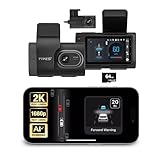
- Full Coverage, Front and Rear - The TYPE S T200 PLUS showcases a 2K 1440p front-facing dashcam and an optional 1080p rear camera. This configuration empowers you to capture both the front and rear perspectives of your vehicle while driving, greatly enhancing safety. This comprehensive coverage can provide crucial evidence in the unfortunate event of accidents.
- Minimize the Blind Spots - The TYPE S AI dash cam incorporates a crucial Blind Spot Warning feature to improve road safety. This system actively monitors the vehicle's blind spots, alerting the driver to the presence of other vehicles in these hard-to-see areas. Using visual or audible signals, the dashcam provides timely warnings, prompting the driver to exercise caution during lane changes or maneuvers.
- Front & Rear Collision Warning - The TYPE S ADAS dash cam features Front & Rear Collision Warning, a smart system that alerts you when you're too close to the car in front or if a vehicle behind is approaching too quickly. Using advanced driver assistance algorithms, it provides real-time warnings, enabling quick responses and enhancing overall road safety.
- Lane Departure Warning - The Lane Departure Warning built-into the TYPE S AI Dashcam uses AI triggered advanced sensors to monitor your vehicle's lane position. If any deviation is detected, it issues a prompt alert, enhancing driving safety by notifying you of deviations and potentially preventing lane-related incidents.
- Stop & Go Reminder - Stay vigilant at traffic stops as the 1440p AI dash cam by TYPE S recognizes when the car ahead starts moving while you're still. Our intelligent reminder keeps you on track, gently prompting you to get moving and prevent any traffic disruptions
Garmin’s published material does not establish a current U.S. street price in the evidence available for this guide, so treat any retailer figure as date-sensitive. Choose another model if you require front-and-rear coverage, extensive parking surveillance or a confirmed low price.
2. Garmin Dash Cam 67W: best balance
The 67W has explicit LDWS support and a wide field of view. Garmin specifies alerts above 64 km/h (40 mph) for the 47/57/67W documentation. That threshold makes it primarily a freeway and highway aid, not a low-speed city safety system.
Rank #2
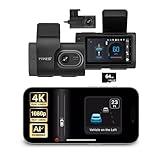
- [Full Coverage, Front and Rear] The TYPE S T400 PLUS dash cam for cars features a front-facing 4K camera and an optional 1080p rear camera. This dual dash cam setup empowers you to capture both the front and rear perspectives of your vehicle while driving, significantly enhancing safety. With this comprehensive coverage, you have access to crucial evidence in the unfortunate event of accidents.
- [Minimize the Blind Spots] The TYPE S AI dash cam incorporates a crucial Blind Spot Warning feature to improve road safety. This system actively monitors the vehicle's blind spots, alerting the driver to the presence of other vehicles in these hard-to-see areas. Using visual or audible signals, the TYPE S ADAS dash cam provides timely warnings, prompting the driver to exercise caution during lane changes or maneuvers.
- [Front & Rear Collision Warning] Powered by AI Algorithms, this TYPE S 4K dash cam features Front & Rear Collision Warning, a smart cam with a smart system that alerts you when you're too close to the car in front or if a vehicle behind is approaching too quickly. Using Ai dash cam advanced driver assistance algorithms, this dual dash cam provides real-time warnings, enabling quick responses and enhancing overall road safety.
- [Lane Departure Warning] The Lane Departure Warning built into the TYPE S AI Series dash cam uses AI-triggered advanced sensors to monitor your vehicle's lane position. If any deviation is detected, it issues a prompt alert, enhancing driving safety by notifying you of deviations and potentially preventing lane-related incidents with the wireless ADAS dash cam.
- [Stop & Go Reminder] Stay vigilant at traffic stops as the front and rear G-Sensor dash cam by TYPE S recognizes when the car ahead starts moving while you're still. Our intelligent reminder keeps you on track, gently prompting you to get moving and prevent any traffic disruptions, making it a reliable wireless dash cam.
The wide view captures more surroundings but can stretch objects near the edges. Correct mounting and camera-position calibration matter more than the headline field-of-view number. The official feature description is in Garmin’s manual. A third-party 2026 aggregation listed approximately $160, but that is not an official current price; verify the seller and warranty.
What’s actually slowing this PC down?
Pick the symptom - the matching free tool is one click away.
3. Garmin Dash Cam 57: best compact mainstream alternative
The 57 preserves the explicitly documented LDWS function and the same 40-mph threshold cited for this Garmin family. It suits drivers who want a smaller, practical Garmin warning system rather than the newest premium model. Resolution, current U.S. stock and price should be confirmed on the seller’s listing and Garmin support materials before ordering.
Rank #3

- [Advanced ADAS Technology] WOLFBOX G850 PRO mirror dashcam enhances safety with Advanced Driver Assistance System alerts, including forward collision, pedestrian collision, lane departure, lead vehicle start, and distance monitoring. This rearview mirror camera allows you to auto monitor your surroundings, ensuring you drive confidently and securely
- [Enhanced BSD Algorithm] Monitor blind spots effectively with this digital rear view mirror. Detect dangers during lane changes by your car and following car, plus rear collision alerts. WOLFBOX mirror dash cam front and rear delivers thorough protection
- [4K Dual Channel Recording] Record in ultra-high definition with front 2160P(2560*1440)@30fps and rear 1080P@25fps cameras. The WOLFBOX dash cam mirror features a full IPS touch screen for easy operation, and both channels utilize WDR/HDR and wide angle lens to capture super clear details when driving through shadows, direct sunlight, or nighttime conditions
- [5.8GHz WiFi Connectivity] This rear view mirror dash cam features upgraded 5.8GHz WiFi for a seamless connection. Connect to the WOLFBOX App effortlessly, allowing you to download and share videos instantly. Streamline your video management and enjoy effortless access to your footage with this advanced functionality
- [Voice Control Functionality] Operate your WOLFBOX dash camera for cars with simple voice commands. Keep your attention on driving while seamlessly interacting with your backup camera mirror. 12 voice commands available, including turn on WiFi, take picture, and lock the video, among others
4. Garmin Dash Cam 47: best lower-tier option
The 47 is the entry point in the same documented LDWS family. It is appropriate when the warning function and basic incident recording matter more than flagship footage or connectivity. Do not call it the cheapest option without checking current prices, and do not expect an LDWS warning below the documented 40-mph operating threshold.
5. Garmin Dash Cam Live or DriveCam 76: connected and hybrid choices
Dash Cam Live
The Live manual documents LDWS and adds connected, live-view-oriented functionality. It is better for owners who value remote vehicle monitoring than for someone seeking a simple camera. Cellular coverage, data-plan terms, availability and hardware price vary; consult Garmin’s Live manual and current U.S. listing.
Rank #4
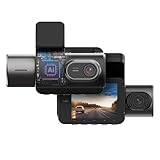
- [Dual View, Twice the Security] The TYPE S T401 provides dual view recording with a 4K front camera and a 1080p interior camera equipped with infrared night vision. This setup captures every detail on the road and inside your vehicle, ensuring clear footage both day and night. With comprehensive coverage, you can drive with confidence, knowing every moment is securely documented.
- [Forward Collision Warning] The TYPE S AI dash cam's driver assistance includes a Forward Collision Warning system that monitors the distance between your vehicle and the one ahead, detecting potential risks and issuing timely alerts. Whether in heavy traffic or on the highway, this feature helps you react quickly and avoid accidents.
- [Lane Departure Detection] The Lane Departure Warning system in this AI dashcam enhances driving safety by monitoring your vehicle’s position within the lane. When it detects unintended drifting, it issues an immediate alert, helping you stay on course. This feature is particularly valuable on highways or during long drives, where maintaining lane discipline is crucial for safety.
- [Pedestrian Collision Warning] The included Pedestrian Collision Warning system utilizes AI to detect pedestrians in your path and instantly alerts you to potential risks. Ideal for urban settings, crosswalks, and parking lots, this advanced driver assistance feature gives you the crucial moment to react and avoid accidents, ensuring peace of mind on the road.
- [Stop & Go Reminder] In heavy traffic, this 4K dash cam keeps you alert with a Stop & Go Reminder that signals when the vehicle ahead starts moving. This feature, powered by AI driver assistance system, helps reduce the risk of delayed reactions during stop-and-go situations, ensuring you're always ready to move and keeping your drive smooth and safe.
DriveCam 76
The DriveCam 76 documents LDWS and camera-placement settings, but it is a navigation device with an integrated camera. Treat it as an alternative format, and check whether its age and availability suit your vehicle. Its manual is available from Garmin.
How reliable is aftermarket LDWS?
Expect missed or inappropriate warnings when lane paint is faded, contradictory or hidden. Snow, standing water, glare, fog, darkness and heavy rain reduce the camera’s view. Construction shifts, merges, exit ramps, sharp curves, narrow unmarked roads and temporary markings also confuse lane geometry. A windshield tint band, steep glass, an obstructed mounting spot or an incorrect horizontal-position setting can degrade detection.
Best Value

- 【4K Front & Rear Dash Cam with Flexible Rear Camera】4K front camera + 1080P rear camera with an adjustable rear lens that can record inside the cabin or behind the vehicle. Captures license plates, road signs, and critical driving details from multiple angles with sharp clarity. Stronger Evidence When It Matters. Whether it’s an accident, road dispute, or insurance claim, you’ll always have clear video proof to protect yourself
- 【Superior Night Vision with F1.55 Aperture & Dual HDR】7-layer glass lens, F1.55 large aperture, and Dual HDR technology enhance light intake and optimize exposure. Produces brighter, clearer footage at night, in tunnels, or during rain and glare conditions. Drive with Confidence Day and Night. Your dash cam keeps recording sharp and reliable footage no matter the lighting conditions.
- 【Free 128GB Card, G-Sensor & 24H Parking Monitor】Includes a free 128GB microSD card with support up to 512GB, built-in G-sensor emergency lock, loop recording, and optional 24-hour parking surveillance. Automatically saves critical footage during impacts and continues monitoring your vehicle even when parked. Complete Protection for Your Car. From driving on the road to parking overnight, your vehicle is always guarded
- 【Ultra-Fast Wi-Fi 6 & Smart App Control】Built-in Wi-Fi 6 provides data transfer speeds up to 5× faster than traditional Wi-Fi dash cams and works seamlessly with the 70mai app. Instantly preview, download, and share videos directly on your phone without removing the SD card. Footage at Your Fingertips. Access important recordings on the spot for police reports, insurance claims, or sharing unforgettable moments
- 【ADAS Safety Alerts & OTA Smart Updates】Advanced Driving-Assistance System provides lane departure and forward collision alerts, while OTA updates keep the system optimized. Real-time voice alerts help drivers stay aware of potential risks, while automatic firmware updates ensure improved performance over time. Smarter and Safer Driving. Your dash cam not only records the road but also helps you avoid potential hazards.
Garmin’s 40-mph figure applies to the documented 47/57/67W instructions; do not apply it automatically to every Garmin model or firmware version. The X310 and Live manuals should be checked for their own behavior.
Installation and calibration checklist
- Mount the camera high and near the windshield center without blocking the driver’s view.
- Keep the lens clean and aim it so the horizon and lane boundaries are visible.
- Keep the camera level; do not leave it rotated.
- Enter the correct camera-placement or horizontal-position setting.
- Ensure the mount does not obstruct factory cameras, rain sensors, airbags or inspection areas.
- Use a supported high-endurance microSD card and verify that loop recording continues.
- Test on a clearly marked road in good weather, above the model’s operating threshold.
- Adjust alert volume or sensitivity where the model permits it; reduce nonessential alerts if they become distracting.
LDWS versus your car’s factory ADAS
Factory systems are calibrated to the vehicle and can combine steering angle, speed, braking and radar or camera data. An aftermarket dash cam is a supplementary reminder and cannot provide lane centering or corrective steering. In a newer vehicle, two audible systems may become annoying or confusing; check whether the factory warning can be adjusted before adding another.
When a different dash cam is the better purchase
If lane warnings are optional, choose based on the job you actually need:
Quick Recap
- Thinkware U3000 PRO: 4K front, 2K rear, STARVIS 2 sensors, radar parking functionality and optional LTE. The cited official material does not verify explicit LDWS. Front-only was listed at $499.99 and bundles from $579.99 to $729.99 in the referenced store listings; prices are date-sensitive. Product page.
- VIOFO A229 Pro: a video-evidence choice with 4K front and 2K rear options, GPS and Wi-Fi. Official listings showed $349.99 for the two-channel version and $309.99 front-only; LDWS is not established by the cited product material. A229 series.
- BlackVue DR970X-2CH LTE Plus II: premium dual-channel cloud/LTE positioning; the North American model was listed at $540.99. Do not assume LDWS without model-specific documentation. BlackVue series page.
- Nextbase iQ: connected monitoring, parking assistance, voice features, GPS, Bluetooth and Wi-Fi, with optional subscription costs noted in TechRadar’s comparison. It is a more complex ownership model, not a verified LDWS substitute.
Buying decision
- Clearest documented LDWS: Garmin.
- Newest premium Garmin: X310.
- Balanced wide-view model: 67W.
- Compact or lower-tier choices: 57 or 47, subject to current price and stock.
- Connected or navigation format: Live or DriveCam 76.
- Best footage, rear coverage or parking surveillance instead: compare Thinkware, VIOFO or BlackVue on those criteria, not on unverified LDWS claims.
Product prices and availability are accurate as of the date/time indicated and are subject to change. Any price and availability information displayed on Amazon at the time of purchase will apply.