Apple acknowledged a wireless CarPlay connection problem associated with the iOS 18.4 period. iOS 18.4.1, released on April 16, 2025, included a fix for a rare issue that prevented wireless CarPlay from connecting in certain vehicles. However, that wording does not mean iOS 18.4 broke CarPlay for every driver or that the update resolved every reported symptom.
After iOS 18.4 arrived on March 31, 2025, some iPhone owners reported wireless CarPlay repeatedly connecting and disconnecting, failing to launch until they tried several reconnections, losing Now Playing information from the vehicle’s instrument cluster, or experiencing problems with Siri audio. Reports mentioned vehicles from Honda, Mazda, Audi, Ford, Volkswagen, Nissan, and other manufacturers, but the available evidence did not establish a universal problem affecting every model or connection type.
As an Amazon Associate I earn from qualifying purchases.
What happened to CarPlay after iOS 18.4?
The first reports came mainly from users on Reddit, Apple Community, and MacRumors forums. Many said CarPlay had worked normally before installing iOS 18.4 and became unreliable afterward. The complaints were not limited to one vehicle brand, which made an iPhone-side software problem plausible, but forum reports cannot establish how frequently the problem occurred or prove that every symptom had the same cause.
Quick wins for a faster PC:
Clear out junk files and repair common Windows errorsFree Scan →Fix the driver behind crashes, sound loss and screen glitchesFind Drivers →Repair Windows errors before they cause bigger problemsFix Now →Some drivers said a normal restart, re-pairing, or resetting network settings did not consistently solve the issue. Others reported improvement after installing iOS 18.4.1. Still, continued reports of instability indicate that the vehicle’s infotainment firmware, USB cable, adapter, pairing state, or a model-specific compatibility problem may also be involved.
#1 Best Overall

- 【Enjoy Wireless Streaming Music】This car Bluetooth adapter can be connected to non-Bluetooth car audio systems, home stereos, speakers, wired headphones via the 3.5mm AUX adapter; And equipped with a Bluetooth 5.3 chip for stable connection / fast transmission / wide signal range. Just pair it with your phone and start listening to your favorite music!
- 【Intelligent Noise Reduction Tech】Our Bluetooth audio receiver adopts the latest CVC8.0 Noise Cancellation and Digital Signal Processor (DSP) technologies, which can eliminate echo and block out intrusive background noise (such as wind, traffic, or crowds), providing you with crystal-clear calling sounds.
- 【Up to 16 Hours of Battery Life】The working time of this aux Bluetooth adapter is up to 16 hours when making calls or playing music. And it takes only 2.5 hours to fully charge the device by using a Type-C fast charging cable (Included in the package). In addition, this Bluetooth music adapter can be used while charging, which is very convenient.
- 【Hands-free Calling & Navigation】A built-in microphone and one “MFB” button to answer / redial / hang up / reject calls, help you make hands-free calls. And the Bluetooth audio adapter supports broadcasting voice notification from existed navigation App. You don’t have to look down the phone on the move. Make sure you drive safely!
- 【Dual Connection】The portable Bluetooth stereo adapter can be paired with 2 devices at the same time. You can enjoy your music and never worry about missing any calls. Once paired, the car receiver will automatically reconnect to your last paired Bluetooth devices, as long as they are within the wireless range.
What Apple officially confirmed
Apple’s iOS 18.4 release information described general features, bug fixes, and security updates but did not specifically identify the CarPlay failure described by users. Apple’s iOS 18.4.1 documentation later listed a fix for a rare problem that prevented wireless CarPlay from connecting in certain vehicles.
That is the strongest official evidence that at least one wireless-CarPlay defect connected to the iOS 18.4 update period was real and recognized by Apple. It is important not to broaden Apple’s statement beyond what it says: iOS 18.4.1 was not presented as a fix for every CarPlay complaint, every vehicle, or every wired connection problem.
Symptoms drivers reported
- Repeated wireless connection and disconnection: CarPlay appears briefly, drops out, and reconnects in a loop.
- CarPlay does not launch: The phone and vehicle may see each other, but the CarPlay interface does not appear without repeated attempts.
- Missing Now Playing details: Music or podcast information may not appear correctly on the car’s instrument cluster or infotainment display.
- Siri audio problems: Siri may fail to respond audibly or route its audio incorrectly.
- Inconsistent results after resets: Restarting the iPhone, vehicle, or pairing process may help temporarily—or not at all.
These symptoms can have different causes. A wireless CarPlay failure is not necessarily the same problem as missing dashboard metadata or a Siri-routing issue, so one driver’s successful fix may not apply to another.
The Tool Desk
Outbyte Driver Updater FREEScan for outdated or missing drivers - takes under a minuteDriver Scan →Outbyte PC Repair FREERepair Windows errors before they cause bigger problemsFix Now →Before troubleshooting: identify your connection type
First determine whether your vehicle uses wireless or wired CarPlay. The troubleshooting path differs:
| Connection | Important variables |
|---|---|
| Wireless CarPlay | Bluetooth discovery, Wi-Fi, Auto-Join, pairing records, vehicle firmware, and wireless compatibility |
| Wired CarPlay | USB port, data cable, iPhone connector, adapters, and vehicle USB compatibility |
Wireless CarPlay uses Bluetooth to discover the phone and Wi-Fi to establish the CarPlay connection. A phone can therefore show Bluetooth-related activity while still failing to establish the Wi-Fi connection CarPlay needs.
How to troubleshoot CarPlay after iOS 18.4
1. Install the newest compatible iOS update
Open Settings > General > Software Update and install the newest compatible release offered for the iPhone. Apple specifically documented the wireless CarPlay fix in iOS 18.4.1, so remaining on iOS 18.4 leaves a known issue unaddressed.
Rank #2

- 54W High Power Fast Charging, 4-Port Synchronous Charging: Nulaxy Bluetooth car adapter integrates PD36W and QC18W, offering a high-speed and efficient charging solution. Its innovative four-port design supports parallel charging of multiple devices, effortlessly overcoming battery anxiety and enhancing charging efficiency.
- Technological Leadership, Revolutionary Bluetooth 5.3: The iphone fm transmitter for car radio uses the latest Bluetooth 5.3 technology, significantly improving connection speed and data transmission efficiency. Enhanced sound quality ensures rapid and stable connections, providing a clearer, smoother experience for both calls and music playback.
- Stunning Bass, Colorful Lighting Effects: One-touch activation of stunning bass effects reproduces the true texture of music, offering an unparalleled musical experience. The five-color lighting design provides accurate perception at night, ensuring easy and safe operation, making nighttime driving more relaxed.
- Voice Commands and Precise Touch Control: Our bluetooth cigarette lighter adapter supports smart voice navigation from your phone for truly hands-free driving. Its unique raised button design provides precise, sightless control, ensuring safety and convenience while driving.
- Comprehensive Safety Assurance and Wide Compatibility: FM modulator bluetooth for car provides all-around safety protection, including over-current, over-voltage, overheating, and short-circuit protection, ensuring the safety of you and your devices. Its wide compatibility supports 12V to 24V vehicle voltages, suitable for most cars. Nulaxy continues to innovate, offering industry-leading car Bluetooth adapter that ensure safety and compatibility. (Please compare the size between the transmitter and your car cigarette lighter )
Keep the iPhone connected to power if the update is large, and do not judge the result until the update has finished and the phone has restarted. If the iPhone cannot update, resolve that issue first rather than repeatedly deleting and recreating the CarPlay pairing.
2. Restart both sides of the connection
Restart the iPhone and fully restart the vehicle’s infotainment system if the manufacturer provides a restart procedure. Turning the ignition off may not always reboot the head unit immediately; some systems remain active for a short period after the vehicle is parked.
After both devices restart, try CarPlay before changing several other settings. This provides a clearer indication of whether the update or a temporary connection state was responsible.
3. Check wireless CarPlay settings
For wireless CarPlay, confirm that Bluetooth and Wi-Fi are enabled on the iPhone. Also check that the CarPlay network is permitted to join automatically:
- Open Settings > Wi-Fi.
- Look for the network associated with the vehicle or CarPlay.
- Make sure Auto-Join is enabled when that option is available.
Do not assume that manually connecting to a random Wi-Fi network will repair CarPlay. The vehicle and iPhone must complete the CarPlay pairing process, and the vehicle may need to be awake and selected as the active source.
What’s actually slowing this PC down?
Pick the symptom - the matching free tool is one click away.
4. Make sure Siri is available
CarPlay relies on Siri for voice commands and several hands-free functions. Check that Siri is enabled under the iPhone’s Siri settings. Also verify that CarPlay has not been restricted by Screen Time:
Rank #3

- [Humanized Ambient Light Switch Design] - Indulge in a delightful driving experience with our trendy rainbow light design. Immerse yourself in fun while having the convenience of easily turning off the light by double pressing the red "B" button when not needed. Enjoy the captivating ambiance of the rainbow lights and have full control over your driving atmosphere.
- [Upgraded Bluetooth 5.4 Technology] - The latest Bluetooth 5.4 technology, optimizing the transmission delay and connection defect problems, Bluetooth 5.4 will bring you a faster, more stable and smarter connection with less sound quality loss, uninterrupted calls and music experience. It takes only 1 second to complete pairing, and no need to repeat pairing after the first successful pairing with your device.
- [Intelligent Dual USB Ports & Fast Charging] - Coming with 2 USB ports(PD 36W and USB A 12W), can charge two devices simultaneously. Built-in over-current protection, over-voltage protection, intelligent temperature control, short circuit protection, it will effectively ensure safe charging.
- [Great Clear Music Streaming] - Bluetooth 5.4 provides a stable connection, while Noise Suppression (CVC) technology and echo-cancellation grant an amazing hands-free calling experience. In addition, this Bluetooth car adapter supports Bluetooth connection and USB stick connection (≤64GB).
- [Hi-Fi Deep Bass & Backlit] - Just press the button "B" and you will enjoy powerful deep bass and immersive sound. The high-fidelity Hi-Fi sound quality will also make the music more dynamic and pleasing to the ear, taking your passion for music to a new level.
- Open Settings > Screen Time.
- Review Content & Privacy Restrictions.
- Confirm that CarPlay is allowed under the applicable permitted-app or restriction settings.
Menu wording can vary slightly by iOS version and region. If CarPlay launches but Siri remains silent, check the vehicle’s audio source and volume while Siri is speaking, not only the music volume.
5. Forget the vehicle and pair it again
Rebuild the pairing record on both sides:
- Open Settings > General > CarPlay on the iPhone.
- Select the vehicle.
- Tap Forget This Car.
- Remove the iPhone from the vehicle’s Bluetooth or paired-device list if the vehicle retains its own record.
- Restart the iPhone and infotainment system.
- Pair the phone again using the vehicle manufacturer’s normal CarPlay procedure.
Deleting only the iPhone-side record may leave a stale record in the vehicle. If the vehicle has reached its maximum number of paired phones, remove unused devices before pairing again.
6. If CarPlay is wired, test the cable and USB port
A wired connection adds two common failure points: the cable and the vehicle’s USB port. Try another port if the car has more than one, and use a known-good, data-capable cable rather than a charge-only cable.
Free tools Windows power users keep installed
One-click scans. No signup required.
Apple also warns that some combinations of adapters, cables, and vehicle systems can disrupt wired CarPlay. For a vehicle that supports only wired CarPlay, connect the iPhone directly to the vehicle with one suitable cable whenever possible. Avoid diagnosing the problem through a chain of USB adapters, hubs, and extension cables.
If your existing cable is damaged, intermittent, or intended only for charging, a direct USB cable for CarPlay can be a sensible diagnostic or replacement accessory. Match the cable to the iPhone’s connector—USB-C or Lightning—and to the vehicle’s USB port. A new cable can isolate a physical connection problem, but it is not a guaranteed cure for the iOS 18.4 wireless software defect.
7. Update the vehicle’s infotainment firmware
Check the vehicle manufacturer’s support site, owner app, dealer, or infotainment settings for a firmware update. Apple recommends using the latest stereo firmware supplied by the vehicle manufacturer.
Do not assume that a vehicle built recently has the newest head-unit software. Manufacturers may release updates separately from recalls, routine service, or iPhone updates. Follow the manufacturer’s instructions carefully; some systems require a USB drive, a dealer installation, or specific battery and ignition conditions.
Recommended Free Tools
Rank #4
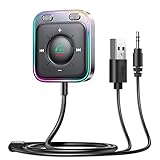
- HiFi Stereo Audio: JOYROOM Bluetooth 6.0 AUX car adapter with the stable Bluetooth technology, solving the transmission delay and connection issues of older versions. Enjoy faster, more stable audio with minimal sound loss, plus a working distance of up to 100FT—ideal as car accessories for daily use
- Clearer Calls: This AUX Bluetooth car adapter features dual microphones that work in tandem to capture your voice from 360° for smoother calls. The Bluetooth AUX receiver upgraded CVC8.0 technology and built-in filter IC effectively filters out more road noise, current sound, and other distractions, resulting in clearer hands-free calls on both ends of the line
- Plug and Play: Simply insert the bluetooth aux adapter into your car 3.5mm aux jack and power via USB. Start your car, and the Bluetooth car adapter will automatically pair your phone immediately. Supports two devices simultaneously, making it a versatile car essential for music and hands-free calls
- Multifunction Button & LED Light Design: The car AUX adapter has an independent buttonfor music, volume, and calls. This Bluetooth receiver supports one-key up and down song/volume up/down/answer/hang up/call back. Ease of use, no distractions, and safer driving. LED lights make it easier to find buttons when night falls
- Multi Safety Protection: Our AUX Bluetooth adapter meets rigorous quality standards and carries FCC, CE, RoHS, and BQB certifications. This reliable Bluetooth AUX for car also features built-in voltage, overcurrent, short-circuit, and overheating protection—ensuring safe, worry-free use. A durable car essential you can trust
8. Test another iPhone if possible
A second iPhone is one of the fastest ways to narrow the fault:
- If two different iPhones fail in the same vehicle, suspect the vehicle, USB port, cable, adapter, or infotainment firmware.
- If another iPhone works but the updated iPhone does not, suspect the iPhone’s iOS version, pairing state, settings, or device-specific compatibility.
- If the problem follows a particular cable or port, replace or avoid that accessory or port.
- If wireless fails but wired works, focus on wireless pairing, Bluetooth, Wi-Fi, and vehicle firmware rather than the entire CarPlay system.
Should you buy a wireless CarPlay adapter?
A wireless CarPlay adapter is relevant only in a particular configuration: the vehicle must already support wired CarPlay, while the owner wants to use CarPlay wirelessly. The adapter adds another compatibility layer between the iPhone and the vehicle, so it should not be treated as Apple’s fix for the iOS 18.4 issue.
Using an adapter while troubleshooting can make diagnosis harder. First establish that wired CarPlay works reliably with a direct cable. If it does, a wireless adapter may be considered later for convenience, provided the adapter is compatible with the vehicle and iPhone. If wired CarPlay itself is failing, an adapter is unlikely to be the most useful first step.
When to contact Apple or the vehicle manufacturer
Escalate the problem after installing the available iOS update, restarting both systems, checking the relevant wireless or wired settings, rebuilding the pairing, and testing the cable or port where applicable. Contact the vehicle manufacturer or dealer when the issue affects only one vehicle, follows the car across multiple phones, or remains after an infotainment update.
Do these 3 things before closing this tab:
1Repair Windows errors before they cause bigger problems2Scan for outdated or missing drivers - takes under a minute3Clear out junk files and repair common Windows errorsPrepare these details before requesting support:
- iPhone model
- Exact iOS version and build
- Vehicle year, make, and model
- Infotainment system version or firmware number
- Wired or wireless connection type
- Exact symptom and how often it occurs
- Whether the issue began immediately after iOS 18.4
- Whether another iPhone works in the same vehicle
- Cable, adapter, and USB-port details for wired connections
This information helps separate an iOS issue from a vehicle-specific compatibility problem. It also avoids the less useful description that “CarPlay is broken” when the actual failure may be limited to wireless discovery, Siri audio, dashboard metadata, or one USB port.
What this incident does—and does not—show
The timing of the reports, the range of vehicle brands mentioned, and Apple’s iOS 18.4.1 release note support the conclusion that at least one wireless-CarPlay connection problem existed for some users during the iOS 18.4 period. They do not provide a controlled failure rate or prove that all reported CarPlay symptoms came from one software defect.
Best Value
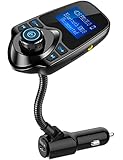
- 1.44 Inch LCD Display: Nulaxy 2024 Upgraded KM18 Bluetooth Adapter Aux Input&Output has a 1.44 inch screen for better displaying information like phone calls, FM channels, music, car battery voltage, etc. The ideal screen size to assist you in driving safe without disturbance.
- Flexible Gooseneck: The rotatable Gooseneck of the wireless radio adapter can provide you with an adjustable viewing angle and optimal viewing comfort of LCD display screen.
- Noise Cancellation&Hi-Fi Sound Quality: Nulaxy noise-cancellation technology dampens the road noise and gives you clear, crisp sound for hands-free calls. Music Streaming ensures crystal clear sound for listening music and hands-free calls.
- Bluetooth V5.4: With the Bluetooth V5.4 technology, the car bluetooth adapter can provide a more stable and faster connecting without intermittent disconnection.
- Hands-free Calls: All in one button for hands-free calls: answer,reject,hand up,recall make you seamlessly switch between incoming calls and music. Enjoy complete voice-control and safer driving with this Bluetooth transmitter.
There was no evidence of a broad Apple recall. Nor is there evidence that one particular cable, adapter, or reset permanently resolves every affected vehicle. The safest approach is to install iOS 18.4.1 or a later compatible update, then troubleshoot according to the vehicle’s connection type.
Frequently Asked Questions
Did iOS 18.4 break CarPlay for everyone?
No. Some users reported CarPlay problems after installing iOS 18.4, but the reports did not establish a universal failure. Apple later documented a fix for a rare wireless CarPlay connection problem in certain vehicles through iOS 18.4.1.
Did iOS 18.4.1 fix all CarPlay problems?
Not necessarily. Apple described a narrow fix for wireless CarPlay failing to connect in certain vehicles. Cable faults, adapters, pairing records, vehicle firmware, and model-specific compatibility can cause other symptoms.
Why does wireless CarPlay keep disconnecting?
Possible causes include the iPhone’s Bluetooth or Wi-Fi state, Auto-Join settings, a stale pairing record, vehicle infotainment firmware, or an iOS compatibility issue. Update iOS, restart both systems, forget and re-pair the vehicle, and check its firmware.
Can a new cable fix CarPlay after iOS 18.4?
A suitable data cable may fix a wired CarPlay problem caused by a damaged cable, incompatible adapter, or faulty USB connection. It is a useful diagnostic step for wired CarPlay, but it is not a guaranteed fix for the documented wireless iOS issue.
Will a wireless CarPlay adapter solve the iOS 18.4 problem?
It should not be viewed as an official or universal fix. Wireless adapters are designed mainly for vehicles that already support wired CarPlay and add another compatibility layer. First confirm that wired CarPlay works reliably with a direct cable.
Crashes, No Sound, or Screen Glitches?
Random freezes, missing sound and display glitches usually trace back to one bad driver. Find and replace yours safely.Free scan · under a minuteWindows Errors? Fix Them Before They Spread
Repair common Windows errors and clear accumulated junk for a smoother, more stable PC - no reinstall needed.Free scan · no reinstallThe Bottom Line
Some iPhone owners did encounter CarPlay problems after iOS 18.4, and Apple acknowledged a rare wireless-connection bug in iOS 18.4.1. Update the iPhone first, then troubleshoot the specific connection type: Bluetooth, Wi-Fi, and pairing for wireless CarPlay; cable, USB port, and adapters for wired CarPlay. If the problem survives those checks—or affects multiple phones in the same vehicle—investigate the vehicle’s infotainment firmware and contact the manufacturer.
Quick Recap
Product prices and availability are accurate as of the date/time indicated and are subject to change. Any price and availability information displayed on Amazon at the time of purchase will apply.




