Some links on this page are affiliate links: if you buy through them we may earn a commission, at no extra cost to you.
Google Maps lets you replace the standard blue navigation arrow with a driving avatar. Start turn-by-turn navigation, tap the blue arrow (or your current vehicle marker), swipe through the available designs, choose a color when that design supports it, and tap Done. You can return to the blue arrow at any time. The icon is only a visual marker; it does not change your route, vehicle settings, or navigation accuracy.
How to change your Google Maps navigation vehicle icon
The current Google Maps Help procedure is the most reliable method on a phone. It works after navigation has started, rather than from the general Maps settings menu.
As an Amazon Associate I earn from qualifying purchases.
The Tool Desk
Outbyte Driver Updater FREEScan for outdated or missing drivers - takes under a minuteDriver Scan →Outbyte PC Repair FREEClear out junk files and repair common Windows errorsFree Scan →- Open the Google Maps app on your phone.
- Enter a destination and tap Directions, then choose the driving mode.
- Tap Start to begin turn-by-turn navigation.
- Tap the blue navigation arrow. If you previously selected a vehicle, tap that vehicle marker instead.
- Swipe left or right through the driving avatars.
- If the selected design offers color choices, tap the color you want.
- Tap Done. The new avatar appears in place of the arrow during navigation.
Google documents this sequence in Choose your driving avatar in the Google Maps app. The same screen also lets you switch back to the blue arrow whenever you prefer.
If you see a vehicle choice while setting up a trip
Google’s October 9, 2025 customization guide calls the feature a custom navatar and describes tapping the navigation arrow when starting a trip to choose a ride. The exact moment the picker appears can differ by app build and account rollout, so use the in-navigation arrow method above if you do not see a choice during trip setup. Google’s guide is available at 8 ways to customize Google Maps.
Popular on Amazon
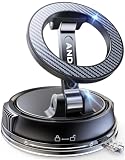
- Compact Foldable Design & Flexible Viewing: The 360° rotating base and 210° dual-axis folding metal arms let you adjust your phone for navigation, calls, or everyday use. Its compact design helps reduce dashboard clutter and minimizes windshield obstruction when properly positioned. Fold the mount to reduce its size by 50% when not in use. Tested through 3,000+ durability cycles. Protected by US Design Patent No. US D1,076,905 S.
- 78 lbs Vacuum Suction & Stable Hold: The rotating-lock vacuum mechanism and 4-layer nano-gel suction cup provide up to 78 lbs of suction force, helping keep your phone stable on bumpy roads and during sudden stops. Designed for smooth, clean, flat dashboards or windshields. Rated for temperatures from -40°F to 300°F and tested through 9,999+ durability cycles and 200+ reattachments. The washable suction cup can be rinsed and reused to help restore grip.
- 22 N55 Magnets & 3900gf Magnetic Force: Built with 22 high-performance N55 magnets delivering up to 3900gf of magnetic force, this MagSafe car phone mount helps keep your phone securely attached during daily driving. Tested through 5,000 vibration cycles for stability on uneven roads. The magnetic design allows quick, one-handed phone attachment and easy removal while keeping navigation and calls within reach.
- Circular Airflow Design: The circular magnetic head reduces contact with the back of your phone, allowing more room for airflow around the mounting area. Its compact design works well for everyday navigation, hands-free calls, and longer drives without adding unnecessary bulk to your dashboard. The carbon-fiber finish adds a sleek, modern look to your car interior.
- Wide Compatibility & Easy One-Handed Use: Compatible with iPhone 12–18 series using MagSafe or a MagSafe-compatible case. An included magnetic ring allows compatible non-MagSafe phones and cases to attach to the holder when installed as directed. The magnetic connection makes placing and removing your phone quick and convenient. Suitable for various vehicles with appropriate mounting surfaces. This model is a magnetic phone holder and does not provide wireless charging.
What the available icons and colors represent
There is no permanent, universal catalog that every Google Maps account receives. Designs are delivered through the app and Google’s servers, so the picker can vary by operating system, region, account, and temporary promotion. The following descriptions separate established examples from dated reports.
| Icon category | What you may see | Color behavior | Availability qualification |
|---|---|---|---|
| Classic navigation arrow | Blue arrow showing your position and heading | Blue; no color picker | Google’s fallback option and the design you can restore at any time |
| Standard vehicle avatars | Car, pickup truck, SUV and other driving shapes | Some designs can be recolored | Google introduced sedan, pickup-truck and SUV examples on iOS in 2018; current selections can change |
| Recolorable vehicles | Several cars, SUVs and trucks reported in the modern picker | Five options were reported with selectable colors in May 2025 | Dated third-party observation, not a guaranteed count for every user or region |
| Legacy fixed-color vehicles | Three older vehicle designs reported alongside the recolorable set | Color is fixed | Dated May 2025 observation; Google can change the catalog |
| Event or promotional avatar | A McLaren F1 design was reported for the United States Grand Prix | Use the color or appearance supplied by the event design | Android Central reported availability until November 23, 2026, with uneven visibility on tested iPhone and Android devices |
The five recolorable and three fixed-color choices come from a May 8, 2025 report by 9to5Google, not from a Google promise that those eight designs remain available. Its examples are useful for understanding the picker, but they should not be treated as a current inventory for every account. Google’s original iOS announcement on May 21, 2018, described a sedan, pickup truck and SUV as alternate icons; those examples explain the feature’s history rather than guarantee what your app shows today. Read the launch description at Now on iOS: new vehicle icons to spice up your drive.
The reported McLaren F1 event icon
Android Central reported in October 2026 that Google Maps was rolling out a McLaren F1 avatar connected with the United States Grand Prix. The report gave November 23, 2026, as the end date and noted that the design was visible on some tested devices but not others. Because it is a server-side, time-limited promotion, it may not appear even when your app is up to date, and it may disappear after the stated date. If the event design matters to you, check the picker on the date you plan to drive rather than assuming it will be present.
Using a custom icon with Android Auto
Phone-selected avatar mirrored to the car
A May 2025 9to5Google report said Google Maps vehicle icons selected on the phone could appear in both Android Auto and CarPlay sessions. At that time, the car display itself did not provide the selector. For Android Auto, the report said you generally had to disconnect and reconnect after changing the phone’s icon before the updated marker appeared on the vehicle screen. This is a dated description of the behavior, not a guarantee for every current release.
Also popular on Amazon

- Versatile Car Phone Mount: Cell phone car mount boasts premium suction strength and an upgraded air vent clip, allowing for flexible installation options on windshields, dashboards, and air vents wall mounts. Note!3M Dashboard Pad is NOT REQUIRED when using a phone holder on windshield Pads Mats
- Strong Suction Performance: Car phone holder comes with a double-locked suction cup made of heat-resistant TPU material, guaranteeing it stays firmly attached to your dashboard even in extreme heat. Reactivate its sticky power by washing with water and air-drying Pads Mats.
- Fully Adjustable Design: Featuring a 360-degree rotating ball joint and an adjustable extension arm ranging from 3.7 inches to 5.9 inches, this dash-Mounted phone mount for cars allows you to customize your phone's placement to any desired angle or distance, offering maximum viewing flexibility Pads Mats.
- Universal Fit: Engineered to accommodate all smartphones ranging in size from 4.0 to 7.1 inches and devices up to 14mm thick, including GPS devices, this phone stand for trucks includes a one-touch release mechanism for swift and easy phone mounting. It serves as an excellent accessory for drivers requiring constant phone access, enhancing driving stability and safety Pads Mats.
- Comprehensive Safety Features: The car phone mount for iPhone includes a unique hook design fortified with stainless steel and padded with thick plastic, ensuring secure engagement with air vent blades without causing scratches. The robust silicone rubber provides sturdy protection, even on bumpy roads. Note: Not suitable for circular air vents desk mount Pads Mats.
The 2026 Android Auto on-screen picker rollout
On September 16, 2026, 9to5Google reported that Google was rolling out a driving-avatar picker directly on the Android Auto display. In vehicles that have received the feature, you can select an avatar and, where supported, a color without reaching for the phone. The outlet did not see the control on every device even with the software versions cited in its report, indicating a server-side rollout rather than a universally enabled switch. Details are in Android Auto update lets you customize your Google Maps ‘driving avatar’ via car display.
If the picker is missing from Android Auto, use the phone procedure while parked, reconnect the phone, and check again later. Do not infer that a missing button means your vehicle, cable, or head unit is defective; the feature may simply not have reached your account.
What CarPlay supports
The May 2025 report described phone-selected icons appearing in CarPlay, but the reviewed evidence does not confirm a new CarPlay on-screen picker equivalent to the Android Auto rollout reported in September 2026. Select the avatar in Google Maps on the iPhone before connecting to CarPlay, then allow the session to refresh. If the old arrow remains, disconnecting and reconnecting is a reasonable update step, but there is no documented universal CarPlay control to choose the icon from the dashboard.
Availability can therefore differ in three separate ways: the icon may not have reached your Google Maps account, the phone may not have synchronized with the car session, or the platform may not expose an in-car picker. Treat those as different conditions when troubleshooting.
Also popular on Amazon

- 【True Military-Grade Certified, Ultimate Upgraded Model】Over the past decade of specializing in high-end car mounts, VANMASS have listened to the voices of millions users, rigorously tested to MILITARY GRADE standards (stability, compatibility, flexibility, security, durability). Finally, we overcome all weaknesses to design the Ultimate Model. This item obtained international military-grade shockproof certification No. GZMR220601855501
- 【Larger Suction Cup, Strongest Suction】The diameter of the suction cup has been increased from 2.5in to 2.8in, and the PU adhesive has been applied to increase the suction power by 44%. Over 85 pounds of suction means even the heaviest phones are secure on bumpy roads. The suction cup is easy to remove and can be washed clean and reused. Attention: Install suction cup on a flat surface, avoiding curves or leather surface
- 【Multi-Function Phone Stand for Dashboard / Windshield / Vent】Are you not sure which installation would best suit your vehicle? No problem the unit is extremely flexible!!! Dashboard, Windshield even air vent, all places work perfectly!
- 【High-end = Quality Materials + Grandmaster Design】VANMASS car phone mount made of PC+ABS material has passed 4 environmental reliability tests and has a temperature resistance range of -40℉ to 194℉, it is also highly resistant to UV rays (Ensuring reliability even in the sun), and the telescopic pole uses a reinforced sliding rail structure to greatly reduce wobbling during driving. This suction phone cradle obtained CP65 / REACH / RoHS safety certifications
- 【Installation Guide】(1)The clamp fits phones+cases ≤0.55 inches thick (No Extra-thick cases).(2)The suction cup adheres only to flat surfaces and fails on leather dashboards; Avoid curved spots which may trap air.(3)Max temperature limit:194°F. Do not mount in areas with prolonged direct sunlight.(4)Clean surface(Tell our support for dash pad if surface is textured);firmly press cup side-to-side to expel air and fully seal edges; secure the mount by FULLY rotate safety lock from to LOCK icon.
The icon does not change your route or vehicle profile
Google presents the navatar as an appearance choice. It changes the symbol representing your position on the map; it does not tell Maps what you are driving and does not alter turn instructions. Google’s 2025 customization guide discusses routing preferences separately, including avoiding tolls, highways or ferries, HOV lanes, and fuel-efficient routing based on vehicle type.
| Setting | What it changes | Where to look |
|---|---|---|
| Driving avatar | The marker shown for your location during navigation | Tap the arrow or current vehicle marker after navigation starts |
| Route preferences | Whether Maps may avoid tolls, highways or ferries, or use HOV and fuel-efficient routing choices | Route-options controls before or during a trip, separate from the avatar picker |
| Vehicle type for fuel-efficient routing | Information Maps can use when offering an efficient route | Vehicle and route-preference settings, not the visual icon selector |
Choosing a truck-shaped marker does not configure truck restrictions, and choosing an SUV does not identify the real vehicle to Maps. Likewise, changing the marker will not activate HOV routing, suppress toll roads, or make a route suitable for a vehicle with unusual dimensions.
Do these 3 things before closing this tab:
1Clear out junk files and repair common Windows errors2Scan for outdated or missing drivers - takes under a minute3Repair Windows errors before they cause bigger problemsDo not use the Navigation SDK documentation for this consumer setting. The SDK page at Modify the navigation UI covers developer-controlled navigation interfaces and UI accessories, not the ordinary Google Maps driving-avatar picker.
Troubleshooting missing icons, colors and updates
The arrow does not open a picker
- Start an actual driving-navigation session first; the selector is not necessarily visible from the ordinary map screen.
- Tap the current marker itself. After a previous selection, it may be a car or truck rather than a blue arrow.
- Check that you are using Google Maps navigation, not a developer navigation interface or a static route preview.
- If no designs appear, the feature may not be enabled for your account or region. Google’s Help instructions describe the feature, but they do not promise identical catalogs for all users.
A color control is missing
Color choices are design-dependent. Some avatars support recoloring while fixed-color legacy designs do not. Swipe to another vehicle before concluding that color selection is unavailable; the absence of a color control can be normal for the design you selected.
Also popular on Amazon

- ✅【Designed for Magsafe】 - The most fashionable iphone car mount in 2026 Magsafe is designed for iPhone 18 Pro Max/17/16/15/14/13/12 Pro Max Mini and official Magsafe cases and other magnetic phone cases and can be fixed directly to these phones without the need to affix metal plates. All Android Phones Will Work: Metal rings are provided; they fit cases and other phones without magsafe. Based on Unique Grandmaster Design (Protected by US Design Patent No. US D1,112,194 S)
- ✅【STRONG MAGNETIC MagSafe Car Mount】 - This powerful magnetic phone holder can create a powerful attraction that firmly supports your device while allowing you to drive without distraction. it easily and securely holds your phone through bumps, sharp turns or even sudden stops, no worrying of dropping your phone.
- ✅【SUPER STICK FORCE】 - VHB Dash Mounted Holders adhesive provides strong stick force between the dashboard and the car phone holder, which can firmly stick to any plane in the car, fix your device, adapt to a variety of road conditions such as sudden braking, speed bump, and rugged mountain road.
- ✅【SAFE DRIVING VIEW】 - Mini-size, not taking up space, it is placed in the dashboard without blocking the view at all, and does not need to look down at the device to ensure your safe driving. Cell Phone Car Mount is suitable for most cars, pickups, SUV, taxi; It is the best assistant for Uber and Lyft drivers
- ✅【360° FREE ROTATION】 - With an adjustable swivel ball joint, you can rotate your smartphone or device at your own will, providing the best viewing angle. Quickly pick and place with one hand, free your hands and make calls and GPS navigation more convenient
The phone changed but Android Auto still shows the old arrow
- End or pause navigation safely before changing settings.
- Change the avatar on the phone using the documented arrow-tap procedure.
- Close or disconnect the Android Auto session.
- Reconnect the phone and restart navigation.
- If the in-car picker is available in your rollout, try selecting the avatar directly on the Android Auto display instead.
The reconnect step reflects the 2025 report’s observation; newer Android Auto builds may update more quickly, while the 2026 display picker is still a reported rollout.
A temporary design has disappeared
Event avatars can be removed when a promotion ends or withheld from particular accounts. The reported McLaren F1 design, for example, was associated with a stated end date of November 23, 2026. If it is gone after that date, that is consistent with a time-limited promotion rather than evidence that your saved settings failed.
The vehicle icon looks wrong on the map
The avatar is directional: it represents your approximate location and heading, just as the blue arrow does. GPS drift, weak signal, tunnels and normal map-position smoothing can make any marker appear offset or briefly point the wrong way. Changing the artwork does not correct positioning; wait for the location to settle or follow Maps’ normal location troubleshooting.
Independent reader supportYour contribution helps us test, update, and keep practical guides available for everyone.How to choose the best icon for your use
For maximum clarity
Use the blue arrow if you want the least decorative, most familiar marker. It remains the fallback Google documents and is easy to recognize when the map is busy or viewed briefly.
Also popular on Amazon

- 【𝐁𝐄𝐒𝐓 𝐂𝐡𝐨𝐢𝐜𝐞: 𝐇𝐢𝐠𝐡-𝐄𝐧𝐝 𝐂𝐚𝐫 𝐌𝐨𝐮𝐧𝐭 𝐓𝐫𝐮𝐬𝐭𝐞𝐝 𝐛𝐲 𝟗,𝟗𝟎𝟎,𝟎𝟎𝟎+𝐔𝐬𝐞𝐫𝐬 𝐨𝐯𝐞𝐫 𝟏𝟎 𝐘𝐞𝐚𝐫𝐬】This Interior Accessories Sets car holder is certified by all authorities (Military-Grade Shockproof Cert No. GZMR230200285101, CP65,REACH,RoHS), based on Unique Grandmaster Design (EUIPO Patent No.006590790-0003), TOP Durable & Healthy Materials from 20,900 materials & Industry-Leading Safety Tests (Monthly 5,000+ open/close test; 100,000+km rugged road tests).
- 【𝐈𝐧𝐝𝐮𝐬𝐭𝐫𝐲 𝐍𝐨.𝟏 𝐚𝐟𝐭𝐞𝐫 𝟏𝟎 𝐘𝐞𝐚𝐫𝐬 𝐑&𝐃 - 𝟒 𝐄𝐱𝐜𝐥𝐮𝐬𝐢𝐯𝐞 𝐀𝐝𝐯𝐚𝐧𝐜𝐞𝐝 𝐓𝐞𝐜𝐡𝐧𝐨𝐥𝐨𝐠𝐢𝐞𝐬】 ①Extreme-40-194°F Surface TEMP Resistance due to VANMASS's Exclusive R&D High-Strength materials ②Extreme 85LBS Suction Force due to Enlarged PU Adhesion(2.5"-2.8")& Bigger Suction Cup with Stronger Vacuum Power ③Ultimate Steel-Cored Structure of Vent Clip & Suction Mount: 20X Stable & Durable ④Ultimate Compatibility due to Deepest Phone Cradle(Depth: 0.7" ) Strongest Clamp Force from Internal 1-Gear Symmetric Control.
- 【𝐊𝐞𝐞𝐩 𝐔𝐩𝐠𝐫𝐚𝐝𝐢𝐧𝐠, 𝐊𝐞𝐞𝐩 𝐓𝐡𝐞 𝐒𝐭𝐫𝐨𝐧𝐠𝐞𝐬𝐭 𝐒𝐮𝐜𝐭𝐢𝐨𝐧】Perfect 2.7” Diameter of suction cup has been tested out by VANMASS Laboratory, 60X Stronger than old models (Stick firmly, yet no block view). PU Adhesive by 2026 Latest Technology is Melt-Resistant so No Residue Left. Easily install with Pre-install Cleaning Kit. Easily Remove with Thoughtful Tear-notch. Note: Install suction cup on a flat surface, avoiding curves, textile or leather surface.
- 【𝐂𝐨𝐦𝐩𝐚𝐭𝐢𝐛𝐢𝐥𝐢𝐭𝐲 & 𝐈𝐧𝐬𝐭𝐚𝐥𝐥𝐚𝐭𝐢𝐨𝐧 𝐆𝐮𝐢𝐝𝐞】 ①The clamp fits phones + cases ≤0.7 inches thick (No Extra-thick cases). ②The suction cup adheres only to flat surfaces and fails on leather dashboards; Avoid curved spots which may trap air. ③Max temperature limit:194°F (Mounting Surface Temperature | Not Ambient Air Temp). Do not mount in areas with prolonged direct sunlight.
- 【𝐈𝐧𝐬𝐭𝐚𝐥𝐥𝐚𝐭𝐢𝐨𝐧 𝐟𝐨𝐫 𝐎𝐩𝐭𝐢𝐦𝐚𝐥 𝐒𝐭𝐚𝐛𝐢𝐥𝐢𝐭𝐲】①Clean flat surface(Contact support for the dash pad if the surface is textured); firmly press cup side-to-side to expel air and fully seal edges; close safety lock buckle to secure mount.②The release button is designed on the back of the middle of the cradle legs exactly, to be Easiest for you to locate.③ Width of Clamp Arm: 2.2"-3.8"; Diameter of Suction Cup: 2.8" ;Length of Telescopic Arm: 5"-7.5"
For quick visual recognition
Choose a high-contrast vehicle and a color that stands out against the map theme. A distinctive silhouette can make it easier to find your position at a glance, but avoid treating the artwork as a substitute for spoken directions or safe attention to traffic.
For personalization
Try the recolorable designs and select the color you prefer. Because the catalog is account- and rollout-dependent, the “best” option is the one actually offered in your picker and still visible on the platform you use.
What’s actually slowing this PC down?
Pick the symptom - the matching free tool is one click away.
For a promotion
Select an event avatar only if you understand that it may be temporary. Save no route assumptions to it: the icon is cosmetic, and a server-side campaign can remove it without changing any navigation preference.
Availability, dates and what is not known
- Google’s official Help page confirms the phone workflow and the ability to switch back to the arrow, but it does not publish a universal icon count.
- Google’s October 2025 guide uses “custom navatar” and separates the appearance setting from route preferences.
- The five recolorable and three fixed-color vehicle count was reported by 9to5Google in May 2025 and should be treated as a snapshot.
- The Android Auto display picker was reported as a server-side rollout on September 16, 2026, so having the relevant app version does not ensure that the control is present.
- The reviewed evidence does not establish a matching new on-screen picker for CarPlay.
- No official source reviewed publishes usage, popularity or performance statistics for driving avatars. The icon is a visual customization, not a measured navigation improvement.
Google can change designs, colors, rollout eligibility and promotional dates without changing the basic phone workflow. If a control described here is absent, compare the behavior on the phone and in the car, check for an available Maps update, reconnect the vehicle session, and allow for server-side availability before assuming a hardware fault.
Safety and practical use
Make changes before moving or have a passenger do them. The avatar is not a safety aid, a vehicle-class declaration, or a substitute for lane, speed and road-sign information. Keep spoken guidance enabled as needed and follow local laws governing phone use while driving.
Bottom line
For a phone, the dependable path is: start driving navigation, tap the blue arrow or current vehicle marker, swipe to a vehicle, choose a color when offered, and tap Done. The blue arrow is always the fallback. Android Auto now has a reported in-car picker rollout, while CarPlay’s reviewed support remains phone-selected rather than a confirmed dashboard selector. Treat icon catalogs and event designs as changeable, and keep this visual choice separate from route and vehicle-type settings.
Quick wins for a faster PC:
Repair Windows errors before they cause bigger problemsFix Now →Scan for outdated or missing drivers - takes under a minuteDriver Scan →Clear out junk files and repair common Windows errorsFree Scan →