Free tools Windows power users keep installed
One-click scans. No signup required.
Short answer: Tesla says to avoid using the Model 3 touchscreen to adjust settings while the car is moving. Set up navigation, climate, media, and preferences before you leave; use voice commands for supported tasks when you need an adjustment; and wait until you are safely parked for anything that requires browsing menus, typing, or looking at the screen.
Can you use the Tesla Model 3 touchscreen while driving?
Tesla’s Model 3 Owner’s Manual says: “Always pay attention to road and traffic conditions when driving. To minimize driver distraction and ensure the safety of vehicle occupants as well as other road users, avoid using the touchscreen to adjust settings while the vehicle is in motion.” The screen controls features including climate, lights, media, navigation, entertainment, and vehicle customization, so an adjustment can require attention that belongs on the road. Tesla Model 3 Owner’s Manual: Touchscreen
A practical rule is to assess the task before moving: if it needs a sequence of screen taps, menu browsing, or typing, do it while parked. If a supported voice command can handle it, you can make the request without navigating the screen—but continue to monitor traffic and be ready to stop interacting if conditions demand your attention.
Set up the screen before you set off
- Enter or confirm your destination and route.
- Choose your media and set a comfortable volume.
- Set the climate and any other preferences you expect to need.
- Make sure the screen is responding normally before departure.
Pre-setting these controls reduces the chance that you will need to reach for menus once the car is moving. If something changes on the road, prioritize driving; pull over safely and park before making a screen adjustment that requires sustained attention.
#1 Best Overall

- 【Tailored Design】Compatible with Model Y (2020 2021 2022 2023 2024 2025) and Model 3 (2017 2018 2019 2020 2021 2022 2023). Not compatible with Model 3 (2024~2026) & Model Y Juniper
- 【Glare-Free, Stay Visible All Day】Tired of being frustrated by sunlight or portrait reflections on your central control screen while driving? Say no more! After thousands of optical experiments, wigoo has solved this problem for you once and for all. The wigoo matte Screen Protector utilizes diffuse reflection optical technology, reducing 80% of glare without compromising clarity! Your screen will remain clear and visible day and night
- 【Smooth Touch, No Fingerprints】Fed up with resistance when swiping your screen and the smudges left behind? Wigoo’s Zero Lag design will provide you with a responsive touch experience like baby’s skin! The silky-smooth touch ensures your control screen responds just as sensitively as the day you got your Tesla, no matter how many taps and swipes you do
- 【9H Military-Grade Protection】Triple ion exchange technology enhances the glass hardness to surpass 9H and is 4 times stronger than ordinary glass. It has passed the 64g steel ball drop test by multiple institutions. For Tesla, the central control screen is everything, so we understand the importance of protecting it at all times
- 【No Edge Gaps】Tailored for the Tesla 15" central control screen, perfectly adhering to its curved edges without any gaps. Remember, 99% of cracks and bubbles come from the edges. To achieve a 100% fit, we have gone through multiple iterations of production equipment and finally adopted the most precise cutting technology to ensure the No.1 fitting craftsmanship
How to use Model 3 voice commands
Tesla’s manual says to fully press the microphone button on the right side of the steering wheel, then speak after the chime. Examples listed by Tesla include:
- “Make it cooler.”
- “Turn on/off the driver’s seat heater.”
- “Speed up the wipers.”
- “Navigate to [location].”
- “Lower/raise the volume.”
- “Pause/play song.”
These examples are not a guarantee that every command is available in every vehicle or situation. Tesla describes its command list as non-exhaustive and notes that some commands require Park, including examples such as Sentry Mode and Pet Mode. If a command is unavailable, misunderstood, or prompts you to confirm something on the touchscreen, wait until safely parked rather than trying to resolve it while driving. Tesla Model 3 Owner’s Manual: Voice Commands
Rank #2
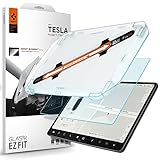
- 9H Hardness – Rated at the highest level on the pencil hardness scale, this glass resists scratches from everyday hazards such as key fobs, sunglasses, paw scratches from pets in the car, and the everyday contact of parking-lot bumps and daily driving without leaving a mark on your tesla 15-inch touchscreen.
- Anti-Glare Matte Finish – The micro-textured surface scatters incoming light in multiple directions, diffusing reflections before they reach your eyes. Navigation maps, rear camera feeds, and driving information stay readable across changing cabin lighting and direct sunlight without the sharp glare common to clear glass.
- Matte Anti-Fingerprint Finish – Matte texture minimizes the appearance of fingerprints on the 15-inch center touchscreen, helping to preserve screen clarity and touch responsiveness.
- EZ FIT Tray, Installation under 60 seconds – EZ FIT includes auto-alignment tray makes installation quick and easy, helping position the protector perfectly in under 60 seconds. A silicone adhesive layer helps prevent air bubbles during application for a clean, seamless fit
- Check the compatibility – Engineered for Tesla Model 3 (2017/2018/2019/2020/2021/2022/2023), Tesla Model Y (2020/2021/2022/2023/2024) 15 inch Dashboard only - NOT compatible with Tesla Model 3 (2024/2025/2026), Model Y (2025/2026)
Choose the safer method for the task
| Task | Safer approach | Why |
|---|---|---|
| Destination, route, or preference setup | Use the touchscreen before departure, while parked. | These tasks can involve several choices or screen confirmations. |
| Brief supported climate, wiper, navigation, or media change | Use a voice command if available, while keeping attention on traffic. | It can avoid a sequence of screen taps, but does not remove the need to drive attentively. |
| Typing, menu browsing, or a voice command that needs screen confirmation | Pull over safely and park before interacting. | The task demands visual or manual attention that should not compete with driving. |
| Screen troubleshooting or restart | Stop and shift to Park first. | Vehicle-status information, safety warnings, and the backup camera are not visible during a touchscreen restart. |
What to do if the touchscreen is unresponsive
Do not restart the screen while driving. Tesla’s procedure is to shift into Park and hold both steering-wheel scroll buttons until the screen turns black. During the restart, the car-status display, safety warnings, and backup camera are unavailable, so wait until the vehicle is stopped in a safe place before beginning. Tesla Model 3 Owner’s Manual: Touchscreen
Tesla also advises against applying a screen protector: it may cause phantom inputs, delayed response, or unresponsiveness, and damage from installation is not covered by warranty. A protector should not be treated as a driving-safety aid.
The Tool Desk
Outbyte Driver Updater FREEScan for outdated or missing drivers - takes under a minuteDriver Scan →Outbyte PC Repair FREERepair Windows errors before they cause bigger problemsFix Now →Rank #3

- Aluminacore 10H Glass Protection – High-purity alumina-silicate glass tempered through ion-exchange resists key fobs, sunglasses, paw scratches from pets in the car, and the everyday contact of parking-lot bumps and daily driving, built tougher than standard soda-lime tempered glass at the same 10H+ hardness rating.
- Anti-Glare Matte Finish – The micro-textured surface scatters incoming light in multiple directions, diffusing reflections before they reach your eyes. Navigation maps, rear camera feeds, and driving information stay readable across changing cabin lighting and direct sunlight without the sharp glare common to clear glass.
- Matte Anti-Fingerprint Finish – Matte texture minimizes the appearance of fingerprints on the 15.4-inch center screen, helping to preserve screen clarity and touch responsiveness.
- EZ FIT Tray, Installation under 60 seconds – EZ FIT includes auto-alignment tray makes installation quick and easy, helping position the protector perfectly in under 60 seconds. A silicone adhesive layer helps prevent air bubbles during application for a clean, seamless fit
- Check the compatibility – Engineered for Tesla Model 3(2024/2025/2026), Model Y Standard (2025), Model Y Premium (2025 ONLY) 15.4" only. NOT compatible with Tesla model Y Standard(2026), Model Y premium (2026) and Model Y Performance
Why minimizing interaction matters
NHTSA defines distracted driving as activity that diverts attention from driving and specifically includes fiddling with entertainment or navigation systems. It says that any non-driving activity is a potential distraction and increases crash risk. In the United States, NHTSA reported 3,208 people killed in crashes involving distracted drivers and 315,167 people injured by distracted driving in 2024. Those are all-vehicle national figures, not Tesla-specific statistics and not counts attributed to touchscreen use alone. NHTSA: Distracted Driving
Use the manual for your Model 3 generation and market
Screen layouts and available functions can vary by vehicle options, software version, region, and language. Tesla’s current North American manual page for 2024-and-newer Model 3 lists software version 2026.32; 2017–2023 Model 3 vehicles have a separate manual. Consult the current manual that matches your vehicle and market rather than assuming that a menu or voice feature works the same across every Model 3. Tesla Model 3 Owner’s Manual
Rank #4

- Aluminacore 10H Glass Protection – High-purity alumina-silicate glass tempered through ion-exchange resists key fobs, sunglasses, paw scratches from pets in the car, and the everyday contact of parking-lot bumps and daily driving, built tougher than standard soda-lime tempered glass at the same 10H+ hardness rating.
- Anti-Glare Matte Finish – The micro-textured surface scatters incoming light in multiple directions, diffusing reflections before they reach your eyes. Navigation maps, rear camera feeds, and driving information stay readable across changing cabin lighting and direct sunlight without the sharp glare common to clear glass.
- Matte Anti-Fingerprint Finish – Matte texture minimizes the appearance of fingerprints on the 8-inch dashboard screen, helping to preserve screen clarity and touch responsiveness.
- Installation wing film – Built-in handling films attached to the screen protector that help with precise alignment and easy installation, then peel away cleanly after application.
- Vehicle-Specific Precision Cut – Engineered for Tesla Model 3 (2024/2025/2026), Model Y Juniper (2025/2026) 8" Rear touch display
Distracted-driving laws also vary: NHTSA notes that state legislatures and governors set U.S. laws. Check the rules where you drive rather than assuming one legal standard applies everywhere.
Quick Recap
Product prices and availability are accurate as of the date/time indicated and are subject to change. Any price and availability information displayed on Amazon at the time of purchase will apply.