What’s actually slowing this PC down?
Pick the symptom - the matching free tool is one click away.
GM is moving away from Apple CarPlay and Android Auto in future vehicles, but it has not removed them from every GM vehicle today. The phase-out began with newer EVs, will eventually extend to future gas-powered vehicles, and is expected to broaden around GM’s next centralized computing transition near 2028. Meanwhile, some 2026 gas-powered models still advertise wireless CarPlay and Android Auto.
GM’s decision is real—but the headline needs a date and model-year qualifier
General Motors is moving away from Apple CarPlay and Android Auto in future vehicle programs. However, GM has not removed either feature from every vehicle, and it has not announced a retroactive shutdown for cars that already support phone projection.
As an Amazon Associate I earn from qualifying purchases.
The transition began with newer electric vehicles, including the 2024 Chevrolet Blazer EV, and is expected to expand to future gas-powered vehicles as GM introduces its next generation of centralized computing hardware. Reporting following CEO Mary Barra’s October 2025 interview placed the broader transition around 2028, but that is not a promise that every GM vehicle launched in 2028 will lose CarPlay and Android Auto on the same date.
As of August 12, 2026, GM’s lineup is mixed. Some new EVs use Google Built-in instead of smartphone projection, while official 2026 Chevrolet Trailblazer and Buick Encore GX materials still list wireless Apple CarPlay and Android Auto as standard equipment.
#1 Best Overall

- The Ultimate Smarter Copilot: Stay on Top of Your Driving- The 3A magic link CarPlay box control everything with a word, Or a touch, Or a twist. Save your 40% of time by quick auto conn and seamless operation, such as navigation, music playing, Siri assistant, phone calls, radio etc(Our Carplay Only Compatible with wired Apple CarPlay Car systems)
- Uncompromisingly 7A Microchip Tech: Help You Focus on Driving- With 5.8 GHZ WiFi, 5.3 Bluetooth and 8-core processor for CarPlay genius makes transmission rate by up 40%, you can 10X faster than other car play take google maps, media, and messaging apps to car display. Unique black 7A chip keeps excellent performance in Anti-Oxidant, hardness, corrosion, and Temperature tests (-20°C to 70°C). No worry about disconnect during a long driving
- 5.0 Premium Ultra-light Al alloy Dongle: Compact and Durable- Our cables and metal boxes that have withstood 50,000+ tests, last 3× longer than plastic receiver. Also, special material car adapter enhanced the heat dissipation
- Serious Power, Serious Value: Designer Box with Stylish- All eye on classic & sleek exterior. Instant plug and play, fast auto-connect, online upgrades, sophisticated UI design ensure smoothly while driving, that for all factory OEM Wired Car. No need dash mount, even if your cell phone is in your pocket, it works
- No Risk to Try: Any problem, 365 days of No Worry. Do solve your troubles within HOUR
The timeline: from EV experiment to company-wide direction
2022–2023: GM makes native software central to its EV strategy
The 2024 Chevrolet Blazer EV became the clearest early example of GM’s new infotainment approach. Rather than treating the vehicle’s screen as a display for a phone, GM built the system around software running directly in the vehicle, including Google Maps, Google Assistant, and Google Play.
The Chevrolet Equinox EV followed the same general approach. GM describes it as using Google Built-in for embedded access to Google Maps, Google Assistant, and the Play Store. These vehicles are not simply older GM infotainment systems with a missing projection option; they represent a different software strategy in which the vehicle’s own operating environment is the primary interface.
October 2025: GM confirms the plan also applies to gas-powered vehicles
In an October 2025 Decoder interview, Mary Barra confirmed that GM ultimately intends to phase out Apple CarPlay and Android Auto in future internal-combustion vehicles as well as EVs. Automotive reporting characterized the next major step as beginning with GM’s next centralized computing platform, expected around 2028.
Free tools Windows power users keep installed
One-click scans. No signup required.
GM’s clarification matters just as much as the headline. The company said it was not changing existing vehicles and that CarPlay and Android Auto would continue where they were already supported. GM also said both systems would remain available in gas-powered vehicles for the foreseeable future.
In practical terms, GM is changing the equipment and software architecture of future vehicles—not reaching back through the fleet to deactivate a feature that owners already have.
2026: two GM infotainment strategies coexist
GM’s current portfolio demonstrates why a simple “GM has killed CarPlay” statement is misleading. Official July 2026 product material lists wireless Apple CarPlay and Android Auto as standard on the 2026 Chevrolet Trailblazer and Buick Encore GX. Other models, especially newer EV programs with Google Built-in, follow the native-software model instead.
That means the transition is gradual and model-specific. The GM brand, and even the powertrain alone, is not enough to establish compatibility. A gas-powered vehicle may still include phone projection, while a newer EV may not. Future gas models will eventually join the native-software strategy, but GM has not provided a complete model-by-model launch matrix for the 2028 transition.
Google Built-in is not Android Auto
These names are often confused, but they describe different systems:
Rank #2
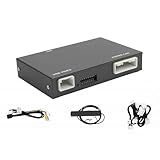
- Fitment: This wireless carplay adapter is compatible with 2014-2019 Toyota Touch2 & Entune2.0 system.
- Not Compatible With: 360-degree camera/bird's-eye view systems, Corolla 86140-02540 Fujitsu with 7" display, 4runner with Pioneer host, Prius models with 11.6" screens and RAV4 86100-42241.
- Support Original Vehicle Function: This wireless carplay/android auto adapter supports your original car's knob and steering wheel button control. While retaining all original console functions: voice control, real-time navigation, calls, music, and message sending/receiving.
- Multi-System Compatibility:Supports the wireless connection of CarPlay and Android Auto to realize the link between the phone and the car. This wireless adapter supports navigation, music, phone calls,email and other functions of your phone.
- Attention: Please note that your original car's display hardware limits resolution. Our carplay adapter (not a screen)can't directly improve it.
| Feature | How it works | What it means in a GM vehicle |
|---|---|---|
| Apple CarPlay | Projects a compatible iPhone’s supported apps and interface onto the vehicle display. | The car is using the phone as the source of the projected experience. |
| Android Auto | Projects a compatible Android phone’s supported interface and apps onto the vehicle display. | The car is using the phone as the source of the projected experience. |
| Google Built-in | Runs selected Google services directly on the vehicle’s infotainment hardware. | The car can provide Google Maps, Google Assistant, Google Play, and related features without Android Auto. |
A GM vehicle can have Google Built-in and still not accept Android Auto from a driver’s phone. Google Built-in is an embedded vehicle platform; Android Auto is a smartphone-projection system. One is not a substitute in the technical sense, even if both can provide navigation and voice control.
Google Built-in also does not mean that every Android app is automatically available. GM says app availability depends on the vehicle, software, service plan, and location. Model-year 2024-and-newer GM vehicles equipped with Google Built-in can receive additional Google Play apps under the applicable conditions. GM has also said eligible model-year 2022-and-newer Cadillac, Chevrolet, Buick, and GMC vehicles with Google Built-in are scheduled to receive Google Gemini, subject to the relevant rollout and vehicle requirements.
Why GM is making the change
GM’s public explanation focuses on integration. With software running natively in the vehicle, GM can design the infotainment system, voice controls, maps, connected services, and selected vehicle functions as one experience instead of relying on a phone-projection layer.
GM’s technology materials emphasize several benefits:
- Native navigation and voice control: Google Maps and Google Assistant are available through the vehicle’s own interface.
- Connected services: The system can work with GM’s connectivity and OnStar ecosystem.
- App distribution: Google Play provides a controlled way to add selected apps to supported vehicles.
- Software updates: A centralized computing architecture gives GM a way to extend or change vehicle functions through software.
- Personalization: GM can build more of the digital experience around vehicle accounts, settings, and connected services.
GM has also presented the decision as a safety measure. Its argument is that putting routing, voice controls, and other functions into the vehicle’s integrated interface may reduce the need for drivers to handle a phone.
That is GM’s stated rationale, not independent proof that removing CarPlay or Android Auto necessarily produces a safer experience. Safety depends on the design of the native system, the quality of voice controls, the driver’s behavior, and how easily the required functions can be accessed. A built-in system may reduce phone handling for some tasks, but it does not automatically make every interaction distraction-free.
The business implication
There is also a broader industry implication. By emphasizing native apps, Google Play, OnStar connectivity, and centralized computing, GM retains more control over the in-vehicle software environment and the customer relationship after the sale.
That could give GM greater control over app availability, connected features, software updates, and future services. It is a reasonable business inference from GM’s stated platform strategy, but it should not be presented as a proven financial motive unless GM provides additional financial disclosure. The company’s public explanation is primarily about integration, connected services, software capability, and safety.
Rank #3

- Wireless CarPlay Adapter: The carplay adapter converts your wired CarPlay to a wireless connection, making it easy to use navigation, music streaming, hands-free calling and voice control functions (compatible with CarPlay only, not compatible with other systems.)
- Easy to use: Simply plug the adapter into your car's USB port and pair, no apps or updates required. After the initial pairing, your phone will automatically connect to the CarPlay adapter every time you start your vehicle(Does not work with Android phones)
- Multiple control methods: After connection, this Wireless Carplay Adapter uk also supports voice control, steering wheel, touch screen and knob operation. Make you safer while driving
- Compatible with a variety of wireless car players: CarPlay Wireless is also equipped with USB-C and USB-A ports. Whether your car interface is USB or USB-C, you can use our CarPlay Wireless Adapter. This wireless adapter is only suitable for vehicles equipped with original wired CarPlay. Only suitable for vehicles manufactured in 2016 and later
- Compact design: The wireless carplay adapter will not block any interface, and its small size ensures that it will not interfere with other devices and save space
What this means for current GM owners
If your GM vehicle already supports Apple CarPlay or Android Auto, GM’s stated policy is that the vehicle will continue to support those systems. The company has not announced a plan to remove them from existing vehicles through a blanket software update.
That does not mean every future software update will be identical in every market or trim. It does mean current owners should not assume that GM’s future vehicle strategy changes the equipment they bought. The relevant question is whether the specific vehicle was manufactured with factory CarPlay or Android Auto.
Owners should check their vehicle’s manual or infotainment documentation for terms such as “Apple CarPlay,” “Android Auto,” “Projection,” or “if equipped.” Manuals commonly qualify these features because availability can vary by trim, model year, market, and equipment package.
Quick wins for a faster PC:
Fix the driver behind crashes, sound loss and screen glitchesFind Drivers →Clear out junk files and repair common Windows errorsFree Scan →Scan for outdated or missing drivers - takes under a minuteDriver Scan →What prospective buyers should check before ordering or buying
Do not rely on a dealer’s statement that a vehicle is “connected,” “Google-equipped,” or “smartphone compatible.” Those descriptions do not necessarily mean that CarPlay or Android Auto is present.
- Confirm the exact model year. A 2026 vehicle can differ substantially from a 2025 vehicle with a similar name, cabin, or body style.
- Confirm the exact trim and equipment package. Look at the window sticker, build sheet, and vehicle-specific equipment list. “If equipped” language in the owner’s manual is a warning to verify rather than assume.
- Check the powertrain, but do not stop there. Newer EVs are the clearest early group without traditional phone projection, while some 2026 gas-powered models still advertise wireless CarPlay and Android Auto.
- Read the vehicle-specific owner’s manual. Search the digital manual for “Apple CarPlay” and “Android Auto,” then check whether the language applies to the exact vehicle and trim.
- Ask for VIN-specific confirmation. If the feature is important to you, ask the dealer to confirm it for the exact VIN rather than for the model generally.
- Test the vehicle before signing. Pair an iPhone or Android phone, check the available USB ports, and confirm whether the vehicle supports wired projection, wireless projection, or neither.
- Check the market and software status. Google Built-in features, Play Store apps, Gemini availability, connectivity, and service-plan requirements can vary by vehicle, software version, and location.
For a buyer who considers phone projection essential, the safest approach is to treat it as a separately verified feature—not as a standard assumption attached to Chevrolet, Buick, GMC, or Cadillac ownership.
What can you do if a GM vehicle has no phone projection?
1. Use a car phone mount with Bluetooth or native voice controls
For a vehicle without CarPlay or Android Auto, a properly installed car phone mount is the simplest workaround. Pair the phone to the vehicle over Bluetooth for calls and audio, then use the phone’s voice assistant or the vehicle’s native voice controls for navigation and media when supported.
This is not a replacement for an integrated dashboard interface. It does not provide the same steering-wheel controls, vehicle display integration, or visual consistency. It does, however, keep the phone in a fixed and visible position instead of loose in a cupholder or hand.
Crashes, No Sound, or Screen Glitches?
Random freezes, missing sound and display glitches usually trace back to one bad driver. Find and replace yours safely.Free scan · under a minutePC Slower Than It Used to Be?
A free scan shows the junk files, broken settings and background clutter dragging Windows down - then fixes them in one click.Free scan · Windows 10 & 11Position the mount so it does not block the driver’s view, an airbag, an instrument display, or vehicle controls. Use voice commands before driving or while safely stopped, and follow local distracted-driving and windshield-mount laws. A mount should support hands-free use, not encourage manual phone operation.
Rank #4

- Compact Wireless CarPlay Conversion: This stylish, compact, and lightweight wireless CarPlay adapter is easy to carry and saves space in your car. It converts wired OEM CarPlay to wireless effortlessly. It supports navigation, music, Siri, calls, and messages, offering a full CarPlay experience without interfering with your car's original functions. Say goodbye to messy cables and enjoy a cleaner, more convenient, and wireless driving experience
- Quick Setup with Auto-Reconnect Function: Super easy setup in just 3 simple steps: plug into car USB port, pair via Bluetooth, and enjoy Wireless CarPlay instantly. The adapter features auto-reconnect function that will automatically link to your phone as soon as you start the car, with no repeated manual operations needed, saving your time on every trip
- Durable Construction with Stable Signal: Made of high-quality metal casing and acrylic glass surface, the adapter is scratch-resistant and built for long-term use. Its tight-fit structural design ensures stable signal transmission even on bumpy roads or winding mountain paths. The compact, minimalist appearance seamlessly matches your car's interior without looking obtrusive
- Wide Compatibility with Factory CarPlay Systems: This adapter is only for factory-wired CarPlay vehicles. It covers 98% of factory-installed CarPlay systems on the market and works flawlessly with all eligible iPhones running iOS 10 or later versions
- FCC-Certified Safety with Lifetime Updates: FCC-certified to meet strict international safety standards, ensuring worry-free use without signal interference. We provide free lifetime firmware updates to optimize connection speed and fix potential bugs
2. Install an aftermarket CarPlay or Android Auto head unit
Owners of some older GM vehicles may be able to replace the factory radio with an aftermarket CarPlay head unit. This can be a stronger solution than a phone mount because it can provide a dedicated screen, hands-free calling, navigation, and—depending on the unit—both Apple CarPlay and Android Auto.
Compatibility is highly vehicle-specific. Before buying, verify all of the following:
- Dashboard opening and vehicle-specific dash kit requirements
- Wiring harness and whether an interface is needed
- Retention of steering-wheel audio controls
- Backup-camera compatibility and display behavior
- Factory amplifier, chimes, microphone, and USB-port integration
- OnStar or emergency-call functions
- Vehicle settings that may be accessed through the original radio
- Professional installation requirements and any need for programming
This route is most realistic for older GM vehicles with a replaceable stereo. It should not be presented as a guaranteed upgrade for newer GM vehicles whose displays, climate controls, cameras, vehicle settings, and other functions are deeply integrated into the car’s electronics. Replacing a screen in such a vehicle may be difficult, expensive, or impractical even if an aftermarket product physically fits.
Do these 3 things before closing this tab:
1Fix the driver behind crashes, sound loss and screen glitches2Repair Windows errors before they cause bigger problems3Scan for outdated or missing drivers - takes under a minute3. Use a wireless CarPlay adapter only when wired CarPlay already works
A wireless CarPlay adapter can be useful if the vehicle already has factory wired Apple CarPlay and the owner wants to connect without plugging in a cable each time. The adapter typically uses the vehicle’s existing wired CarPlay capability and converts the connection to wireless.
It generally cannot add CarPlay to a GM vehicle that was manufactured without factory CarPlay. It also is not a remedy for a newer GM EV that uses Google Built-in but never supported CarPlay in the first place. Before purchasing one, connect the iPhone by cable and verify that wired CarPlay launches through the vehicle’s original system. If wired CarPlay does not exist, a wireless adapter is the wrong product.
Independent reader supportYour contribution helps us test, update, and keep practical guides available for everyone.What GM’s move means for the broader car-buying decision
GM is betting that drivers will prefer a consistent, vehicle-centered software system over bringing a familiar phone interface to the dashboard. That may appeal to buyers who value built-in navigation, voice control, connected features, and software updates without plugging in a phone.
It may be less attractive to drivers who depend on Apple CarPlay or Android Auto for a familiar interface, their preferred navigation apps, or a platform that follows them from one vehicle to another. Native Google services can offer useful functionality, but they do not guarantee that every phone app, account, setting, or workflow will behave like CarPlay or Android Auto.
Recommended Free Tools
The practical result is not a universal GM cutoff in 2026. It is a change in what buyers must verify. In the past, many shoppers could reasonably expect phone projection from a new vehicle in this price range. As GM moves toward centralized computing and native Google software, that assumption becomes unsafe.
Best Value

- NEW UPGRADED TYPE-C Interface: Upgrade your Mazda with this smarter, safer CarPlay and Android Auto hub. Effortlessly access maps, contacts, notifications, music, and voice assistants (Siri/Google Assistant) while driving. The built-in Type-C port provides PD fast charging, ensuring your phone stays powered during use
- WHY CHOOSE OUR CARPLAY KIT: Enjoy true cable-free convenience with fast and stable auto-connection. The built-in USB port charges your device quickly, even during use. Backed by professional technical support for complete peace of mind
- MAZDA COMPATIBILITY: Replaces OEM Part: TK78-66-9U0C / K1414 / 00008FZ34. Compatible with Mazda Connect systems including CX-5 (2013-2016), CX-9 (2016-2020), CX-3 (2014-2020), Mazda 2/3/6 (see listing for years), and MX-5 (2015-2020). Confirm your model before ordering
- PRESERVE ORIGINAL CONTROLS: Retain full use of your car's center control knob and steering wheel buttons. Designed to integrate smoothly with your Mazda's built-in systems for intuitive and safe control while driving
- IMPORTANT NOTES: Supports Wireless CarPlay only for iPhone. Does NOT support Wireless Android Auto. Your Mazda Connect system must be firmware version V70.00.21 or newer. Please upgrade firmware before installation (remove SD card during upgrade)
The short answer to “Is GM ditching CarPlay and Android Auto for good?”
For future vehicle programs, increasingly yes; for every GM vehicle today, no. GM began the phase-out with newer EVs, confirmed that future gas-powered vehicles will eventually follow, and is expected to broaden the strategy as next-generation computing hardware arrives around 2028. But GM is still selling 2026 vehicles that advertise wireless Apple CarPlay and Android Auto, and it says existing supported vehicles will not be changed.
Check the exact model year, trim, VIN, manual, window sticker, and software requirements before buying. If projection is absent, a phone mount is the most universal workaround, an aftermarket head unit may help older vehicles, and a wireless adapter only makes sense when wired CarPlay already works.
Frequently Asked Questions
Will GM remove CarPlay and Android Auto from my current vehicle?
No. GM says vehicles that already support Apple CarPlay or Android Auto will continue to support them. The phase-out applies to future vehicle programs rather than being a retroactive removal from the existing fleet.
Do 2026 GM vehicles still have Apple CarPlay and Android Auto?
Some do, and some do not. Official 2026 Chevrolet Trailblazer and Buick Encore GX materials list wireless Apple CarPlay and Android Auto, while newer EVs such as the Blazer EV and Equinox EV use GM’s Google Built-in strategy instead. Verify the exact year, trim, and equipment.
Is Google Built-in the same as Android Auto?
No. Google Built-in runs selected Google services directly on the vehicle’s hardware. Android Auto projects a compatible Android phone onto the vehicle display. A GM vehicle can have Google Built-in without supporting Android Auto.
Can a wireless CarPlay adapter add CarPlay to a GM vehicle without it?
Only if the vehicle already has factory wired Apple CarPlay. The adapter converts an existing wired CarPlay connection to wireless; it generally cannot add CarPlay to a vehicle that never had factory CarPlay, including unsupported GM EVs.
The Bottom Line
Bottom line: GM is phasing out Apple CarPlay and Android Auto in future vehicle programs, not instantly deleting them from every vehicle. Newer EVs are the clearest early examples, while some 2026 gas-powered models still include wireless projection. Treat CarPlay and Android Auto as features to verify for the exact GM model, year, trim, and VIN.
The Tool Desk
Outbyte PC Repair FREERepair Windows errors before they cause bigger problemsFix Now →Outbyte Driver Updater FREEFix the driver behind crashes, sound loss and screen glitchesFind Drivers →Quick Recap
Product prices and availability are accurate as of the date/time indicated and are subject to change. Any price and availability information displayed on Amazon at the time of purchase will apply.




