The Tool Desk
Outbyte Driver Updater FREEScan for outdated or missing drivers - takes under a minuteDriver Scan →Outbyte PC Repair FREEClear out junk files and repair common Windows errorsFree Scan →Stop charging immediately if the scooter, charger, plug, or charging port is hot, wet, burnt, melted, or visibly damaged. Otherwise, switch the scooter off, use only its supplied or exact-model-approved charger, verify the outlet and connections, let the battery return to its permitted temperature range, and then escalate to qualified service if charging still does not begin.
Start with safety, not diagnosis
Lithium-ion scooter batteries can deliver enough energy to cause burns or fire when a connector, wire, charger, or cell pack is damaged. Before trying another charging cycle, look at the whole charging path: wall outlet, mains cable, charger body, low-voltage plug, scooter charging port, and the surrounding deck or battery compartment.
As an Amazon Associate I earn from qualifying purchases.
- If any part is unusually hot, smoking, swollen, wet, burnt, discolored, cracked, melted, or giving off an odor, unplug it if you can do so without touching the damaged area and stop using it.
- Do not insert a key, screwdriver, paper clip, or other metal object into the charging port.
- Do not charge while asleep or away from the scooter. The U.S. Consumer Product Safety Commission says: “Always be present when charging micromobility products, never while sleeping, and only use the supplied charger.”
- Do not use a charger merely because its barrel connector fits. Voltage, current, polarity, connector dimensions, firmware communication, and regional certification can differ.
Keep the scooter on a stable, nonflammable surface with ventilation around the charger. If the battery has been involved in a crash, exposed to water, or physically crushed, treat it as a service issue even if it appears to charge.
Do these 3 things before closing this tab:
1Repair Windows errors before they cause bigger problems2Fix the driver behind crashes, sound loss and screen glitches3Clear out junk files and repair common Windows errorsConfirm that the scooter is supposed to accept a charge
Turn the scooter completely off
Some scooters will not start a charging cycle while powered on. Xiaomi’s 6 Pro instructions, for example, state that the scooter cannot be charged while it is switched on. Turn it off using the normal power control, wait for the display to go dark, and then connect the charger in the order specified by the manual.
#1 Best Overall

- [Upgraded Performance] The 36V 78000mAh replacement scooter battery adopts a new upgraded chip, which is powerful in terms of range and capacity, with more than 1000 charging and discharging cycles, which supports the device to run continuously for a long time without recharging, and no memory effect, and the battery lasts for a long time
- [Product Compatibility] The size of the length plus the protective plate is 12.01*2.76*1.38 inches ( 305*70*35mm), mainly Compatible with Swagtron Swagger 5 Boost/5 Elite, Compatible with Hover-1 Alpha & hover 1 journey 2.0, or other electric scooters with the same voltage and current parameters of this battery
- [Reliable Durable] Our lithium battery pack is made of waterproof material, the inner layer ensures waterproof sealing and high adhesion, corrosion and abrasion resistance and insulation to ensure the durability and safety of the battery
- [Intelligent Protection] The 36v rechargeable battery adopts an advanced intelligent battery protection system, which can prevent overcurrent, overcharge and overdischarge as well as short-circuit, providing comprehensive protection for the safe use of the battery
- [Quality Assurance] Our products have passed strict testing at the factory, please don't worry about its quality and safety. If you have any questions about this product, please feel free to contact us, our professional service is at your service
Check the displayed state
Look at the dashboard or companion app before connecting power. A battery at or near 100 percent may not draw current, so a charger that does not change state can be normal when the pack is full. Check for a temperature warning, charging lockout, battery fault, or error code. Record the exact wording or code; similar icons can represent different conditions on different models.
Use the model manual as the authority
Charging behavior, connector order, indicator colors, and temperature cutoffs are not standardized across the scooter industry. The make, model year, regional edition, and firmware can all matter. If your manual says to connect the charger to the wall first or to the scooter first, follow that sequence rather than a generic instruction.
Inspect the outlet, charger, cable, and port
Test the wall outlet
- Disconnect the charger from the scooter.
- Plug a known-working appliance into the same outlet to verify power.
- If the outlet is controlled by a switch, reset switch, or circuit breaker, restore it only if there is no sign of overheating or electrical damage.
- Try a second indoor outlet on a different circuit if the first one is uncertain.
Do not use an extension lead, travel adapter, or power strip as a diagnostic shortcut unless the scooter maker explicitly permits it. A poor connection can create heat without delivering stable power.
Recommended Free Tools
Examine the charger and mains cable
Look for cuts, crushed sections, exposed conductors, loose strain relief, a cracked charger case, or a plug that feels abnormally hot. A charger that rattles, smells burnt, or has a discolored label should not be opened or reused. The output label is useful later when speaking with service, but it is not permission to substitute a charger with matching numbers from an unknown source.
Rank #2

- Mighty Max 12V 7Ah SLA battery and complete wire harness Replacement for 24v Razor ride on toy
- Plug & play, easy installation, exact fit and comes with everything needed to get your ride on toy powered up
- Compatible with all Razor Pocket Mod including Betty, Bella, Blossom, Bistro, Daisy, Hannah, Chrissy, Hannah Montana, Sweet Pea, Kiki and Vapor. NOT COMPATIBLE with Razor Dirt Quad 500 ATV models that come with a 36-volt system also will not fit E100, E125, E150, E175
- Kit includes a wire harness, 24 volt battery pack includes two ML7-12 12 volt 7 ah sla batteries, 30 amp fuse and a connector
- Our batteries are maintenance free and Absorbent Glass Mat (AGM) technology with a valve regulated design making it easy for anyone to handle
Check the scooter charging port externally
With the charger unplugged, shine a light into the port. Dirt, corrosion, bent contacts, a loose socket, or a pin pushed out of alignment can prevent contact. Do not scrape the contacts or probe them with metal. If the port is dry and the manual permits external cleaning, remove loose dust without forcing anything into the socket. A port that is loose in the body, burnt, melted, or wet requires service rather than repeated plugging and unplugging.
Seat the connector without force
Align the plug correctly and push it in firmly, but never twist, wiggle, or force it. A connector that falls out easily, binds, or only works when held at an angle indicates mechanical or wiring damage. Stop if you see arcing, hear crackling, or feel rapid heat.
Read the charger light cautiously
A color is not a universal diagnosis. Check the exact charger and scooter manual, and observe the light with the scooter connected and disconnected only in the way the manufacturer describes.
Quick wins for a faster PC:
Scan for outdated or missing drivers - takes under a minuteDriver Scan →Clear out junk files and repair common Windows errorsFree Scan →Fix the driver behind crashes, sound loss and screen glitchesFind Drivers →| Example guidance | What the light may mean | Why it cannot be generalized |
|---|---|---|
| Xiaomi 6 Pro | An unattached charger is normally green; unlit or red when unattached may indicate a charger problem according to its guidance. | Those meanings apply to that model’s charger and operating conditions. |
| Apollo charging guide | Green can indicate a full battery or that charging is not occurring; red indicates charging in progress on the guide. | The same color can represent different states on another scooter. |
| Other models | Use the supplied manual, app, or support instructions. | Some systems use different colors, blinking patterns, or no charger LED at all. |
If the light remains green, do not assume the battery is charging and do not assume the charger is dead. First establish whether the battery is already full, whether the scooter is accepting charge, and what that model defines as green. A red light by itself also does not prove that current is reaching the battery.
Rank #3

- [Upgraded Performance] The 36V 75000mAh replacement solenoid adopts a new upgraded chip, which is powerful in terms of range and capacity, with more than 1000 charging and discharging cycles, which supports the device to run continuously for a long time without recharging, and no memory effect, and the battery lasts for a long time
- [Product Compatibility] Dimensions are 11.73 x 2.87 x 1.57 inches, mainly Compatible with iScooter i9/i9 Pro & Compatible with isinwheel S9/S9 Pro/S9 Max & Compatible with 5th wheel Electric Scooter, or other electric scooters with the same voltage and current parameters of this battery
- [Reliable Durable] our lithium battery pack is made of waterproof material, the inner layer ensures waterproof sealing and high adhesion, corrosion and abrasion resistance and insulation to ensure the durability and safety of the battery
- [Intelligent Protection] The 36v battery adopts an advanced intelligent battery protection system, which can prevent overcurrent, overcharge and overdischarge as well as short-circuit, providing comprehensive protection for the safe use of the battery
- [Quality Assurance] Our products have passed strict testing at the factory to ensure their safety, if you have any questions about this product, please feel free to contact us, our professional service is at your service
Temperature can block charging
Allow a cold or hot battery to stabilize
Move the scooter to a dry indoor location and let it reach room temperature naturally. Do not use a hair dryer, heater, ice pack, or refrigerator to force the temperature change. Wait until the warning clears or the manual’s permitted range is reached, then retry with the scooter switched off.
Do not apply one cutoff to every scooter
Xiaomi’s 6 Pro guidance lists a charging range of 8 °C to 40 °C. That is a model-specific limit, not a universal rule. Xiaomi gives different low-temperature protection guidance for the 4 Pro (2nd Gen), demonstrating why a number from one scooter cannot be transferred to another. Use the temperature range in your own manual or app.
Separate ambient temperature from battery temperature
A scooter stored in a cold garage can have a battery colder than the surrounding air, while a pack warmed by a long ride or direct sun can remain above the safe charging limit indoors. If the display reports a temperature fault, treat that message as more authoritative than a room thermometer.
Outdated Drivers Are Slowing You Down
One free scan finds every outdated or missing driver and matches the right update for your exact hardware.Free scan · exact hardware matchWindows Errors? Fix Them Before They Spread
Repair common Windows errors and clear accumulated junk for a smoother, more stable PC - no reinstall needed.Free scan · no reinstallConsider long storage and deep discharge
A scooter left unused for a long period can self-discharge until the battery-management system disconnects the pack. In that state, a normal charger may show no obvious charging activity. Storage history is important: note how long the scooter sat, its approximate charge level when parked, and whether it was stored in heat, freezing conditions, or dampness.
Rank #4
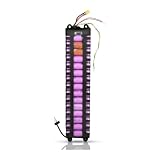
- 36V 7.8Ah Communication Scooter Battery:7800mAh 36V lithium-ion replacement battery for original M365 communication-version 8.5 inch electric scooters and same size models. Size:13.18 x 2.85 x 1.62 inches. Please check your original battery specs, compartment size and connectors before buying.
- Intelligent BMS Multi-Protection:Built-in smart BMS chip protects against over-charge, over-discharge,short-circuit & over-current. Premium lithium cells reduce heat. Designed for communication-version M365 scooter.
- 5 Pcs Adapter Cables Included:Comes with 5 adapter cables for discharge, taillight, communication and charging ports. Sturdy connectors prevent poor contact. Wire up following your scooter s original wiring. For communication-enabled M365 scooter.
- Pre-Purchase Check to Avoid Mismatch:Check before purchase: Controller voltage 36V, rated current less than or equal to 20A. Confirm battery dimension fits your compartment. Good match delivers stable ride and longer battery life.
- Brand-New Ready-to-Install Battery Pack:Fully pre-assembled pack, no complicated assembly. Approximately 5 hours full charge. Direct swap for old battery. Great for commute and short leisure trips. Only for communication-supported M365 electric scooter.
Do not bypass the battery-management system, connect power directly to cells, open the pack, or “wake” it with another battery. Those actions defeat protective electronics and can cause a high-current fault, fire, or cell damage. If ordinary outlet, connection, temperature, and indicator checks do not restore charging after extended storage, arrange manufacturer or qualified battery service.
What may be wrong when external checks pass
Once the outlet and visible connections are sound, several faults remain possible:
- Charger failure: The charger may not be producing its rated output even though its LED illuminates.
- Port or wiring failure: A socket can loosen from the deck, or a wire can break internally after vibration or a pull on the cable.
- Fuse or protection device: Some scooters include a fuse or other replaceable protection component; its location and serviceability are model-specific.
- Battery-management-system lockout: The electronics may block charging after detecting over-temperature, over-voltage, under-voltage, impact, or another fault.
- Battery-pack failure: One or more cells, welds, sensors, or interconnects may be damaged or excessively degraded.
These possibilities cannot be distinguished reliably from a charger color alone. Apollo’s advanced troubleshooting material describes multimeter measurements and internal access for technicians or highly skilled owners, while its general battery guidance recommends leaving internal repairs to battery professionals. For most riders, the correct next step is a service appointment, not opening the deck.
What’s actually slowing this PC down?
Pick the symptom - the matching free tool is one click away.
When a multimeter test is appropriate
Measuring a charger’s output can help a qualified technician compare the reading with the voltage and current printed on the charger label and the scooter’s service specification. It does not prove that the charger is safe under load, that the port wiring is intact, or that the battery can accept energy. Testing live connectors, opening a pack, bridging a fuse, or measuring individual cells creates shock, short-circuit, and fire hazards.
Best Value

- 1. ✅【Safety-First Engineering】 "Built-in 30A BMS ensures overcharge/discharge protection, temperature control, and short-circuit prevention. Durable casing with flame-retardant materials enhances safety during operation
- 2. ✅【Efficient and Compatible Design】 ✅ Easy to install on Jetson Bolt Pro, withIncludes XT60 discharge connector, SM charging connector, quick connection with your controller,(Size:7.48x2.75x2.75 inches)
- 3. ✅【Efficient and Compatible Design】 ✅ 【Plug and play convenience】- Lightweight waterproof shell design (IP54 protection level), equipped with intelligent charging interface, supports fast charging technology, and can quickly recover energy in 4 hours
- 4. ✅【Universal Compatibility & Smart Integration】 "this battery seamlessly integrates with various 36V motor systems and DIY projects. Note: Verify device voltage requirements before use
- 5. ✅【Multi-Device Application】 Compact design allows flexible installation in tight spaces
If you are not trained to work on lithium-ion systems, stop at external inspection. A service center can test the charger, port, wiring, protection circuits, and pack with the correct equipment and procedures.
Choosing a replacement charger
Only consider a replacement after the troubleshooting evidence points toward the charger and the scooter itself has been checked. The safest choice is the supplied charger or one explicitly approved for the exact make, model, edition, and region. Compare all of the following with the manufacturer’s specification:
- Output voltage and current
- Connector size, keying, and polarity
- Charging protocol or communication requirements, if used
- Input-voltage and regional certification markings
- Manufacturer approval for that specific scooter
Do not choose by appearance, wattage alone, or a seller’s claim that a charger is “universal.” If the label is unreadable or the model has multiple battery options, ask the manufacturer or an authorized service center before buying. Keep the original charger for comparison and do not continue using it if it overheats or shows damage.
Prepare an efficient service request
Support can diagnose the fault faster when the symptom is documented precisely. Provide:
- The exact scooter model, edition, serial number, and region of purchase
- The charger’s brand, model number, voltage, and current printed on its label
- Whether the scooter was on or off during the attempted charge
- What the charger light did when disconnected and when connected
- Any app message, dashboard code, temperature warning, or unusual sound
- When the problem began and whether it followed storage, rain, a fall, transport, or a long ride
- Clear photographs of the charger label, plug, port, cable, and any discoloration or melting
Tell the technician whether the battery was recently stored for weeks or months and approximately how full it was at storage. Do not conceal a crash or water exposure; it changes the safe inspection procedure.
A quick decision path
- Stop: If there is heat, smoke, swelling, moisture, burning, melting, or impact damage, disconnect safely and seek service.
- Power down: Turn the scooter off and check its display or app for a full-charge state or fault code.
- Verify power: Test the wall outlet and inspect the mains cable and charger case.
- Inspect externally: Check the plug and port for dirt, corrosion, bent contacts, looseness, or burns without inserting metal.
- Reconnect correctly: Seat the approved charger according to the model manual and observe the indicator.
- Stabilize temperature: Let the scooter reach the model’s permitted charging range, using the manual rather than a generic cutoff.
- Escalate: If charging still fails, stop repeated attempts and arrange qualified diagnosis of the charger, wiring, protection electronics, or battery.
This sequence separates safe rider checks from work that requires electrical training. It also prevents the two most common unsafe responses: forcing a damaged connector and bypassing battery protections after long storage.
Quick Recap
Product prices and availability are accurate as of the date/time indicated and are subject to change. Any price and availability information displayed on Amazon at the time of purchase will apply.




