Recommended Free Tools
Before your first Cybertruck drive, set your seating position and mirrors, choose a familiar on-road mode, check the lights and selected gear, and finish any touchscreen changes while parked. Treat these as a setup checklist—not a reason to rush: Tesla says screen visualizations may miss vehicles, so mirrors and shoulder checks still matter.
1. Set your driving position and save a profile
While parked, adjust the driver’s seat, steering wheel, and exterior mirrors so you can reach the controls comfortably and see around the vehicle. Then create or select a driver profile and save the positions. Tesla says profiles can also store preferences such as display, lights, climate, and driving settings. Tesla’s Driver Profiles instructions explain the feature.
If you want a different position for getting in and out, Easy Entry can store a separate seat and steering-wheel position. Check the profile shown on screen before setting off, especially if someone else has recently driven the truck.
2. Pick an on-road mode you understand
Tesla lists Comfort, Sport, and Custom on-road modes. Comfort and Sport use built-in combinations for acceleration, ride and handling, and preferred ride height where equipped; Custom lets you adjust available options. Equipment affects which choices appear. Review the available settings in Tesla’s On-Road Modes instructions rather than assuming every Cybertruck has identical controls.
The Tool Desk
Outbyte Driver Updater FREEFix the driver behind crashes, sound loss and screen glitchesFind Drivers →Outbyte PC Repair FREERepair Windows errors before they cause bigger problemsFix Now →#1 Best Overall

- Custom Designed For Cybertruck: Precision-engineered to flawlessly fit the 2024, 2025, and 2026 Tesla Cybertruck door pockets. This 2-piece set is perfectly compatible with AWD (Dual Motor/Premium) and Cyberbeast models, blending seamlessly with the futuristic interior.
- Maximized Door Storage: Innovative design transforms unused space into a compartment that neatly stores sunglasses, keys and small tools, making your vehicle interior more organized and tidy
- Stable Installation: The limit buckle design and additional sponge pads ensure a stable installation, reducing the need for frequent disassembly
- Pop-up Design: These storage boxes come with pop-up lid for easy access. Just press it to open, quickly take out personal items
- Installation Steps: Align the storage box buckle with the edge of the door and insert it into the door slot, then simply push the entire box in
- For gentler acceleration: consider Chill, which Tesla describes as limiting acceleration, or choose the normal Standard level if you prefer.
- For a familiar baseline: use the mode and settings you can explain and operate confidently; no one mode is best for every driver or road.
- For public-road use: do not treat Beast or off-road settings as ordinary on-road choices.
Make the selection while parked and leave yourself time to understand what it changes before driving.
3. Leave the headlights on Auto, then assess conditions
Tesla’s manual says exterior lights are set to Auto each time the Cybertruck starts, and Auto turns them on in low lighting. Check the light setting and the conditions anyway: the driver remains responsible for using suitable lights for the weather and circumstances. Menu wording may vary by market; Tesla’s UAE English Lights instructions describe the setting, but use the controls and current manual for your vehicle.
Rank #2
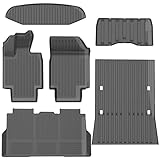
- 1-Perfect custom fit for 2025-2026 Model Y (Juniper),3D scanned for seamless contour matching
- 2-Premium Safe TPE Material:Crafted from odorless, non-toxic thermoplastic elastomer that stays flexible in extreme temperatures (-40°F to 176°F). Free of harmful chemicals, safe for kids and pets; wear-resistant for long-term use.
- 3-All-Weather Heavy-Duty Protection:Deep channels and raised edges trap mud, slush, rain, and sand, keeping interior dry and clean. Textured anti-slip surface prevents cargo sliding during transit—ideal for daily commutes, off-roading, or pet travel.
- 4-No-Slip Safety Design:Reinforced anti-skid backing and vehicle-specific anchors lock mats in place, avoiding pedal interference. Raised edge trim contains spills, reducing cleanup hassle and enhancing driving safety.
- 5-Effortless Clean & Quick Install:Install in minutes—just lay and press to fit. Clean by hosing off, wiping with soapy water, or shaking out; stain and water-resistant surface dries fast for ongoing protection.
4. Review assistance features without treating them as autonomous driving
Do not make Full Self-Driving (Supervised) a default first-drive setting. Tesla says the feature requires driver attention and may be unavailable or abort if headlights are set to Off. If you specifically plan to learn it, read the current manual and understand its limits before use; supervision remains necessary. See Tesla’s Full Self-Driving (Supervised) instructions.
5. Decide whether to enable PIN to Drive
PIN to Drive is an optional security setting: when enabled, a four-digit PIN is required before driving. It adds an access step for you and for anyone else authorized to drive, so decide whether that trade-off suits your use. It is separate from a driver profile, which stores preferences and positions rather than serving as this PIN check. Tesla explains the setting in its Safety & Security instructions.
Rank #3
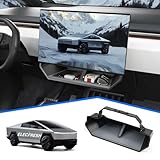
- CUSTOMIZED FOR CYBERTRUCK OWNERS: Designed to precisely fit the under screen storage space for all 2025‑2026 Cybertruck trims (Dual Motor AWD, Premium AWD, Cyberbeast), offering easy access to essentials like phones, licenses, keys, and more
- UPGRADED SECURE CLIP DESIGN FOR EXTRA STABILITY: Reinforced with clip mechanism, this under screen storage organizer is even more secure and reliable than magnetic attachments
- ANTI-SLIP LINER FOR MAXIMUM STABILITY: The under screen storage organizer includes a premium anti-slip liner that keeps all items stable and prevents shifting, allowing worry-free storage for small devices, cards, glasses, etc.
- VERSATILE AND SPACIOUS STORAGE: With ample room to store everything from phones, licenses and keys to masks, and tissues, this under screen storage tray for Cybertruck maximizes storage while keeping essentials organized and within reach
- EFFORTLESS INSTALLATION AND REMOVAL: This organizer is crafted for hassle-free use with a no-tool installation, fitting smoothly in the under screen storage area and removable in seconds for easy cleaning and reinstallation
6. Confirm the selected gear before moving
If Auto Shift out of Park is enabled, look at the displayed gear selection before pressing the accelerator. Tesla specifically cautions drivers not to rely on automatic selection without confirming the selected gear. Follow the starting procedure shown by your vehicle and its current manual; see Tesla’s Starting and Powering Off instructions.
7. Set the display while parked; keep checking the road yourself
Choose display preferences, including energy units, before departure. Tesla advises against adjusting touchscreen settings while the vehicle is moving. Range displays are estimates, so use them as general guidance rather than an exact prediction. The touchscreen can visualize detected surroundings, but Tesla warns that it may not display every vehicle. Check mirrors and blind spots with shoulder checks; the visualization is not a substitute. See Tesla’s Touchscreen instructions and Getting Maximum Range and Vehicle Status instructions.
Rank #4

- Perfect Fit for Your Tesla: Precisely designed for the 2024+ Tesla Cybertruck, this under-seat storage box features a 3-piece connected structure that seamlessly matches your interior contours while combining style, functionality, and eco-friendly durability
- 3-Piece Connected Structure: The storage box is made up of three parts — two side boxes with protruding tabs and a center box with matching holes. Simply align and press them together for easy assembly. Perfect for storing emergency gear, tools, or picnic supplies
- Optional Divider Boxes: Customize the compartments to fit your needs — perfect for neatly organizing and separating small items. Simply insert the small divider boxes into the connecting areas between sections. They can hold small items or act as dividers to keep everything in place
- Hidden Storage: Designed to keep your items out of sight while maintaining seat comfort and full functionality. Does not affect leg movement or seat folding
- Customer Service: At VaultsOnWheels, we’re dedicated to making sure you have a great experience with our product. If you have any problem with our product, please reach out to us anytime
8. Check tire pressure before a longer trip
Tesla advises keeping tires at the recommended inflation pressures; use the pressure information for your vehicle rather than relying on a generic number. The tire-pressure information is available in a status card. A gauge can be useful for checking pressure, but it is optional—not a required first-drive purchase. Tesla’s range and vehicle status guidance covers tire-pressure information.
9. Use voice commands only when they help you stay focused
Tesla lists supported voice commands for tasks such as climate, wipers, locks, Sentry Mode, and navigation. Learn the commands available in your vehicle before relying on them. Voice control may reduce touchscreen interaction, but it does not remove the need to keep attention on driving. See Tesla’s Voice Commands instructions.
Best Value

- Perfect Fit: BestEvMod charging pad cover is custom-designed to fit the Cybertruck charging pad perfectly, ensuring a snug and secure fit that won't slip or slide
- High Quality Material: Made of high-quality silicone material, soft, heat-resistant and easy to clean
- Enhanced Protection: Safeguard your Cybertruck's charging pad from dust, spills, and scratches with our durable cover, ensuring it stays in pristine condition. The textured surface prevents your phones from sliding around while charging, providing a stable and secure charging experience
- Easy Installation: Simple to install and remove, allowing for hassle-free maintenance and cleaning
- Service: We are committed to providing customers with great products and service. If you have any problem with our product, please feel free to contact us at any time and we will try our best to guarantee you are 100% satisfied
Before you leave
- Seat, steering wheel, and mirrors set; the right driver profile selected.
- A familiar on-road mode selected.
- Headlights on Auto unless conditions call for a different appropriate setting.
- Touchscreen preferences handled while parked.
- Gear selection checked before pressing the accelerator.
- Mirrors and shoulder checks planned for every maneuver, regardless of what the screen shows.
Tesla notes that touchscreen details can vary with equipment, software, market region, and language. Follow the controls in your Cybertruck and its current manual. The Cybertruck Owner’s Manual provides the broader reference for mirrors, lights, driving, and other functions.
Quick Recap
Product prices and availability are accurate as of the date/time indicated and are subject to change. Any price and availability information displayed on Amazon at the time of purchase will apply.




