Quick wins for a faster PC:
Clear out junk files and repair common Windows errorsFree Scan →Scan for outdated or missing drivers - takes under a minuteDriver Scan →Repair Windows errors before they cause bigger problemsFix Now →To charge with the IONITY app, select the station and charger, review the price, tap Continue, confirm Order and Pay, authorize the temporary payment hold, and only then connect the car. Starting the cable connection before payment can cause a timeout or failed attempt.
Stop an active session with the app’s STOP control, the charger’s physical STOP control, or the vehicle controls where that option is offered. Wait for the session to finish and the connector to unlock before returning it to the holder. App and IONITY charging-card invoices are available in Sessions; QR, NFC and payment-website receipts are retrieved from receipts.ionity.eu.
As an Amazon Associate I earn from qualifying purchases.
What you need before starting
Have the vehicle parked within reach of the charger connector, the charging port open, and a payment method ready. The exact screen layout and button position can differ between charger models, so follow the instructions shown on the unit as well as the app. Check the charger number printed on the physical unit; selecting a neighboring connector in the app can start the wrong point or fail to connect.
Free tools Windows power users keep installed
One-click scans. No signup required.
- IONITY app: Sign in, keep mobile data available, and add a valid credit or debit card. Apple Pay or Google Pay may appear where enabled.
- QR or payment website: Use the QR code displayed beside the charger and complete payment in the browser before plugging in.
- Contactless terminal: Only selected locations have an NFC terminal. Bring a supported contactless card or wallet and follow that terminal’s prompts.
- RFID or charging card: Your card must be accepted by the network or mobility provider. Eligibility and tariff depend on the card issuer.
- Mobility-service-provider account: Confirm that the provider supports IONITY at this site and that its tariff includes the station.
Starting a session in the IONITY app
1. Select the station and the exact charger
- Open the IONITY app and choose the station you are parked at.
- Select the charger number that matches the number on the physical unit beside your vehicle. You can also scan the QR code near the charger display to identify it.
- Look at the physical charger before continuing. Availability in the app can lag behind the station’s actual state, so an apparently available point may briefly show as occupied, or vice versa.
2. Review the price before authorizing payment
Check the displayed price and any tariff information before you commit. The amount can differ when you use an IONITY account, a mobility provider, or a direct payment route. If the rate is not what you expected, stop here and verify your selected account or provider rather than starting the cable connection.
#1 Best Overall

- Road-Trip Ready & Apartment-Friendly: Comes with a 20ft heavy-duty cable that easily spans a standard parking space, plus a NEMA 5-15 adapter for plug and play convenience. Whether you're charging at home or hitting the highway, this portable EV Charger is your ultimate travel companion for weekend getaways and camping trips
- Delay Timer & Adjustable Current: Use the built-in timer to delay your start by 1-12 hours and easily harvest off-peak energy savings. Then pick from 6/8/10/12/16A (Level 2) to match your garage grid. It automatically locks in your favorite setting and never forces you to re-adjust. No complicated apps or Wi-Fi needed, just straightforward, reliable control
- Tactile Buttons & LED Screen: No glitchy smartphone apps or finicky touchscreens that lag, freeze, and misfire in winter. Our EV charger is engineered with a high-definition LED display that tracks critical real-time data, including live voltage and current. Tactile buttons deliver direct, satisfying click feedback that remains highly responsive even when wearing heavy winter gloves or operating in torrential downpours—conditions where standard touchscreens completely fail
- ETL Certified Safety & IP65 All-Weather Shield: ETL certified to meet US safety standards for charging. Engineered with a certified IP65 dust-and-waterproof enclosure and a heavy-duty TPE cable that operates reliably across a wide -22°F to 130°F range. An intelligent multi-protection defense system (GFCI, over-voltage, over-current, surge, short-circuit, and over-temp) keeps a 24/7 watch for 100% safe, unattended overnight charging in any weather
- J1772 Compatible + Dual-Level Charging: Works with all J1772 EVs (Tesla requires a separate J1772 adapter). Level 2: built-in NEMA 6-20 plug. Level 1: included NEMA 5-15 adapter fits any standard outlet. Please confirm your outlet is NEMA 6-20 or 5-15 before purchase
3. Confirm Order and Pay
- Tap Continue after reviewing the price.
- Tap Order and Pay.
- Choose a saved payment method or add a new one. Depending on your location and device, the app may offer a credit or debit card, Apple Pay, or Google Pay.
- Approve the payment authorization shown by the app.
IONITY’s example authorization is 40 EUR, 40 GBP, or a similar amount in another currency. This is a temporary preauthorization, not a promise that the session will cost that amount. Your bank may display the hold as pending until the final charge is reconciled.
4. Connect only after payment confirmation
Wait for the app to confirm that payment has been accepted. Then take the charger’s connector, insert it firmly into the vehicle, and wait for the app to show that the car is connected or charging. In the app flow, IONITY specifically instructs drivers to complete payment first and connect afterward; reversing those steps can lead to a timeout and a failed attempt.
5. Verify that charging actually began
Do not leave immediately after inserting the plug. Check the app and the vehicle’s charging indicator. A successful start normally produces a connected or charging status, while a failed handshake may leave the connector locked without delivering energy. If the status does not change, follow the troubleshooting section below before trying another start.
Other ways to start charging
QR code and payment website
- Scan the QR code printed on or beside the charger.
- On the payment page, confirm the charger identity and displayed price.
- Select a payment method and accept the terms.
- Complete the temporary card authorization.
- Only after approval, connect the charger to the vehicle and wait for the charging confirmation.
This route does not require an app account, but the receipt is handled differently: you retrieve it later from the Receipt Portal rather than from the app’s Sessions list.
Rank #2

- Flex Level 1 EV Charger - The EVDANCE Level 1 electric car charger is compatible with J1772 electric vehicles and plug-in hybrid vehicles (North American Standard). *Tesla requires a SAE J1772 adapter.
- Convenient to Use - This charger has both NEMA 6-20 plug for 16A 240V charging (3.68kW, 10-12 mi/h) and a NEMA 6-20 to 5-15 plug adapter for 12A 120V charging (1.44kW, 2-5 mi/h). The included bag makes it easier to carry on the go. It also has a 25ft cable length, you can use it flexibly from anywhere in the garage or driveway.
- Check Your Outlet Type -This charger works with standard 120V NEMA 5-15/5-20 outlets (2-5 mph charging speed) and 240V NEMA 6-20 outlets (10-12 mph) . It's not compatible with NEMA 6-15/10-30/14-30/14-50/6-50 outlets – you'll need a NEMA 14-50/14-30/10-30/6-50 to 6-20 adapter (sold separately) to connect.
- Compatible EV Models -This EV charger works with most major electric vehicles, including Ford, Chevrolet, Hyundai, Audi, Nissan Ariya, Rivian R1S, Kia, and others. However, it's not compatible with Mini Cooper Electric Hardtop,Toyota Prus Prime/Z4X/RAV4Prime, Porsche Taycan Base/4S/Turbo/Turbo S or Tesla models (Tesla requires a J1772 to Tesla Adapter, sold separately). For a full list of compatible models, check out the Full Compatibility List on our product page.
- Indication Displays - LED display that can tell you the status as well as indicate errors while charging your electric vehicle.
Contactless terminal at selected sites
NFC terminals are not installed at every IONITY location. If your site has one, press Start on the terminal, choose the charger when the terminal is separate from the unit, and authorize payment with a supported card or digital wallet. Connect the plug only after the terminal approves the payment. The terminal’s on-screen instructions take precedence if they differ from a general sequence.
RFID or charging card
- At the charger, select the charging point if the display asks you to do so.
- Present your RFID or charging card to the reader.
- Follow the screen’s authentication instruction.
- Connect the plug when the charger indicates that it is ready.
Charger designs vary. Some require you to connect first and then present the card or follow a start prompt. Use the order shown on that specific display. If authentication fails, try the IONITY app, the QR payment page, or another supported route instead of repeatedly tapping an unrecognized card.
Mobility-service-provider access
An account or card from a mobility provider works only when that provider is compatible with the location and its tariff includes IONITY. The provider, not IONITY, determines the contracted rate and may impose its own authorization or receipt process. Check the provider’s app for eligibility and price before connecting.
What’s actually slowing this PC down?
Pick the symptom - the matching free tool is one click away.
How to stop an IONITY charging session
Stopping a session started in the app
- Open the active session in the IONITY app.
- Tap the STOP control.
- Wait for the app to confirm that energy delivery has ended.
- Wait for the connector lock to release, then remove the plug and return it to the holder.
Do not pull against a locked connector. Ending the session and releasing the vehicle lock can take a short time, particularly when the car is still completing its own shutdown sequence.
Rank #3
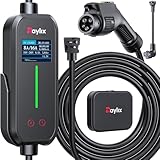
- [2026 INTELLIGENT CHARGING UPGRADE — PRECISION CONTROL MEETS SMART SCHEDULING] After surveying 100K+ U.S. EV owners, the Raylix R&D team found that nearly all drivers recognized the necessity of adjustable current and scheduled charging. Our upgraded J1772 charger features 4-level adjustable current (8A/10A/12A/16A) and a 1–12 hour smart delay timer. Whether you're charging overnight or during off-peak hours, enjoy smarter energy use, lower costs, and total convenience—on your schedule.
- [ONE CHARGER, ALL J1772 EVs/PHEVs READY!] Compatible with all SAE J1772 electric vehicles and plug-in hybrids—whether it’s Ford, GM, Nissan, Audi, BMW, Kia, Hyundai, Honda, Chevy, or more. Perfect for home or on-the-road charging, our 16A Level 1 & 2 charger ensures your EV is always powered and ready for any journey.
- [CHARGE 4× FASTER — NO MORE WAITING] In a rush? Our 16A Level 1 & 2 charger delivers charging speeds up to 4× faster than standard 8A Charger Level 1. Whether it's an early commute, a spontaneous trip, or last-minute errands, your EV will be ready when you are.
- [LEVEL 1 & 2 PORTABLE CHARGER — CHARGE ANYWHERE, ANYTIME] Designed for maximum flexibility, Raylix Level 1 & 2 EV charger features both 5-15 and 6-20 plug compatibility. Whether you're charging in your garage, at a friend's house, or at a roadside motel. NEMA 6-20 plug for Level 2 ev charging (240V, 16A, 3.68kW, 9-12 miles/hr) and a NEMA 5-15 adapter for Level 1 ev charging (120V, 12A, 1.44kW, 3-5 miles/hr) NOTE: In compliance with North American electrical safety standards, the charger automatically limits current to 12A when using a 5-15 outlet—protecting both your vehicle and your home’s electrical system.
- [AT-A-GLANCE CHARGING COMMAND: TOTAL CONTROL, INSTANTLY] While most ev chargers solutions confine vital data to in-car screens, the Raylix tesla charger breaks free with its enhanced TFT color display. This Raylix-exclusive feature delivers crystal-clear, real-time updates—voltage, current, power load, AND critical charging temperature—directly on the unit. Just one glance gives you complete charging insight. It’s not just information; it's the empowering peace of mind and satisfying control that transforms every charge into a masterfully managed experience.
Using the charger’s STOP control
IONITY chargers may place the physical STOP button on the display, beside it, below the screen, or near the plug holder. Press the control identified on your unit and wait for the station to report that the session is complete. Once the connector unlocks, return it securely to its holder.
Stopping from the vehicle
Some vehicle and payment flows allow you to end charging from the car’s charging menu or release control. Use that option only when the vehicle indicates it can stop the session safely. Confirm on the charger or in the app that the session has ended before removing the cable.
If the screen is black
A black display does not always mean that the charger is unusable. IONITY guidance says charging may still be started through the app, QR code, or RFID. If the session was started through the app, payment website, or a mobility-provider app, try stopping it in that same app. Physical STOP controls may still be available even when the main screen is dark. If neither the app nor the station responds, record the charger number and use the support route shown on the site signage.
Recommended Free Tools
Where to find your receipt or invoice
Sessions started in the IONITY app or with an IONITY charging card
Open the app’s Sessions list and select the completed session. Use the download icon to save the invoice. IONITY also says an invoice is emailed automatically for these sessions. Its guidance describes delivery within 24 hours in one place and on the following working day in another, so email arrival is not tied to an exact hour. If you need the document immediately, check Sessions rather than waiting for the message.
Rank #4

- SAE J1772 Standard Charger: Compatible with all North American electric vehicles and plug-in hybrids, including Ford, Chevrolet, Nissan, BMW, Volkswagen, Hyundai, Kia, Audi, Mercedes-Benz, Rivian, Porsche, Toyota, Honda, Jeep, and GMC. Tesla vehicles can be charged with a separate SAE J1772 adapter (sold separately).
- Adjustable Current: Choose from 8A, 10A, 13A, or 16A to match your vehicle’s charging needs.Dual Plug Compatibility,NEMA 6-20 Plug (220/240V): Delivers up to 3.84 kW/h, providing approximately 15.36 MPH charging speed at 16A.NEMA 5-15 Plug (110/120V): Supports 10A charging at 120V, offering 1.2 kW/h (around 4.4 MPH). Customizable Charging: Easily adjust current to suit different charging scenarios, giving you maximum flexibility at home or on the go
- Hassle-Free Installation: Forget complicated setups—just plug in and go. Equipped with NEMA 5-15 and NEMA 6-20 (220V/240V) connectors, it works with any standard 110V–240V outlet. The 25-foot cable gives you the freedom to reach vehicles parked at a distance, making charging convenient anywhere.
- Intelligent Charging: Featuring a 2.8-inch touch display, you can easily select the charging current (8A / 10A / 13A / 16A) and schedule charging with a 1–12 hour delayed start. Perfect for maximizing off-peak hours and cutting electricity costs. (Example: Set a 2-hour delay, and charging begins automatically after 2 hours.)
- Comprehensive Safety: Designed to meet CE and FCC safety standards, this charger offers multiple layers of protection, including overvoltage, overload, short-circuit, grounding, and leakage safeguards. The durable IP65-rated waterproof housing and reinforced cable ensure reliable charging in all weather conditions, keeping your vehicle safe year-round.
QR, NFC and payment-website sessions
Use the IONITY Receipt Portal at receipts.ionity.eu. General invoice guidance allows 24–48 hours for a receipt to become available. NFC-specific guidance commonly describes availability within 24 hours, but the wider 24–48-hour window is the safer expectation when the document has not appeared yet.
Information required by the portal
The terminal receipt lookup asks for the country, charge date, payment method, and the last four digits of the card used. When you paid with Apple Pay or Google Pay, enter the final digits of the wallet’s virtual card number, not automatically the last digits printed on the physical card. Keep the charge date and charger location handy if you made several sessions close together.
Browser compatibility for NFC receipts
IONITY’s NFC instructions say the Receipt Portal does not work in Safari and recommend Chrome or Edge. If the page fails to load or does not return a receipt, retry in one of those browsers, disable a content blocker for the page, and re-enter the details exactly as they appear in your payment record.
Outdated Drivers Are Slowing You Down
One free scan finds every outdated or missing driver and matches the right update for your exact hardware.Free scan · exact hardware matchWindows Errors? Fix Them Before They Spread
Repair common Windows errors and clear accumulated junk for a smoother, more stable PC - no reinstall needed.Free scan · no reinstallUnderstanding the temporary payment hold
Direct app and payment-page sessions normally place a temporary authorization before energy is delivered. The commonly cited example is 40 EUR, 40 GBP, or an equivalent local-currency amount. The final transaction is based on the energy actually consumed, not automatically on the authorization amount.
Best Value
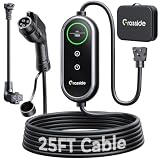
- Universal J1772 Compatibility: Designed with a standard J1772 connector, this J1772 charger works with most J1772 electric vehicles and PHEVs, including BMW, Mercedes-Benz, Hyundai, Kia, Nissan, Rivian, Ford, Chevy, Volkswagen, Toyota and more. Note: Tesla vehicles require a J1772 to Tesla adapter (not included)
- Flexible Outlet Compatibility: This portable EV charger comes with a NEMA 6-20 plug and a NEMA 5-15/5-20 to 6-20 adapter. Supports Level 1 (8–12A) and Level 2 (16A). Max 12A (1.44kW) on 120V NEMA 5-15/5-20 outlets, and full 16A (3.84kW) with a 240V NEMA 6-20 outlet. One charger is designed to cover home, garage, and travel charging needs with reliable performance
- Adjustable Smart Charging Control: Customize charging safely with adjustable current settings (8A/10A/12A/16A) to match different circuits. The 0–12 hour delay timer helps schedule overnight charging during lower electricity rates. Integrated LCD display shows real-time voltage, current, power, and charging status for clear monitoring without apps. Note: Press 'A' or 'T' for 3s to set and confirm.
- Home Charging & Travel Backup: For daily home use while remaining fully portable for travel. This level 1 ev charger includes a durable 25FT ev charging cord, providing flexible reach for garage or driveway charging. Charge overnight to take advantage of lower utility rates—potentially saving up to $500 annually on electricity costs. The included carrying case makes storage easy and keeps a dependable backup charger available in your trunk for road trips or visiting friends
- Engineered For Safety & Durability: Built for dependable daily use, this electric car charger features an IP65 waterproof rating for all weather operation. Equipped with a UL-listed cable, fully rubberized connector, and advanced protection against overcurrent, overheating, and electrical faults. Designed to ensure safe, stable, and long-term charging performance in demanding environments
After the session closes, the payment system reconciles the hold with the final charge. If the session cost less than the authorization, the remaining amount is released; the timing depends on your bank or card issuer. A pending authorization can therefore remain visible after the final charge without representing a second completed purchase. If both entries remain finalized, contact the issuer with the session receipt and transaction details.
Choosing the most suitable payment route
| Route | Account needed | Where the receipt appears | Important limitation |
|---|---|---|---|
| IONITY app | IONITY account and payment method | App Sessions and email | Complete payment before connecting; charger status can lag. |
| QR or payment website | No app account required | Receipt Portal | Complete the web payment before plugging in. |
| Contactless terminal | No app account required | Receipt Portal | Available only at selected sites; follow the terminal sequence. |
| RFID or charging card | Compatible card or provider account | IONITY or provider process, depending on issuer | Authentication and plug order vary by charger model. |
| Mobility provider | Provider account or card | Usually the provider’s process or the route it specifies | Compatibility and tariff inclusion must be confirmed with the provider. |
Use the app when you want a persistent session history and in-app controls. QR or contactless payment is practical for a one-off session, provided the site supports that route and you are prepared to retrieve the document through the portal. A mobility-provider card can be convenient when its tariff is lower or integrated with your travel account, but the provider’s conditions apply.
Troubleshooting common failures
The app shows the charger as occupied
App availability can lag. Compare the charger number and physical status at the station, then refresh the app. If another vehicle is connected or the unit displays an error, choose a different point rather than attempting to start the occupied one.
The Tool Desk
Outbyte Driver Updater FREEScan for outdated or missing drivers - takes under a minuteDriver Scan →Outbyte PC Repair FREEClear out junk files and repair common Windows errorsFree Scan →Payment was approved but charging did not start
- Confirm that you selected the same charger number shown on the physical unit.
- Check that the connector is fully inserted and the vehicle is in a state that permits charging.
- Wait for the app’s connected or charging confirmation instead of relying only on the vehicle’s dashboard.
- If the attempt times out, end any pending session in the app, unplug only after the lock releases, and retry the payment flow.
The card or RFID token is rejected
Check that the card is enabled for contactless or online payments and that the provider includes IONITY. For RFID, hold the card at the reader until the charger responds. If it still fails, use the app or QR payment page. A different payment route can also help distinguish a card-issuer problem from a station problem.
The connector will not release
Stop the session again through the same route used to start it, wait for the charger to report completion, and use the vehicle’s unlock or charge-port release control if required. Never force the cable. If the connector remains locked after both the vehicle and charger show an ended session, follow the station’s assistance instructions and provide the charger number.
Quick Recap
No receipt is visible
- For an app or IONITY charging-card session, open Sessions and select the completed record.
- For QR, NFC, or website payment, wait through the applicable 24–48-hour availability window and search the Receipt Portal.
- Use Chrome or Edge for NFC lookups, and enter wallet virtual-card digits when a digital wallet was used.
- Check the date, country, payment method, and card digits for typing errors.
Before you leave the station
- Confirm that the app, charger, or vehicle shows the session as stopped.
- Wait for the connector lock to release.
- Remove the plug without twisting or pulling against resistance.
- Return the connector to its holder and close the vehicle’s charge port.
- Save the session record or note the charge date and payment details needed for a later portal lookup.
Product prices and availability are accurate as of the date/time indicated and are subject to change. Any price and availability information displayed on Amazon at the time of purchase will apply.




