Outdated Drivers Are Slowing You Down
One free scan finds every outdated or missing driver and matches the right update for your exact hardware.Free scan · exact hardware matchPC Slower Than It Used to Be?
A free scan shows the junk files, broken settings and background clutter dragging Windows down - then fixes them in one click.Free scan · Windows 10 & 11The most effective way to reduce climate-control drain is to precondition the cabin while the EV is connected to a charger. Once driving, use moderate temperature and fan settings, and use heated seats or a heated steering wheel for personal warmth when your vehicle has them. In hot weather, park in shade or use a vehicle-specific windshield sun shade to limit how hot the parked cabin becomes.
Climate energy comes from the same high-voltage battery that supplies the motor, but the amount varies with weather, trip length, traffic, vehicle design and whether the vehicle also heats or cools its battery. There is no reliable, cross-model percentage or miles-saved figure. Your vehicle’s energy display and trip data are the best way to measure the effect on your car.
As an Amazon Associate I earn from qualifying purchases.
Why climate control reduces EV range
An EV’s heater, air conditioner, blower and pumps consume electrical energy. That energy could otherwise be used for propulsion, so range can fall when the cabin needs substantial heating or cooling. Cold weather can also increase the energy required to bring the battery itself to an operating temperature, while hot-weather systems may run cooling equipment for the battery as well as the cabin.
Cabin comfort and battery thermal management are related but not identical. A scheduled function may condition both, depending on the model. Battery conditioning can support charging performance or driving performance, not merely occupant comfort. Do not assume that a setting described as battery preconditioning is an economy mode for the cabin.
#1 Best Overall

- 🔋High Value Battery Tester: BM200 is your go-to solution for 12V lead-acid and lithium battery. Equipped with advanced features like voltage & cranking & charging system test, abnormal alarm and real-time trip records.This battery monitor ensures your car battery is always in optimal condition. Whether it's for your car, motorcycle, truck, RV or boat, this 12V battery tester has got you covered. Get it, and forget winter breakdown worries.
- 🚗Keep Your Journey Smooth: Ever lose your car in a crowded parking lot? Not anymore! From real-time battery monitoring and smart alerts to multi-vehicle management and location tracking, the BM200 12v battery tester isn't just a battery tester—it’s your all-in-one vehicle management companion. Perfect for drivers who want to avoid battery surprises and keep their vehicles running smoothly every day. Note: Seek car function requires GPS permissions to be authorized for the device to identify the vehicle's location.
- 🎄Cranking & Charging System: The cranking test helps you assess the battery's performance during vehicle startup, while the charging test lets you evaluate the operational efficiency between the battery, alternator, and electrical system——keeping your vehicle running smoothly without any surprises. With reliable accuracy, the BM200 car battery tester gives you the info you need to stay ahead, no matter the conditions.
- ✌️Effortless Battery Testers: Enjoy hassle-free battery monitoring with Bluetooth 4.2 technology. No need to stand by your car's hood—sit back in your car or within a 15~30FT range to access real-time battery information. Whether it's hot, cold, or rainy, you can conveniently monitor your battery's condition. Plus, the enhanced Bluetooth connection provides faster pairing and a stable, reliable connection.
- 📈Accurate Data, Every Time: With this battery checker tester smart chip tech, you’ll get razor-sharp accuracy every time you check your battery health. Compatible with both iOS and Android, the ancel BM200 battery tester app lets you monitor up to 4 devices all at once—keeping you effortlessly connected. Additionaly, this saves the day by recording battery data every 2 minutes and stashing 70 days' worth of history, so you can always track back and see what's up with your power. It is recommended to install the device after the vehicle has been switched off for two hours, when the voltage will be stable and the data will be more stable.
Battery-electric vehicles and plug-in hybrids also behave differently. A plug-in hybrid can use its engine or other systems in some circumstances, while a battery-electric vehicle relies on its high-voltage battery for propulsion and climate energy. Always use the instructions for the exact model, trim and software version.
The highest-impact actions at a glance
| Situation | Action | Important qualification |
|---|---|---|
| Before leaving | Schedule cabin preconditioning while the vehicle is plugged in. | Unplugged preconditioning may draw from the high-voltage battery instead. |
| Cold-weather driving | Use a moderate cabin temperature and fan speed; use heated seats and steering-wheel heat when available. | Keep enough heat and airflow for clear windows and safe visibility. |
| Hot-weather parking | Choose shade and add a correctly fitted windshield sun shade. | A shade reduces heat buildup but does not cool an occupied vehicle. |
| Short trips | Expect the initial warm-up or cool-down to represent a larger share of energy use. | The effect is vehicle- and weather-specific; no universal percentage applies. |
| After changing settings | Check the vehicle’s energy screen or trip data. | Displayed categories and calculations differ by manufacturer. |
Precondition the cabin while charging
Preconditioning moves much of the initial heating or cooling work to a time when the car can draw from the charging source. Ford’s Mustang Mach-E owner’s manual says plugged-in preconditioning uses the charging source and reduces the energy needed to bring the cabin to a comfortable temperature after driving begins.
How to set it up
- Connect the vehicle to a charger that is actually supplying power. A connector that is physically inserted is not enough if charging has stopped or the circuit is unavailable.
- On the vehicle touchscreen or companion app, open the climate, departure-time or scheduled-preconditioning control. Names and menu locations vary by make and model.
- Enter the desired departure time and enable cabin preconditioning. If the interface separately offers battery conditioning, read the description before enabling it; that function may serve charging or performance needs as well as comfort.
- Confirm that the schedule is active and that the vehicle shows a plugged-in or charging status. Some systems show a future departure event rather than a separate climate timer.
- Leave the vehicle connected until departure. The car can then obtain at least part of the conditioning energy from the charger rather than the traction battery.
Do not assume that a scheduled event is harmless when the cable is disconnected. Ford notes that scheduled preconditioning may run regardless of plug status; when unplugged, the energy comes from the high-voltage battery and can reduce available range. If you must precondition away from a charger, shorten the run time and accept that it is a range trade-off.
Why timing and limits differ
Preconditioning is not a universal 20-minute or fixed-temperature process. Mazda’s 2026 CX-90 PHEV owner’s manual states that its cabin preconditioning operates for 20 minutes and may not reach the target temperature in extreme conditions. That specification applies to that plug-in hybrid and should not be transferred to a battery-electric vehicle.
Use the departure schedule rather than repeatedly starting remote climate several times. Repeated manual starts can consume more energy than one planned cycle, and the vehicle may stop the function automatically when its model-specific limit is reached.
Rank #2

- APPLICATION --- The battery testers can be used for testing battery voltage and capacity for electric motorcycle, motorcycle,golf cart, automotive , car, marine, RV, boat, etc.
- APPLICABLE BATTERY --- The digital battery monitor is suitable for 7-100V (12v 24v 36v 48v 60v 72v 84v) Ternary lithium battery, lead-acid,AGM battery, LiFePO4 battery. Default 12 volt lead acid battery .
- PROTECTION ---The smart battery monitor with fully colsed protective shell, dustproof ,IPX7 Waterproof ,It can be used for indoor and outdoor. Even if you soak in water for 72 hours, it will not get water.Input reverse connection protection.
- INSTALLATION --- The red wire for the positive and the black wire for the negative. The wires length are 23.62 inches(60.0cm),we provide mounting bracket,double-side adhensinve and screw for conventient installing.
- Buzzer Alarm&Temperature--- The battery monitor can set low and high voltage buzzer alarm and short press"M"key can switch voltage and temperature(Celsius).
Reduce energy use in cold weather
Choose a moderate setpoint and fan speed
Maximum heat and maximum fan settings demand more power than a moderate setting. Ford recommends moderate climate settings, and Volkswagen gives similar advice for electric vehicles in cold weather. Set the cabin to a temperature that is comfortable without creating a large temperature difference from the outside, then allow the automatic climate system to regulate airflow if your vehicle’s automatic mode works well for you.
Do not reduce heat so far that windows fog or visibility suffers. Defrost and defog functions are safety controls; use them whenever necessary, even if that increases energy use. Efficient driving is not a reason to drive with an obstructed view or inadequate ventilation.
The Tool Desk
Outbyte Driver Updater FREEFix the driver behind crashes, sound loss and screen glitchesFind Drivers →Outbyte PC Repair FREEClear out junk files and repair common Windows errorsFree Scan →Warm the occupants locally
Heated seats and a heated steering wheel warm the parts of your body that need comfort without first heating all of the cabin air. Tesla’s Model 3 guidance says these localized heaters are more efficient for keeping occupants warm than using climate controls to heat the entire cabin, and Volkswagen also recommends them as a lower-energy option.
Use localized heat as a complement, not a substitute for safe window clearing. If passengers need a warm cabin or the glass is misting, raise the cabin temperature or select the appropriate defog mode.
Account for short trips and traffic
On a short trip, the initial effort to bring the cabin and, in some vehicles, the battery to operating temperature is spread over fewer miles. Tesla’s Model 3 manual specifically warns that average consumption can rise on very short trips or in stop-and-go traffic for this reason. Combine errands when practical, and precondition while plugged in before the first departure rather than performing several cold starts.
Rank #3

- It compatible with all 12-volt vehicle batteries;Voltage: 9-16V With Bluetooth 4.0; Supports Solar Power Systems/RVs/Motorcycles/Boats/Cars/Trucks with All 12 Volts.
- Automatic LowVolt Alarm: Alert user if battery is LowVolt when enters Bluetooth range in 10 meters.
- Safe and Reliable: Battery load tester tells you everything about the battery: voltage, charge,cranking power, Engine starting detect automatically, etc.
- Free app for both iOS & Android, IOS: IOS 7.1 and Later Available: Android 4.3 and Later
- Easy to Operate: Battery Monitor’s App is Battery Monitor BM2. Please scan machine backup or user manual scan code to download software. Connecting Bluetooth and open app, no code, you can know battery or battery load’s Condition and check charging and starting system, list time of each driving.
Keep an EV cooler in hot weather
Reduce heat before you start the car
Park in shade whenever practical. A cooler starting cabin requires less air-conditioning work after you enter. If shade is unavailable, a vehicle-specific windshield sun shade can limit solar heating through the glass. Check the fit for your exact vehicle; an ill-fitting shade can leave gaps and may interfere with sensors or visibility when the car is moved.
Free tools Windows power users keep installed
One-click scans. No signup required.
A shade is a parking aid, not a cooling system. It does not make an unattended vehicle safe for a child or animal and does not replace active climate control when occupants are inside.
Use remote cooling from the charger when possible
If your vehicle supports remote climate, start it while the car remains connected. Tesla’s hot-weather guidance advises leaving a Model 3 plugged in when possible, especially when using preconditioning or Cabin Overheat Protection, because parked climate functions can use battery energy.
Remote climate labels and operating limits vary. Confirm that the command starts cabin cooling rather than only battery conditioning, and check whether the vehicle stops after a fixed duration. If the charging session has ended, the cooling load may come from the traction battery.
Understand overheat protection
In the Model 3 owner’s manual, Cabin Overheat Protection can run the air conditioner or fan when cabin temperature exceeds 105 °F (40 °C) or another selected threshold, when the feature is available. The 105 °F figure is a feature threshold, not a measurement of energy use or a promise of a particular temperature inside the car.
Recommended Free Tools
Rank #4
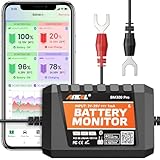
- 6V, 12V & 24V MONITORING - View voltage, estimated state of charge and temperature through the ANCEL BM300 Pro app. On supported 12V and 24V vehicle systems, review cranking and charging voltage tests. For 6V systems, use voltage, SOC and temperature monitoring; cranking and charging tests are not supported.
- MONITOR UP TO 4 BATTERIES - Each BM300 Pro connects to one battery. Add up to four BM300 Pro devices in the app to view four batteries from one phone, useful for multiple vehicles or separate battery banks. This package includes one monitor; additional batteries require additional monitors
- BLUETOOTH 5.3, NOT REMOTE CELLULAR - View live data and receive supported alerts when your phone is within Bluetooth range. The monitor stores up to 72 days of history while disconnected and syncs data when you reconnect. It does not provide Wi-Fi, cellular, or unlimited-distance monitoring
- APP DATA FOR BETTER CONTEXT - Review voltage, estimated SOC, temperature, cranking and charging results, trip records, and historical graphs. Trip and Find Car features use the phone’s location services and require permission; the monitor itself does not contain a GPS or cellular tracker
- MADE FOR LONG-TERM INSTALLATION - Average current draw is approximately 1mA. Built-in reverse-polarity and short-circuit protection support permanent installation, while the IP67-rated housing is designed for engine-bay conditions. For the best signal, mount away from thick metal obstructions and secure both terminal leads
Tesla warns that the cabin may still become dangerously hot even when Cabin Overheat Protection is enabled. Never leave children or pets unattended in a vehicle. Follow local safety requirements and the instructions for your own vehicle; no automated feature should be treated as occupant protection.
Cabin climate versus heated seats: how to choose
| Your priority | Usually the better first choice | When to use cabin climate instead |
|---|---|---|
| Keeping the driver warm on a cold commute | Heated seat and steering wheel, with moderate cabin heat | When the windshield needs defogging or passengers need a warmer cabin |
| Several passengers need equal comfort | Moderate automatic climate control | Localized heat may leave passengers cold or create uneven comfort |
| Very hot cabin after parking | Plugged-in pre-cooling before departure | Use active cooling while occupants are present; a sun shade alone is insufficient |
| Comparing two settings on your vehicle | Use the setting that meets comfort and visibility needs with lower displayed energy use | Do not infer a fixed result from another make or model |
Outside temperature, trip length, passenger count, equipment and the vehicle’s control strategy all affect the result. Localized heaters are generally the efficient choice for personal warmth, but the car’s own energy display is the appropriate way to compare settings in practice.
Model-specific figures you should not generalize
| Vehicle or source | Figure or instruction | What it means |
|---|---|---|
| Mazda 2026 CX-90 PHEV owner’s manual | 22 °C (72 °F) recommended set temperature | Mazda’s recommendation for this plug-in hybrid; an extremely high or low setting increases power consumption and charging time. |
| Mazda 2026 CX-90 PHEV owner’s manual | 20-minute cabin-preconditioning operation | The stated duration for that model; it is not a universal EV timer. |
| Tesla Model 3 owner’s manual | 105 °F (40 °C) Cabin Overheat Protection threshold when available | A feature trigger, not a range-saving statistic or guaranteed cabin temperature. |
| Ford Mustang Mach-E owner’s manual | Plugged-in preconditioning uses the charging source | Unplugged operation can draw from the high-voltage battery. |
These figures come from manufacturer manuals and guidance, not an independent cross-model test. Your vehicle may use different temperatures, timers, thresholds or energy sources.
Independent reader supportYour contribution helps us test, update, and keep practical guides available for everyone.Measure what your own vehicle is using
After changing one setting, drive a comparable route and review the vehicle’s energy or trip screen. Look for a climate-control category, accessory-energy display, consumption graph or trip-energy breakdown. Record outside temperature, distance, traffic, passengers and whether the car was preconditioned; otherwise, a warmer day or shorter route can make a setting appear better or worse than it is.
Tesla describes its Energy app as showing real-time and projected energy use, but the instructions and available views are model-specific. Other manufacturers may show climate energy only in a trip summary or may combine it with accessories. Treat the displayed category as a diagnostic aid, not as a laboratory measurement.
Best Value

- It compatible with all 12-volt vehicle Lead acid batteries;Voltage: 9-16V With Bluetooth 4.0; Supports Solar Power Systems/RVs/Motorcycles/Boats/Cars/Trucks with All 12 Volts.
- Automatic LowVolt Alarm: Alert user if battery is LowVolt when enters Bluetooth range in 10 meters.
- Safe and Reliable: Battery load tester tells you everything about the battery: voltage, charge,cranking power, Engine starting detect automatically, etc.
- Free app for both iOS & Android, IOS: IOS 7.1 and Later Available: Android 4.3 and Later
- Easy to Operate: Battery Monitor’s App is Battery Monitor BM2. Please scan machine backup or user manual scan code to download software. Connecting Bluetooth and open app, no code, you can know battery or battery load’s Condition and check charging and starting system, list time of each driving.
A simple comparison method
- Choose two similar trips with similar outside temperatures and traffic.
- For the first trip, use your normal climate setting and note the climate or accessory reading.
- For the second, precondition while plugged in or use moderate settings and localized heat, depending on what you are testing.
- Compare energy per distance and total battery percentage used, while noting differences in route and conditions.
- Keep the setting that provides adequate comfort and visibility with the lower observed energy use.
Common mistakes and how to correct them
Assuming the cable is supplying the climate load
A plugged-in vehicle can still be unable to draw power if charging is paused, the circuit is overloaded or the schedule has ended. Check the charging indicator before relying on preconditioning. If the car is unplugged, assume the high-voltage battery may supply the climate system unless the manual says otherwise.
Using extreme temperatures to reach comfort faster
Setting the thermostat to its hottest or coldest value does not necessarily make the cabin comfortable sooner, and it can increase power use. Start with a moderate target and let automatic regulation do the work. Mazda specifically warns that an extremely high or low setting increases power consumption and charging time on the 2026 CX-90 PHEV.
Turning climate control off when visibility or health requires it
Climate energy is a trade-off, not an instruction to sacrifice safe driving. Use defrost, defogging, ventilation or cooling when conditions require them. A small range reduction is preferable to driving with fogged windows, unsafe heat exposure or inadequate airflow.
Confusing battery preconditioning with cabin preconditioning
A menu item that mentions battery temperature may be intended for charging speed or performance. Read the on-screen explanation and owner’s manual. If your goal is a comfortable cabin before departure, select the cabin or departure-climate function.
Treating a sun shade or overheat feature as a guarantee
Sun shades reduce solar gain but do not actively cool the car. Overheat protection can consume battery energy and may not prevent dangerous temperatures. Never use either as a substitute for supervision of children or animals.
A practical decision checklist
- Is the vehicle connected to a functioning charger? If yes, schedule preconditioning before departure.
- Are you driving in cold weather? Use moderate heat and fan settings, then add seat or steering-wheel heat for personal comfort.
- Are windows fogging? Use the required defog or defrost mode, regardless of the energy cost.
- Is the car parked in sun? Choose shade or a correctly fitted windshield sun shade, and use plugged-in remote cooling when supported.
- Is the trip very short or congested? Expect the initial warm-up or cool-down to have a larger effect on average consumption.
- Did a change produce the expected result? Verify it with the vehicle’s energy display or trip data rather than relying on a generic range claim.
The dependable strategy is to move climate work to the charger when possible, avoid unnecessarily extreme settings, use localized heating for personal warmth, reduce parked heat gain and keep safety controls available. Exact timers, temperatures and energy flows remain vehicle-specific, so the owner’s manual and your car’s own energy data take precedence over any one-size-fits-all rule.
Quick Recap
Product prices and availability are accurate as of the date/time indicated and are subject to change. Any price and availability information displayed on Amazon at the time of purchase will apply.
What’s actually slowing this PC down?
Pick the symptom - the matching free tool is one click away.




