Free tools Windows power users keep installed
One-click scans. No signup required.
Program a Viper 7146V through the vehicle’s installed Viper control unit—not by pairing the remote directly. With the ignition on, use the system’s Valet/Program switch to select a channel, then press the remote button you want assigned to it. A confirmation chirp means the code was learned.
Before you start
Confirm that the installed Viper control unit supports the 7146V and that you can reach its Valet/Program switch. The 7146V is a one-way, four-button replacement or additional remote; it is not a control unit and will not operate a vehicle without a compatible working Viper system. The Viper/Directed owner guide notes that system features vary by installation, so remote start or security functions may not be present. Check the control-unit model and any applicable date-code limits against the specialist compatibility listing before using or buying a remote.
The model-specific instructions identify the programming control as the Valet/Program switch plugged into the system’s blue port. If you cannot locate it, or do not know which control unit is installed, ask the installer or an authorized Viper/Directed dealer rather than following instructions for another remote or system.
Program the 7146V
The sequence is “Key, Choose, Transmit and Release,” as described in the 7146V programming instructions. Have the desired channel number ready before beginning.
#1 Best Overall

- Viper 1 Way replacement remote
- 4-Button remote control
- Up to 1/4 mile range
- Lock, unlock and start your vehicle remotely with the touch of a button. Viper System Compatibility: 4105V, 5305V, 3305V, 5105V, 3102V, 3305V, 3105V
- Key: Turn the vehicle ignition to ON.
- Choose: Within 10 seconds, press and release the Valet/Program switch the number of times matching the channel you want. After the last count, press the switch once more and hold it. The LED flashes and the horn honks if connected to confirm the selected channel.
- Transmit: While continuing to hold the switch, press the 7146V button you want assigned to that channel. Listen for the system chirp confirming the code was learned.
- Release: After the confirmation chirp, release the Valet/Program switch.
Repeat the procedure for another channel or remote button as needed. The channel assignment determines what that button does; choose the function that matches the installed system.
Independent reader supportYour contribution helps us test, update, and keep practical guides available for everyone.Choose the correct channel
The 7146V instructions list these channel functions:
Rank #2
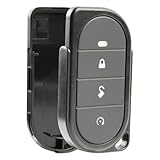
- Remote Programming: Self programmable with one working key
- Complete key fob with electronics and a battery
- Buttons: Lock, Unlock, Remote Start
- Replaces P/N: 7146V, 4105V, 5305V, 3305V, 5105V, 3102V, 3305V, 3105V
- Case and shell only, no electronics (aftermarket replacement)
| Channel | Function |
|---|---|
| 1 | Auto Learn |
| 2 | Arm / Panic On / Panic Off |
| 3 | Disarm / Panic Off |
| 4 | Silent Mode / Channel 2 |
| 5 | Remote Start |
| 6 | Channel 4 |
| 7 | Short Run / Turbo |
| 8 | Timer Mode |
| 9 | Arm / Disarm / Panic |
| 10 | Panic Only |
| 11 | Defogger Control |
| 12 | Delete All Transmitters |
Do not use channel 12 for ordinary programming. Assigning a known transmitter button to channel 12 deletes all stored transmitters and restores default feature settings, according to the model-specific instructions.
Quick Recap
Rank #3

- Programming Instructions: This key fob replacement is designed for easy programming, making it a suitable DIY solution by following the simple instructions provided
- Premium Replacement Quality: This car fob is designed to match the specifications of the factory remote, ensuring seamless integration with your car's security system while maintaining high-quality performance and offering an affordable and convenient option for replacing a lost or damaged remote
- Convenient Button Functions: This Keyless Option replacement remote features convenient button options, providing a range of functions for added security and ease of use
- Package Contents: Includes 2 keyless entry remote control key fobs with 3-button functionality for lock, unlock, and remote start operations compatible with Viper systems
- Vehicle Compatibility: This car remote can only be programmed for specific Makes and Models as an aftermarket replacement for 7146V, 4105V, 5305V, 3305V, 5105V, 3102V, 3305V, 3105V
If programming does not work
- One long horn honk: The learn routine has exited. It exits if the ignition is turned off, the switch is pressed too many times, or more than 15 seconds pass between steps. Start again and count the switch presses carefully.
- One long honk when you try to enter programming: The routine may have been locked using Bitwriter. The instructions say a Viper dealer must unlock it with Bitwriter.
- No confirmation chirp: The remote code was not confirmed as learned. Check that you selected the intended channel, kept holding the Valet/Program switch while pressing the remote button, and are working with a compatible, functioning control unit.
- You cannot find the switch or identify the system: Contact the original installer or an authorized Viper/Directed dealer. The October 2017 North American owner guide directs owners to an authorized dealer for support.
Product prices and availability are accurate as of the date/time indicated and are subject to change. Any price and availability information displayed on Amazon at the time of purchase will apply.
What’s actually slowing this PC down?
Pick the symptom - the matching free tool is one click away.




