Do these 3 things before closing this tab:
1Repair Windows errors before they cause bigger problems2Scan for outdated or missing drivers - takes under a minute3Clear out junk files and repair common Windows errorsEnter your destination with the correct EV profile and leave Plan charging automatically enabled. TomTom will add charging stops when the route exceeds the car’s modeled range, estimate charging time and arrival battery, then update the plan as driving conditions change. You should still verify every stop’s connector, live status, access rules and opening hours, and keep a backup station for any stop that matters.
What TomTom’s EV routing does
TomTom’s Long Distance EV Routing builds a route around the vehicle rather than treating charging as an afterthought. It uses the battery level, battery capacity, charging capability and consumption characteristics available from the vehicle integration. Map attributes and, in TomTom’s newer EV experience, weather, traffic, terrain and personalized learning can also influence the consumption model.
As an Amazon Associate I earn from qualifying purchases.
When the calculated journey is longer than the vehicle’s usable range, the system automatically suggests charging stops and creates an optimized itinerary. In the automotive interface, the itinerary shows how many charging stops are planned, how long each stop is expected to take and where the stations are located on the map. The route is an estimate, not a reservation: a station can become occupied or unavailable after the calculation.
Free tools Windows power users keep installed
One-click scans. No signup required.
Prepare the EV profile before entering a destination
Routing quality depends on the information TomTom receives. Before planning a long trip, check these inputs in the vehicle or navigation settings:
#1 Best Overall

- Road-Trip Ready & Apartment-Friendly: Comes with a 20ft heavy-duty cable that easily spans a standard parking space, plus a NEMA 5-15 adapter for plug and play convenience. Whether you're charging at home or hitting the highway, this portable EV Charger is your ultimate travel companion for weekend getaways and camping trips
- Delay Timer & Adjustable Current: Use the built-in timer to delay your start by 1-12 hours and easily harvest off-peak energy savings. Then pick from 6/8/10/12/16A (Level 2) to match your garage grid. It automatically locks in your favorite setting and never forces you to re-adjust. No complicated apps or Wi-Fi needed, just straightforward, reliable control
- Tactile Buttons & LED Screen: No glitchy smartphone apps or finicky touchscreens that lag, freeze, and misfire in winter. Our EV charger is engineered with a high-definition LED display that tracks critical real-time data, including live voltage and current. Tactile buttons deliver direct, satisfying click feedback that remains highly responsive even when wearing heavy winter gloves or operating in torrential downpours—conditions where standard touchscreens completely fail
- ETL Certified Safety & IP65 All-Weather Shield: ETL certified to meet US safety standards for charging. Engineered with a certified IP65 dust-and-waterproof enclosure and a heavy-duty TPE cable that operates reliably across a wide -22°F to 130°F range. An intelligent multi-protection defense system (GFCI, over-voltage, over-current, surge, short-circuit, and over-temp) keeps a 24/7 watch for 100% safe, unattended overnight charging in any weather
- J1772 Compatible + Dual-Level Charging: Works with all J1772 EVs (Tesla requires a separate J1772 adapter). Level 2: built-in NEMA 6-20 plug. Level 1: included NEMA 5-15 adapter fits any standard outlet. Please confirm your outlet is NEMA 6-20 or 5-15 before purchase
- Vehicle identity and battery capacity: confirm that the selected model and battery size match the car you are driving. A wrong battery variant changes the estimated range and every later stop.
- Current state of charge: use the car’s actual percentage at departure, not the percentage from an earlier trip or a default value.
- Charging capability: verify the maximum AC and DC charging power the vehicle can accept. A station rated for more power cannot make the car charge above its own limit.
- Connector support: make sure the vehicle’s inlet type is represented correctly, including the connector used for fast DC charging.
- Departure conditions: enter the planned departure time when the implementation supports it. Temperature, traffic and terrain can materially affect consumption.
If any of those fields are unavailable or wrong, treat the stop times and arrival percentages as conservative planning aids rather than precise predictions. Correct the profile before comparing routes.
Plan the trip step by step
- Open the route planner and select the EV profile. Confirm the car, battery and connector settings before adding destinations.
- Enter the final destination and any waypoints. Add required stops in the order you expect to visit them. A waypoint can change the road choice and therefore the charging plan.
- Leave Plan charging automatically enabled for the first calculation. TomTom says Long Distance EV Routing automatically suggests charging stops when a route exceeds the vehicle’s range and optimizes the route from battery level, charging capability and consumption characteristics.
- Calculate the route and inspect the itinerary. Note the number of charging stops, each predicted charging duration, the planned arrival state of charge and the station locations shown on the map.
- Open every charging-stop detail card. Check connector compatibility, available power, live availability, payment options, opening hours and nearby amenities. Do not rely solely on the station name or a map pin.
- Check the battery buffers. Review the minimum state of charge required at each charging stop and at the destination. If the trip includes a critical destination, inspect that setting separately.
- Choose a backup for any critical leg. Select another compatible station within reach, especially where there is only one practical fast charger or where arriving with a low battery would leave no safe alternative.
- Start navigation only after reviewing the complete itinerary. Keep the car’s displayed battery percentage in view during the drive and accept route updates when conditions change.
How much battery should remain at stops and the destination?
TomTom’s documented defaults set a 15% minimum state of charge at a charging stop and a 15% minimum at the destination. For a home destination, the critical-destination setting defaults to 35% of the destination minimum. With the documented 15% destination minimum, that critical threshold works out to 5.25 percentage points; the setting is a relationship to the destination minimum, not a universal promise that every car will arrive with that exact percentage.
These are planning defaults, not a recommendation that every driver should deliberately run the battery down to them. Increase the buffer when weather is severe, traffic is unpredictable, the route crosses sparsely served areas, the vehicle is heavily loaded or the next charger is uncertain. The important check is whether the planned arrival percentage leaves a realistic fallback if the first station is occupied or offline.
Recommended Free Tools
Charging-duration settings that affect the estimate
| Setting | Documented value | How to interpret it |
|---|---|---|
| Minimum charging time | 300 seconds | A planned session is not shorter than five minutes, even if the modeled energy need is very small. |
| Session overhead in Online Routing API | 60 seconds | Added time for a charging session in that API implementation. |
| Session overhead in Navigation SDK or Automotive Navigation Application | 180 seconds | Added plug-in or session time in those implementations. |
| Minimum state of charge at a charging stop | 15% default | The route attempts to reach a stop with at least this modeled battery level. |
| Minimum state of charge at destination | 15% default | The route attempts to finish with at least this modeled battery level. |
| Critical destination factor for home | 35% of the destination minimum by default | A separate critical-destination threshold; the exact percentage depends on the destination minimum configured. |
Service versions and vehicle integrations can expose different controls. If your screen uses different labels or values, follow the values displayed in that implementation rather than assuming these defaults are unchanged.
Verify a station before you commit to it
TomTom’s EV Data Service reports more than 2.3 million charge points across 117 countries, with 1.4 million providing real-time data, according to TomTom’s 2026 product information. Those figures are TomTom’s product claims and coverage can vary by country, operator and data connection. A large database does not mean every listed connector is working at the moment you arrive.
Rank #2

- Flex Level 1 EV Charger - The EVDANCE Level 1 electric car charger is compatible with J1772 electric vehicles and plug-in hybrid vehicles (North American Standard). *Tesla requires a SAE J1772 adapter.
- Convenient to Use - This charger has both NEMA 6-20 plug for 16A 240V charging (3.68kW, 10-12 mi/h) and a NEMA 6-20 to 5-15 plug adapter for 12A 120V charging (1.44kW, 2-5 mi/h). The included bag makes it easier to carry on the go. It also has a 25ft cable length, you can use it flexibly from anywhere in the garage or driveway.
- Check Your Outlet Type -This charger works with standard 120V NEMA 5-15/5-20 outlets (2-5 mph charging speed) and 240V NEMA 6-20 outlets (10-12 mph) . It's not compatible with NEMA 6-15/10-30/14-30/14-50/6-50 outlets – you'll need a NEMA 14-50/14-30/10-30/6-50 to 6-20 adapter (sold separately) to connect.
- Compatible EV Models -This EV charger works with most major electric vehicles, including Ford, Chevrolet, Hyundai, Audi, Nissan Ariya, Rivian R1S, Kia, and others. However, it's not compatible with Mini Cooper Electric Hardtop,Toyota Prus Prime/Z4X/RAV4Prime, Porsche Taycan Base/4S/Turbo/Turbo S or Tesla models (Tesla requires a J1772 to Tesla Adapter, sold separately). For a full list of compatible models, check out the Full Compatibility List on our product page.
- Indication Displays - LED display that can tell you the status as well as indicate errors while charging your electric vehicle.
Use the station details to make five checks:
- Connector: match the physical plug and charging mode to the inlet on your car. A station may list several connector types, but only one may fit your vehicle.
- Power: compare the station’s rated output with the car’s maximum acceptance. The higher number is not the speed you will necessarily receive.
- Live availability: look for an available compatible connector and note when that status was last updated, if shown.
- Access and payment: confirm whether the location requires an account, a contactless card, a local app or another method. A technically compatible charger is not useful if you cannot start a session.
- Opening hours and access: check whether the site is reachable at your expected arrival time and whether gates, parking controls or private-property rules apply.
Also inspect practical amenities such as toilets, food, lighting and safe waiting areas when the stop will be long or overnight. Treat amenities as a planning factor, not as proof that the charger is operational.
Change the automatically generated plan
TomTom’s Automotive Navigation Application lets you take control after the first automatic calculation. The available controls include:
Turn automatic charging off
Disable automatic charging when you want to design the energy plan yourself, for example when you have a preferred network, a workplace charger or a destination with a guaranteed plug. With automatic planning off, the system will not keep inserting replacement stops as you edit the route, so verify that every leg remains within a safe range.
Add a station with Charger Finder
Use Charger Finder to search for a compatible station and add it as a stop. Recalculate after adding it, then inspect the resulting arrival battery and the effect on later stops. A manually chosen station can be convenient but may force an additional stop farther along the route.
Remove or reorder stops
Remove a suggested station that has poor access or unreliable status. You can reorder manually added stops when the sequence matters. After every change, read the complete itinerary again: changing one stop changes the battery available for the next leg.
Rank #3
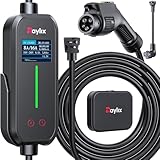
- [2026 INTELLIGENT CHARGING UPGRADE — PRECISION CONTROL MEETS SMART SCHEDULING] After surveying 100K+ U.S. EV owners, the Raylix R&D team found that nearly all drivers recognized the necessity of adjustable current and scheduled charging. Our upgraded J1772 charger features 4-level adjustable current (8A/10A/12A/16A) and a 1–12 hour smart delay timer. Whether you're charging overnight or during off-peak hours, enjoy smarter energy use, lower costs, and total convenience—on your schedule.
- [ONE CHARGER, ALL J1772 EVs/PHEVs READY!] Compatible with all SAE J1772 electric vehicles and plug-in hybrids—whether it’s Ford, GM, Nissan, Audi, BMW, Kia, Hyundai, Honda, Chevy, or more. Perfect for home or on-the-road charging, our 16A Level 1 & 2 charger ensures your EV is always powered and ready for any journey.
- [CHARGE 4× FASTER — NO MORE WAITING] In a rush? Our 16A Level 1 & 2 charger delivers charging speeds up to 4× faster than standard 8A Charger Level 1. Whether it's an early commute, a spontaneous trip, or last-minute errands, your EV will be ready when you are.
- [LEVEL 1 & 2 PORTABLE CHARGER — CHARGE ANYWHERE, ANYTIME] Designed for maximum flexibility, Raylix Level 1 & 2 EV charger features both 5-15 and 6-20 plug compatibility. Whether you're charging in your garage, at a friend's house, or at a roadside motel. NEMA 6-20 plug for Level 2 ev charging (240V, 16A, 3.68kW, 9-12 miles/hr) and a NEMA 5-15 adapter for Level 1 ev charging (120V, 12A, 1.44kW, 3-5 miles/hr) NOTE: In compliance with North American electrical safety standards, the charger automatically limits current to 12A when using a 5-15 outlet—protecting both your vehicle and your home’s electrical system.
- [AT-A-GLANCE CHARGING COMMAND: TOTAL CONTROL, INSTANTLY] While most ev chargers solutions confine vital data to in-car screens, the Raylix tesla charger breaks free with its enhanced TFT color display. This Raylix-exclusive feature delivers crystal-clear, real-time updates—voltage, current, power load, AND critical charging temperature—directly on the unit. Just one glance gives you complete charging insight. It’s not just information; it's the empowering peace of mind and satisfying control that transforms every charge into a masterfully managed experience.
Set the desired battery at arrival
Use the arrival-battery control when you need more charge at the destination, such as before a remote return journey or when no charger is available there. A higher requested arrival percentage can lengthen an earlier charging session or add another stop. The setting is a target for planning, not a guarantee against weather, traffic or a station outage.
Adjust avoidances
Route preferences can avoid tolls, motorways, ferries, tunnels or border crossings. Each avoidance can change both the road distance and the charging plan. Recheck stop count, charging time, arrival percentage and station availability after changing an avoidance option.
Compare alternative routes by total trip risk
When TomTom offers alternatives, do not choose solely by driving time. Compare the complete journey using the same vehicle and battery assumptions.
| Comparison point | What to inspect |
|---|---|
| Total travel time | Driving time plus every modeled charging session and session overhead. |
| Arrival state of charge | Whether the route leaves enough battery for your destination plans or an unexpected detour. |
| Stops | The number of stops, the duration of each and whether one long session is preferable to several short ones. |
| Compatibility | Connector type, vehicle acceptance rate and station power at every planned stop. |
| Live status | Whether compatible connectors are currently available and how fresh the status appears. |
| Detour | Extra distance and road complexity required to reach each station. |
| Road restrictions | Tolls, motorways, ferries, tunnels and border crossings selected or avoided. |
| Amenities | Food, toilets, lighting and other facilities that make the predicted charging time usable. |
A route with one fewer stop can be the worse choice if its only station has no live status or leaves a small battery margin. Conversely, a slightly longer route may reduce risk when it offers several compatible stations and a larger arrival buffer.
Why the displayed charging time can differ from the charger’s kW rating
The number printed on a charger is an upper limit, not a promise of the power your car will receive. TomTom’s calculation starts with the limiting value among vehicle power, station power, voltage and current constraints. It then accounts for base load and charging efficiency. The model integrates the vehicle’s charging curve across the required state-of-energy range, rather than assuming the car charges at its peak rate from empty to full, and adds a fixed plug-in or session overhead.
PC Slower Than It Used to Be?
A free scan shows the junk files, broken settings and background clutter dragging Windows down - then fixes them in one click.Free scan · Windows 10 & 11Outdated Drivers Are Slowing You Down
One free scan finds every outdated or missing driver and matches the right update for your exact hardware.Free scan · exact hardware matchRank #4

- SAE J1772 Standard Charger: Compatible with all North American electric vehicles and plug-in hybrids, including Ford, Chevrolet, Nissan, BMW, Volkswagen, Hyundai, Kia, Audi, Mercedes-Benz, Rivian, Porsche, Toyota, Honda, Jeep, and GMC. Tesla vehicles can be charged with a separate SAE J1772 adapter (sold separately).
- Adjustable Current: Choose from 8A, 10A, 13A, or 16A to match your vehicle’s charging needs.Dual Plug Compatibility,NEMA 6-20 Plug (220/240V): Delivers up to 3.84 kW/h, providing approximately 15.36 MPH charging speed at 16A.NEMA 5-15 Plug (110/120V): Supports 10A charging at 120V, offering 1.2 kW/h (around 4.4 MPH). Customizable Charging: Easily adjust current to suit different charging scenarios, giving you maximum flexibility at home or on the go
- Hassle-Free Installation: Forget complicated setups—just plug in and go. Equipped with NEMA 5-15 and NEMA 6-20 (220V/240V) connectors, it works with any standard 110V–240V outlet. The 25-foot cable gives you the freedom to reach vehicles parked at a distance, making charging convenient anywhere.
- Intelligent Charging: Featuring a 2.8-inch touch display, you can easily select the charging current (8A / 10A / 13A / 16A) and schedule charging with a 1–12 hour delayed start. Perfect for maximizing off-peak hours and cutting electricity costs. (Example: Set a 2-hour delay, and charging begins automatically after 2 hours.)
- Comprehensive Safety: Designed to meet CE and FCC safety standards, this charger offers multiple layers of protection, including overvoltage, overload, short-circuit, grounding, and leakage safeguards. The durable IP65-rated waterproof housing and reinforced cable ensure reliable charging in all weather conditions, keeping your vehicle safe year-round.
TomTom documentation gives typical model parameters of 0.1–0.5 kW base load for AC and 0.4–1.0 kW for DC. Those ranges are inputs to the model, not measurements promised for your particular vehicle or station. Charging commonly slows as the battery fills, so a session from 10% to 80% can have a very different average power from a session that continues toward 100%.
Expect the estimate to move when the selected station, vehicle limits, battery temperature, arrival percentage or requested departure conditions change. Use the displayed duration for comparing routes, then allow practical time for parking, authentication, cable handling and payment.
Independent reader supportYour contribution helps us test, update, and keep practical guides available for everyone.Use battery pre-conditioning when a fast stop is planned
When a fast-charging stop is planned in-dash, TomTom says the vehicle can prepare the battery before arrival. In cold weather, TomTom describes a possible saving of up to 30 minutes on a typical 10%–80% session. “Up to” is a maximum illustrative benefit, not a guaranteed saving; the result depends on temperature, the vehicle’s thermal system, battery state and the charger.
Leave the planned fast-charging stop in the active route long enough for the vehicle integration to recognize it. If you replace the station with an unplanned stop, the car may not pre-condition for that location. Follow the vehicle manufacturer’s requirements for enabling or interrupting battery conditioning.
What’s actually slowing this PC down?
Pick the symptom - the matching free tool is one click away.
What happens while you drive
TomTom states that the charging plan updates during driving. The system can revise the remaining stops when the vehicle consumes energy differently from the original estimate or when route conditions change. Its consumption model uses vehicle parameters and map attributes; TomTom’s EV Experience description also refers to weather, traffic, terrain and personalized learning.
Best Value
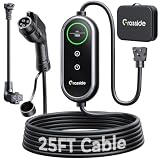
- Universal J1772 Compatibility: Designed with a standard J1772 connector, this J1772 charger works with most J1772 electric vehicles and PHEVs, including BMW, Mercedes-Benz, Hyundai, Kia, Nissan, Rivian, Ford, Chevy, Volkswagen, Toyota and more. Note: Tesla vehicles require a J1772 to Tesla adapter (not included)
- Flexible Outlet Compatibility: This portable EV charger comes with a NEMA 6-20 plug and a NEMA 5-15/5-20 to 6-20 adapter. Supports Level 1 (8–12A) and Level 2 (16A). Max 12A (1.44kW) on 120V NEMA 5-15/5-20 outlets, and full 16A (3.84kW) with a 240V NEMA 6-20 outlet. One charger is designed to cover home, garage, and travel charging needs with reliable performance
- Adjustable Smart Charging Control: Customize charging safely with adjustable current settings (8A/10A/12A/16A) to match different circuits. The 0–12 hour delay timer helps schedule overnight charging during lower electricity rates. Integrated LCD display shows real-time voltage, current, power, and charging status for clear monitoring without apps. Note: Press 'A' or 'T' for 3s to set and confirm.
- Home Charging & Travel Backup: For daily home use while remaining fully portable for travel. This level 1 ev charger includes a durable 25FT ev charging cord, providing flexible reach for garage or driveway charging. Charge overnight to take advantage of lower utility rates—potentially saving up to $500 annually on electricity costs. The included carrying case makes storage easy and keeps a dependable backup charger available in your trunk for road trips or visiting friends
- Engineered For Safety & Durability: Built for dependable daily use, this electric car charger features an IP65 waterproof rating for all weather operation. Equipped with a UL-listed cable, fully rubberized connector, and advanced protection against overcurrent, overheating, and electrical faults. Designed to ensure safe, stable, and long-term charging performance in demanding environments
When a revised route appears, compare the new arrival battery and station details before accepting it. If traffic creates a detour, the battery percentage falls faster than expected or a station loses availability, stop safely before making a manual change. Never interact with the navigation screen while driving if local law or the vehicle’s safety system prohibits it.
Build a backup plan for a failed or occupied charger
Live data lowers risk but cannot reserve a connector or predict every failure. Before departure, identify a second compatible station for each critical leg. Prefer a backup that remains reachable with the planned arrival buffer, not one that requires arriving at a nearly empty battery.
If the planned station is occupied
- Check the station details for another compatible connector at the same site.
- If none is available, use Charger Finder or the map to select the nearest reachable alternative.
- Recalculate the route and confirm the new station’s opening hours, payment method and connector.
- Reduce speed and climate loads only within safe and legal limits if the battery margin is shrinking.
If the station is offline or inaccessible
Do not assume a listed point can be used merely because it appears in the database. Navigate to the backup only after confirming that the car can reach it with a safety margin. If the battery warning appears, follow the vehicle manufacturer’s emergency guidance and use roadside assistance rather than attempting to stretch the range beyond a safe limit.
Portable charging cable: check fit before buying or packing
A portable EV charging cable can be useful at destinations or public AC points, but it is not a substitute for a compatible fast-charging stop. Before relying on one, verify the vehicle inlet, whether the cable is for AC or DC use, its amperage rating, the regional plug and whether the destination charger already supplies its own cable. TomTom’s charging calculations treat connector and vehicle/station power limits as fundamental constraints, so a cable with the wrong connector or rating will not deliver the planned result.
Final pre-departure checklist
- Correct vehicle, battery capacity and connector selected.
- Actual departure state of charge entered or synchronized.
- Destination and waypoints checked.
- Automatic charging enabled for the initial calculation.
- Stop count, charging durations and arrival battery reviewed.
- Every station checked for connector, power, live status, payment and hours.
- Arrival buffer and critical-destination setting appropriate for the trip.
- Backup station identified for every high-risk leg.
- Route avoidances and amenities fit the passengers and schedule.
- Vehicle battery pre-conditioning behavior understood for planned fast stops.
TomTom’s figures, defaults and station data are product documentation that can change with service versions, geography, vehicle integration and data availability. Confirm the car’s actual state of charge, current weather and traffic, and the station’s status immediately before leaving. That combination of automatic routing, deliberate verification and a reachable backup is the dependable way to use TomTom for an EV road trip.
Quick Recap
Product prices and availability are accurate as of the date/time indicated and are subject to change. Any price and availability information displayed on Amazon at the time of purchase will apply.




