What’s actually slowing this PC down?
Pick the symptom - the matching free tool is one click away.
The reliable way to plan an EV road trip is to use a route planner that knows your exact vehicle and current battery charge, then verify every stop’s connector, network access, live status, and a backup option. Treat the dashboard range estimate and charger availability as changing inputs—not guarantees—and leave enough charge to handle weather, traffic, elevation, towing, driving style, or an outage.
What a dependable EV road-trip plan contains
A useful plan answers four questions for every leg: how much energy you are likely to use, where you can recharge, whether your vehicle can use that site, and what you will do if the site is unavailable. Start with the car you will actually drive, its present state of charge (SOC), and the destination. A planner that uses a generic vehicle profile can produce a route that looks plausible but does not reflect your battery, connector, charging limits, or access to particular networks.
As an Amazon Associate I earn from qualifying purchases.
The U.S. Department of Energy (DOE) advises beginning a long trip with a full battery and planning charging stops along the route. Many EVs can travel about 200 to 300 miles on a charge, according to the DOE Alternative Fuels Data Center, but that is a broad description of vehicles, not a promise for your model, route, weather, or speed. Your plan should therefore be based on a route-specific arrival SOC rather than the vehicle’s headline range.
Do these 3 things before closing this tab:
1Repair Windows errors before they cause bigger problems2Scan for outdated or missing drivers - takes under a minute3Clear out junk files and repair common Windows errors- Vehicle and battery: select the exact model and battery version, and enter the current SOC accurately.
- Leg limits: choose stops so the predicted arrival charge remains above your personal buffer.
- Compatibility: confirm the connector, charging standard, vehicle restrictions, and network or payment access.
- Availability: check live status when offered and reconfirm sites whose status is uncertain.
- Resilience: identify another usable station or a safe detour before committing to a remote leg.
Start with the actual vehicle and starting charge
Select the exact EV
Open the vehicle’s built-in navigation or a charging-aware route-planning app and choose the precise vehicle configuration. Battery size, wheel and tire choices, drivetrain, software, and model year can change the usable range and charging behavior. If the tool cannot represent your vehicle, treat its range estimate as a rough map rather than a trip guarantee.
#1 Best Overall

- Flex Level 1 EV Charger - The EVDANCE Level 1 electric car charger is compatible with J1772 electric vehicles and plug-in hybrid vehicles (North American Standard). *Tesla requires a SAE J1772 adapter.
- Convenient to Use - This charger has both NEMA 6-20 plug for 16A 240V charging (3.68kW, 10-12 mi/h) and a NEMA 6-20 to 5-15 plug adapter for 12A 120V charging (1.44kW, 2-5 mi/h). The included bag makes it easier to carry on the go. It also has a 25ft cable length, you can use it flexibly from anywhere in the garage or driveway.
- Check Your Outlet Type -This charger works with standard 120V NEMA 5-15/5-20 outlets (2-5 mph charging speed) and 240V NEMA 6-20 outlets (10-12 mph) . It's not compatible with NEMA 6-15/10-30/14-30/14-50/6-50 outlets – you'll need a NEMA 14-50/14-30/10-30/6-50 to 6-20 adapter (sold separately) to connect.
- Compatible EV Models -This EV charger works with most major electric vehicles, including Ford, Chevrolet, Hyundai, Audi, Nissan Ariya, Rivian R1S, Kia, and others. However, it's not compatible with Mini Cooper Electric Hardtop,Toyota Prus Prime/Z4X/RAV4Prime, Porsche Taycan Base/4S/Turbo/Turbo S or Tesla models (Tesla requires a J1772 to Tesla Adapter, sold separately). For a full list of compatible models, check out the Full Compatibility List on our product page.
- Indication Displays - LED display that can tell you the status as well as indicate errors while charging your electric vehicle.
Record whether your car can use the connector at each candidate site. A physical plug that appears similar may still be incompatible, or it may require an approved adapter. Network membership, account requirements, roaming agreements, and payment methods also vary by site. The DOE recommends checking compatibility before departure; do not wait until the battery is low to discover that a station is inaccessible.
Enter the current SOC
Set the planner’s starting battery percentage to the number shown in the car when you leave. If the app is not connected to the vehicle, enter the percentage manually where supported. Recheck it after a long stop: a small difference at departure can become a large difference at the next charger when the leg is long or conditions are unfavorable.
Begin with a full battery when practical
Charging at home or another dependable location before departure reduces pressure on the first leg. This is the DOE’s specific advice for a long trip. A full start does not eliminate the need to plan; it simply gives the route more flexibility if the first intended station is busy or unavailable.
Build the route one charging leg at a time
Enter the destination and inspect the proposed stops
After selecting the vehicle and starting SOC, enter the final destination. Let the planner propose stops, then open each stop rather than accepting the route blindly. For every site, inspect:
- connector type and whether the stall is usable by your vehicle;
- network access, account, payment, and any vehicle or site restrictions;
- the estimated arrival SOC and the amount of charging needed for the next leg;
- available charging power as shown for that site and vehicle;
- opening hours, parking rules, and whether the charger is on a restricted property;
- restrooms, food, shelter, or other amenities if you need them; and
- the current status of each stall, when live information is available.
Do not plan around a single isolated station when another route or detour is practical. A second compatible location can be more valuable than a theoretically faster first stop if an outage would leave you stranded.
Choose an arrival buffer
Set a minimum arrival SOC that reflects the route’s uncertainty and your tolerance for risk. ChargePoint’s route-planning guidance describes 20–30% as a reasonable end-of-trip target for many drivers and notes that choosing a lower target can reduce the number of stops. That is app guidance, not a universal safety threshold. A remote road, severe weather forecast, unfamiliar charger, or limited roadside assistance justifies a larger buffer; a dense corridor with several compatible alternatives may support a smaller one.
Rank #2

- Road-Trip Ready & Apartment-Friendly: Comes with a 20ft heavy-duty cable that easily spans a standard parking space, plus a NEMA 5-15 adapter for plug and play convenience. Whether you're charging at home or hitting the highway, this portable EV Charger is your ultimate travel companion for weekend getaways and camping trips
- Delay Timer & Adjustable Current: Use the built-in timer to delay your start by 1-12 hours and easily harvest off-peak energy savings. Then pick from 6/8/10/12/16A (Level 2) to match your garage grid. It automatically locks in your favorite setting and never forces you to re-adjust. No complicated apps or Wi-Fi needed, just straightforward, reliable control
- Tactile Buttons & LED Screen: No glitchy smartphone apps or finicky touchscreens that lag, freeze, and misfire in winter. Our EV charger is engineered with a high-definition LED display that tracks critical real-time data, including live voltage and current. Tactile buttons deliver direct, satisfying click feedback that remains highly responsive even when wearing heavy winter gloves or operating in torrential downpours—conditions where standard touchscreens completely fail
- ETL Certified Safety & IP65 All-Weather Shield: ETL certified to meet US safety standards for charging. Engineered with a certified IP65 dust-and-waterproof enclosure and a heavy-duty TPE cable that operates reliably across a wide -22°F to 130°F range. An intelligent multi-protection defense system (GFCI, over-voltage, over-current, surge, short-circuit, and over-temp) keeps a 24/7 watch for 100% safe, unattended overnight charging in any weather
- J1772 Compatible + Dual-Level Charging: Works with all J1772 EVs (Tesla requires a separate J1772 adapter). Level 2: built-in NEMA 6-20 plug. Level 1: included NEMA 5-15 adapter fits any standard outlet. Please confirm your outlet is NEMA 6-20 or 5-15 before purchase
Use the buffer at the next charger, not only at the final destination. Arriving with energy left lets you bypass a failed or occupied station and reach the backup. If the planner predicts an arrival below your chosen minimum, add an earlier stop, select a different station, slow down, or reduce the leg’s uncertainty before departure.
Free tools Windows power users keep installed
One-click scans. No signup required.
Plan the amount of charging, not necessarily a full battery
Charging time depends on the vehicle, battery temperature, starting SOC, station capability, and how much energy you need. A stop may be long enough to reach the next reliable station rather than to fill the battery completely. Avoid assuming that a published maximum charging rate will apply throughout a session; the car may reduce power as the battery fills or if it is cold or hot. Use the vehicle or app’s time estimate and update it after the session begins.
Account for conditions that reduce real-world range
The rated range is a standardized comparison figure. It is not the distance available in every trip. Energy use can rise with cold weather, strong wind, rain, high speed, steep climbs, heavy traffic, roof loads, or towing. Descents may return some energy, but they do not guarantee that a difficult climb will be offset on the same leg.
Cold weather
ChargePoint’s official route-planning FAQ says that drivers going through cold weather should lower their effective range manually because the planner does not automatically detect environmental factors. If your tool has a weather or consumption adjustment, use it; otherwise reduce the range assumption yourself and recalculate the stops. Preconditioning while connected to power can help in some vehicles, but follow the vehicle maker’s instructions rather than assuming every EV behaves the same way.
Towing and heavy loads
Towing, a roof box, a full passenger load, or substantial cargo can materially increase consumption. Enter a lower effective range when the planner permits it. If it does not, shorten the legs and preserve a larger arrival buffer. A route that works for an unloaded car in mild weather may not work with a trailer.
Quick wins for a faster PC:
Fix the driver behind crashes, sound loss and screen glitchesFind Drivers →Clear out junk files and repair common Windows errorsFree Scan →Traffic, elevation, and driving style
Stop-and-go traffic, sustained high speeds, mountain passes, and rapid acceleration can all change the forecast. Review elevation and traffic overlays where the planner provides them, and recalculate after a major delay or route change. A dashboard estimate that falls faster than expected is a prompt to change the plan early, not a reason to continue to the original station.
Rank #3

- LEVEL 1 CHARGING - The Lectron Level 1 Charger lets you quickly charge your EV with a standard 120V outlet; You get 15 amps and 1.65 kW of power for the standard full-charge time for your car, at home or at wor
- CONVENIENT OVERNIGHT CHARGING - The Lectron 15 Amp EV Charger is a more affordable and faster charging option compared to other Level 2 EV chargers, delivering an extra 40-50 miles of overnight charge at home — without breaking the bank
- J1772 COMPATIBILITY - This J1772 charger is compatible with all electric vehicles that use the J1772 standard, including BMW, Ford, Honda, Hyundai, Kia, Porsche, Nissan, and Chevy
- SAFE AND RELIABLE - FCC and ETL certified (UL2594 standard) for safety with overvoltage, overcurrent, and short circuit protection; Energy Star certified for efficiency; IP65 rated for dust and water resistance
- PORTABLE CONVENIENCE - Whether you're on a road trip or visiting a friend, you can easily plug in your EV and charge with our portable EV charger. Please refer to the included User Manual for complete operating instructions and compatibility requirements
Verify connector, network, and site access
Connector compatibility
Match the vehicle inlet to the connector shown for the stall. If an adapter is required, verify that the vehicle, adapter, charging network, and site rules permit that combination. Compatibility is site-specific; do not infer that because one station works, every station in the same network will work for your vehicle.
Network and payment access
Confirm whether you need an account, an app, a contactless card, a physical membership card, or another payment method. Tesla states that access for non-Tesla vehicles varies by Supercharger location, so check the individual site rather than relying on a general assumption about the network. Keep the required app installed and signed in before leaving, and make sure the payment method is valid.
Location and operating restrictions
A station can appear on a map yet be inaccessible because it is inside a gated facility, a fleet-only area, a dealership, or a car park that closes overnight. Check the site’s address, opening hours, parking instructions, and any need to obtain a gate code. If the station’s status is not dependable, use the listed contact details to confirm that it is operating and available for your vehicle. The DOE specifically advises calling ahead because a station may not be operational or available.
Check availability and prepare a backup
Use live status, but do not treat it as a guarantee
Live data may show whether a station is online, occupied, or reporting a fault. Status can change between the time you leave and the time you arrive, and some stations provide less reliable information than others. Recheck the next stop during the drive, especially before committing to a long leg. If the app shows a fault, unusual occupancy, or stale data, select another station while you still have enough charge to reach it.
Choose a practical backup station
A backup should be reachable with the predicted arrival SOC and should support your vehicle. Record its address and access method before departure; relying on a last-minute map search is risky when the battery is low or mobile coverage is weak. On a sparse route, make the backup the primary stop and treat the original as optional if the detour is short and the first site’s status is uncertain.
What to do when a charger is occupied
If every compatible stall is occupied, check the estimated wait and compare it with the energy required to reach the backup. Do not unplug another vehicle or assume a queue will be honored unless the site specifies one. If waiting would consume your buffer, leave for the alternative while you still have enough energy to arrive safely.
Rank #4
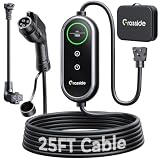
- Universal J1772 Compatibility: Designed with a standard J1772 connector, this J1772 charger works with most J1772 electric vehicles and PHEVs, including BMW, Mercedes-Benz, Hyundai, Kia, Nissan, Rivian, Ford, Chevy, Volkswagen, Toyota and more. Note: Tesla vehicles require a J1772 to Tesla adapter (not included)
- Flexible Outlet Compatibility: This portable EV charger comes with a NEMA 6-20 plug and a NEMA 5-15/5-20 to 6-20 adapter. Supports Level 1 (8–12A) and Level 2 (16A). Max 12A (1.44kW) on 120V NEMA 5-15/5-20 outlets, and full 16A (3.84kW) with a 240V NEMA 6-20 outlet. One charger is designed to cover home, garage, and travel charging needs with reliable performance
- Adjustable Smart Charging Control: Customize charging safely with adjustable current settings (8A/10A/12A/16A) to match different circuits. The 0–12 hour delay timer helps schedule overnight charging during lower electricity rates. Integrated LCD display shows real-time voltage, current, power, and charging status for clear monitoring without apps. Note: Press 'A' or 'T' for 3s to set and confirm.
- Home Charging & Travel Backup: For daily home use while remaining fully portable for travel. This level 1 ev charger includes a durable 25FT ev charging cord, providing flexible reach for garage or driveway charging. Charge overnight to take advantage of lower utility rates—potentially saving up to $500 annually on electricity costs. The included carrying case makes storage easy and keeps a dependable backup charger available in your trunk for road trips or visiting friends
- Engineered For Safety & Durability: Built for dependable daily use, this electric car charger features an IP65 waterproof rating for all weather operation. Equipped with a UL-listed cable, fully rubberized connector, and advanced protection against overcurrent, overheating, and electrical faults. Designed to ensure safe, stable, and long-term charging performance in demanding environments
Review the plan during the drive
Road-trip planning is iterative. Compare the car’s predicted arrival SOC with the planner’s estimate after each major change. Tesla’s Trip Planner documentation describes arrival-energy estimates, updates to charging-time estimates, and rerouting around outages; feature availability depends on the vehicle and region. Other systems may offer fewer of these functions, so continue checking manually.
Recommended Free Tools
- Before each leg, confirm the destination charger is still compatible and available.
- While driving, watch the projected arrival SOC rather than only the remaining miles. If it is dropping faster than expected, reduce speed where safe, select an earlier stop, or reroute.
- After a delay, detour, weather change, or traffic buildup, recalculate the route and inspect the next two charging options.
- At the charger, verify that charging has started, check the estimated completion time, and adjust the next stop if the session is slower than expected.
- Before leaving, make sure the connector is released, the session is ended correctly, and the vehicle’s SOC matches the plan.
Use overnight charging strategically
An overnight stop can reduce the number of daytime charging breaks. Hotels and other properties may offer destination charging, but the presence of a charger does not prove that it is working, reserved for guests, or available when you arrive. Tesla identifies destination chargers at hotels, restaurants, and shopping centers; access and operation still depend on the individual property.
When booking an overnight stop, contact the property and confirm that guest charging is operating, that your vehicle can use the connector, whether reservations are required, and whether a separate parking or charging fee applies. Keep a public fast-charging alternative in the plan in case the destination charger is occupied or out of service. Do not arrive at a remote lodging site with only enough energy for the advertised charger unless you have verified that access.
Compare route-planning tools by capability
The best tool is the one that represents your vehicle and gives you enough information to make a safe decision in your region. Built-in navigation may integrate the battery state and vehicle systems; a phone app may offer a wider station directory or easier stop editing. You can use both, but reconcile differences before setting out.
| Capability to check | Why it matters | Questions to ask before relying on it |
|---|---|---|
| Exact vehicle and connector | Determines whether the range and plug assumptions fit your car. | Is my model, battery version, inlet, and any approved adapter represented? |
| Starting and target SOC | Turns a generic route into a battery-aware plan. | Can I enter the current percentage and set an arrival minimum? |
| Live station status | Reveals faults, occupancy, or offline sites before you commit. | Is the data current, and does it show individual stall status? |
| Environmental adjustments | Helps account for temperature, elevation, traffic, towing, and driving style. | Which factors are modeled automatically, and which must I lower manually? |
| Stop editing and alternatives | Lets you avoid a weak or unavailable station without rebuilding the trip. | Can I add, remove, reorder, or compare nearby stations? |
| Regional and account availability | A feature may not exist for your vehicle, country, or account. | Is the function available in my region and on my software version? |
ChargePoint says advanced route planning is available only to select users. Tesla notes regional limitations for Trip Planner. Check the current feature settings in your account and vehicle rather than assuming that documentation for another market applies to you.
A practical planning procedure
- Charge before departure. Start from a full battery when practical, as the DOE recommends.
- Identify access. Record your vehicle’s connector, permitted networks, adapters, payment methods, and any account logins.
- Set the trip. Enter the destination in the vehicle navigation or a charging-aware app, select the exact EV, and enter the current SOC.
- Adjust the model. Lower effective range for cold weather, towing, heavy loads, or other factors the planner does not detect automatically.
- Inspect every stop. Check compatibility, charging capability, operating hours, amenities, address, and live status.
- Set a buffer. Choose an arrival SOC appropriate to the route and your risk tolerance. ChargePoint’s 20–30% guidance is a reference for many drivers, not a mandatory threshold.
- Add resilience. Save a compatible backup station for each critical leg and verify that you can reach it with the planned arrival charge.
- Confirm before leaving. Recheck the first stop’s status and access details immediately before departure.
- Monitor and recalculate. During the trip, respond to changing arrival estimates, traffic, weather, charging speed, and outages before the battery becomes critical.
- Confirm the final leg. For an overnight destination, verify lodging-charger access and keep a public alternative available.
Troubleshooting common planning failures
The predicted arrival charge is falling quickly
Check speed, wind, temperature, elevation, traffic, payload, and towing. Recalculate with a lower effective range, choose an earlier station, or slow down where safe. Do not wait for the low-battery warning if the next charger is uncertain.
Best Value

- [LEVEL 1 & 2 CHARGING FOR HOME, BACKUP & TRAVEL] One charger for everyday home charging, road trips, and backup use. This Level 1/2 EV charger supports both 110/120V and 240V power: use the included NEMA 5-15 adapter as a 120V electric car charger, or connect the NEMA 6-20 plug to 240V power for Level 2 charging up to 16A / 3.68kW. Whether kept in your garage or carried in the vehicle, this portable EV charger gives you more charging options when a dedicated charging station is not available.
- [8-16A ADJUSTABLE CURRENT & 1-12H DELAY CHARGING] Unlike fixed-current chargers, YLITES lets you choose 8A, 10A, 12A, or 16A to better match different outlets and charging environments. When connected to a NEMA 5-15 household outlet, current is automatically limited to 12A for appropriate circuit use. The 1–12 hour delay timer lets you schedule charging to start later, making overnight and off-peak charging more convenient. Flexible current control makes it especially practical for garages, older homes, apartments, and travel charging.
- [SAE J1772 COMPATIBILITY, SMOOTH CONNECTION & 25FT TOTAL LENGTH] Compatible with electric vehicles and plug-in hybrids equipped with an SAE J1772 charging inlet, including vehicles from GM, Nissan, Audi, Kia, Honda, BMW, Hyundai, and more. The J1772 connector is designed for smooth insertion and easy release, making everyday charging simple and convenient. With a 25FT total length, this portable EV charger offers flexible reach for garages, driveways, parking spaces, travel, and emergency backup charging. Tesla/NACS vehicles require a J1772-to-NACS adapter, sold separately.
- [SMART TFT DISPLAY & ACTIVE TEMPERATURE PROTECTION] The enhanced TFT color display provides clear real-time charging information, including voltage, current, power, charging status, and temperature. The YLITES temperature management system continuously monitors the plug-outlet connection point and can intelligently reduce current when necessary to help reduce overheating risk. Over-voltage, over-current, leakage, grounding, and insulation protection provide additional safeguards for more reliable daily charging, whether charging on 110/120V Level 1 power or 240V Level 2 power.
- [BUILT FOR SAFE & RELIABLE EVERYDAY CHARGING] Designed for repeated home and on-the-road use, the charger features an IP66 water-resistant enclosure, fire-resistant materials, and multi-layer electrical protection. It is designed to operate in temperatures from −22°F to 122°F, supporting charging in garages, driveways, and changing outdoor conditions. Combining dual-voltage flexibility, a long cable, portable construction, and multiple safety protections, this EV portable charger works as a dependable everyday charger or a convenient backup charging solution.
The planned station is offline or full
Open the saved backup and verify its compatibility and current status. If the backup is beyond your revised range, choose an even earlier site or reduce consumption before continuing. Contact the station when live data is absent and the DOE’s call-ahead advice applies.
The plug fits but charging will not start
Check that the connector is fully latched, the vehicle is unlocked if required, the correct stall is selected in the app, and payment or authorization has completed. If the site still fails, end the session properly, document the stall identifier, and move to the backup before your buffer is exhausted.
The charging session is taking longer than planned
Review the car’s current power, battery temperature, SOC, and the station’s reported capability. If the delay threatens the next reservation or closing time, update the route and select a station with suitable access rather than assuming the original estimate will recover.
Outdated Drivers Are Slowing You Down
One free scan finds every outdated or missing driver and matches the right update for your exact hardware.Free scan · exact hardware matchWindows Errors? Fix Them Before They Spread
Repair common Windows errors and clear accumulated junk for a smoother, more stable PC - no reinstall needed.Free scan · no reinstallThe destination charger is unavailable overnight
Use the public station identified in your plan, provided it is compatible and reachable. If the lodging site is essential to the next day’s route, arrive with enough charge to avoid depending on an unconfirmed destination charger.
Final pre-departure checklist
- Exact EV and battery version selected in the planner.
- Starting SOC entered accurately and battery charged as far as practical.
- Every stop checked for connector, network, payment, hours, and vehicle access.
- Arrival buffer chosen for weather, terrain, load, traffic, and station uncertainty.
- Cold-weather or towing adjustment applied when the planner does not model it.
- Live status checked shortly before departure and again during the drive.
- At least one reachable backup identified for each critical leg.
- Overnight charging confirmed directly with the property, with a public alternative saved.
- Vehicle navigation or app configured to update the route when conditions change.
A successful EV road trip is not based on one optimistic range number or a map pin. It is a continuously checked plan that matches your vehicle, preserves an arrival buffer, verifies each charger’s access, and changes early when weather, traffic, charging speed, or station status changes.
Quick Recap
Product prices and availability are accurate as of the date/time indicated and are subject to change. Any price and availability information displayed on Amazon at the time of purchase will apply.




