A 360-degree, or surround-view, camera can make parallel parking easier by showing the space and nearby obstacles from several camera angles. It does not park the car for you or guarantee clearance. The safe method is to use the display as a supplementary reference while controlling the vehicle slowly, checking the space through the windows and mirrors, and following the instructions for your exact vehicle.
The menu name, activation conditions, colored boxes, projected lines, camera coverage and steering instructions vary by model and market. Treat the sequence below as a conservative framework, then use your owner manual for any vehicle-specific command or maneuver.
As an Amazon Associate I earn from qualifying purchases.
What a 360-degree camera actually shows
A surround-view system combines images from cameras mounted around the vehicle and presents them as a single view. The familiar overhead or “bird’s-eye” picture is a stitched projection, not a camera mounted above the car. It is useful for judging the car’s relationship to nearby curbs, vehicles and painted lines, but perspective can be distorted and some areas may not be visible.
What’s actually slowing this PC down?
Pick the symptom - the matching free tool is one click away.
Front, rear and side views can help you see low obstacles that are difficult to judge from the driver’s seat. Some vehicles add a dedicated parallel-parking mode, dynamic guidelines, distance markings or a target box. Those features are design-specific. A line or box on one vehicle should never be assumed to have the same meaning on another.
#1 Best Overall
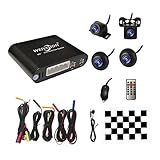
- Please be noted: this system should Professional Installation,this unversal model, the car side mirror should drill a 20mm hole to install the side camera.
- 4 Super wide angle(above 170 degree) Cameras, Waterproof IP69, Night vision
- Provide the driver a clear 360 degree bird's-eye view around vehicle, Universal for almost vehicles (Except long vehicles such as buses)
- Eliminate most of the blind spots, makes much easier for parking and passing the narrow road
- Seamless Splicing Technology, Auto image mosaic, Parking monitoring with shock sensor, auto record, the video format is MP4, you can view the video on PC or mobile.
Ford’s owner guidance describes parallel parking as a use for its 360-degree camera and says the display must be used together with the windows and interior and exterior mirrors. Mahindra’s BE 6 manual similarly calls its 360° Camera a supplementary driving aid that cannot replace the driver’s vigilance or responsibility.
Before you begin
Choose and inspect the space directly
- Check traffic first. Scan approaching vehicles, cyclists and pedestrians through the windshield, side windows and mirrors. Signal according to local rules and stop in a position that gives following traffic time to react.
- Confirm that the space is suitable. Look for a curb that is reasonably continuous, a surface without an abrupt drop, and enough length for your vehicle. The camera cannot determine whether the space is legally permitted, structurally safe or large enough for a maneuver your vehicle can physically complete.
- Look for objects the display may miss. Check for children, animals, narrow posts, wheel stops, open doors, low walls, holes and objects extending into the roadway. Walk around the vehicle when conditions make that practical and safe.
Prepare the camera system
- Make sure the camera lenses are clean and unobstructed. Mazda’s 2025 CX-5 owner manual advises wiping water droplets, snow or mud from a lens with a soft cloth.
- Unfold the door mirrors and make sure they are positioned for driving. Renault warns that its system should not be used with folded mirrors or with objects placed on or in front of the cameras.
- Check for damage around a camera mount. Mazda notes that damage in the camera’s installation area can shift its position or angle, so a previously familiar view may no longer line up correctly.
- Fasten your seat belt, select the normal driving position and keep your foot ready to control the brake. Do not begin by relying on the screen alone.
Find the correct parking view
If your vehicle has a 360-degree-camera button, parking menu or parallel-parking mode, select it using the procedure in the owner manual. Some systems open automatically when reverse is selected; others require a button press or only operate below a specified speed. If the manual says to activate the mode while stationary, do so before moving. Do not copy a control sequence from a different make or model.
Step-by-step: a general camera-assisted parallel-park sequence
1. Stop in a position that lets the cameras see the space
Drive alongside the vehicle ahead of the opening, leaving a safe lateral gap and stopping where your manual says to begin. Keep the car straight and the wheels under control. If the system requires a particular reference point, use only the reference described for your vehicle; there is no universal distance or steering timing that applies to every car.
Free tools Windows power users keep installed
One-click scans. No signup required.
2. Select the view without moving your attention away from the surroundings
Open the overhead or side view, if available, and verify that the image is live. Check the physical scene again before selecting a gear. A frozen, dark, dirty or obviously misaligned image is a reason to stop and troubleshoot, not a reason to continue slowly.
3. Start moving at walking pace or slower
Release the brake progressively and use gentle steering inputs. Keep looking out of the rear and side windows and at both mirrors. The camera helps you judge relative position; it does not sense every object or control the car unless your vehicle has a separate, explicitly documented automated-parking function.
4. Use the display to align the body, not to claim exact clearance
Watch how the vehicle’s projected footprint tracks between the parked cars and the curb. Keep an additional margin whenever the image is unclear. If the display and your direct view disagree, trust the direct view and stop to investigate. Never continue simply because a colored line appears not to touch an obstacle.
5. Follow your vehicle’s gear and steering instructions
Depending on the model, the manual may require a sequence of reverse, neutral and forward selections, or may describe a particular steering direction at a reference point. Apply only those instructions. A “parallel parking” label does not mean that every system turns the wheel, changes gear or displays the same guidance.
Rank #2
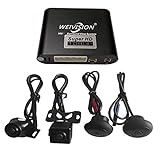
- Weivision 360° Around View Camera System can get real surround vision of driving, help to avoid blind spots and secure driving safety! It’s designed for car pick up all within 22ft vehicles, etc, easy to install and calibrate.
- Weivision 360° Around View Camera System helps a lot in various driving situations, such as reverse parking, eliminating blind spots and turning at narrow roadnarrow road
- Provides bird's eye view of all blind spots,Avoid Potential dangers hidden among blind areas.
- 4CH 1080P 190° wide angle fish eye camera, horizontal viewing angle >170°,Max.32GB for recording, Cycle recording, 4CH 1080P recording, HD 1080P video output
- Support 4CH inputs, customization available according to your vehicle requirements. If you want to OEM, please contact our service
6. Pause whenever the scene changes
Stop if a pedestrian approaches, a cyclist passes, another vehicle enters the space, a door opens, the camera view becomes blocked, or you lose track of a corner. Recheck all sides before resuming. A pause is safer than trying to interpret a rapidly changing stitched image.
7. Finish with a direct inspection and a small correction if needed
Once the car is in the space, select the required gear or park setting and look around the vehicle directly. Confirm that you are clear of the curb, neighboring bumpers, driveways, hydrants and traffic lanes. If the position is poor, make a slow correction while continuing to watch windows, mirrors and the camera.
How to interpret lines, boxes and the overhead image
Projected guide lines
Guide lines show a calculated path or vehicle outline under particular steering and camera assumptions. Renault states that its front and rear guide lines are projected onto flat ground. The same guidance warns that the lines should not be relied on when they are superimposed on vertical objects or objects lying on the ground. A line crossing a curb face, pole, wheel stop or irregular mound therefore cannot provide a precise clearance measurement.
Lines can also move when you turn the steering wheel, change the selected view or change the vehicle’s position. Read them as an aid to alignment, then verify the actual object through a window or mirror.
Quick wins for a faster PC:
Repair Windows errors before they cause bigger problemsFix Now →Fix the driver behind crashes, sound loss and screen glitchesFind Drivers →Colored boxes and target zones
A box may indicate where the system expects the parking slot to appear, not a guaranteed envelope in which the entire car will fit. Its color, size and meaning are set by the manufacturer. If your manual does not define a box, do not infer that green means “safe” or red means “collision is certain.”
Bird’s-eye stitching and blind areas
The overhead view is assembled from multiple lenses, so objects near a camera seam can look stretched, doubled or displaced. Renault’s manual also identifies areas that the system cannot display. A blank or apparently open patch is not proof that the ground is clear. Use the side windows, mirrors and a physical look around the vehicle to cover those areas.
A model-specific example: Mahindra BE 6
The Mahindra BE 6 manual illustrates why your own instructions matter. In its described procedure, the driver selects Parallel Parking Mode, drives ahead so the camera can see the slot, and positions one of two green rectangular boxes inside the intended space. The driver then checks for obstacles in the indicated slot and turns toward the intended parking side.
Rank #3

- 4-Channel Dash Cam for Complete Vehicle Coverage: This dash cam is equipped with four Full HD 1080P cameras, capturing footage of the front, rear, left, and right sides of your vehicle simultaneously. The adjustable front cameras enhance visibility and offer flexible recording angles, including interior footage.
- Time-Lapse Recording & Parking Mode: With time-lapse recording, 60 minutes of footage is compressed into 1 minute, saving memory card space. Activate parking mode with the optional ACC hardwire kit (sold separately) for security when your vehicle is parked.
- Enhanced Night Vision & WDR Technology: The dash cam features advanced night vision and Wide Dynamic Range (WDR) technology for clear, balanced footage, even in low-light conditions. Eight infrared lights ensure optimal visibility, and WDR adjusts exposure to capture detailed images in varying lighting.
- Optional GPS for Real-Time Vehicle Tracking: Purchase the GPS logger (sold separately) to add location, speed, and time tracking, providing a visual representation of your vehicle's route. This feature is perfect for documenting travel details in case of incidents.
- 5GHz Wi-Fi & App Integration: Share videos easily via Wi-Fi using the mobile app for both iOS and Android devices. This feature allows for quick video downloads and sharing on your preferred platforms.
Those green boxes and that sequence are features of the BE 6 system as described in its manual; they are not a universal 360-degree-camera standard. Another vehicle may use different boxes, no boxes, a different starting point or no dedicated parallel mode at all. Use this example to recognize the type of information to look for in your manual, not as a substitute for it.
When the camera view is not enough
The display and direct view disagree
Stop with the vehicle secured, look through the relevant window and mirror, and inspect the camera lens. If the disagreement remains, disable the maneuver and reposition only after you understand the cause. Possible causes include a dirty lens, a changed camera angle after impact, a folded mirror or an object hidden in an area the system does not display.
A vertical or low object appears to be outside the path
Do not estimate its clearance from a projected line alone. Vertical faces and objects on the ground are exactly the situations for which Renault cautions that its flat-ground lines are unreliable. Stop, obtain a direct view or have a passenger guide you from a safe position.
The screen is blank, frozen or warning messages appear
Keep the vehicle stationary and follow the manual’s fault procedure. Clean the lenses with a soft cloth, check that mirrors are unfolded and remove anything covering a camera. If the image remains unavailable or looks misaligned, park without the camera or postpone the maneuver until the system can be inspected. Do not treat a warning as an invitation to continue using an unverified view.
Rain, snow, mud or glare reduces visibility
Weather can obscure a lens or reduce the contrast of the display. Stop in a safe place and clean the affected lens gently. If glare, darkness or spray still prevents you from identifying the surroundings, rely on direct observation and choose a simpler parking option rather than forcing the maneuver.
PC Slower Than It Used to Be?
A free scan shows the junk files, broken settings and background clutter dragging Windows down - then fixes them in one click.Free scan · Windows 10 & 11Crashes, No Sound, or Screen Glitches?
Random freezes, missing sound and display glitches usually trace back to one bad driver. Find and replace yours safely.Free scan · under a minuteAdjusting the system and keeping it reliable
Some vehicles allow image-quality or view adjustments only while stationary. Mazda manual material, for example, describes adjusting image quality while the vehicle is stopped. Make such adjustments before entering traffic or the parking maneuver, and do not change menus while the vehicle is moving unless your manual explicitly permits it.
- Clean lenses regularly with a soft, non-abrasive cloth; do not scrape ice or use a harsh solvent on a camera cover.
- After bodywork, a bumper replacement or an impact near a camera, have the camera position and calibration checked as specified by the manufacturer.
- Keep accessories, bike racks, tow equipment and cargo from blocking a camera or changing the view unless the manual says the system supports them.
- Learn how the system exits: some views disappear above a set speed, after a time, when a door opens or when another menu is selected. Be ready to continue with mirrors and direct observation.
Practical adaptations for common parking situations
Parking between two large vehicles
Use the side and rear views to monitor the nearest corners, but remember that tall vehicles can hide pedestrians from your seat. Make a full window-and-mirror check before each movement and pause if anyone could enter the gap.
Rank #4
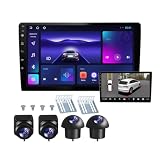
- 360°panoramic DVR with 4 Cameras lens support Automatic Switch & Auto Recording. and Right and left blind zone camera for image display for safe parking.front/Left / Back / Right camera display at the same time.Android 10 system with powerful 4-core processor provide you with a smarter and more efficient services. 4G RAM ensures that the car radio runs smoothly, and 64G ROM allows you to download and install multiple apps that you like through the store.
- You can connect the android car stereo with your smart phone via Bluetooth or Original USB data cable to enjoy seamless connectivity. Support voice control, driver can keep his hands free and focus on the road by saying 'Hey Siri' or 'OK Google' to reach the function he wants.
- Built-in WiFi, GPS Navigation and Split Screen, Click the rectangle at the top of the screen, select a browsing page and drag it to the left or right side of the screen to display two pages on the same screen, and the left and right screens can be operated independently. Built-in WiFi and navigation app provides real-time road conditions, helping avoid traffic jams. Offline maps are supported.
- 360°Around View Camera System helps a lot in various driving situations, such as reverse parking, eliminating blind spots and turning at narrow roadnarrow road.You can choose from different angles to view your car's surroundings, and the camera automatically switches views as you turn and reverse. Including 4 waterproof night vision cameras with over 170 degrees wide angle, help to record data, provide you with important evidence and bring you more convenience.
- 32 EQ DSP, FM/RDS Radio, Pre-installed car DSP tuning software with DSP tuning technology, you can adjust frequency, AE, 32 band EQ, 10 band EQ, sound type selection on the APP to make up for the lack of original speakers and get better lossless sound quality. Built-in FM/RDS radio with 30 preset station allows you to listen to new broadcasts, real-time traffic, weather forecasts anytime anywhere.Multiple UI and Wallpaper Choose,UI desktop themes.
Parking beside a low curb or narrow post
Keep more margin than the screen appears to require. A low curb may sit below the camera’s useful perspective, while a narrow post can be distorted at a stitch boundary. Approach in short movements and verify the final position from the side window.
Parking on a slope
A slope changes the relationship between the projected ground plane and the actual vehicle. Follow the parking-brake and wheel-position instructions in your manual and do not use a horizontal guide line as a level-distance measurement.
Recommended Free Tools
Darkness or poor weather
Use the camera only if the image clearly represents the surroundings. Headlights, reflections and water can make an open-looking area deceptive. Slow down, increase your direct checks and abandon the maneuver if you cannot identify the vehicle’s corners.
How to practice without depending on the screen
- Choose an empty, legal practice area and use cones or other soft, visible markers well away from the vehicle.
- First perform the maneuver using mirrors and windows, then repeat it with the camera view selected.
- Notice which vehicle corners disappear from your normal seating position and how those corners appear in each camera view.
- Practice stopping, changing the view and reassessing rather than trying to complete the maneuver continuously.
- After each attempt, exit and inspect the actual spacing. This builds a visual reference without assuming that a line or box represents a fixed number of centimeters.
Practice should teach you how your particular display relates to your particular car. It cannot turn a model-specific aid into a universal clearance guarantee.
Key safety checks before leaving the space
- The vehicle is fully within the legal parking area and is not blocking a driveway, crossing, hydrant or traffic lane.
- You have checked the curb side, front and rear corners directly.
- No person, animal, bicycle or object is hidden beside the vehicle.
- The camera image, mirrors and windows agree about the vehicle’s position.
- The selected gear, parking brake and vehicle shutdown procedure match the owner manual.
Frequently Asked Questions
Can a 360-degree camera parallel-park the car by itself?
A camera view is a visual aid, not automatic control. Unless your vehicle has a separately documented automated-parking system, you remain responsible for steering, braking, gear selection and checking the surroundings.
Do green lines or boxes mean I have guaranteed clearance?
No. Their meaning is model-specific, and projected lines can be inaccurate around vertical or ground-level objects. Verify clearance through the windows and mirrors.
What should I do if the camera image looks wrong after an impact?
Stop using it for close maneuvering, inspect and clean the lens, and have the camera position or calibration checked according to the manufacturer’s instructions. Damage can change the camera’s angle.
Is there one universal starting distance or steering timing for camera-assisted parallel parking?
No. Starting points and steering instructions depend on the vehicle, camera mode and market. Use the exact procedure in your owner manual.
Quick Recap
Product prices and availability are accurate as of the date/time indicated and are subject to change. Any price and availability information displayed on Amazon at the time of purchase will apply.




