Do these 3 things before closing this tab:
1Clear out junk files and repair common Windows errors2Fix the driver behind crashes, sound loss and screen glitches3Repair Windows errors before they cause bigger problemsThe dependable way to plan a long EV trip is to combine a route-aware station map with your vehicle’s connector, charging capability, battery state and desired arrival charge. In the United States and Canada, start with the U.S. Department of Energy’s Alternative Fueling Station Locator, use the Joint Office of Energy and Transportation’s corridor data to filter candidates, and then confirm each stop in a network platform shortly before you arrive. A map listing is not a promise that a plug will be working or free when you get there, so build a practical backup into the route.
What you need before searching for a charger
Public charging works only when the station, vehicle and trip all fit together. Gather these details before choosing stops:
As an Amazon Associate I earn from qualifying purchases.
- Vehicle charging capability: record the connector type your car accepts and the charging levels it can use. Use the vehicle’s manual or manufacturer specifications rather than assuming that a connector visible at a station will fit.
- Usable range for this trip: begin with the car’s current estimated range, then allow for speed, temperature, hills, wind, passengers, cargo and any battery reserve you want to keep. The dashboard estimate is a planning input, not a guarantee of miles remaining.
- Current state of charge (SOC): note the battery percentage when planning and again before each departure. A route made with a full battery can become unrealistic after an earlier stop is shortened.
- Desired arrival SOC: decide how much charge you want left when you reach the destination or the next dependable charger. A larger reserve helps when weather, traffic or a detour changes energy use.
- Trip constraints: identify the roads you must use, acceptable detour time, planned meal or restroom breaks, opening hours at destinations, and whether every traveler can use a restricted site.
Those inputs let a planner propose stops that match the actual trip instead of simply displaying every charger near a line on the map.
Use a route-aware station locator
AFDC Alternative Fueling Station Locator
The U.S. Department of Energy’s Alternative Fueling Station Locator searches publicly accessible charging stations in the United States and Canada and can map stations along a route. Enter the origin and destination, then inspect stations near the intended roads rather than searching only by city. The route view helps expose gaps that a simple destination-radius search can hide.
#1 Best Overall

- Flex Level 1 EV Charger - The EVDANCE Level 1 electric car charger is compatible with J1772 electric vehicles and plug-in hybrid vehicles (North American Standard). *Tesla requires a SAE J1772 adapter.
- Convenient to Use - This charger has both NEMA 6-20 plug for 16A 240V charging (3.68kW, 10-12 mi/h) and a NEMA 6-20 to 5-15 plug adapter for 12A 120V charging (1.44kW, 2-5 mi/h). The included bag makes it easier to carry on the go. It also has a 25ft cable length, you can use it flexibly from anywhere in the garage or driveway.
- Check Your Outlet Type -This charger works with standard 120V NEMA 5-15/5-20 outlets (2-5 mph charging speed) and 240V NEMA 6-20 outlets (10-12 mph) . It's not compatible with NEMA 6-15/10-30/14-30/14-50/6-50 outlets – you'll need a NEMA 14-50/14-30/10-30/6-50 to 6-20 adapter (sold separately) to connect.
- Compatible EV Models -This EV charger works with most major electric vehicles, including Ford, Chevrolet, Hyundai, Audi, Nissan Ariya, Rivian R1S, Kia, and others. However, it's not compatible with Mini Cooper Electric Hardtop,Toyota Prus Prime/Z4X/RAV4Prime, Porsche Taycan Base/4S/Turbo/Turbo S or Tesla models (Tesla requires a J1772 to Tesla Adapter, sold separately). For a full list of compatible models, check out the Full Compatibility List on our product page.
- Indication Displays - LED display that can tell you the status as well as indicate errors while charging your electric vehicle.
Use the station record to check its address, access description, charging level, connector information, network and reported status. A station that appears close to the route may still require a substantial entrance, exit or local-road detour. Open the station details and verify the site’s access conditions before treating it as a planned stop.
Joint Office charging and corridor data
The Joint Office of Energy and Transportation directs drivers to charging-station and corridor data with filters for charging level, access type, station status and whether a site is on a major corridor. Apply those filters to narrow a long list:
- Filter for the charging level your vehicle can use on the schedule you need.
- Remove private, fleet, employee-only or otherwise restricted sites when you need a public stop.
- Use reported status to identify stations that may be unavailable, then verify the status again close to departure.
- Check corridor placement when a route crosses a region with long distances between towns or services.
These federal tools are excellent for discovery and route structure. They do not guarantee that a particular connector will be free, working or accessible at the moment you arrive.
Quick wins for a faster PC:
Fix the driver behind crashes, sound loss and screen glitchesFind Drivers →Repair Windows errors before they cause bigger problemsFix Now →Scan for outdated or missing drivers - takes under a minuteDriver Scan →Set the vehicle and battery assumptions in a planner
A route planner should know more than the car’s model name. ChargePoint’s route-planning help describes recommendations based on EV range, current state of charge and desired end-of-trip state of charge. Its advanced route flow can show and let you edit the vehicle profile, SOC values and selected charging stops. ChargePoint says advanced planning is available only to select users, and its help page was last updated June 16, 2026.
- Select the closest vehicle profile. Confirm that the profile reflects the exact battery and charging configuration, if the service distinguishes them.
- Enter the SOC at departure. If you are planning several legs, use the estimated SOC after each previous leg rather than leaving the initial value for the entire route.
- Set the arrival SOC target. Choose the amount you realistically want at the destination or at the next planned stop. A target that is too low leaves little margin for a detour; one that is unnecessarily high can add a long session.
- Review every suggested stop. The algorithm can identify a mathematically reachable site that is inconvenient, restricted or poorly placed for your schedule.
- Edit the route when necessary. If advanced controls are not enabled for your account, use the planner’s available alternatives and confirm the final sequence manually in a station locator.
No planner can know every temporary closure, queue or weather effect. Treat its output as a draft that you validate against station details and your own tolerance for risk.
Rank #2

- Road-Trip Ready & Apartment-Friendly: Comes with a 20ft heavy-duty cable that easily spans a standard parking space, plus a NEMA 5-15 adapter for plug and play convenience. Whether you're charging at home or hitting the highway, this portable EV Charger is your ultimate travel companion for weekend getaways and camping trips
- Delay Timer & Adjustable Current: Use the built-in timer to delay your start by 1-12 hours and easily harvest off-peak energy savings. Then pick from 6/8/10/12/16A (Level 2) to match your garage grid. It automatically locks in your favorite setting and never forces you to re-adjust. No complicated apps or Wi-Fi needed, just straightforward, reliable control
- Tactile Buttons & LED Screen: No glitchy smartphone apps or finicky touchscreens that lag, freeze, and misfire in winter. Our EV charger is engineered with a high-definition LED display that tracks critical real-time data, including live voltage and current. Tactile buttons deliver direct, satisfying click feedback that remains highly responsive even when wearing heavy winter gloves or operating in torrential downpours—conditions where standard touchscreens completely fail
- ETL Certified Safety & IP65 All-Weather Shield: ETL certified to meet US safety standards for charging. Engineered with a certified IP65 dust-and-waterproof enclosure and a heavy-duty TPE cable that operates reliably across a wide -22°F to 130°F range. An intelligent multi-protection defense system (GFCI, over-voltage, over-current, surge, short-circuit, and over-temp) keeps a 24/7 watch for 100% safe, unattended overnight charging in any weather
- J1772 Compatible + Dual-Level Charging: Works with all J1772 EVs (Tesla requires a separate J1772 adapter). Level 2: built-in NEMA 6-20 plug. Level 1: included NEMA 5-15 adapter fits any standard outlet. Please confirm your outlet is NEMA 6-20 or 5-15 before purchase
Compare candidate stops on the factors that matter
When several stations can serve one leg, compare them in a consistent order. The following checklist keeps a fast-looking but fragile stop from winning by default.
| Factor | Questions to answer | How to verify |
|---|---|---|
| Vehicle fit | Does the connector match the vehicle, and is the charging level usable by this car? | Vehicle manual or specifications plus the station’s connector and level listing. |
| Access | Is it publicly accessible at the time you need it, or limited to a site, membership or customer group? | Station access field, site rules and any posted hours. |
| Availability confidence | What status is reported, and how recently could the underlying record have changed? | Live network status where available, then a second check shortly before arrival. |
| Route impact | How far does the exit, entrance and local-road detour take, and does it fit your schedule? | Turn-by-turn map and the actual road approach, not just straight-line distance. |
| Session logistics | Will you need a network account, app, payment method, identification or a particular start procedure? | Network-provider platform and station instructions. |
| Resilience | Is another practical charger nearby if this one is occupied or unavailable? | Search the same corridor for a second compatible public site. |
Vehicle compatibility and detour length must be checked against your specific car and route; no universal model, connector or travel time applies to every EV.
Plan the route leg by leg
1. Draw the route before selecting chargers
Enter the actual origin, destination and roads you intend to use. Mark places where you will naturally stop for food, rest or a change of driver, but do not assume a convenient-looking business permits public charging. A charger is useful only if you can legally and practically reach it.
2. Identify the longest exposed stretches
Look for sections with few towns, services or alternate roads. Prioritize a dependable option before a short detour elsewhere. If the route crosses a charging gap, plan to leave the preceding stop with enough energy to reach a second site, not merely the first one shown by the map.
3. Choose an arrival reserve
Set a conservative minimum SOC for each leg. The right reserve depends on your vehicle, weather, terrain and risk tolerance; the broad title of this guide cannot supply a percentage that is safe for every car. If conditions worsen, slow down where legal and safe, reduce unnecessary cabin energy use, and divert to the nearest compatible station rather than waiting for the original target.
Rank #3

- LEVEL 1 CHARGING - The Lectron Level 1 Charger lets you quickly charge your EV with a standard 120V outlet; You get 15 amps and 1.65 kW of power for the standard full-charge time for your car, at home or at wor
- CONVENIENT OVERNIGHT CHARGING - The Lectron 15 Amp EV Charger is a more affordable and faster charging option compared to other Level 2 EV chargers, delivering an extra 40-50 miles of overnight charge at home — without breaking the bank
- J1772 COMPATIBILITY - This J1772 charger is compatible with all electric vehicles that use the J1772 standard, including BMW, Ford, Honda, Hyundai, Kia, Porsche, Nissan, and Chevy
- SAFE AND RELIABLE - FCC and ETL certified (UL2594 standard) for safety with overvoltage, overcurrent, and short circuit protection; Energy Star certified for efficiency; IP65 rated for dust and water resistance
- PORTABLE CONVENIENCE - Whether you're on a road trip or visiting a friend, you can easily plug in your EV and charge with our portable EV charger. Please refer to the included User Manual for complete operating instructions and compatibility requirements
4. Select a primary and a backup
A backup is valuable when it is genuinely reachable, not when it is merely nearby on a map. Check the second station’s connector, access and route approach. On a sparse corridor, leave the primary stop with enough charge to reach that alternative or another known service area.
The Tool Desk
Outbyte PC Repair FREEClear out junk files and repair common Windows errorsFree Scan →Outbyte Driver Updater FREEFix the driver behind crashes, sound loss and screen glitchesFind Drivers →5. Record the plan offline
Save the station addresses, network names, access notes and backup order in your phone and, for remote travel, in a form you can read without a data connection. Include the road exit and the side of the divided highway. Cellular coverage can disappear exactly where a last-minute search is most difficult.
Understand charging levels without overpromising speed
Charging-level labels describe the type of electrical service, but they do not by themselves tell you how long your particular session will take. The vehicle’s maximum intake, battery temperature, current SOC, station output, shared-power arrangement and the number of occupied stalls all affect the result.
- Lower-power charging: useful when the car will remain parked for a long period, but often a poor fit for a brief highway stop.
- Higher-power or DC fast charging: generally suited to long-distance breaks, provided the vehicle supports the station’s connector and power. The car may taper power as the battery fills, so a short session is not always proportional to the station’s advertised maximum.
- Mixed sites: some locations offer more than one level or connector. Confirm which stall type your route plan assumes and whether another vehicle can occupy a shared position.
Do not infer a guaranteed miles-per-minute figure from a listing. Use the vehicle maker’s charging guidance and leave time for arrival, authentication, parking, a queue and departure.
Check access, network and payment requirements
“Public” describes who may use a site, not necessarily how a session starts. A public charger can still have a parking fee, time limit, network account, app requirement, contactless-payment option or site-specific rules.
Recommended Free Tools
Rank #4
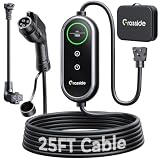
- Universal J1772 Compatibility: Designed with a standard J1772 connector, this J1772 charger works with most J1772 electric vehicles and PHEVs, including BMW, Mercedes-Benz, Hyundai, Kia, Nissan, Rivian, Ford, Chevy, Volkswagen, Toyota and more. Note: Tesla vehicles require a J1772 to Tesla adapter (not included)
- Flexible Outlet Compatibility: This portable EV charger comes with a NEMA 6-20 plug and a NEMA 5-15/5-20 to 6-20 adapter. Supports Level 1 (8–12A) and Level 2 (16A). Max 12A (1.44kW) on 120V NEMA 5-15/5-20 outlets, and full 16A (3.84kW) with a 240V NEMA 6-20 outlet. One charger is designed to cover home, garage, and travel charging needs with reliable performance
- Adjustable Smart Charging Control: Customize charging safely with adjustable current settings (8A/10A/12A/16A) to match different circuits. The 0–12 hour delay timer helps schedule overnight charging during lower electricity rates. Integrated LCD display shows real-time voltage, current, power, and charging status for clear monitoring without apps. Note: Press 'A' or 'T' for 3s to set and confirm.
- Home Charging & Travel Backup: For daily home use while remaining fully portable for travel. This level 1 ev charger includes a durable 25FT ev charging cord, providing flexible reach for garage or driveway charging. Charge overnight to take advantage of lower utility rates—potentially saving up to $500 annually on electricity costs. The included carrying case makes storage easy and keeps a dependable backup charger available in your trunk for road trips or visiting friends
- Engineered For Safety & Durability: Built for dependable daily use, this electric car charger features an IP65 waterproof rating for all weather operation. Equipped with a UL-listed cable, fully rubberized connector, and advanced protection against overcurrent, overheating, and electrical faults. Designed to ensure safe, stable, and long-term charging performance in demanding environments
- Open the network-provider platform named in the station record.
- Check whether the location is shown as available, in use, offline or under maintenance.
- Read the instructions for starting and ending a session, including any required account or payment method.
- Confirm that the stall is usable without entering a restricted facility or passing a gate that closes before your arrival.
- Keep a second payment method or another way to authenticate if the station offers one.
The AFDC describes network platforms as supporting station discovery, real-time status, session start and payment where required. That convenience varies by network and location, so complete account setup before leaving home when possible.
Recheck the listing close to departure and arrival
Station data has different update schedules. AFDC says it receives daily API imports for connected networks, periodic spreadsheet imports for some other networks, and manual entries for non-networked stations that are verified every other year. A record can therefore be accurate when collected yet stale when you arrive.
Use a two-stage check:
- Before departure: reopen every primary and backup station, inspect the current status, and look for closure or access notes.
- Near the stop: check again while you still have enough battery to divert. If the status is offline, unavailable or ambiguous, choose the backup before committing to the exit.
Even a live status feed cannot show every queue, blocked stall, vehicle fault or temporary site closure. The Department of Energy’s public overview states: “A good charging experience is one that is safe and reliable.” Reliability in practice comes from verification and alternatives, not from assuming a map pin is a reservation.
Independent reader supportYour contribution helps us test, update, and keep practical guides available for everyone.Use a practical trip-day charging routine
Before leaving
- Charge to the level appropriate for the first leg and confirm the planned departure SOC.
- Open the route, primary stops and backups while connected to reliable internet.
- Confirm network access and payment, and keep the station addresses available offline.
- Check weather, temperature, wind and elevation for conditions that may reduce expected range.
At each stop
- Approach the station using the planned entrance and obey site and parking signs.
- Inspect the stall and cable for visible damage before connecting.
- Start the session using the required app, card or other method, then verify that charging has actually begun.
- Watch the vehicle display and station screen for an error, unexpected power reduction or a session that stops early.
- End the session correctly, replace the connector and move the car when finished so the stall remains available.
Before the next leg
Recalculate the remaining range using the current SOC and conditions. If the session delivered less energy than expected, shorten the next leg, add a stop or switch to the backup route while you still have options.
Troubleshoot the common failure branches
The station is listed but unreachable
Check whether the map selected a service road, opposite carriageway or private entrance. Reopen the station details and use the site’s actual address in navigation. If the approach requires a gate or restricted property, select the backup.
Best Value

- [LEVEL 1 & 2 CHARGING FOR HOME, BACKUP & TRAVEL] One charger for everyday home charging, road trips, and backup use. This Level 1/2 EV charger supports both 110/120V and 240V power: use the included NEMA 5-15 adapter as a 120V electric car charger, or connect the NEMA 6-20 plug to 240V power for Level 2 charging up to 16A / 3.68kW. Whether kept in your garage or carried in the vehicle, this portable EV charger gives you more charging options when a dedicated charging station is not available.
- [8-16A ADJUSTABLE CURRENT & 1-12H DELAY CHARGING] Unlike fixed-current chargers, YLITES lets you choose 8A, 10A, 12A, or 16A to better match different outlets and charging environments. When connected to a NEMA 5-15 household outlet, current is automatically limited to 12A for appropriate circuit use. The 1–12 hour delay timer lets you schedule charging to start later, making overnight and off-peak charging more convenient. Flexible current control makes it especially practical for garages, older homes, apartments, and travel charging.
- [SAE J1772 COMPATIBILITY, SMOOTH CONNECTION & 25FT TOTAL LENGTH] Compatible with electric vehicles and plug-in hybrids equipped with an SAE J1772 charging inlet, including vehicles from GM, Nissan, Audi, Kia, Honda, BMW, Hyundai, and more. The J1772 connector is designed for smooth insertion and easy release, making everyday charging simple and convenient. With a 25FT total length, this portable EV charger offers flexible reach for garages, driveways, parking spaces, travel, and emergency backup charging. Tesla/NACS vehicles require a J1772-to-NACS adapter, sold separately.
- [SMART TFT DISPLAY & ACTIVE TEMPERATURE PROTECTION] The enhanced TFT color display provides clear real-time charging information, including voltage, current, power, charging status, and temperature. The YLITES temperature management system continuously monitors the plug-outlet connection point and can intelligently reduce current when necessary to help reduce overheating risk. Over-voltage, over-current, leakage, grounding, and insulation protection provide additional safeguards for more reliable daily charging, whether charging on 110/120V Level 1 power or 240V Level 2 power.
- [BUILT FOR SAFE & RELIABLE EVERYDAY CHARGING] Designed for repeated home and on-the-road use, the charger features an IP66 water-resistant enclosure, fire-resistant materials, and multi-layer electrical protection. It is designed to operate in temperatures from −22°F to 122°F, supporting charging in garages, driveways, and changing outdoor conditions. Combining dual-voltage flexibility, a long cable, portable construction, and multiple safety protections, this EV portable charger works as a dependable everyday charger or a convenient backup charging solution.
The connector does not fit
Stop the session attempt and verify the vehicle specification against the station record. Do not force a connector or assume that an adapter is suitable. Adapter and cable needs depend on the vehicle, connector, market and charging situation; this general guide cannot identify a safe accessory for an unspecified car.
The charger shows unavailable
Do not wait until the battery is nearly empty to investigate. Check the network status and station notes, then navigate to the backup while the remaining range supports the detour. If no backup is reachable, reduce speed where safe and seek the nearest compatible public site or staffed service location.
The station is occupied
Estimate the queue honestly rather than assuming a quick turnover. Look for another compatible stall at the same site, then compare the next nearby station’s detour and status. A lower-power stall may be useful if it prevents a much longer diversion, but only if your vehicle can use it.
Free tools Windows power users keep installed
One-click scans. No signup required.
The session will not start
Confirm that the connector is fully seated, the selected stall matches the number in the app or on the screen, and the chosen payment or account method is accepted. Follow the station’s support instructions. If the fault persists and the backup is reachable, end the attempt safely and leave rather than repeatedly draining the battery at a failed site.
What the home-charging statistic means for road trips
The U.S. Department of Energy’s National EV Charging Network page displays an estimate that about 80 percent of charging happens at home, dated November 8, 2024. That pattern explains why public charging needs a different plan: a long-distance driver cannot assume the routine access, time and certainty of a home installation. Public stops should be selected for route position, compatibility, access and resilience.
Geographic limits and international travel
The AFDC locator’s stated coverage is the United States and Canada. Other regions may use different station maps, connector standards, network operators, roaming arrangements, payment rules and definitions of public access. Before an international trip, identify the destination country’s official or widely used locator, verify local connector terminology and confirm whether your payment method works across networks. Do not transfer a U.S. or Canadian route plan directly to another market.
Quick Recap
A compact checklist to save with your route
- Vehicle connector and supported charging levels confirmed.
- Departure SOC, realistic range and arrival-reserve target entered.
- Primary station selected on the route, not merely near the destination.
- Access restrictions, hours, network and payment method checked.
- Current status reviewed before leaving and again before the exit.
- Backup station verified for connector, access and reachable detour.
- Addresses, instructions and support details saved for offline use.
- Weather, terrain, traffic and any exposed charging gaps considered.
Product prices and availability are accurate as of the date/time indicated and are subject to change. Any price and availability information displayed on Amazon at the time of purchase will apply.