For routine owner maintenance, clean the Prius hybrid-battery cooling intake filter—not the fan itself. Turn the vehicle off, follow the instructions for your exact model year and market, and vacuum the filter gently along its pleats. Fan removal is a separate, model-specific repair procedure; do not dismantle the battery-cooling system based on a generic guide.
What you can clean yourself
The owner-level task documented by Toyota is cleaning the battery-cooling air intake and filter. The filter helps keep dust and debris from the cooling airflow. The fan is a different component, and accessing it may require disassembly covered by the repair manual for the specific vehicle. Toyota’s bulletin T-SB-0062-20, dated June 18, 2020, describes dust, lint, or debris in the intake filter or cooling fan on specified Toyota hybrid vehicles, including some Prius variants. It does not establish one universal DIY fan-cleaning procedure.
Because the title does not identify year, generation, trim, or market, use the owner’s manual for your car before removing a cover or filter. The intake location and access differ among Prius versions. For example, Toyota’s 2016 US-market manual places the vent below the right side of the rear seat; that location should not be assumed for every Prius. See the 2016 Prius Owner’s Manual (OM47A29U) or the manual for your exact vehicle.
What you need—and what to avoid
Use a vacuum cleaner with a soft or plastic-bristle brush attachment, if needed, and keep contact light. Toyota’s Japanese Prius owner guidance specifically recommends a plastic-brush vacuum when dust or sand remains. Technique matters more than the vacuum model: do not press the nozzle or brush hard against the filter.
#1 Best Overall
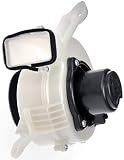
- Direct replacement - this hybrid battery cooling fan matches the fit and function of the original fan on specific vehicle years, makes and models
- Restores operation - replacement keeps hybrid battery pack cool and functioning properly
- Thoroughly tested -vehicle try-on, air flow and life-cycle testing ensures product meets performance standards
- Trustworthy quality - backed by team of product experts and engineers in the United States
- Ensure fit - to make sure this part fits your exact vehicle, input your make, model and trim level into the garage tool
- Do not clean the filter with water or other liquids. Toyota’s 2016 US manual warns: “Do not get water or foreign materials in the air intake vent as this may cause a short circuit and damage the hybrid battery (traction battery).”
- Do not use compressed air, a hard or metal brush, or forceful suction pressed into the filter.
- Do not flatten, shift, or deform the filter pleats.
- Do not put your hands or feet into the intake. Toyota warns that the cooling fan can cause entanglement and that high-voltage components are nearby.
- Do not drive with the filter removed. Refit the filter and secure its cover correctly.
How to clean the intake filter
This is a filter-cleaning procedure, not a fan-removal guide. Check the exact owner’s manual for your Prius before taking off any trim, cover, or filter part.
- Switch the vehicle off. Stop the hybrid system before working near the intake.
- Open the intake cover as the manual directs. Use the tabs or clips specified for your vehicle; do not force a cover or remove unrelated trim.
- Release the filter from the cover. If dust is visible on the cover, vacuum it gently.
- Vacuum the filter lightly along the pleats. Use a soft or plastic brush if useful, without pressing hard. Do not use liquid or compressed air.
- Check the filter against a light. If it remains blocked or noticeably dirty after gentle cleaning, stop and contact a Toyota dealer rather than escalating to harsher cleaning methods.
- Reinstall the filter and cover. Make sure the filter sits correctly without shifted or flattened pleats, then secure the cover as directed in the manual.
What to do if a cooling-system warning appears
Toyota’s 2016 US manual says a filter may be clogged when the “Maintenance Required for Hybrid Battery Cooling Parts at Your Dealer” message appears; it directs the owner to have the filter cleaned or replaced by a dealer. Toyota’s Japanese guidance says that after cleaning, the related warning may take about 20 minutes of driving to clear. That timing and the displayed message are market- and model-dependent, so follow your own manual. If the warning remains or returns, arrange an inspection rather than attempting fan disassembly.
Rank #2

- 【Other part numbers】G923047080,G9230 47080,G923002030,G9230 02030.The part number I gave you may not be the same as the part number on your car, but the part is the same
- 【Package included】1X Battery Cooling Blower Fan Motor
- 【Check whether the accessories are applicable before buying】Ensure that the parts are suitable for your exact vehicle, which can be clearly confirmed by the vehicle identification number, car model and OEM number.If you are not sure if it applies to your car, please send me your VIN number and I will confirm it for you.
- 【Product attributes】Brand new, quality guaranteed. The appearance is slightly blemished due to friction between storages.
- 【outer packaging】The outer packaging of all our products is just a simple paper box or plastic foam bag. Please confirm that you are aware of and can accept this situation before purchasing.
A filter that stays visibly dirty after cleaning, is damaged, or cannot be seated correctly also warrants dealer help. Filter replacement is vehicle-specific: confirm the model year and trim before sourcing a part.
Independent reader supportYour contribution helps us test, update, and keep practical guides available for everyone.How often to clean it
Toyota’s Japanese Prius owner page gives about 25,000 km as a cleaning guide for high-use vehicles or use in a large city or dusty or high-traffic area; the page does not state a publication year. Treat this as Japan-market, use-qualified guidance, not a universal interval for US or other-market Priuses. Follow the maintenance guidance for your own vehicle and inspect sooner if the intake is visibly dusty or a warning appears.
Free tools Windows power users keep installed
One-click scans. No signup required.
Quick Recap
Best Value

- Vehicle Specific
- Manufacturer Warranty
- Toyota Quality Assured
- OEM, Not After Market
- Vehicle Specific
Rank #4

- 【❗Fitment (Compatibility Description):❗:】 Direct Fit For 2004-2009 Toyota Prius Drive Motor/Battery Pack Cooling Applications; Intended For Vehicles That Use This Assembly.
- ✅【 Function (Component Description):】 Designed To Circulate Air To Cool The Drive Motor/Battery Pack Area And Support Thermal Management In The Vehicle System.
- ✅【 Replacement Reason (Service Description):】 Replaced When The Fan Assembly Becomes Noisy, Stops Operating, Or Shows Electrical Or Mechanical Failures.
- ✅【 Construction and Material:】 Includes Fan Motor And Impeller Components Built To Match Factory Dimensions And Electrical Connections.
- ✅【 Testing and Installation:】 Quality-Checked For Electrical Continuity And Rotational Balance; Installs Using Factory Mounting Points And Original Connector Connections.
Rank #3

- 【Part Name】HV Battery Cooling Fan Filter
- 【Part Number】G92DH-47060
- 【Application Models For】Compatible with Toyota 14-15 Prius Hybrid
Product prices and availability are accurate as of the date/time indicated and are subject to change. Any price and availability information displayed on Amazon at the time of purchase will apply.