Quick wins for a faster PC:
Repair Windows errors before they cause bigger problemsFix Now →Fix the driver behind crashes, sound loss and screen glitchesFind Drivers →Clear out junk files and repair common Windows errorsFree Scan →Choose the exact EV, not just its badge or connector. Confirm the model year and trim, identify whether it has a CCS1 or NACS (J3400) inlet, verify that the automaker authorizes the vehicle on the stations you use, and check compatible chargers on your real routes. Connector fit alone does not grant charging permission. Before buying or traveling, use the current automaker and network apps to confirm station eligibility, adapter requirements, live availability, pricing, payment setup and the vehicle’s own DC-charging capability.
Start with the vehicle-and-route match
Fast-charging access is a three-part test: the vehicle must physically connect, the network must authorize that vehicle, and a compatible site must exist where you need it. Tesla’s live support guidance lists makes that can access some NACS Superchargers and asks drivers to add vehicle details in the Tesla app or use its interactive map to identify compatible locations. A make appearing on that list does not mean every model year, trim or Supercharger is eligible. Check the specific vehicle and the specific site at the time of purchase and again before a trip. Tesla’s Supercharging guidance is the current reference for its eligibility and location rules.
As an Amazon Associate I earn from qualifying purchases.
This article focuses on North American CCS1 and NACS/J3400 compatibility. Other regions use different connectors, regulations and network arrangements, so do not transfer these steps to Europe, Asia or other markets without region-specific confirmation.
Understand the three checks that are often confused
1. Connector fit
North American EVs are in a transition between the Combined Charging System 1 (CCS1) and the North American Charging Standard (NACS), now standardized as J3400. A vehicle may have a factory NACS inlet, or it may have CCS1 and require an approved adapter for a NACS charger. The Joint Office of Energy and Transportation expects both connector types to remain prevalent during the transition and explains compatibility considerations in its connector and adapter guidance.
#1 Best Overall

- CHARGE YOUR TESLA & NACS-PORT EV AT CCS FAST CHARGERS: This UL-compliant LENZ adapter lets EVs with a NACS (Tesla-style) charging port to connect to CCS1 DC fast charging stations—ideal for expanding charging options beyond NACS-only plugs.
- BUILT FOR THE NEW WAVE OF NACS VEHICLES (2026+): Supports NACS-port vehicles including Tesla and select 2026+ non-Tesla EVs adopting NACS, such as 2026 Hyundai Ioniq 5, Ioniq 9, 2026 Kia EV6, EV9, 2026 Rivian, and 2026 Toyota bZ models, 2026+ Rivians, and more as NACS adoption expands. NOT Compatible with Tesla Cybertruck.
- DESIGNED FOR CCS1 DC FAST CHARGING STATIONS: Built specifically for DC fast charging with CCS1 connectors commonly found at Electrify America, EVgo, Chargepoint and other publie networks. NOT for Tesla Superchargers. NOT for Level 2 AC charging.
- ENGINEERED FOR DC FAST CHARGING SAFETY: SGS certified to UL 2251 and CSA C22.2 standards. Precision-engineered fit and reinforced locking interface to ensure stable alignment and confident connection. Designed to handle high-voltage DC (up to 500V) and consistent performance at up to 500 kW.
- LENZ CHARGING SOLUTIONS - BUILT FOR REAL-WORLD USE: Engineered for frequent use at public fast chargers and backed by LENZ support. Great for road trips, fleets, and drivers moving into the NACS era who still rely on CCS networks.
2. Network authorization
A physically compatible plug is not authorization. Tesla says Supercharging is available to NACS-equipped vehicles and to CCS1 vehicles using an adapter supplied by Tesla or the vehicle manufacturer; only selected Supercharger sites are open to other makes. The automaker may need to enable a model through software, an account association or an approved adapter. The network can also exclude a site even when another site in the same network is open to your vehicle.
3. Site and route availability
Eligibility is location-specific. A station may be too short for your route, have a cable that cannot reach your port, be restricted to Tesla vehicles, or be temporarily unavailable. Open the live map and inspect each likely stop instead of relying on a network-wide station count.
Compare EVs with a consistent framework
Use the same questions for every candidate. Record the answers for the exact model year and trim; specifications can change within a nameplate.
| Decision axis | What to verify | Why it changes the purchase |
|---|---|---|
| Vehicle and inlet | Model year, trim, factory inlet (CCS1 or NACS/J3400), port position and the vehicle’s DC-fast-charge capability | Determines whether you plug in directly, need an adapter and can physically reach the connector |
| Network authorization | Whether the automaker has enabled that specific vehicle on the network; required adapter, software or app account | Prevents buying a car that fits a plug but cannot start a session |
| Route coverage | Compatible sites along your regular commutes, vacation routes and winter alternatives; inspect individual stations in the current map | A large network total is irrelevant if your usable stops are not on your routes |
| Charging performance | Vehicle DC charge limit and expected curve, station power, battery preconditioning behavior and the charge level at which speed tapers | A high-rated connector does not guarantee that the car will receive that rate |
| Stop experience | App and payment process, membership terms, live stall status, cable reach, port location, idle or congestion fees and site access hours | Two cars with similar range can have very different trip times and effort |
| Transition flexibility | Whether you will need CCS1-to-NACS or NACS-to-CCS equipment, and whether the vehicle maker supports the exact adapter | Determines future access while both standards remain in service |
How to verify Tesla Supercharger access before buying
- Write down the complete vehicle identity. Include make, model, model year, trim and factory inlet. “The same model” is not precise enough when eligibility differs by year or equipment.
- Check Tesla’s current non-Tesla support page. Review the eligible-make information and any model-specific notes at tesla.com/support/charging/supercharging-other-evs.
- Enter the vehicle in the Tesla app or interactive map. Tesla directs non-Tesla drivers to add vehicle details so the map can show applicable Superchargers. Select a few stations on your actual routes, not merely a convenient-looking location near a dealership.
- Inspect each candidate station. Confirm that the site is open to your vehicle, note its connector type, operating restrictions and live stall status, and check whether the cable can reach your port position.
- Confirm the adapter source. If the EV has CCS1, identify the Tesla- or automaker-supplied adapter approved for that exact vehicle. Do not assume an adapter advertised for another make will work.
- Ask the dealer or automaker for written fitment confirmation. Keep the answer with the vehicle’s VIN or build specification when possible. Eligibility pages and software policies can change after a vehicle is produced.
Tesla’s support page is the authority for current site eligibility, but it is not a permanent promise of access. Recheck immediately before a long trip because station status, pricing and compatible-vehicle lists are volatile.
Rank #2

- 【PLEASE CONFIRM COMPATIBILITY】: This Tesla Charger Adapter is designed specifically for 2021 - 2026 Tesla Model 3, Y, S, and X vehicle. Not compatible with Teslas manufactured before 2021. Before use, please verify that your vehicle supports the CCS adapter: check that the “CCS Adapter Support” status is set to “Enabled.” This ensures you can use the adapter with confidence, eliminating the need for guesswork and preventing unnecessary purchases.
- 【ESSENTIAL FOR TESLA CHARGING, ONE ADAPTER IS ENOUGH】: The Ecogenix 2-in-1 CCS & J1772 to Tesla Adapter brings true charging freedom to your Tesla. It allows your Tesla to use both CCS1 and J1772 charging equipment, unlocking nearly all charging options, Compatible with ChargePoint, Blink Charging, EVgo, Electrify America, and all J1772 charging devices. Say goodbye to the hassle of finding superchargers or dealing with charging incompatibility issues!
- 【LESS WAITING, LEVEL 1, 2 & 3 SUPERFAST CHARGING】: The 2-in-1 CCS and J1772 to Tesla adapter allows your Tesla to use Level 3 CCS charging equipment (up to 250kW, 400A DC) and Level 1 & 2 J1772 equipment (MAX to 250V 80A AC). With our adapter, your Tesla can unlock Level 1, 2, and 3 charging speeds simultaneously. This enables your Tesla to charge quickly and efficiently, reducing downtime and getting you back on the road faster.
- 【EASY TO INSTALL, PLUG-AND-PLAY】: Without intricate setups, effortlessly charge your Tesla at any CCS1/J1772 station. Just plug in and power up, making it the perfect travel companion for hassle-free charging on the go. Compact and lightweight tesla charger converter comes with a convenient carrying bag means it easily fits in your Tesla's storage areas. Ensuring it’s always there when you need it, without taking up valuable tesla space.
- 【SUPERIOR DURABILITY】: Designed to withstand the rigors of road travel, the 2-in-1tesla charger adapter can withstand over 20,000 mating tests and 4,700 pounds of load pressure, ensuring longevity and reliability. With its waterproof construction and high flame retardancy, the tesla adapter can handle all weather conditions, is fireproof, and extremely durable. Charge with confidence knowing your 2IN1 CCS&J1772 charging adapter is as resilient as your adventurous spirit.
Choose between a factory NACS EV and a CCS1 EV with an adapter
Factory NACS (J3400)
A factory NACS vehicle removes the need for a CCS1-to-NACS adapter at NACS Superchargers. It does not automatically provide access to every Tesla site: the vehicle still needs network authorization, and site restrictions still apply. Confirm the automaker’s software and account process and inspect the port location for cable reach.
CCS1 with an approved NACS adapter
A CCS1 EV can be a sound choice when its manufacturer supports a specific adapter and the desired stations accept that vehicle. The adapter must match the vehicle’s electrical and software requirements; the Joint Office warns that not all adapters work with all vehicle models or chargers and recommends using the vehicle manufacturer’s adapter as directed. Tesla’s official Supercharging guidance states: “For safety reasons, using third-party adapters is prohibited.” Read the full policy at Tesla’s support page.
Do not treat a generic adapter listing as proof of compatibility. Ask who made the adapter, which vehicle part numbers it supports, which charging networks permit it and whether the automaker has issued installation or inspection instructions.
Free tools Windows power users keep installed
One-click scans. No signup required.
Why adapter ownership is not enough
An adapter can solve the physical connection while the account, software or site remains unauthorized. Conversely, an authorized vehicle can still fail to charge if the adapter is damaged, incorrectly seated or outside its temperature and power limits. Keep the adapter clean and dry, inspect its contacts, and follow the automaker’s storage and use instructions.
Rank #3

- Compatible with Tesla Cybertruck and 2020+ Tesla Models Model 3, Y, S, X Please note: Pre 2020 Teslas will require a CCS enable retrofit
- Integrated Safety Features Real-time internal temperature monitoring At 179 °F the current will be reduced; at 188.6 °F the current will be cut off until ambient temperature is restored
- Plug and pull, small size and convenient belt, through the safety certification
- Our YIGPAIPO CCS Tsl adapter features a built-in temperature detection system. If the charging temperature becomes too high, the adapter will automatically pause charging until the temperature cools down, ensuring a safe and efficient charging experience.
- 2 in 1 :Design Allow Tesla or EV owners to use CCS1 and J1772 Chargers Compatibility :Works with all 2020+ Tesla (Teslas before 2020 require CCS Enable Retrofit) CCS: 500V DC 250KW Max J1772: 240V AC 80A Max Operating Temperature: -22 °F to 122 °F Storage Temperature: -40 °F to +185 °F
Evaluate the car’s actual DC-charging performance
Network power and vehicle power are different specifications. Tesla notes that charging speeds vary by Supercharger and vehicle. A station’s advertised maximum is therefore not the rate your EV will necessarily receive. Compare the vehicle’s maximum DC input, the shape of its charging curve and the time needed to reach the battery level you normally use.
- Peak rate: the highest input the vehicle can accept under favorable conditions, not a guaranteed trip average.
- Charging curve: how quickly the car tapers as the battery fills. A lower peak with a sustained rate can beat a higher peak that lasts briefly.
- Battery temperature: cold or hot packs may charge more slowly until conditioning completes.
- State of charge: charging is usually fastest at a lower state of charge and slows near full. Plan stops around the energy needed for the next leg rather than routinely waiting for 100 percent.
- Port position and cable reach: a front, rear or side port may require a particular parking orientation, especially where a cable is short or shared between stalls.
Ask the automaker for a charging-time range under stated conditions, then compare that with the station power on your routes. Avoid treating a connector’s wattage label as the vehicle’s delivered rate.
Map your real routes, including backups
Build a route list
Write down your weekly commute, frequent intercity trips, holiday destinations and the longest stretch you would drive in cold weather. For each route, identify a primary compatible site, a second site and a destination charger. This exposes gaps that a national station count hides.
Check individual stations in the live app
Use the current Tesla map or app after entering the vehicle details. Verify connector compatibility, site access, available stalls and any restrictions. Availability can change while you drive, so use the in-car or phone map shortly before arrival as well.
Rank #4

- NOTE: Verify Compatibility Before Purchase -PLEASE CONFIRM your CCS electric vehicle manufacturer has enabled access to the respective charging network for Tesla Supercharger Protocol(Check Automaker for Compatibility)
- Currently not compatible with Audi, BMW, Mercedes-Benz, Kia, Mazda, MINI, Nissan, Porsche, STELLANTIS, Toyota, Volkswagen, and Honda. NOT compatible with Level 1 or Level 2 AC chargers
- NACS to CCS Adapter with Interlock -for NACS dc adapter is SGS certified to comply with the UL 2252 standard for safety. Heavy-duty design with interlock structure for added stability
- Fast Charging -Compatible with Tesla Supercharger charger adapter rated for 500 amps and 1,000 volts, charge up to 150 miles of range in just 15 minutes(Actual charging speed is determined by the charger's output, your vehicle's battery management system, and environmental conditions)
- Expand Your Charging Options -for CCS charging adapter charges at 25,000+ V3 and V4 Superchargers DC fast charging stations, providing Multiple Charging Options. Designed for daily commuting, road trips charging needs for more convenient charging flexibility
Account for terrain and weather
Range falls with high speed, headwinds, hills, heavy loads and cold temperatures. A route that works on a mild day may require an additional stop in winter. Keep enough reserve to reach your backup; do not plan a trip around the car’s laboratory range or a station that has no alternative nearby.
Check cable and parking logistics
Look at photographs or site descriptions where available. A pull-through site, trailer position, blocked stall or cable on the opposite side can make a technically compatible charger impractical. If your port is at the rear left and the cable is short, identify stalls where you can park without crossing or occupying another space.
Independent reader supportYour contribution helps us test, update, and keep practical guides available for everyone.Understand Tesla’s non-Tesla session process
Tesla’s instructions for eligible non-Tesla drivers use the Tesla app. The usual sequence is:
- Install or open the Tesla app and create or sign in to an account.
- Add the vehicle details so the app can filter compatible Superchargers.
- Add a payment method before arriving; do not rely on having a physical card reader at the stall.
- Select an applicable site and stall in the app, then follow the on-screen start instructions.
- Connect the approved cable or adapter firmly and verify that the session has started in the app.
- Stop charging in the app, unplug when complete and move the vehicle promptly. Review the receipt and any site fees.
Accessible sites do not require a Tesla membership, according to Tesla. An optional membership may reduce prices at selected locations, but the value depends on how often you use those sites. Prices, taxes, congestion charges and idle fees can change; rely on the current app listing rather than an old screenshot or quoted rate.
Best Value
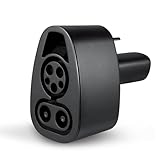
- CCS CHARGER ACCESS - The Lectron CCS1 to NACS Tesla charger adapter allows you to charge at over 12,000 CCS fast chargers in North America
- FAST CHARGING - Supports up to 250 kW charging rate for Tesla. (Note: Charge rate also depends on your Tesla's battery level and the specifications of the charging station.)
- HEAVY-DUTY - This Lectron DC fast charger adapter is rated for a maximum of 500V and 500A, with an operating temperature range from -22°F to 122°F
- TESLA COMPATIBLE - The Lectron CCS1 to NACS Adapter is fully compatible with CCS1 chargers and all Tesla models that are CCS enabled. (Note: Any Tesla built before October 2020 will require an ECU retrofit to enable CCS. For Teslas built after October 2020, check vehicle settings to ensure CCS compatibility: Control > Software > Additional Vehicle Information > CCS Adapter Support. Any Tesla built before 2014 is excluded from CCS compatibility.)
- PLUG & PLAY - Light, compact, and easy to use, this CCS to Tesla charger adapter fits easily in your glove box. Just pull up, slide it onto the CCS charger, and quickly charge your Tesla
Compare other fast-charging networks without assuming Tesla rules
Every network can define its own eligible vehicles, roaming relationships, app requirements, payment methods, pricing and adapter policy. A car that works at one NACS network may not work at another, and a manufacturer’s Tesla access announcement does not establish access elsewhere.
Use the automaker’s network instructions
Check the vehicle maker’s support page for activation, software updates and approved hardware. If an app says a station is visible but not startable, treat that as an authorization issue until the automaker or network confirms otherwise.
Example: GM vehicles
GM states that its NACS DC Adapter is intended for eligible GM CCS EVs and compatible NACS DC stations. GM also notes that some Tesla sites remain Tesla-only and directs GM drivers to the GM app to locate applicable chargers and manage charging. Do not apply GM’s adapter or access rules to another make. GM’s FAQ reports access to over 27,500 Tesla Superchargers in the United States and Canada; GM Energy’s page is undated (accessed 2026), so verify the current figure and eligibility before relying on it. See GM Energy’s FAQ and its adapter overview.
Do these 3 things before closing this tab:
1Repair Windows errors before they cause bigger problems2Scan for outdated or missing drivers - takes under a minute3Clear out junk files and repair common Windows errorsSeparate roaming from direct network access
An automaker app may show a third-party station through roaming, while the station’s own app may have different pricing or start requirements. Before a trip, determine which app will authorize the session, whether a credit card is accepted, and whether roaming adds a fee.
Budget for the complete charging stop
| Cost or requirement | Question to answer |
|---|---|
| Energy price | What is the current per-kWh or time-based rate at the specific site and in your region? |
| Membership | Is a subscription optional, and how many monthly sessions would offset its fee? |
| Idle or congestion fee | When does the fee begin, and how is it calculated? |
| Adapter | Does the automaker supply, sell or require a particular part for your vehicle? |
| Payment setup | Must you preload a payment method in an app, or is contactless payment available? |
| Time cost | How long will the car take to add the energy needed for the next leg at that site? |
Do not compare EVs using an assumed universal charging price. Rates vary by network, location, time, taxes and membership status. Use the app listing on the date you travel and retain a backup payment method if the network supports one.
Common mistakes and how to avoid them
- “It has NACS, so every Supercharger works.” Access remains vehicle- and site-specific. Check the live map after entering the vehicle.
- “Any CCS1-to-NACS adapter will do.” Use the vehicle manufacturer’s approved adapter; Tesla prohibits third-party adapters for Supercharging.
- “The network has thousands of chargers, so my route is covered.” Count only compatible sites on your routes and identify backups.
- “The station’s 250-kW label means my car charges at 250 kW.” The vehicle, battery temperature, state of charge and station sharing determine the delivered rate.
- “The app shows the site, so I can charge there.” Visibility is not authorization. Confirm that your vehicle is listed as applicable and that the session can be started.
- “A membership always saves money.” Calculate the break-even point using current prices and your expected use.
- “A screenshot from purchase day is enough.” Eligibility, pricing, software and station availability can change. Recheck before long trips.
- “The same model has the same hardware every year.” Verify model year, trim and inlet; production changes can alter access.
A practical pre-purchase and pre-trip checklist
Before ordering an EV
- Record the exact model year, trim and inlet type.
- Ask the automaker whether that vehicle is authorized on the Tesla sites and other networks you use.
- Identify the approved adapter part number, if one is required, and confirm availability.
- Map your regular routes with the vehicle entered in the live network app.
- Compare DC charge capability, charging curve information, port position and cable reach.
- Review app, payment, membership and fee requirements.
Before a long drive
- Update the network and automaker apps and confirm your payment method.
- Check the primary and backup stations’ current compatibility and stall status.
- Pack the approved adapter and inspect it for damage or contamination.
- Plan for weather, elevation, traffic and a reserve sufficient to reach the backup.
- Confirm how to stop a session and where idle or congestion fees begin.
Decision rule: which EV is the safer choice?
Choose the EV that gives you verified, repeatable access on your own routes, not the one with the most impressive connector specification. A factory NACS inlet is convenient when the vehicle is authorized at the stations you need. A CCS1 vehicle can be equally practical when its automaker supplies a supported adapter and your route map shows enough compatible sites. If either authorization or route coverage is uncertain, treat the vehicle as unconfirmed until the automaker and network provide a current answer.
Recheck Tesla’s live support and map tools at tesla.com/support/charging/supercharging-other-evs, review the Joint Office compatibility guidance at driveelectric.gov/adapter-compatibility, and use your vehicle maker’s current instructions before purchase or travel. Those checks turn a connector promise into a usable charging plan.
Quick Recap
Product prices and availability are accurate as of the date/time indicated and are subject to change. Any price and availability information displayed on Amazon at the time of purchase will apply.




