As of 17 October 2026, Zagreb is the simplest European city in which most members of the public can book a robotaxi directly. Verne accepts bookings and payment in its app for Pony.ai-powered rides, with service initially covering about 90 square kilometres, including Zagreb Airport, during a published 07:00–21:00 operating window. Uber also carries the service in covered Zagreb areas.
London offers a different model: Uber may match you with a Wayve autonomous vehicle when you request UberX, Uber Electric or Uber Comfort, but you cannot guarantee that outcome. Hamburg’s MOIA service remains a selected, pre-registered passenger test rather than an open taxi operation. In every city, check the supervision label at booking; “robotaxi” does not necessarily mean that no person is aboard.

As an Amazon Associate I earn from qualifying purchases.
Where you can ride a public robotaxi in Europe
Availability is city-specific and changes as operators expand or pause service. The three public-facing programs described below do not offer the same booking certainty or level of driverless operation.
Zagreb: direct booking through Verne
On 8 April 2026, Pony.ai and Verne announced what they described as Europe’s first commercial robotaxi service. A member of the public can create a Verne account, add a supported payment method, enter a trip and pay in the app. The launch map covered approximately 90 square kilometres of Zagreb, including Zagreb Airport. Pony.ai published a daily operating window of 07:00 to 21:00 for that launch phase.
#1 Best Overall
Uber also carries the service in covered Zagreb areas, but the clearest direct-booking path is Verne’s own app. The initial commercial phase used a licensed operator who monitored from the vehicle. Fully driverless passenger tests began on 10 September 2026 with invited passengers, so the app’s current supervision notice is more important than the generic word “autonomous.”
London: an Uber match you may accept or decline
Wayve rides launched through Uber in London in September 2026. You request a normal eligible category—UberX, Uber Electric or Uber Comfort—and use Uber’s Ride Preferences to increase the likelihood of an autonomous match. Uber says riders cannot specifically request an autonomous vehicle, so enabling the preference is not a reservation or guarantee.
If Uber offers a Wayve vehicle, the app displays the vehicle information and upfront fare before you decide. You may accept or reject the match. The launch uses a person who can intervene, and there is no additional charge for receiving an autonomous match. London coverage and matching frequency are dynamic rather than defined by a single published service map.
What’s actually slowing this PC down?
Pick the symptom - the matching free tool is one click away.
Hamburg: a restricted MOIA test
MOIA announced a July 2026 passenger test using self-driving ID. Buzz vehicles in Hamburg. Initially, only selected Hamburg residents who had pre-registered could book. The hvv switch app was planned as an additional booking channel. This is a controlled test with limited eligibility, not an open taxi service that any visitor can summon on demand.
Choose the right booking route before you leave
Use the following checks to avoid arriving in a city expecting a service that is not open to you.
- City and operating area: Confirm that your pickup and destination pins sit inside the operator’s active map. Zagreb’s announced launch area was approximately 90 km² and included the airport; a current map in the app takes precedence over that original description.
- Eligibility: Verne’s public booking flow requires an account and supported payment method. Hamburg’s MOIA test requires selection and pre-registration. London’s Uber flow requires an eligible Uber account and an available match.
- Time: Zagreb’s launch notice specified 07:00–21:00 daily. Do not assume those hours remain unchanged after the launch phase. London and Hamburg availability is more variable.
- Supervision status: Read whether a licensed monitor, safety operator or other human is aboard or able to intervene. A supervised autonomous ride is operationally different from a fully driverless test.
- Payment and phone: Add and verify your payment method before requesting a trip, and start with a charged phone so you can see pickup instructions and contact support.
How to book and ride in Zagreb
Zagreb is the most straightforward option when you want to choose an autonomous ride rather than wait for an algorithm to offer one.
Rank #2

- Opening parts and rolling wheels
- Easy assembly, pre-painted metal body
- When finished the vehicles are fully functional
- Rolling diecast replica
- Skill level: intermediate
1. Install Verne and create your account
- Install or open the Verne app.
- Create an account using the details requested in the app.
- Add a supported payment method and complete any verification prompts before you travel.
A completed account matters because an unverified payment method can prevent a vehicle request even when cars are visible on the map.
2. Check the live service map
- Enter your pickup point.
- Enter your destination.
- Confirm that both pins are inside the active Zagreb operating area shown in the app.
The original launch description covered about 90 km², including Zagreb Airport. Treat the live map as authoritative: service boundaries can be smaller at a particular time because of traffic, weather, vehicle availability or testing restrictions.
3. Select the available autonomous ride
- Review the ride options the app presents.
- Select an autonomous option when one is available.
- Check the displayed fare, pickup point and supervision information.
- Confirm the booking and payment.
No independent price series was published for Zagreb, so the fare shown for your trip is the only reliable price for that request. Do not infer a standard tariff from the launch announcement.
4. Walk to the mapped pickup point
- Follow the exact pickup pin rather than stopping at a nearby street corner.
- Keep your phone available for vehicle-identification or boarding instructions.
- Allow extra time if the pickup is at an airport, large venue or multi-lane road.
An autonomous vehicle may be unable to stop safely at an improvised location. If the pin is inaccessible, use the app’s support function instead of waving the vehicle into traffic.
5. Board and follow the in-vehicle instructions
During the initial commercial phase, a licensed operator monitored from the vehicle. Follow the displayed boarding instructions, occupy the permitted seat, buckle your seat belt and do not interfere with controls or sensors. Fully driverless passenger tests began on 10 September 2026 with invited passengers; therefore, the current ride’s supervision label—not an earlier news description—tells you whether a person is present.
6. Complete the trip and report problems promptly
Remain seated and keep the app open enough to receive route or stop notifications. If the vehicle stops unexpectedly, takes an obviously wrong route or you feel unsafe, use the in-app support channel or tell the onboard operator immediately. Do not open a door into traffic or attempt to move the vehicle yourself.
Rank #3
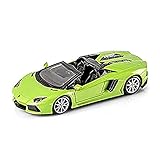
- Authentic 1:24-1:27 scale model kit
- Die-cast metal body with plastic parts
- Working steering and opening doors
- No glue or paint needed
How to get a Wayve robotaxi through Uber in London
London’s process is a probability-enhancing preference, not a guaranteed autonomous booking.
1. Request an eligible Uber category
- Open Uber and enter your pickup and destination.
- Choose UberX, Uber Electric or Uber Comfort.
- Review the estimated pickup and upfront fare shown for that request.
Requesting one of these categories makes you eligible for a possible Wayve match; it does not reserve one.
2. Turn on the autonomous-vehicle preference
- Open Settings in Uber.
- Open Ride Preferences.
- Enable the autonomous-vehicle preference.
The setting increases the chance of being matched with a Wayve vehicle when one is available. Uber says riders cannot specifically request an autonomous vehicle, so a conventional driver may still be assigned.
Free tools Windows power users keep installed
One-click scans. No signup required.
3. Decide when Uber offers a Wayve vehicle
If a Wayve match appears, inspect the vehicle information and upfront fare in the request screen. Accept if the pickup, timing and supervision arrangement suit you; reject it if you prefer a conventional ride. Uber states that an autonomous match carries no extra charge.
4. Ride under launch supervision
The London launch includes a person who can intervene. Follow the app’s boarding instructions, wear a seat belt and keep your phone available. If the vehicle behaves unexpectedly, use the in-app help route; do not assume that the absence of a visible steering action means no human oversight exists.
What Hamburg’s MOIA test means for passengers
Hamburg is relevant if you are studying autonomous transit or have been selected for the test, but it is not the place to arrive and expect an immediate robotaxi booking.
Rank #4

- DIY Building: The F1 car kit requires assembly, which is a fun and challenging science kit for children and adults. The process of building the car helps to develop creativity, fine motor skills, and hand-eye coordination. Good choice for children aged 9-16.
- STEM Education: The F1 car kit is designed to be an educational toy that promotes STEM education. By building and assembling the car, children can learn about basic engineering concepts and gain problem-solving skills.
- High-Quality Wood Material: The F1 car kit is made of high-quality wood, ensuring durability and longevity. The wood material provides an authentic and unique feel to the product and enhances the overall building experience.
- Remote Control: The F1 car kit comes with a remote control that allows users to control the car's movements, making it a fun and engaging toy for kids and adults alike. The remote control is easy to use, making it accessible to everyone.
- Racing Experience: Once the car is built, it can be raced against other remote control cars or driven around to showcase its speed and agility. The F1 car kit provides a realistic racing experience and is sure to impress both kids and adults.
- Access: MOIA initially limited bookings to selected, pre-registered Hamburg residents.
- Vehicle: The July 2026 passenger test used self-driving ID. Buzz vehicles.
- Booking channel: MOIA announced its own process and planned an additional hvv switch app channel.
- Expectation: Availability depends on selection, registration, test schedules and operating boundaries.
If you have not received confirmation of eligibility, plan ordinary transportation. A test invitation is not equivalent to a public taxi entitlement.
The Tool Desk
Outbyte PC Repair FREERepair Windows errors before they cause bigger problemsFix Now →Outbyte Driver Updater FREEScan for outdated or missing drivers - takes under a minuteDriver Scan →What happens during a robotaxi trip
Although interfaces differ, the passenger experience follows a predictable sequence.
Before pickup
The app assigns a specific pickup point, not merely a neighbourhood. Verify the vehicle description, registration or identification details shown in the app before boarding. Keep the screen readable and your phone charged; a dead battery can leave you without navigation, support or trip details.
At the curb
Stand where the map places you and remain visible without stepping into moving traffic. If the vehicle cannot reach the pin, wait for an updated instruction or contact support. Do not block a bus lane or ask the vehicle to stop outside its permitted location.
Inside the vehicle
Use the seat belt, keep aisles and doors clear, and follow any prompts on the cabin screen. Do not touch emergency equipment unless there is a genuine emergency. A monitor or safety operator may provide instructions even when the vehicle is controlling steering and speed.
During an unusual stop
Autonomous systems can pause for roadworks, uncertain right-of-way, blocked lanes or a remote-assistance decision. Stay seated and wait for instructions. If the stop appears unsafe, contact the operator or app support immediately and describe the exact location and what you can see.
Best Value

- Perfect Gift for Children: This STEM kit for 10-12 year olds is an ideal gift for birthdays or Christmas. It includes all the parts needed to assemble a remote control car (except batteries) and is suitable for children aged 9, 10, 11, 12, 13, 14 and up.
- Functional Perfection: The STEM toy car kit has a steering system that allows the front wheels to swing from side to side and is also self-centring. The kit comes with detailed step-by-step colour instructions and an assembly video.
- Interference-Free Racing: Multiple cars can be raced simultaneously without interference from one another. Kids can enjoy thrilling races with their friends and family, fostering healthy competition and social interactions.
- Stimulating Curiosity and Learning: This engaging and challenging toy for boys ages 10-14 encourages them to explore scientific concepts and learn about the car's steering system. This is a great STEM project for 10-14 year olds that is both educational and entertaining.
- Cultivate Creativity and Imagination: Assembling these toys for 9-14 year olds promotes hand-eye co-ordination and stimulates the imagination, making it a highly interactive activity that promotes physical and intellectual development.
At drop-off
Wait until the vehicle indicates that it has reached the approved stop and that the doors are unlocked. Check for cyclists, traffic and belongings before exiting. End the trip through the app if required and report damage, lost property or a route problem while the trip record is still available.
Independent reader supportYour contribution helps us test, update, and keep practical guides available for everyone.Comparison: booking certainty, coverage and supervision
| City and service | How you request it | Booking certainty | Published coverage or hours | Supervision information |
|---|---|---|---|---|
| Zagreb — Verne/Pony.ai | Choose an autonomous ride in the Verne app; Uber also carries the service in covered areas. | Direct service booking when an option is available. | Approximately 90 km² at launch, including Zagreb Airport; 07:00–21:00 daily in the announced launch phase. | Licensed onboard monitor during the initial commercial phase; fully driverless passenger tests began 10 September 2026 with invited passengers. |
| London — Wayve through Uber | Request UberX, Uber Electric or Uber Comfort; enable Settings > Ride Preferences > autonomous-vehicle preference. | Not guaranteed; Uber may offer a Wayve match that you can accept or reject. | Dynamic London availability; a fixed public map and hours were not stated. | Launch uses a person who can intervene. |
| Hamburg — MOIA test | MOIA test booking; hvv switch was planned as an additional channel. | Restricted to selected, pre-registered residents at the outset. | Test availability and boundaries are dynamic; a public timetable was not stated. | Self-driving ID. Buzz passenger test; exact passenger-facing supervision terms depend on the test booking. |
Fares, eligibility and what has not been published
Published announcements establish operating models, not a reliable Europe-wide price list. Zagreb’s and Hamburg’s standard passenger fares were not stated in the available official material. In London, Uber displays an upfront fare for the requested trip and says there is no extra charge for an autonomous match. That does not establish that every London request costs the same amount; time, route, category and demand can affect the fare shown in the app.
No independent ridership total, safety rate or comparative crash statistic was published in the official material available for these launches. Avoid treating marketing descriptions or a successful demonstration as a measured safety result. For a decision on whether to ride, rely on the current in-app supervision notice, service terms and the information displayed for your specific trip.
Quick wins for a faster PC:
Scan for outdated or missing drivers - takes under a minuteDriver Scan →Clear out junk files and repair common Windows errorsFree Scan →Fix the driver behind crashes, sound loss and screen glitchesFind Drivers →Safety and etiquette checklist
- Charge your phone and keep mobile connectivity available.
- Arrive at the exact mapped pickup point.
- Verify the vehicle identity shown in the app before boarding.
- Read all rider instructions and follow cabin prompts.
- Wear a seat belt for the entire trip.
- Keep children, luggage and service animals within the permitted arrangements shown by the operator.
- Do not assume a robotaxi is fully driverless; check whether a monitor or intervention operator is part of the service.
- If the vehicle stops, deviates from the route or presents a hazard, contact the onboard operator or app support immediately.
- Do not attempt to steer, open a door into traffic or override the vehicle’s controls.
Troubleshooting common booking problems
The app says the destination is outside the service area
Move the destination pin to a permitted road only if that accurately reflects where you need to go. Otherwise, use another transport mode for the out-of-area leg. Do not enter a false destination to force a booking; the vehicle may still be unable to complete the trip.
No autonomous option appears in Zagreb
Check the time, live map, payment status and vehicle availability. The 07:00–21:00 window was an announced launch-phase schedule, not a permanent guarantee. If Verne offers no autonomous vehicle, an Uber request in a covered Zagreb area may be an alternative, but availability is still subject to the app.
Uber offers only a conventional London vehicle
Confirm that you selected UberX, Uber Electric or Uber Comfort and enabled the autonomous preference under Settings > Ride Preferences. Even with the preference enabled, Uber does not guarantee a Wayve match. Accept the conventional ride or try again later if timing permits.
You are in Hamburg but cannot book
Check whether you were selected and pre-registered for the MOIA test. Without that eligibility, the service is not an open on-demand taxi. Follow the test operator’s instructions for any hvv switch access rather than assuming the app is available to all residents or visitors.
Do these 3 things before closing this tab:
1Repair Windows errors before they cause bigger problems2Fix the driver behind crashes, sound loss and screen glitches3Clear out junk files and repair common Windows errorsThe vehicle stops and you are unsure what to do
Remain seated, keep your seat belt fastened and wait for the vehicle’s instruction. Use the support function or contact the onboard operator with your location and concern. If there is immediate danger, follow local emergency procedures first.
Which European robotaxi option fits your trip?
Choose Zagreb when you want the clearest public, direct-booking path and can travel within the active map during the operating period shown by Verne. Choose London if you already use Uber and are comfortable with a possible—not guaranteed—Wayve match. Treat Hamburg as a test opportunity only when you have been selected and registered. Whichever city you use, make the supervision status and live app instructions part of your booking decision, because the same “robotaxi” label can describe a monitored commercial ride, a probabilistic match or a limited passenger test.
Quick Recap
Product prices and availability are accurate as of the date/time indicated and are subject to change. Any price and availability information displayed on Amazon at the time of purchase will apply.




