The Tool Desk
Outbyte PC Repair FREERepair Windows errors before they cause bigger problemsFix Now →Outbyte Driver Updater FREEFix the driver behind crashes, sound loss and screen glitchesFind Drivers →Google Maps does not provide a clearly labeled universal “speed camera alerts” master switch. Instead, camera warnings are part of reported-incident alerts during active driving navigation. Open Profile picture or initial → Settings → Navigation → Alert options, enable Get alerts for reported incidents and other conditions that may impact your drive, then start a route and tap Start.
You can also enable Google Maps’ separate speedometer for speed-limit feedback, but it is not a speed-camera alert system and should not replace your vehicle’s speedometer or attention to posted signs.
As an Amazon Associate I earn from qualifying purchases.
Enable speed-camera and incident alerts
Google Maps can show reported incidents, including Mobile speed camera reports, as you approach them during navigation. Availability varies by country and region, and Google does not promise complete camera coverage or a particular warning distance.
Outdated Drivers Are Slowing You Down
One free scan finds every outdated or missing driver and matches the right update for your exact hardware.Free scan · exact hardware matchWindows Errors? Fix Them Before They Spread
Repair common Windows errors and clear accumulated junk for a smoother, more stable PC - no reinstall needed.Free scan · no reinstallAndroid
- Open Google Maps.
- Tap your profile picture or initial in the upper-right corner.
- Tap Settings.
- Choose Navigation.
- Scroll to Alert options.
- Turn on Get alerts for reported incidents and other conditions that may impact your drive.
- Plan a driving route and tap Start.
Google’s Android navigation documentation lists Mobile speed camera among the report types. Nearby reports may appear on the map and may produce an audio alert, depending on your sound and alert settings.
#1 Best Overall

- UPSCALED 4K FRONT + 1080P REAR DUAL DASH CAM: The ROVE R2-4K DUAL records the road ahead and behind at the same time. The front camera captures at 2.5K (QHD) and intelligently upscales to 4K (2160P) for higher-detail playback, while the rear camera records at Full HD 1080P. This is upscaled 4K, not native 4K, engineered to show sharper everyday detail than standard 1080P dash cams, so you can read license plates, signs, and surroundings in front and rear footage.
- SONY STARVIS 2 IMX675 SENSOR + SUPER NIGHT VISION: The front camera uses a Sony STARVIS 2 IMX675 5MP image sensor with a wide F1.5 aperture (F1.8 rear) and HDR to pull in more light for clearer low-light footage. This advanced sensor enhances nighttime clarity, helping capture license plates, road signs, and surrounding vehicles with greater reliability when driving after dark, through tunnels, or in dusk and dawn conditions.
- ULTRA FAST 5.8GHz WIFI/ UP TO 20MB/s DOWNLOAD SPEED: With its built-in dual-band 5.8GHz and 2.4GHz WiFi, you can use the ROVE dash cam app to view and manage dash cam recordings instantly on your iPhone and Android smartphone. Using the ROVE app, download your recorded videos directly to your smartphone at up to 20 MB/sec, then easily share them on social media with friends and family. Additionally, manage camera settings and update the latest firmware over-the-air via the ROVE App.
- CAR CAMERA WITH GPS: The new front and rear dashcam comes with built-in GPS, which enables you to view real-time live speed and compass on the 3” IPS wide camera screen. It records precise driving routes, locations, and speed stamps directly on the video so you can watch dashcam videos with GPS data using ROVE's free GPS Player on your PC or Mac & get additional evidence when you need it.
- FEATURES WITH STATE-OF-THE-ART TECHNOLOGY INCLUDED: Experience peace of mind with this front and rear car dash cam. It comes with a free 128GB microSD card and offers advanced features such as an f1.5 aperture, motion detection, G-sensor, seamless loop recording, emergency video lock, screen saver, live speed and compass direction, voice guidance, ring of threads for optional CPL filter, a built-in supercapacitor for extended product life, support for up to 1TB microSD cards, and many more.
iPhone and iPad
- Open Google Maps.
- Tap your profile picture or initial.
- Go to Settings → Navigation.
- Under Alert options, turn on Get alerts for reported incidents and other conditions that may impact your drive.
- Start driving navigation by planning a route and tapping Start.
The iPhone and iPad instructions also identify Mobile speed camera as a report category and describe alerts as you approach reported incidents.
Turn on the speedometer and speed-limit warning
The speedometer is useful if you want Google Maps to compare your speed with the displayed speed limit where that data is available. It is separate from camera warnings: turning it on does not enable speed-camera alerts.
Android
Go to Profile picture or initial → Settings → Navigation → Driving options → Speedometer.
During navigation, the speed indicator may change color when Maps believes the vehicle is traveling above the displayed limit. Google says this reading is for information only and may differ from the car’s actual speed. Use the vehicle’s speedometer and obey posted signs. See Google’s Android speedometer guidance.
iPhone and iPad
Go to Profile picture or initial → Settings → Navigation → Map display → Show speedometer.
Where supported, the speed indicator may change color when you exceed the displayed limit. Speed-limit data is not available everywhere. See Google’s iPhone and iPad guidance.
Make sure audio alerts can be heard
A camera icon can appear without a spoken warning. Google describes audio alerts conditionally, so check the following:
Quick wins for a faster PC:
Repair Windows errors before they cause bigger problemsFix Now →Fix the driver behind crashes, sound loss and screen glitchesFind Drivers →Rank #2

- 7” high-resolution navigator with built-in dash cam (Some jurisdictions regulate or prohibit use of the camera function of this device; it is your responsibility to know and comply with applicable laws and rights to privacy in jurisdictions where you plan to use the camera function of this device) and map updates of North America (With map coverage of the U.S., Mexico, Canada, Puerto Rico, U.S. Virgin Islands, Cayman Islands and Bahamas).
- Built-in dash cam (Some jurisdictions regulate or prohibit use of the camera function of this device; it is your responsibility to know and comply with applicable laws and rights to privacy in jurisdictions where you plan to use the camera function of this device) serves as your eyewitness on the road; saved video clips automatically upload to the secure online Vault to easily view and share via the Garmin Drive app on your compatible smartphone
- Hands-free calling when paired with your compatible smartphone with BLUETOOTH technology; convenient Garmin voice assist lets you ask for directions to places you want to go
- Forward collision and lane departure warnings (Certain conditions may impair the warning function) encourage safer driving; alerts for school zones, sharp curves and speed changes help increase driver awareness
- Road trip–ready features include U.S. national parks directory, TripAdvisor traveler ratings and millions of Foursquare POIs
- With a route active, tap the sound control and make sure navigation is not set to Mute.
- Use normal navigation sound, or—where available—Traffic alerts only if you want alerts without every spoken direction.
- Raise the phone’s media volume.
- If connected to the car, raise the vehicle’s media volume as well.
- Confirm that Bluetooth, Android Auto, or CarPlay is sending audio to the intended speaker.
- Test the setup with an active driving route, not just while browsing the map.
- Return to Settings → Navigation → Alert options and confirm incident alerts are still enabled.
Controls can differ in Android Auto, CarPlay, and Google Maps built into a vehicle. Google explains the available in-car sound modes in its Google Maps car-navigation documentation.
How to report a mobile speed camera
During active navigation, tap Report on the right side of the map and choose Mobile speed camera. This creates a report that may help other drivers receive an alert.
Only report an incident when it is safe and lawful. Do not handle your phone while driving. If necessary, have a passenger make the report or wait until you are safely parked. Google lists this report category for Android, iPhone and iPad, and supported in-car experiences.
Why Google Maps may not warn about a camera
A missing warning does not prove that no camera is present. Check these possibilities:
- The camera is not in Google’s data. Community or map-based reports can be missing, stale, inaccurate, or classified differently.
- The feature is unavailable in your location. Google says incident categories and speed-limit information vary by country and region.
- Navigation is not active. The official instructions describe incident alerts along an active route. Do not assume that merely browsing the map will trigger a warning.
- Incident alerts are disabled. Recheck the setting under Navigation → Alert options.
- Navigation sound is muted. An on-screen alert may still appear even when no voice is heard.
- Audio is routed incorrectly. Check phone volume, vehicle volume, Bluetooth, Android Auto, and CarPlay output.
- The alert is visual rather than spoken. Google does not guarantee a spoken warning for every camera or report.
- The app or vehicle connection is malfunctioning. Check the Maps app, phone connection, car display, and integration before treating a missing alert as a coverage issue.
- You are relying on offline Maps. The current official documentation does not establish that offline maps include current camera alerts, so do not rely on them for this purpose.
- You confused the speedometer with camera alerts. The speedometer indicates speed relative to a displayed limit; it does not identify every enforcement camera.
Google’s Android and iPhone/iPad help pages document regional limitations and conditional alerts, not guaranteed coverage.
Permanent cameras, mobile cameras, and speed traps
These terms should not be treated as interchangeable:
- Mobile speed-camera reports: Reports of temporary or mobile camera locations, including the explicit Mobile speed camera reporting category.
- Permanent speed cameras: Fixed-camera locations maintained in map data. On June 7, 2026, Waze announced that Waze-sourced permanent speed-camera alerts were beginning to surface in Google Maps. That is a rollout announcement, not proof that the feature is available to every country, account, or route.
- Police or speed-trap reports: Incident reports that may indicate enforcement activity; they should not be presented as guaranteed camera locations.
- Speed-limit warnings: The separate speedometer feature, which compares vehicle speed with Maps’ displayed limit where available.
Read the Waze announcement about permanent-camera alerts appearing in Google Maps for the rollout context.
Rank #3
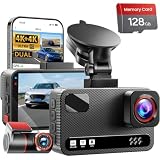
- 4K Front + 4K Rear — This front-and-rear dashcam features dual-channel recording, capturing footage simultaneously from both the front and rear cameras. The front camera records at a resolution of 3840x2160P, while the rear camera also records at 3840x2160P. Equipped with a 170° wide-angle lens in the front and a 150° wide-angle lens in the rear, it delivers clearer footage, balanced exposure, and reliable evidence—day or night
- Starlight-Level Sensor & Super Night Vision — With an f/1.5 large aperture and a 5-element optical lens, this dashcam captures clear, high-contrast video in any lighting conditions. WDR technology balances highlights and shadows, ensuring this dashcam delivers clear image quality with vivid colors and sharp details, even in poor lighting conditions
- Built-in 5.8GHz/ Download Speeds of Up to 20MB/s — With built-in dual-band 5GHz and 2.4GHz Wi-Fi, you can instantly view and manage your dashcam recordings on iPhone and Android smartphones via the dashcam app. You can preview, download, and play back videos in real time, view GPS data, and easily manage settings, making it simple to review recordings and share important moments
- Advanced Features — This dashcam offers a range of advanced features, including photo capture via the app, voice guidance, emergency video lock, loop recording, a collision sensor, and GPS positioning. Made from materials that withstand both extreme cold and heat, the device reliably records clear video across a wide temperature range
- 24/7 Parking Mode — In time-lapse recording mode, the device provides continuous monitoring over long periods. If an event occurs while the vehicle is parked, the collision sensor will record a full 1-minute video clip and securely lock it in the event folder, providing complete video evidence of the incident. (Requires the hard-wiring kit, ASIN: B0H8Y69RQC)
Android Auto, Apple CarPlay, and built-in Google Maps
Google Maps can display and announce reported incidents through supported in-car experiences, but the controls and behavior are not necessarily identical to the phone app.
- Android Auto and CarPlay: Results depend on the phone, Maps version, vehicle, audio routing, country, and connection. A setting changed on the phone may not appear one-for-one on the car screen.
- Google Maps built into the vehicle: The car’s version of Maps has its own interface and may depend on vehicle support, manufacturer configuration, connectivity, or a data plan.
- Sound: Check the car’s navigation or media volume and its selected audio source, not only the phone’s volume.
Consult Google’s documentation for Maps built into cars and supported Google built-in vehicles.
Independent reader supportYour contribution helps us test, update, and keep practical guides available for everyone.Google Maps versus Waze for camera alerts
Google Maps is a sensible choice if you already use it for routing and want incident warnings in the same app. Its reported-camera coverage remains data-dependent, regional, and incomplete.
Waze is worth considering if camera controls are your priority. Its current path is Settings → Alerts and reports → Reports → Cameras. Camera categories can have separate Show on map and Alert while driving controls. Waze says camera data comes from partners and map editors, so it can also miss cameras; its clearer controls do not make coverage guaranteed.
Use the Waze camera-alert help page for the current controls. Do not assume Waze is always more accurate—its main advantage here is an explicit camera-focused alert model.
Do these 3 things before closing this tab:
1Repair Windows errors before they cause bigger problems2Fix the driver behind crashes, sound loss and screen glitches3Clear out junk files and repair common Windows errorsFor iPhone users, Apple Maps supports incident reporting, including speed checks, in selected regions. Availability varies, so it is not a universal replacement for Google Maps camera alerts. See Apple’s guidance for CarPlay traffic reporting and traffic conditions and incidents.
Quick reference
| Task | Path |
|---|---|
| Enable incident and camera alerts | Settings → Navigation → Alert options |
| Enable Android speedometer | Settings → Navigation → Driving options → Speedometer |
| Enable iPhone/iPad speedometer | Settings → Navigation → Map display → Show speedometer |
| Report a mobile camera | Active navigation → Report → Mobile speed camera |
Safety and legal limits
Speed-camera warning laws differ substantially between jurisdictions and may be especially different when you cross an international border. Check local law before using the feature. Regardless of legality, Google Maps is an aid—not a complete or legally authoritative camera database.
Rank #4

- [4K+1080P Dual Recording] REDTIGER F7N TOUCH captures your drive journey in stunning 4K UHD resolution with STARVIS 2 sensor 170° wide-angle view for the front dash cam and 1080P FHD resolution 140° wide-angle for the rear car camera. Equipped with WDR and HDR technology, the enhanced super night vision ensures better visibility even in low-light situations, providing you with reliable recordings day and night.
- [Voice Control & Touch Screen] F7NTOUCH dashcam features voice commands, allowing for hands-free control of your 4K car camera, which enhances safety by minimizing distractions. The dual camera dash cam also has smart touchscreen that can lock emergency video, turn on wifi, and capture scenery with one click. Redtiger also retains the buttons, multiple control methods are integrated.
- [Built-in GPS & 5.8GHz WiFi] Both Android and IOS users can connect to dashcam WiFi via the REDTIGER Cam app. Although the dash cam is installed wired, you can enjoy wireless control on your smartphone, faster 20MB/s download speed and share your driving experiences in real-time with friends and insurance companies. Car recorder built-in GPS provides traceable location, speed, and accurate route in the recordings.
- [Loop Recording & G-Sensor] REDTIGER F7N TOUCH dual channel dash cam automatically overwrites the oldest footage when the memory is full, ensuring endless recording with the included 128GB card. With a built-in G-sensor that detects sudden movements or impacts, it automatically locks and protects the associated footage when an event is detected on the road, ensuring it won't be overwritten during loop recording.
- [24-hour Parking Monitoring*] REDTIGER Car dashboard camera offers G-Sensor Parking Mode that automatically record when it detects any collisions or sudden motion while vehicles is parked. Time Lapse Parking Mode provides continuous surveillance by offering a condensed overview of any events that may occur during parking periods. *Please note that the parking monitoring function requires a separate hardwire kit.
Follow posted signs, use the vehicle’s speedometer as the speed reference, and never adjust settings or submit reports by handling the phone while driving.
Frequently Asked Questions
Does Google Maps have a speed-camera alert switch?
Not as a clearly labeled universal switch. Enable Get alerts for reported incidents and other conditions that may impact your drive under Settings → Navigation → Alert options, then use active driving navigation.
Does turning on the Google Maps speedometer enable camera alerts?
No. The speedometer is a separate, informational speed-limit feature. Camera alerts come from reported incidents and available camera data.
Will Google Maps warn me about every speed camera?
No. Coverage depends on Google’s data, reports, region, active navigation, and alert conditions. A missing warning does not prove that a camera is absent.
Can Google Maps camera alerts work without an active route?
Do not rely on that behavior. Google’s official instructions describe incident alerts along an active driving route, so start navigation and tap Start.
The Bottom Line
Enable reported-incident alerts under Settings → Navigation → Alert options, start active navigation, and separately enable the speedometer if you want speed-limit feedback. Treat every alert—and every missing alert—as conditional, obey local law and posted signs, and never use your phone unsafely while driving.
Quick Recap
Product prices and availability are accurate as of the date/time indicated and are subject to change. Any price and availability information displayed on Amazon at the time of purchase will apply.




