Recommended Free Tools
F1 25 is available on Windows PC through Steam, the EA app and the Epic Games Store. It is a full-price racing game rather than a free-to-play title, and the PC version includes the same core career, multiplayer and story content as the console editions.
For a smooth installation, allow roughly 100 GB of storage, use a 64-bit version of Windows 10 or Windows 11, and install the latest graphics-driver update before launching. Steam and Epic purchases may also require the EA app and an EA account for activation and online features.
As an Amazon Associate I earn from qualifying purchases.
What is F1 25 on PC?
F1 25 is Codemasters’ official Formula 1 racing game, published by Electronic Arts. It includes the 2025 Formula 1 cars, drivers and teams, along with single-player and online modes built around circuit racing.
The main attractions are the third chapter of Braking Point, the redesigned My Team mode, Driver Career, two-player Career, online multiplayer and a range of assist and simulation settings. The game is designed to work with a standard controller, but a force-feedback wheel and pedals provide much more precise control over braking, throttle and steering.
#1 Best Overall
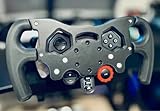
- Enhance Your Racing Experience: for F1 Racing Wheel Mod Kit for Logitech G29 G920 G923 is designed to elevate your simulation experience, delivering professional-grade upgrades tailored for sim racers and motorsports enthusiasts.
- Ergonomic Controls for Precision: Our advanced ergonomic controls ensure optimal comfort and responsiveness, allowing you to maneuver your virtual race car with the precision needed for competitive racing.
- Quick-Install Bracket: Featuring a user-friendly quick-install bracket, this mod kit allows for easy installation and removal, making it an ideal upgrade for both seasoned and novice sim racers.
- Premium Quality Materials: Crafted from high-quality materials, this F1 Racing Wheel Mod Kit is built to withstand intense racing sessions, ensuring durability and longevity for your gaming setup.
- Perfect Gift for Driving Enthusiasts: Whether you're shopping for yourself or looking for the perfect gift for a sim racer or motorsports lover, this mod kit is the ultimate choice to enhance any racing simulation rig.
How to download F1 25 on Windows
Steam
- Install and open the Steam desktop client.
- Sign in, then search the Store for F1 25.
- Choose the edition you want and complete the purchase.
- Open Library, select F1 25, and click Install.
- Choose an SSD or other installation drive with enough free space.
- Start the game from Steam. If prompted, sign in to or create an EA account and allow the EA app to open.
EA app
- Install the EA app from EA’s official website.
- Sign in with your EA account.
- Search for F1 25 in the Store.
- Buy the game or redeem an eligible code.
- Open Library, select F1 25, choose Download, and select the installation folder.
Epic Games Store
F1 25 can also be obtained through Epic Games. After purchase, Epic may hand the launch process over to the EA app. Link the requested Epic and EA accounts, then launch the game from either library.
There is no reason to download a cracked or “free full version” installer. Unofficial repacks can contain malware, fail to connect to EA services, and corrupt game files or saved careers.
PC requirements
The exact requirement list can change with patches and should be checked on the store page before buying. These are the practical targets generally associated with the Windows release:
| Component | Minimum target | More comfortable target |
|---|---|---|
| Operating system | 64-bit Windows 10 | 64-bit Windows 10 or Windows 11 |
| Processor | Intel Core i5-9600K or AMD Ryzen 5 2600X class | Six-core Intel or AMD Ryzen 7 class processor |
| Memory | 8 GB RAM | 16 GB RAM |
| Graphics | GeForce GTX 1060 6 GB or Radeon RX 590 class | GeForce RTX 2070 or Radeon RX 6700 XT class |
| DirectX | DirectX 12 | DirectX 12 |
| Storage | About 100 GB available | About 100 GB on an SSD |
Minimum specifications are not a promise of high settings or a locked frame rate. Large grids, wet-weather races, ray-traced effects and multiplayer sessions can place more demand on the processor and graphics card. An SSD is especially worthwhile because it reduces loading times and helps avoid running out of working space during updates.
F1 25 features worth knowing
Braking Point 3
Braking Point 3 continues the fictional Konnersport storyline through a sequence of races, objectives and cutscenes. It is more structured than a normal championship, so it is a good first mode if you want guided events rather than a long open-ended career.
Rank #2

- Upgrade Your Racing Experience: Transform your gaming setup with the F1-Style Racing Wheel Mod Kit for Logitech G29/G920/G923, delivering a professional simulator experience that enhances your gameplay
- Ergonomic Design for Comfort: Featuring ergonomic controls, this mod kit ensures a comfortable grip and optimal positioning, allowing you to focus on performance during extended racing sessions
- Quick-Install Bracket: The F1-Style Racing Wheel Mod Kit is equipped with a user-friendly quick-install bracket, making it easy to attach and detach without any hassle, so you can spend more time racing and less time setting up
- Durable Materials: Crafted from high-quality materials, this mod kit is designed for durability and long-lasting use, providing you with reliable performance on the track for all your racing adventures
- Satisfaction Guaranteed: Our F1-Style Racing Wheel Mod Kit comes with excellent after-sales support, ensuring you receive assistance and guidance for an enjoyable and seamless racing experience
My Team 2.0
My Team lets you operate a Formula 1 organisation instead of only driving as an individual. You manage the team, select drivers, develop facilities and make decisions that affect performance and finances. The updated structure gives the mode more emphasis on running the organisation as well as competing on track.
Driver Career and two-player Career
Driver Career covers the normal progression from practice and qualifying to contracts, team objectives and championship results. Two-player Career allows two people to progress through a shared season, whether they are cooperating or competing for the better result.
Reverse circuit layouts
F1 25 adds reverse-layout variations for selected circuits. These are not merely cosmetic changes: braking zones, corner sequences and overtaking opportunities are different when the lap is run in the opposite direction. They are useful for time trials and multiplayer because they make familiar tracks feel new.
Online racing and cross-play
PC players can race online against players on supported PlayStation and Xbox platforms through cross-play. The game includes ranked and unranked competition, events and leagues, although online availability depends on EA services and the relevant platform accounts.
Best first settings on a Windows gaming PC
- Run the in-game benchmark first. Record the average and minimum frame rates before changing several options at once.
- Use a sensible frame-rate limit. If your monitor runs at 120 Hz, a stable 120 or 60 fps is usually preferable to an unstable uncapped rate.
- Lower ray tracing before reducing texture quality. Ray-traced reflections and shadows can have a substantial performance cost. Texture quality is often less damaging if the graphics card has enough VRAM.
- Reduce crowd, mirror and particle settings if the CPU is struggling. A low GPU utilisation reading with inconsistent frame time often points to a processor or background-task limit rather than a graphics-quality problem.
- Enable DLSS or FSR only when needed. Use a quality preset first. Performance modes can make distant braking boards and trackside details look visibly softer.
- Calibrate the wheel before a race weekend. Go to Settings → Controls, Vibration & Force Feedback. Set steering saturation and pedal deadzones only high enough to remove unwanted input, then test the brake pedal in a practice session.
- Save a custom control profile. Create separate profiles for a wheel and controller. Otherwise, connecting a different device can leave you with incorrect steering, throttle or button assignments.
Controller, wheel and assist tips
A controller is perfectly usable, particularly with steering and throttle assists enabled. Start with lower steering sensitivity and increase it gradually; excessive sensitivity makes small corrections through fast corners difficult.
Rank #3

- COMPATIBILITY: Designed specifically for Logitech G29, G920, G923, and G929 racing wheels, offering a complete F1-style conversion kit with all necessary mounting hardware.
- AUTHENTIC DESIGN: Features a professional F1-style wheel layout with fully functional buttons and controls, maintaining all original wheel functionalities.
- COLOR OPTIONS: Available in multiple eye-catching colors to personalize your racing setup while maintaining professional aesthetics.
- EASY INSTALLATION: Includes all required hardware and mounting components for a straightforward modification of your existing racing wheel.
- RACING ENHANCEMENT: Transforms your standard racing wheel into a Formula-style controller for improved simulation experience and immersive gameplay.
For a wheel, begin with the manufacturer’s recommended rotation range and adjust the in-game steering lock rather than immediately applying extreme saturation. Set force feedback high enough to feel kerbs and loss of grip, but not so high that the wheel clips or becomes difficult to turn. If the car constantly pulls or the wheel feels heavy in a straight line, recalibrate and check that no duplicate controller profile is active.
The Tool Desk
Outbyte PC Repair FREEClear out junk files and repair common Windows errorsFree Scan →Outbyte Driver Updater FREEScan for outdated or missing drivers - takes under a minuteDriver Scan →Assists can be changed separately from the difficulty level. A useful progression is to keep automatic gears while learning a track, then move to manual gears, reduce braking assistance, and finally tune traction control. Turning every assist off at once is usually a poor way to learn a circuit.
Common Windows problems
| Problem | What to try |
|---|---|
| Steam says the game is running, but no window appears | Close Steam and the EA app completely, restart Windows, then launch again. Check that an overlay or security tool is not blocking the EA app. |
| EA account or activation error | Sign in to the EA app with the account linked to the store purchase. Avoid launching with a different EA account. |
| Missing or damaged files | In Steam, open Library → right-click F1 25 → Properties → Installed Files → Verify integrity of game files. In the EA app, use the game’s three-dot menu and choose Repair. |
| Stuttering after a driver or game update | Allow shader compilation to finish, restart the game, and test with overlays disabled. Recheck the benchmark after changing graphics drivers. |
| Wheel or controller is not detected | Connect the device before launching, update its firmware, remove duplicate bindings, and select the correct control preset under Settings → Controls, Vibration & Force Feedback. |
| Online session will not connect | Confirm that every player is fully updated, signed into EA services and using compatible cross-play settings. Restart the game after a failed matchmaking attempt. |
Edition and upgrade considerations
The standard edition is enough for the complete core game. A premium or Champions Edition may include early access, additional icons, cosmetics, points or other bonus content, depending on the offer and purchase date. Read the current store listing rather than assuming that every bonus is permanent or available in every mode.
PC purchases are tied to the store and EA accounts used at checkout. Check which account is linked before buying, especially if Steam or Epic automatically opens an EA login belonging to another household member.
FAQ
Is F1 25 available on Windows PC?
Yes. F1 25 is available for Windows through Steam, the EA app and the Epic Games Store. Online play requires an EA account and an internet connection.
Rank #4
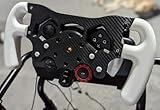
- Enhance Your Racing Experience: for Racing Wheel Mod Kit for Logitech G29 G920 G923 is designed to elevate your simulation experience, delivering professional-grade upgrades tailored for sim racers and motorsports enthusiasts.
- Ergonomic Controls for Precision: Our advanced ergonomic controls ensure optimal comfort and responsiveness, allowing you to maneuver your virtual race car with the precision needed for competitive racing.
- Quick-Install Bracket: Featuring a user-friendly quick-install bracket, this mod kit allows for easy installation and removal, making it an ideal upgrade for both seasoned and novice sim racers.
- Premium Quality Materials: Crafted from high-quality materials, this Racing Wheel Mod Kit is built to withstand intense racing sessions, ensuring durability and longevity for your gaming setup.
- Perfect Gift for Driving Enthusiasts: Whether you're shopping for yourself or looking for the perfect gift for a sim racer or motorsports lover, this mod kit is the ultimate choice to enhance any racing simulation rig.
Can F1 25 PC players race with console players?
Yes, supported online modes provide cross-play with PlayStation and Xbox players. Cross-play, account and privacy settings must allow the connection.
How much storage does F1 25 need on PC?
Plan for about 100 GB of free space and leave additional room for patches, temporary files and shader data. Installing on an SSD is recommended for faster loading.
Does F1 25 support a steering wheel?
Yes. It supports compatible PC wheels and pedals with force-feedback controls. Connect the wheel before launching, then configure it under Settings → Controls, Vibration & Force Feedback.
The Bottom Line
F1 25 is a substantial Windows racing game rather than a lightweight arcade download. Install it through Steam, the EA app or Epic, reserve around 100 GB on an SSD, and use a PC close to the recommended graphics target if you want stable performance in rain, large grids and online races. A controller works, but a properly calibrated wheel makes the braking and tyre-management model much easier to exploit.
Quick Recap
Product prices and availability are accurate as of the date/time indicated and are subject to change. Any price and availability information displayed on Amazon at the time of purchase will apply.




