If your electric scooter won’t charge, start with the outlet, cable connections, charger instructions, charging port, and temperature—not a replacement battery. A charging problem can come from the power supply, charger, port, temperature protection, battery, or charging circuit. Work through the external checks below; if they do not resolve it, contact the scooter’s manufacturer or an authorized service provider rather than opening the battery or bypassing its protection.
Start with the simple, safe checks
Before diagnosing a component, make sure the scooter is being charged under the conditions specified for its exact make and model. Charger lights and temperature limits are not universal codes: the same color or temperature can mean something different on another scooter.
As an Amazon Associate I earn from qualifying purchases.
- Check the wall outlet. Try an outlet you know works. If the charger uses a separate mains lead, check that it is firmly seated in the adapter.
- Check the scooter connection. Seat the adapter plug in the scooter’s charging port as described in the manual. Follow the maker’s instructions for connection order and for what the scooter should display while charging.
- Look at the charger indicator. Use the manual or the manufacturer’s support instructions for your model to interpret it. Treat the light as a clue, not a universal fault code.
- Inspect the port from the outside. Check for visible obstruction or damage, and make sure the port cover is not in the way. The plug should seat normally; do not force it or probe the contacts.
- Consider temperature and recent storage. If the scooter was recently ridden or kept in cold conditions, check the model’s charging-temperature guidance before trying again.
These checks can help distinguish a connection or environmental issue from a fault that needs service. They cannot confirm the condition of an internal battery or charging circuit.
Keep the sequence simple: verify the power source and connections first, then check the maker’s instructions for the indicator and charging conditions. This avoids treating one symptom—such as a green light—as proof that a particular part has failed. If a plug will not fit normally, a port appears damaged, or the next step would involve opening the scooter, stop and seek model-specific guidance instead.
#1 Best Overall
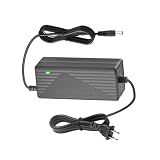
- 【Charger for 36V Battery】 Input: 100-240V 50/60Hz ; Output: 42V 2A .The Connector Size: 5.5 mm , 1-prong DC plug. Suitable for battery voltage of 36V and 1-prong.
- 【Universal Application】Compatible with JETSON GOTRAX GXL DLX V2, G2, G3, G4, Apex, Glider, XR Elite, XR Ultra,G MAX Ultra, Jeton Bolt Pro electrick, Hiboy S2 Pro, Rival 36V Lithium-ion Battery. The Charger is only suitable for 36V lithium battery, NOT for 29.4V /25.2V/ 24V batteries or lower.
- 【Charger Compatibility】go trax charger G2 G3 G4,GXL V2,Rival,XR Ultra/Elite,Apex, Glider,Bolt/Bolt Pro/Adventure/Metro/Journey/LX10/J5/J8,Jetson Eris Pro/Ora Pro/Racer/Rhythm charger
- 【Reliable with High quality】The oxygen-free copper cooling system makes it heat-conductive, fast in heat dissipation and long in service life. The socket head is made of pure copper and is plated with nickel to prevent oxidation, plugging and sparking, and high temperature resistance.
- 【Security Protection Mechanism 】 The electric charger is made of ABS fireproof material,built-in smart chip can give you full-side protection, Including Protection against Over-Heated/Over-Current/Over-Voltage/Short-Circuit.
What the charger light can—and cannot—tell you
Indicator behavior depends on the scooter and charger. A green light does not always mean the same thing, so first identify whether the maker’s instructions describe the charger by itself, the scooter while connected, or the scooter’s charging status.
Use a model-specific charger test
Xiaomi’s Electric Scooter 4 Go FAQ describes a test in which you disconnect the charger from the scooter and plug it into the wall. In that test, a green light indicates that the charger is not defective. That result applies to the 4 Go’s specified test; it should not be treated as a universal rule for other scooters or other indicator states.
Interpret a charging-state message in context
The same Xiaomi 4 Go FAQ says: “If the light is green, the scooter is not charging; please move it to a warmer environment and try charging again.” This is manufacturer guidance for that model and situation, not a general decoding rule. If your scooter’s light stays green, check its own support instructions before concluding that the charger or battery has failed.
Free tools Windows power users keep installed
One-click scans. No signup required.
The two green-light descriptions are not contradictory: one concerns the charger connected to the wall but disconnected from the scooter, while the other describes a scooter that is not charging and may need a warmer environment. The test setup and the exact model matter. Do not copy the 4 Go test or its interpretation to another charger unless that scooter’s manufacturer says to do so.
If the light does not match the documented behavior, or the scooter gives no sign of charging after the connection and temperature checks, note the exact indicator state and any display message. That information can help manufacturer support or a service technician narrow down the fault. If there are separate indicator descriptions for the adapter and scooter, record which one you observed and how everything was connected at the time.
Check the charging port without damaging it
A blocked or damaged port may prevent the plug from making a reliable connection. Inspect it with the scooter unplugged and rely on what you can see from the outside. Confirm that a port cover is clear and that the plug can seat normally.
- Do not force a plug that will not fit or seat.
- Do not put tools or other objects into the port or touch its contacts.
- If the port looks damaged, or the plug feels loose or will not seat normally, stop trying to charge and contact the manufacturer or an authorized service provider.
A visible problem is a reason to seek service, not proof that the port is the only fault. Charging-port and charging-circuit diagnosis can require model-specific procedures. Do not assume that a blocked-looking port should be cleared by inserting an object or that a loose connection can be corrected by pushing harder; the safe check here is visual and external.
Check whether temperature protection is stopping charging
Scooters may inhibit charging when the battery is too cold or too hot. The permitted range and the point at which protection releases vary by model, so do not use another scooter’s threshold as your own. If the scooter was just ridden or stored in cold conditions, let it reach the charging conditions specified by its manufacturer before retrying.
| Model and manufacturer guidance | Published charging-temperature detail | What to take from it |
|---|---|---|
| Xiaomi Electric Scooter 4 Go | Its current FAQ says low-temperature protection activates below 2°C and releases at 7°C. | Use the 4 Go’s stated activation and release points only for this model. |
| Xiaomi Electric Scooter 5 Max | Its current UK FAQ says low-temperature protection activates below 2°C and releases at 5°C. For a hot scooter or elevated battery temperature, it suggests cooling for at least 30 minutes before plugging in. | Follow the 5 Max instructions; its release point differs from the 4 Go’s. |
| Navee V25i Pro | Its FAQ states an allowable battery charging temperature range of 0–45°C. | This is the stated range for the V25i Pro, not a general scooter specification. |
These figures are manufacturer instructions for the named models, not a universal standard or a comparative test. If your scooter is not one of them, look up its own manual or support page rather than inferring a threshold from this table. Notice that Xiaomi’s two examples have the same stated low-temperature activation point but different release points; even figures from the same brand should not be blended into one rule.
For the 5 Max, the stated cooling advice is at least 30 minutes after a hot ride or elevated battery temperature. That is not a substitute for checking the 5 Max guidance or a cooling-time rule for other models. If the scooter remains outside its documented range, wait until it reaches the recommended conditions rather than repeatedly reconnecting it to test whether the protection has released.
If the scooter has been stored for a long time
Prolonged non-use can leave a scooter battery deeply discharged. Xiaomi warns that complete battery drainage after extended storage can cause permanent damage. If a scooter that has been unused for a long period will not charge, repeated attempts or an improvised “wake-up” technique are not a safe substitute for diagnosis.
Recommended Free Tools
Do not bypass battery protection, open the battery pack, or apply power by an unapproved method. If the scooter remains unresponsive after you have confirmed the outlet, connections, port condition, and model-specific temperature conditions, contact the maker or authorized service. A battery may need assessment, and an external check cannot establish whether deep discharge has caused damage.
When describing a storage-related problem, include roughly how long the scooter was unused and whether it was kept in cold conditions. This helps support distinguish the circumstances without implying that storage alone proves the battery is damaged. Follow the maker’s storage and charging instructions for that model; do not assume that a scooter can be recovered safely by leaving it connected indefinitely or by trying an unapproved charger.
When the remaining fault needs service
If the ordinary external checks do not restore charging, the cause may be an internal battery fault, a fuse, the charging port, or the charging circuit. These possibilities cannot be distinguished reliably by charger-light color alone. Internal diagnosis and repair vary by scooter model.
Rank #2

- Output: 42V 2A, Input: AC 100V - 240V, 8ft extra long enough power cord
- Compatibility: Fits for GOTRAX GXL V2, G4, G3, G2, XR Elite, XR Ultra, Apex, Glider, fit for GOTRAX 36V Lithium-ion Battery
- NOTE: Not for 3-Prong Connector, Not for 29.4V , 25.2V , 24V version
- Security & Protection: The Replacement GOTRAX Scooter charger has undergone strict quality control procedures and is equipped with various safety protections to provide over-voltage, over-load, over-current, short circuit protection
- 30 days refund, 12-months worry free warranty. If you have any quality problems, please contact us
Apollo publishes fuse and charging-port checks for its own scooters, including advanced measurements. Those instructions are model-specific, not a general DIY procedure for other brands. Do not treat an online procedure for a different scooter as a safe diagnostic shortcut. Use the manufacturer’s support channel or an authorized service provider when the port is damaged, the charging behavior remains abnormal, or diagnosis would require opening the scooter or measuring internal components.
For unresolved issues, manufacturer support or an authorized service provider is the relevant next step; there is no universal repair procedure that applies to every scooter. If the scooter is under warranty, ask the manufacturer or seller about the applicable coverage before attempting a repair or authorizing work. Warranty terms and service availability depend on the specific product and seller, so check the terms that came with your scooter rather than assuming coverage.
Before contacting support, record the scooter’s exact make and model, what happens when you connect the charger, the indicator behavior, whether the scooter was recently ridden or stored in cold conditions, and how long it had been unused. Describe the checks you performed without dismantling anything. This gives the service provider useful context while avoiding assumptions about which component has failed.
There is no reliable cost estimate to give without knowing the model, fault, warranty status, and local service options. Ask the manufacturer or service provider for a diagnosis and quote before agreeing to parts or labor. Avoid buying a battery, fuse, charging port, or diagnostic tool on the assumption that it is a universal fix: internal parts and repair steps vary by scooter.
Independent reader supportYour contribution helps us test, update, and keep practical guides available for everyone.Only replace the charger after checking compatibility
Consider a replacement charger only when the charger itself is implicated by the manufacturer’s model-specific test or by service diagnosis. Match it to the exact scooter make and model using the manufacturer’s compatibility information. Check the specified connector and output ratings, and confirm that the charger is officially approved for that scooter.
A plug that appears to fit is not enough to establish compatibility. The available manufacturer guidance does not establish one charger as suitable across scooter brands or models. If the charger test is inconclusive, replacing it at random may not fix a fault in the outlet, port, battery, or charging circuit.
When comparing replacement options, use the manufacturer’s compatibility information as the starting point—not just connector appearance or a generic listing that says it fits electric scooters. Confirm the exact model, the connector, the output ratings required by the manufacturer, and official approval. If those details cannot be confirmed, ask the manufacturer or an authorized provider before buying. A replacement charger is appropriate only when it is actually implicated; it is not a substitute for diagnosing a damaged port or internal battery fault.
Frequently Asked Questions
My electric scooter charger light stays green. Does that mean the charger is bad?
Not necessarily. Indicator meanings depend on the model and whether the charger is connected to the scooter. Xiaomi’s Electric Scooter 4 Go FAQ says a green light during its specified wall-only charger test indicates the charger is not defective; it separately says a green light can mean the scooter is not charging and advises moving it to a warmer environment. Check your exact model’s instructions before drawing a conclusion.
Can I charge my scooter with a charger from another brand?
Do not assume compatibility because the plug fits. Use a charger approved for your exact make and model, and confirm the connector and output ratings required by the manufacturer. If the manufacturer’s compatibility information is unclear, ask support or an authorized service provider rather than testing a generic charger.
The Tool Desk
Outbyte PC Repair FREEClear out junk files and repair common Windows errorsFree Scan →Outbyte Driver Updater FREEFix the driver behind crashes, sound loss and screen glitchesFind Drivers →My scooter will not charge after being stored. Can I wake the battery up?
Do not use an improvised wake-up method, bypass battery protection, or open the battery pack. Xiaomi warns that prolonged non-use can lead to complete battery drainage and permanent damage. After checking the outlet, connections, port externally, and your model’s temperature conditions, contact the manufacturer or authorized service if the scooter remains unresponsive.
What temperature is too cold or too hot to charge an electric scooter?
The limit is model-specific. For example, Xiaomi lists low-temperature protection below 2°C for the 4 Go and 5 Max, with different release temperatures; Navee gives a 0–45°C charging range for the V25i Pro. Follow the range and retry guidance for your own scooter rather than applying another model’s figures.
Should I replace the battery, port, or fuse if external checks do not work?
Not without a model-specific diagnosis. A battery, fuse, port, or charging circuit may be involved, and charger-light color alone cannot identify the failed part. Ask the manufacturer or an authorized service provider to diagnose persistent faults before buying parts or attempting an internal repair.
The Bottom Line
Check the known-working outlet, seated connections, model-specific indicator instructions, visible port condition, and charging-temperature guidance. If the scooter still will not charge—especially after prolonged storage, or if the port is damaged—stop short of opening it or improvising a battery recovery. Get manufacturer or authorized-service guidance, and replace a charger only when it is implicated and confirmed compatible with the exact scooter model.
What’s actually slowing this PC down?
Pick the symptom - the matching free tool is one click away.
Quick Recap
Product prices and availability are accurate as of the date/time indicated and are subject to change. Any price and availability information displayed on Amazon at the time of purchase will apply.




