Turn the scooter off, verify the outlet and charger connections, inspect the charging port for contamination or damage, and check the battery temperature against your model’s manual. Those non-invasive checks resolve many no-charge symptoms. Do not open the battery, bypass its protection circuitry, or force-charge it. If a connection is melted, bent, discolored, loose, or persistently fails after the manufacturer’s checks, stop and contact the manufacturer or an authorized repair provider.
Charging behavior is model-specific. A green charger lamp can mean “full” on one scooter and “not charging” on another, while temperature limits differ substantially. The examples below show how to narrow the fault without treating one brand’s instructions as universal.
As an Amazon Associate I earn from qualifying purchases.
What should I check first?
Work through the checks in order. Keep the charger disconnected from the scooter while inspecting the port, and never use a metal object to scrape contacts.
- Switch the scooter off. A powered-down scooter is the correct starting condition for the basic checks in manufacturer support instructions.
- Confirm wall power. Plug a lamp or another known-working device into the outlet, or use another outlet you know is live.
- Check the charger assembly. Make sure the mains cable is fully seated in the charger brick and that the charger’s indicator behaves as described in your manual.
- Seat the scooter connection. Push the charger plug firmly into the scooter’s charging port without forcing it. A loose connection is a documented cause of no-charge symptoms.
- Inspect before reconnecting. Look into the plug and port for dust, grit, corrosion, bent pins, looseness, discoloration, or melted plastic. Do not charge if you see damage.
- Check temperature and recent use. A battery that is outside its permitted charging range may refuse to charge. Let a hot or cold scooter rest indoors before trying again.
- Consider storage history. A scooter left unused for a long period can become deeply over-discharged. Do not try to “wake” it by bypassing protections; arrange manufacturer or authorized service if normal checks fail.
Document what you observe: the scooter’s exact model, whether it was recently ridden or stored, the charger-lamp color, and whether the lamp changes when the plug is connected. This information helps support staff distinguish a connection issue from a charger or battery fault.
#1 Best Overall

- 24V 2A SLA Battery Charger with 3-Pin XLR Connector – 24 Volt 2 Amp (2000mA) Automatic Battery Charger Designed for Compatible Mobility Scooters and Power Chairs Using 24V Sealed Lead Acid (SLA/AGM) Battery Systems.
- Compatible with Popular Mobility Scooters & Power Chairs – Compatible Replacement Charger for Select Pride Mobility, GoGo Elite Traveller, Jazzy Power Chair, Drive Medical, and ShopRider Models Using a Standard 3-Pin XLR Charging Port. Also Compatible with Many 24V Electric Scooters and Select Electric Bicycles Including Currie, Schwinn, GT, eZip, and IZIP Models.
- Fully Automatic Charging Operation – Smart Charging System Automatically Transitions from Active Charging to Maintenance Mode During Operation. Red Indicator Light Shows Charging in Progress and Green Indicator Light Indicates Batteries Are Fully Charged or Charger Is in Standby Mode.
- Designed for 24V Sealed Lead Acid Battery Systems Only – Compatible ONLY with 24V SLA/AGM Battery Systems Using a Standard 3-Pin XLR Charging Port. NOT Compatible with Other Battery Types.
- Electrical Specifications & Charging Features – Input: AC 100-120V 50/60Hz, Output: 24V 2A (2000mA), Connector Type: 3-Pin XLR Male, Cord Length: Approximately 8.9 Feet. Designed for Compatible 24V SLA/AGM Battery Systems. Built-In Short Circuit, Reverse Polarity, and Over-Current Protection Features.
Why an electric scooter may not charge
Outlet, cable, or loose connection
The simplest failure is an interrupted power path. Xiaomi identifies a loose connection as a cause for the Electric Scooter 6 Pro, while NIU advises checking that the charging port is clean. A cable can look connected while its plug is only partially inserted, and a damaged mains lead can prevent the charger brick from receiving power.
Disconnect everything, inspect each end, and reconnect in the sequence specified by your manual. Do not wiggle a plug to maintain contact, use an extension arrangement that the manufacturer prohibits, or continue when the connection becomes hot, intermittent, or loose.
Contamination or physical damage in the port
Road dust, moisture residue, corrosion, or a bent contact can stop the charger from making a safe electrical connection. With the charger unplugged, use a light to inspect the port. Do not push a pin, knife, screwdriver, or other metal tool into it. If debris cannot be removed without probing the contacts, have the port serviced.
Free tools Windows power users keep installed
One-click scans. No signup required.
Apollo’s charging guidance says not to charge when visible damage is present and to contact support. Treat melted plastic, a burnt smell, darkened contacts, a bent pin, or a port that moves in its housing as a stop condition rather than a cleaning task.
Charger-indicator confusion
Red, green, blinking, and unlit indicators do not have universal meanings. They are programmed and labeled by the scooter or charger manufacturer. Apollo notes that green may mean the battery is full or that the charger is not charging; its instructions tell owners to check the battery level and all connections rather than assume green is normal.
NIU gives a different diagnostic example: when its charger is connected to the wall but not to the scooter, a red or unlit indicator may indicate charger damage. That interpretation belongs to the applicable NIU charger and should not be transferred to another model.
Rank #2

- 【Charger Specifications】:Input: 100-240V 50/60Hz ; Output: 54.6V 1.5A. PLEASE NOTE: 1.Only for the Device that has a 48V 13S Li-ion battery pack.(NOT for 24V 25V 29.4V 36V 42V or other !) 2.Don’t use it for Lead Acid battery pack!
- 【Universal 5 Plugs Charger】:This battary charger comes with 5 types of plugs for true versatility: 5.5x2.5/2.1mm +4 converters(1-prong DC, 0.47in Standard 3-Prong Connector, 18mm RCA and 3-Pin Male XLR Connector, Universal IEC plug) Suitable for most 48V 13S Lithium Battery Devicet.
- 【Safe and Reliable】:UL Certified, The universal power adapter has been tested and confirmed provide overvoltage protection, overcurrent protection, short circuit protection, temperature protection to ensure safe and available.
- 【Indicator Light】:Red light when charging, green light when fully charged. Fast charge with high current. Just plug in and it will maintain the battery automatically.
- 【Great Service】The battery charger is made with high quality materials and sold under strict quality control. Please rest assured to purchase. if you have any qustions about our charger, we will provide you refund or other satisfactory solution!
How to read the charger light correctly
Use the exact owner’s manual or support page for your scooter. Record the lamp state in two conditions: charger connected to the wall only, and charger connected to both the wall and the switched-off scooter. Then compare those observations with the model’s documented meanings.
What’s actually slowing this PC down?
Pick the symptom - the matching free tool is one click away.
| Observed situation | What it can mean | How to proceed |
|---|---|---|
| Green lamp | Full battery or not charging, depending on model | Check the battery display, plug seating, and model instructions; do not assume charging is occurring. |
| Red lamp | Charging on some models; a charger fault in another test condition | Compare with the manual and note whether the lamp changes when connected to the scooter. |
| Blinking lamp | Model-specific charging or fault state | Use the manufacturer’s indicator table rather than a generic online code. |
| No lamp | No mains power, a failed charger, or a model-specific normal state | Verify the outlet and cable, then follow the manufacturer’s charger test guidance. |
If the manufacturer authorizes a second-charger test, use only a charger specified for that exact scooter model. “Same plug” is not proof of electrical compatibility. The U.S. Consumer Product Safety Commission (CPSC) advises using only the supplied charger, and a substitute should be considered only when the manufacturer explicitly approves it.
Check the battery temperature before charging
Temperature protection can prevent charging without indicating a permanently failed battery. The allowable range is not a universal scooter specification.
| Model guidance | Published charging-temperature information | Practical response |
|---|---|---|
| Xiaomi Electric Scooter 6 Pro | 8–40°C, according to Xiaomi support guidance; publication date not shown | Move the scooter to a location within that range and allow it to stabilize before retrying. |
| Xiaomi Electric Scooter 4 Lite (2nd Gen) | Low-temperature protection activates below 2°C and deactivates at 7°C; Xiaomi also recommends waiting at least 30 minutes after high battery temperature. Publication date not shown. | Bring the scooter indoors, wait for the stated recovery condition, and follow the model’s instructions. |
| NAVEE V25 Pro | 0–45°C, according to NAVEE support guidance; publication date not shown | If outside that range, NAVEE recommends letting the scooter rest indoors for more than 30 minutes before trying again. |
These figures describe the named models only. Do not use the 8–40°C, 0–45°C, or 2°C/7°C values as a generic rule for another scooter. Your manual may specify a different charging range, recovery delay, or storage requirement.
If the scooter was just ridden
A warm battery may need to cool before charging. Park it in a dry, ventilated indoor location away from heaters and direct sun. Do not accelerate cooling with ice, water, or refrigeration; condensation and moisture can create a separate hazard.
Quick wins for a faster PC:
Clear out junk files and repair common Windows errorsFree Scan →Fix the driver behind crashes, sound loss and screen glitchesFind Drivers →If the scooter was stored in the cold
Let it reach the manufacturer’s permitted range naturally. Do not connect a frozen or very cold pack and attempt to overcome the protection circuit with a different power source.
Rank #3

- 48V Ebike Charger with 54.6V 2A output, specially designed for 13S 48V lithium battery packs
- Fast charging technology delivers high efficiency and greatly reduces waiting time for electric bike charging
- Equipped with 5 interchangeable plugs to fit most common electric bike connector types
- Wide compatibility with electric bicycles, ebikes, one wheel, scooters, and Rad Power Bike models
- Built-in multiple smart safety protections against over-voltage, over-current, short circuit and overheating
Could long storage have over-discharged the battery?
Yes. Xiaomi states that extended periods without use or charging can over-discharge a battery and prevent normal charging. Its Electric Scooter 4 Lite (2nd Gen) FAQ warns that prolonged non-use can cause complete drainage and permanent damage.
There is no safe, universal “battery wake-up” trick. Do not connect another battery, apply power through exposed leads, bypass a battery-management system (BMS), or open the pack. Those actions defeat protections intended for the cells and can turn a service problem into a fire or shock hazard.
Tell support how long the scooter was stored, whether it was stored fully charged or nearly empty, and whether it was exposed to freezing or high heat. The manufacturer can determine whether a controlled recovery attempt is permitted or whether the pack requires replacement by an approved provider.
Do these 3 things before closing this tab:
1Clear out junk files and repair common Windows errors2Fix the driver behind crashes, sound loss and screen glitches3Repair Windows errors before they cause bigger problemsWhat if the charger and port look fine?
Once the outlet, connections, port condition, indicator behavior, and temperature have been checked, persistent failure points toward a charger, wiring, charging-port, BMS, or battery problem. The symptom alone cannot identify which part has failed.
When a second charger is a valid test
A second charger is useful only when the manufacturer specifies it for the exact model and confirms that the test is appropriate. Use the same electrical specifications and connector required by the scooter. Do not borrow a visually similar charger from another scooter, even if it fits.
When a digital multimeter may help
Apollo documents multimeter checks for technicians or owners already skilled in electrical measurement. Those procedures include checking charger output and checking continuity at the charging port. In Apollo’s diagnostic logic, charger output with no corresponding port voltage can indicate a cable or port fault; port voltage without battery charging can indicate a BMS or battery fault.
Rank #4
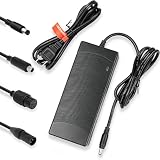
- Plug-and-play design, easy to operate, ideal as a direct replacement charger for original scooter battery chargers.
- 42V 2A fast charger specially designed for 36V 10S lithium-ion batteries, providing stable and efficient charging performance for electric scooters.
- Equipped with 3 different interchangeable connectors to fit multiple charging ports and maximize compatibility with various electric ride-ons.
- Wide compatibility with Pocket Mod, Sports Mod, electric scooters, e-bikes, hoverboards and most 36V lithium battery powered devices.
- Built-in intelligent safety protection system including over-voltage, over-current, short circuit, overheating and reverse polarity protection.
This is advanced diagnosis, not a required first step. A multimeter can expose live electrical points and a wrong setting or probe placement can cause a short. If you are not experienced with DC measurements and continuity testing, stop at the non-invasive checks and use an authorized technician. Never open the battery enclosure or measure exposed cell connections as a substitute for service.
Windows Errors? Fix Them Before They Spread
Repair common Windows errors and clear accumulated junk for a smoother, more stable PC - no reinstall needed.Free scan · no reinstallCrashes, No Sound, or Screen Glitches?
Random freezes, missing sound and display glitches usually trace back to one bad driver. Find and replace yours safely.Free scan · under a minuteSafety rules while troubleshooting
The CPSC’s micromobility charging safety PSA of September 4, 2025 states: “Always be present when charging micromobility products, never while sleeping, and only use the supplied charger.” Apply that rule during every test charge.
- Charge in the location and conditions specified by the manufacturer, away from combustible clutter.
- Remain present; never leave a scooter charging while asleep or away from home.
- Use the supplied charger, or a replacement explicitly approved for the exact model.
- Unplug the charger when charging is complete.
- Stop immediately for smoke, unusual heat, hissing, a chemical odor, swelling, melted plastic, discoloration, or sparking. Move away and contact emergency services if there is an active fire; do not handle a damaged pack.
- Use only approved replacement battery packs. Do not use packs modified or reworked by unqualified personnel, or packs assembled from repurposed or used cells.
A charger that becomes abnormally hot, has a damaged cable, or produces an unexplained smell should not be used for another test. Mark it out of service and ask the manufacturer or an authorized provider about inspection or replacement.
When to stop troubleshooting and seek service
Escalate to the manufacturer’s after-sales team or an authorized repair provider when any of these conditions applies:
- The plug or port is bent, melted, corroded, discolored, loose, or visibly burnt.
- The scooter still refuses to charge after the outlet, connections, indicator instructions, and temperature checks.
- The charger indicator behavior does not match the model’s documented states.
- The scooter has been stored for a prolonged period and may be completely discharged.
- The battery is swollen, unusually hot, leaking, smells abnormal, or has suffered impact or water exposure.
- Diagnosis would require opening the deck, battery enclosure, charger, or BMS wiring.
Xiaomi directs owners to after-sales service when its Electric Scooter 6 Pro checks do not resolve the problem. NAVEE similarly directs owners to official or authorized repair support when its V25 Pro troubleshooting steps fail. Follow the equivalent route for your own brand and region; warranty coverage, parts availability, and repair prices cannot be established from the symptom alone.
The Tool Desk
Outbyte PC Repair FREERepair Windows errors before they cause bigger problemsFix Now →Outbyte Driver Updater FREEFix the driver behind crashes, sound loss and screen glitchesFind Drivers →A symptom-based decision guide
| What you observe | Most useful next action |
|---|---|
| No charger light at a known-working outlet | Check the mains cable and charger condition, then consult the model’s charger-fault instructions. Do not open the charger. |
| Light is normal until the plug is inserted, then changes unexpectedly | Power off, inspect and reseat the plug, and check the port for contamination or damage. Stop if the port is loose or discolored. |
| Green light but the battery level does not rise | Use the exact model’s meaning for green; Apollo documents that green can mean full or not charging. Verify the battery display and connections. |
| Charging is refused after a hot ride or cold storage | Allow the scooter to reach its model-specific charging range. Use the documented recovery delay, such as Xiaomi’s 30-minute recommendation after high temperature or NAVEE’s more-than-30-minute indoor rest. |
| Failure began after months without charging | Suspect over-discharge and contact support. Do not bypass the BMS or force-charge the pack. |
| Basic checks pass but charging still fails | Arrange authorized diagnosis; a charger, port, wiring, BMS, or battery fault may require internal testing. |
Preventing another no-charge situation
- Follow the storage and charging schedule in the owner’s manual instead of leaving the scooter unused indefinitely.
- Keep the charging port covered as designed and dry before connecting the charger.
- Inspect the plug and cable periodically for strain, cuts, discoloration, or looseness.
- Use only the charger supplied or explicitly approved for the exact model.
- Charge while present and unplug when complete, as advised by the CPSC.
- Record the model, charger specification, and any indicator codes before contacting support; precise information speeds diagnosis.
Bottom line
Start with power, connections, port condition, charger-indicator instructions, and battery temperature. Those checks are safe and model-agnostic; the indicator meanings, temperature limits, and approved replacement parts are not. A scooter that remains unable to charge, or shows any physical battery or connector damage, needs manufacturer or authorized service—not a bypass, improvised charger, or opened battery pack.
Quick Recap
Product prices and availability are accurate as of the date/time indicated and are subject to change. Any price and availability information displayed on Amazon at the time of purchase will apply.




