Outdated Drivers Are Slowing You Down
One free scan finds every outdated or missing driver and matches the right update for your exact hardware.Free scan · exact hardware matchPC Slower Than It Used to Be?
A free scan shows the junk files, broken settings and background clutter dragging Windows down - then fixes them in one click.Free scan · Windows 10 & 11Sometimes. A purpose-built 360-degree dash camera can record continuously while the engine is running, and some factory systems can save footage from their surround-view cameras. However, the 360-degree image shown on a parking-assist screen is usually only a live, stitched view. It should not be treated as proof that video is being stored.
The answer depends on your vehicle or camera, trim level, model year, settings, storage device, accessories and region. Look in the owner’s manual for terms such as “record,” “dash cam,” “Surround Vision Recorder” or “parking recording” before assuming footage exists.
As an Amazon Associate I earn from qualifying purchases.
First, identify which kind of 360-degree camera you have
“360-degree camera” describes several different systems. They may use similar wide-angle lenses but have very different recording functions.
What’s actually slowing this PC down?
Pick the symptom - the matching free tool is one click away.
Parking-assist surround view
A surround-view system combines images from several wide-angle cameras into a simulated overhead or three-dimensional view. It is designed to help you judge the car’s position near other vehicles, walls and kerbs. The image is normally displayed on the infotainment screen only while the relevant parking functions are active.
#1 Best Overall

- True 4-Channel 360° Coverage – IIWEY N6 simultaneously records STARVIS 2K (1440p) video from the front, rear, and both sides for all-around coverage. Ultra-wide viewing angles (170° front/rear, 150° sides) and adjustable side cameras help reduce blind spots, while infrared night vision improves nighttime visibility. Vision Enhance tech helps capture clearer license plates and lane markings at intersections—ideal for commuting, rideshare, and fleet use. (CPL Filter: ASIN B0G4R35S76).
- Note: This Dash Cam is Wired and Does Not Have A Built-In Battery. This dash camera must be connected to vehicle power source when in use, you can use the car charger included in the box, or you can buy the hardwire kit to connect to car fuse to use (ASIN: B0DHJNRPB9, for 24/7 parking mode). Please confirm this requirement before purchase to avoid misunderstanding.
- 48-Hour Parking Surveillance (Hardwire Required) – Two smart modes guard your vehicle with the ignition off. 1,Time-Lapse at 1/3/5 fps records continuously for up to ~48 hours while conserving storage. 2,Impact Detection auto-captures and locks a 10-second clip on bumps or tampering. Parking Mode requires the IIWEY hardwire kit (ASIN B0DHJNRPB9; sold separately, not included). If no need Parking Mode, the included car charger is sufficient for daily driving use.
- Wi-Fi 6 (5.8 Ghz) Speed + Built-In GPS – Up to ~20 MB/s for fast in-app preview/download and quick sharing (also supports 2.4 GHz). GPS logs speed and route for playback on map in the iOS/Android app or PC viewer. Tip: long-press “◀” to enable Wi-Fi; auto-off after ~5 min helps reduce heat and power draw. N6 dash cam and hardwire kit fit for turck, car, suv and etc.
- Loop Recording + 128 Gb Card Included – Ready to use out of the box. Seamless loop saves in manageable segments and overwrites the oldest files when full, so recording never stops. G-Sensor Emergency Lock protects critical clips from overwrite during sudden braking or collisions.
For example, the 2025 Kia owner manual documents top, front, side, wide and rear views. Its top view is created from four wide-angle cameras, and the displayed view switches off above 10 km/h (6 mph) in the conditions described by that manual. Those details describe a parking display, not a built-in video archive. A live image on the screen does not establish that any camera feed is being written to a memory card or drive.
A factory recorder that uses surround-view cameras
Some vehicles add a separate recorder application. Chevrolet’s Surround Vision Recorder is an example: on equipped vehicles, it can record, view and save footage from the Surround Vision cameras while the vehicle is on. This is an additional recording feature, not an automatic consequence of having a surround-view display.
An aftermarket 360-degree dash camera
A dedicated dash camera is built to save video. Its operating modes, file handling, resolution and parking functions are specified separately from any factory parking display. CARMATE’s d’Action 360 DC3000, for instance, starts continuous Drive Mode recording when the engine turns on and stops when it turns off.
Do these 3 things before closing this tab:
1Clear out junk files and repair common Windows errors2Fix the driver behind crashes, sound loss and screen glitches3Repair Windows errors before they cause bigger problemsDocumented examples: what records and under which conditions?
| System | Driving capture | Storage and file behavior | Important limits or requirements |
|---|---|---|---|
| CARMATE d’Action 360 DC3000 | Continuous recording from engine-on to engine-off; manual and impact recording are also available. | One file is saved each minute. When the folder is full, the newest file overwrites the oldest. | 360° horizontal and 194° vertical coverage. Driving continuous and impact modes are limited to 1440×1440 Full HD equivalent, although the specification lists 2880×2880 as 4K equivalent. Uses 16–128 GB UHS-I microSDHC/microSDXC cards rated UHS Speed Class 3 or higher; at least 30 MB/sec is required for simultaneous continuous and impact recording or 4K-equivalent recording. |
| Chevrolet Surround Vision Recorder | Records footage from equipped Surround Vision cameras while the vehicle is on. | Uses a customer-supplied USB drive that meets the vehicle’s requirements. Trips are saved as separate videos in two-hour loops; footage can be exported from individual camera views. | Availability varies by vehicle. The Recordings app is accessed with the vehicle on and in Park. The system does not record audio, and video is accessible through the USB drive. Some vehicles can save a 30-second security clip when an alarm event triggers. |
| Kia 2025 surround-view monitor | The cited manual documents a parking-oriented live display rather than a driving recorder. | Recording storage is not stated in the cited manual section. | Documented views switch off above 10 km/h (6 mph) in the stated conditions. This is evidence for that Kia system, not every vehicle with a 360-degree camera. |
| Hyundai built-in Dash Cam | Configurable driving recording and event detection are documented for the cited 2026 vehicle. | The manual includes storage-management and video-setting controls. | Parked recording can be configured for up to 20 hours on the documented vehicle, subject to auxiliary-battery condition and other vehicle factors. |
| Garmin parked-recording feature | Parked recording is a separate feature rather than proof that a vehicle’s parking display records while driving. | Storage behavior depends on the camera and memory card setup. | The cited feature requires a parking mode cable and is unavailable in some regions because of privacy regulations. |
How the CARMATE example works while driving
The DC3000 illustrates why a product’s headline resolution should not be confused with the mode you use on the road. Its specification lists 2880×2880 as a 4K-equivalent capability, but CARMATE states that continuous and impact recording during driving use 1440×1440 Full HD equivalent. The viewing angles remain broad, yet the selected mode determines the saved image quality.
Rank #2

- ❗❗❗NOTE: This product must be powered by the original cigarette lighter charger; it cannot be powered by a USB cable or a Type-C cable. IIWEY N5 dash cam equipped with a 3" IPS screen, FHD 1080P+1080P+1080P+1080P, which can record 360° all-round including front, rear, sides, and interior. It also features a 2.5K+1080P+1080P+1080P mode for diverse needs. In addition, N5 is equipped with 170° super wide-angle front and rear cameras and 150° wide-angle side cameras, providing a wide field of view.
- ❗❗❗NOTE: N5 dash cam DON'T HAVE GPS function. The 128GB SD card has been installed in the card slot. It connects to your cellphone via built-in WiFi, no Bluetooth. The rear camera must be wired and connected to the front camera for use. It uses a super-capacitor instead of a battery, so please keep the dash cam connected to a power source while in use, we recommend to use the included car charger, or you can use our HARDWIRE KIT (ASIN B0DHJNRPB9, sold separately).
- 【Loop Recording & Free 128GB SD Card】N5 Dashcam comes with a 128GB Micro-SD card. (supports up to 256GB) Loop recording will start immediately once you turn on the engine. No seconds will be missing. The video will be saved in segments, and the storage space will be automatically detected. When memory is full, the earliest recorded video will be automatically deleted to achieve seamless loop recording.
- 【5GHz WiFi & Free App Control】❗❗❗NOTE: There are currently two free apps available: iiwey and viidure. You can find both apps on the Google Play Store and the Apple Store. The N5 dashcam boasts built-in 5GHz WiFi for 4x faster connectivity than 2.4GHz (with 2.4GHz support). It pairs with a free app for Android or iOS, enabling seamless control, video preview, download, and sharing.
- 【WiFi Using Note】Please note that each time you want to connect the APP to the dash cam, you need to long press the " ◀ " button to turn on WiFi before you can connect. ❗❗❗If the WiFi is not connected to the APP for more than 5 minutes, the dash cam will automatically turn off the WiFi function. This measure is to prevent the dash cam from overheating.
Drive Mode begins with engine start and ends with engine shutdown. The camera divides the recording into one-minute files, which makes individual clips easier to locate but also means a long trip consists of many files. Loop recording is automatic: once the designated folder is full, the oldest material is replaced by newer footage. Protect important clips promptly if the camera or its software provides a lock function; otherwise they can be lost through normal overwrite behavior.
The camera also supports manual and impact recording. Those modes are useful when you want to preserve an incident, but they do not change the underlying storage limit. The manufacturer specifies a minimum guaranteed card speed of 30 MB/sec or higher for simultaneous continuous and impact recording or for 4K-equivalent recording. Compatible media is microSDHC or microSDXC, 16–128 GB, UHS-I and UHS Speed Class 3 or higher.
Parking mode is not the same as driving mode
CARMATE’s separately sold DC200 Parking Option enables Parking Mode. The manufacturer describes that parked operation as impact-triggered, not continuous all-night surveillance. A car can therefore record continuously on the road yet capture only an impact event when parked.
What Chevrolet’s factory recorder adds
Chevrolet’s Surround Vision Recorder shows the other design pattern: a factory camera system can save video when the vehicle has the recorder feature enabled and equipped. It requires a user-provided USB drive that satisfies the specific vehicle’s requirements. Each trip is stored as a separate video, with recordings arranged in two-hour loops, and footage can be exported from each camera view.
Rank #3

- 360° Coverage with 4 FHD Cameras: Capture every angle around your vehicle with 4 high-definition 1080P cameras. Record the front, rear, left, and right sides simultaneously for complete vehicle protection.
- Adjustable Lens for Enhanced Views: Customize your coverage by adjusting the front 3 cameras' viewing angles. Perfect for recording more details in specific areas around the car, including capturing the interior.
- Time-Lapse & Parking Mode: Save storage space with time-lapse recording, which compresses 60 minutes of footage into just 1 minute. The dash cam switches to parking mode, automatically recording while the car is stationary, ensuring constant protection. (ACC hardwire kit sold separately)
- Integrated GPS with Real-Time Location Tracking: Track your vehicle’s real-time speed, location, and route directly on a map. The GPS log ensures precise documentation of any incidents, which is invaluable for incident verification and claims.
- Wireless Connectivity with Built-in Wi-Fi: Quickly access your recordings with built-in Wi-Fi. Download and share videos directly to your smartphone (iOS and Android compatible), making it easy to share with friends, family, or on social media.
Owners open the Recordings app while the vehicle is on and in Park. The system does not record audio. Chevrolet also states that some vehicles can save a 30-second security clip when an event triggers the vehicle alarm. Because availability and USB requirements vary by vehicle, the owner’s manual takes precedence over a general description of the feature.
Built-in dash cams show why model-year details matter
Hyundai’s 2026 manual describes a built-in Dash Cam with separate driving and parked-recording settings, event detection, storage management and video controls. For the documented vehicle, the maximum configured parked-recording period is 20 hours, but that limit depends on the auxiliary battery’s condition and other vehicle circumstances. A different trim or model year may expose different menus or limits.
This is why “the car has cameras” is not enough information. A manufacturer can fit cameras for parking, add a recorder on selected trims, or provide a built-in dash cam with its own storage and power rules. These are distinct functions even when they share lenses or a display.
How to check whether your own camera records while driving
- Find the exact system name. Note the vehicle model, model year, trim and infotainment version. For an aftermarket unit, record the model number and any connected accessories.
- Search the owner’s manual. Use the index or digital search for “record,” “dash cam,” “surround vision recorder,” “driving recording,” “event recording,” “parking recording,” “USB” and “microSD.”
- Inspect the camera or infotainment menus while parked. Look for a Recordings, Dash Cam, Storage or Camera Recorder app. A screen that only offers front, rear, side or top viewing angles may be a display function with no saving capability.
- Verify the storage device. Check whether the system needs a vehicle-approved USB drive, a particular microSD capacity or a minimum speed class. A card that is too slow or too large can prevent recording or cause errors.
- Confirm the trigger. Determine whether recording starts with ignition, requires a manual button, saves only impacts, or operates only when the vehicle is in Park. Do not assume that a parking mode setting also records continuously on the road.
- Check a short test clip safely. With the vehicle stationary, start the documented recording function, stop it, then inspect the drive or card on the approved interface. Confirm the file time, camera views and audio setting before relying on it.
- Read the regional notice. Manufacturer documentation may restrict parked recording or audio capture in some jurisdictions. Follow local privacy and video-recording requirements.
What to compare when choosing a 360-degree recorder
If you are shopping for a system or deciding whether a separate dash cam is worthwhile, compare the functions below rather than relying on “360°” in the product name.
Rank #4
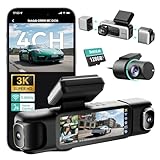
- [4 Channel Dash Cam] 3K 4 channel dash cam Compared with the traditional 2K dash cam, captures crystal-clear license plates even at night! With a 170° front camera, dual 120° side, and 150° rear, you've got complete 560°coverage that leaves no blind spots unmonitored. All four cameras record simultaneously, giving you foolproof evidence of any incident. The side cameras feature a detachable magnetic mount, allowing you to switch between 3 channel (4K+1080P*2) or dual dash cam (4K+1080P) modes.
- [24/7 Parking Mode] G980H 4 channel dash cam offers three modes (requires hardwire kit):① Time-Lapse Recording: Captures footage at 1 frame per second for continuous monitoring while conserving storage.② Sentry Mode: Automatically records a 1-minute emergency video when the front camera detects movement within 5 meters.③Collision Detection: Locks a 1-minute video upon impact to preserve crucial evidence.(Dedicated hardwire kit required-ASIN: B0DT1633D2.)
- [Night Vision] The car dash camera with F1.8 Aperture, 6 lenses, 940nm infrared LED, and Wide Dynamic Range (WDR), the Botslab dash cam delivers sharp, balanced footage in low-light or high-contrast conditions. The F1.8 aperture maximizes light intake for superior clarity.
- [Voice Control & 3.18 " Touch Screen] This 3K 4 channel dash camera features voice control,just say voice commands to start recording or take photos while keeping your eyes safely on the road. The 3.18" touchscreen works for effortless settings adjustment with just a tap. Its exclusive 4 way split screen playback lets you view all camera angles simultaneously on the 3.18" display — no more switching views during accident investigations! With dual touch+voice control, makes driving safer.
- [Built-in GPS] BOTSLAB dash cam features a built-in high precision GPS module, accurately recording your vehicle's location, speed, and travel route in real time. Using [DVplayer] software, you can generate dynamic route animations on your PC, effortlessly replaying your driving path and sharing it with one click. With the AR-enhanced interface (exclusive to Botslab App), key data like GPS coordinates and real-time speed are intelligently overlaid on video footage.
- Capture trigger: continuous ignition-linked recording, event-only capture, manual recording, or a combination.
- Saved views: a full 360-degree image, front and rear views, individual side cameras, or only the view selected on the display.
- Mode-specific quality: check the resolution and frame rate in driving mode, not just the maximum headline specification.
- File structure: one-minute clips, longer trip files, two-hour loops or another interval.
- Overwrite behavior: learn when the oldest files are deleted and how incident clips are protected.
- Storage medium: vehicle-approved USB drive or a specified microSDHC/microSDXC card, including capacity and speed requirements.
- Parked operation: continuous, motion-triggered, impact-triggered or unavailable; check whether a dedicated cable or auxiliary battery is required.
- Audio: some systems, including the cited Chevrolet recorder, do not capture sound.
- Access and export: determine whether clips can be copied through an app, the infotainment screen or only by removing the USB drive or card.
- Regional availability: privacy rules can disable parked recording or affect audio and video functions.
Is a separate dash cam redundant?
Not necessarily. If your factory system genuinely saves driving footage, a second camera may duplicate coverage. But a parking display alone is not a substitute for a recorder, and even a factory recorder may save different views, use a different resolution, omit audio or require the vehicle to be in a particular state before clips can be exported.
Compare the actual files produced by your existing system with what you need: forward road detail, side coverage, rear coverage, incident protection, parked monitoring or easy sharing. If the factory system records only selected camera views or uses event-only capture, a dedicated recorder can fill that gap. If both systems cover the same views and storage needs, the extra device may add wiring and maintenance without adding useful evidence.
Common problems and what they mean
The screen shows a 360-degree image, but no files appear
You may be using a parking-assist display with no recorder. Recheck the manual for a separate recording application or storage requirement.
Free tools Windows power users keep installed
One-click scans. No signup required.
Recording stops as soon as the car is parked
That can be normal. Many systems separate ignition-linked driving recording from parked recording. Check whether a parking cable, auxiliary battery or impact trigger is required.
Best Value

- 4-Channel Dash Cam for Complete Vehicle Coverage: This dash cam is equipped with four Full HD 1080P cameras, capturing footage of the front, rear, left, and right sides of your vehicle simultaneously. The adjustable front cameras enhance visibility and offer flexible recording angles, including interior footage.
- Time-Lapse Recording & Parking Mode: With time-lapse recording, 60 minutes of footage is compressed into 1 minute, saving memory card space. Activate parking mode with the optional ACC hardwire kit (sold separately) for security when your vehicle is parked.
- Enhanced Night Vision & WDR Technology: The dash cam features advanced night vision and Wide Dynamic Range (WDR) technology for clear, balanced footage, even in low-light conditions. Eight infrared lights ensure optimal visibility, and WDR adjusts exposure to capture detailed images in varying lighting.
- Optional GPS for Real-Time Vehicle Tracking: Purchase the GPS logger (sold separately) to add location, speed, and time tracking, providing a visual representation of your vehicle's route. This feature is perfect for documenting travel details in case of incidents.
- 5GHz Wi-Fi & App Integration: Share videos easily via Wi-Fi using the mobile app for both iOS and Android devices. This feature allows for quick video downloads and sharing on your preferred platforms.
The camera records, but the image is lower quality than expected
Review the mode-specific specification. The CARMATE DC3000’s driving continuous and impact modes, for example, use a lower stated resolution than its 4K-equivalent capability.
Files disappear after a trip
Loop recording may have overwritten older clips. Copy or lock important footage immediately, and verify that the storage card or USB drive meets the required capacity and speed.
There is video but no sound
Audio may be intentionally omitted. Chevrolet’s recorder documentation specifies video without audio. Other systems may offer a mute setting, so check both the manual and the recording controls.
Parked recording is unavailable
The feature may require an additional cable, may depend on battery condition, or may be disabled in your region because of privacy regulations. Garmin specifically notes regional unavailability for its cited parked-recording feature.
Bottom line for owners
A 360-degree parking camera is not automatically a dash cam. Some systems provide only a live low-speed display; others save camera footage continuously while driving; still others record only incidents or offer parked monitoring through separate hardware. Identify the exact system, confirm its trigger and storage requirements in the model-specific manual, and check the files it actually creates before relying on it for an incident.
Quick Recap
Product prices and availability are accurate as of the date/time indicated and are subject to change. Any price and availability information displayed on Amazon at the time of purchase will apply.




