Yes—but with an important qualification. The cable is the Beats USB-A to USB-C Woven Cable, not an Apple-branded cable. Apple sells it, and Apple Support specifically names it as a direct option for connecting a USB-C iPhone to a vehicle with wired CarPlay and a USB-A port.
That makes it a practical Apple-sold solution, but not the only cable that can work. The key is matching the cable to the car’s port and using a cable that supports data, not just charging.
As an Amazon Associate I earn from qualifying purchases.
The cable to buy for a USB-A CarPlay port
For a USB-C iPhone and an older car with a USB-A CarPlay port, look for:
Recommended Free Tools
Beats USB-A to USB-C Woven Cable
- Car end: USB-A
- iPhone end: USB-C
- Length: 1.5 meters (5 feet)
- Advertised uses: charging, syncing, data transfer, and CarPlay
- Data standard: USB 2.0
- Charging claim: up to 15 watts on select iPhones and iPads
- U.S. price checked: $18.99
- Power adapter: not included
The woven exterior may appeal to drivers who want a longer, less tangle-prone cable, but its most important feature for CarPlay is the direct USB-A-to-USB-C data connection.
#1 Best Overall

- DESIGNED BY APPLE — Ideal for charging, syncing, and transferring data between USB-C devices, this 1-meter charge cable is made with a woven design and has USB-C connectors on both ends.
- FAST AND CONVENIENT CHARGING — Supports charging of up to 60 watts and transfers data at USB 2 rates. Pair the USB-C Charge Cable with a compatible USB-C power adapter to conveniently charge your devices from a wall outlet and even take advantage of the fast-charging feature on select iPhone models.
- WHAT’S IN THE BOX — Apple USB-C Woven Charge Cable only. Power adapter sold separately.
- CABLE LENGTH — 1 meter (3 feet).
Why USB-C iPhones need this cable in many cars
iPhone 15 and later models use USB-C, while many older vehicles still use USB-A for wired phone connectivity. The connector arrangement must match both devices:
| Car’s CarPlay port | iPhone port | Correct cable |
|---|---|---|
| USB-A | USB-C | USB-A to USB-C |
| USB-C | USB-C | USB-C to USB-C |
| USB-A | Lightning | USB-A to Lightning |
Apple says a compliant USB-A-to-USB-C cable can connect a USB-C iPhone to a USB-A car port. A USB-C-to-USB-C cable will not plug directly into that port, and a USB-C-to-Lightning cable is intended for older Lightning iPhones.
What “official Apple cable” means here
The Beats cable is not Apple-branded. It carries the Beats logo and branding. However, Beats is an Apple brand, Apple sells the cable through its own store, and Apple Support specifically identifies the Beats USB-A-to-USB-C cable as an example of a direct connection for wired CarPlay.
Free tools Windows power users keep installed
One-click scans. No signup required.
Rank #2

- DESIGNED BY APPLE — Ideal for charging, syncing, and transferring data between USB-C devices, this 2-meter charge cable is made with a woven design and has USB-C connectors on both ends.
- FAST AND CONVENIENT CHARGING — Supports charging of up to 240 watts and transfers data at USB 2 rates. Pair the USB-C Charge Cable with a compatible USB-C power adapter to conveniently charge your devices from a wall outlet and even take advantage of the fast-charging feature on select iPhone and Mac models.
- WHAT’S IN THE BOX — Apple USB-C Woven Charge Cable only. Power adapter sold separately.
- CABLE LENGTH — 2 meters (6 feet).
The most accurate description is therefore Apple’s first-party or Apple-sold Beats cable for this use case. Apple has not said it is the only supported cable, nor does the cable guarantee that CarPlay will work in every vehicle.
When the Beats USB-A-to-USB-C cable makes sense
It is a sensible purchase if:
- Your iPhone has a USB-C port.
- Your car supports wired Apple CarPlay.
- The relevant vehicle port is USB-A.
- Your current cable is charge-only, damaged, loose, or unreliable.
- You want a cable sold through Apple rather than an unknown marketplace listing.
- A five-foot woven cable suits the distance from the port to the phone.
You do not need this particular Beats cable simply because your iPhone uses USB-C. A reputable, compliant USB-A-to-USB-C cable with explicit data or sync support may work just as well. The Beats model mainly reduces uncertainty about compatibility and data capability.
If your car has a USB-C port
Use the Beats USB-C to USB-C Woven Cable instead. It has USB-C connectors at both ends, is 1.5 meters (5 feet) long, and is advertised for charging, syncing, audio, CarPlay, and data transfer. Apple lists it as a USB 2.0 cable with charging support up to 60 watts.
Rank #3

- Durable Design: Reinforced nylon exterior and a robust core ensure this cable withstands up to 5,000 bends, outlasting other brands
- Fast Charging: Supports Power Delivery for up to 60W high-speed charging when paired with a USB-C charger
- Versatile Compatibility: Works with virtually all USB-C devices, including phones, tablets, and laptops
- High-Speed Data Transfer: Transfer files quickly with 480Mbps data transfer speeds
- Included Accessories: Comes with a hook-and-loop cable tie for easy organization and a welcome guide for hassle-free setup
The 60-watt rating is not a CarPlay performance advantage. It is more relevant to charging other USB-C devices. Like the USB-A model, this cable is not a high-speed USB 3, Thunderbolt, or professional video cable.
Why a direct cable is preferable to an adapter chain
USB-C iPhone owners may try this setup:
iPhone → USB-C-to-Lightning adapter → existing USB-A-to-Lightning cable → car
Apple says this can work with wired CarPlay in most vehicles, but warns that some combinations of adapters, cables, and vehicle systems can disrupt the connection. A direct USB-A-to-USB-C cable removes an adapter and an additional connection point, making it the cleaner choice when an adapter-based setup is unreliable.
Rank #4

- [60W USB-C to USB-C Fast Charging Cable] Deliver up to 60W (20V/3A) of power with support for PD 3.0 and QC 3.0. Quickly charge your iPhone 18/17/Duo/16 series (including iPhone 18 Pro, iPhone Duo, and iPhone 17 Air), iPad Pro, MacBook Air, and more. Also supports data transfer speeds up to 480Mbps.
- [iPhone 18/Duo/17 Pro Max Compatible Cable] Designed for the latest USB-C devices — fully compatible with iPhone 18/18 Pro/18 Pro Max/18 Air, iPhone Duo, iPhone 17/17 Pro/17 Pro Max/17 Air, iPhone 16/16 Pro/16 Pro Max/16 Plus, and iPhone 15 Series. Also supports iPad Air, iPad Pro (13/12.9/11-inch), and MacBook Air/Pro. One cable for all your USB-C device needs.
- [Durable USB C Charging Cable – 15000+ Bend Lifespan] Crafted from high-quality TPE material, this cable feels just like the original Apple charging cord — smooth, flexible, and soft to the touch. It resists tangling and is built to withstand over 15,000 bends for long-lasting performance without cracking or fraying.
- [3-Pack 3FT Type-C Cable – Convenient Length] Includes three 3FT (1m) cables, perfect for use in different places like home, office, car, or travel. Enjoy freedom of movement while charging — no more being stuck next to the outlet.
- [Safe & Reliable USB-C Cable for Devices] Built-in smart chip ensures safe charging by protecting against over-voltage, overheating, and short-circuit. Certified components ensure stable performance for your high-value devices.
How to connect the cable
- Confirm that the vehicle supports wired Apple CarPlay.
- Find the USB port used for CarPlay. It may be marked with a CarPlay or smartphone icon; some USB ports provide charging only.
- Plug the cable’s USB-A end into the vehicle.
- Plug the USB-C end into the iPhone.
- Start the vehicle and unlock the iPhone.
- Accept any CarPlay prompt. If CarPlay does not open automatically, select the CarPlay icon on the vehicle display.
Apple also requires a CarPlay-compatible vehicle, an up-to-date supported iOS version, Siri enabled, and availability of CarPlay in the relevant country or region. See Apple’s wired CarPlay connection instructions.
Independent reader supportYour contribution helps us test, update, and keep practical guides available for everyone.If CarPlay still does not work
A new cable cannot repair unsupported vehicle hardware, a defective port, infotainment software, or an iPhone setting. Try these steps in order:
What’s actually slowing this PC down?
Pick the symptom - the matching free tool is one click away.
- Try another USB port in the vehicle, if available.
- Confirm that the port supports CarPlay rather than charging only.
- Try a second known-good data cable.
- Restart both the iPhone and the vehicle.
- Make sure Siri is enabled.
- Check Settings > Screen Time > Content & Privacy Restrictions > Allowed Apps > CarPlay.
- Go to Settings > General > CarPlay, select the vehicle, choose Forget This Car, and connect again.
- Update iOS.
- Check the vehicle manufacturer’s infotainment firmware updates.
- Inspect the iPhone’s USB-C port and carefully remove debris without using metal tools.
- If multiple phones are paired, remove unused pairings and test with only the intended iPhone.
Apple’s full troubleshooting guidance is available at Apple Support. If the Beats cable fails too, the problem is more likely to involve the phone, vehicle, port, software, or compatibility rather than the original cable alone.
Best Value
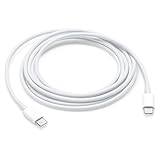
- Pair the USB-C Charge Cable with a compatible USB-C power adapter to conveniently charge your devices from a wall outlet and take advantage of fast-charging capabilities
- USB-C Power Adapters sold separately
- To conveniently charge your MacBook or MacBook Pro from a wall outlet, pair the USB-C Charge Cable with a compatible USB-C power adapter, sold separately
- Ideal for charging USB-C devices
Is the Beats cable better than a cheaper cable?
Not necessarily in CarPlay performance. Wired CarPlay does not require high-wattage charging or high-speed USB storage capabilities. A compliant third-party USB-A-to-USB-C data cable can be a reasonable lower-cost alternative, particularly if you need a shorter length, a different connector angle, or a different return policy.
The Beats cable’s advantages are its Apple distribution, explicit CarPlay and data-transfer claims, woven construction, and the fact that Apple Support names it for this USB-A-to-USB-C scenario. Its limitations are the USB 2.0 data rate, fixed five-foot length, lack of a power adapter, and the possibility that it costs more than a generic cable with similar basic functionality.
Bottom line for buyers
Buy the Beats USB-A-to-USB-C Woven Cable if you have a USB-C iPhone, a known wired-CarPlay vehicle, and a USB-A CarPlay port—and you want an Apple-sold direct cable. At the U.S. price checked on August 16, 2026, it costs $18.99.
Quick wins for a faster PC:
Scan for outdated or missing drivers - takes under a minuteDriver Scan →Repair Windows errors before they cause bigger problemsFix Now →Fix the driver behind crashes, sound loss and screen glitchesFind Drivers →Choose the USB-C-to-USB-C Beats cable for a USB-C vehicle port. If CarPlay is already failing, check the port, settings, Siri, software, and vehicle compatibility before assuming a new cable is the cure.
Quick Recap
Product prices and availability are accurate as of the date/time indicated and are subject to change. Any price and availability information displayed on Amazon at the time of purchase will apply.




