Xiaomi scooter firmware hacking gets hands-on when you stop treating “Xiaomi scooter” as a single hardware target: identify the BLE, DRV, and BMS boards and versions first, then choose an official update, compatible custom package, or wired recovery path. An ST-LINK V2 programmer matters only for advanced M365-family controller recovery, not every flash.
This is a practical guide for owners, repairers, and authorized researchers. It does not promise that every Xiaomi scooter can be unlocked, sped up, downgraded, or recovered with one app. Hardware revisions, firmware versions, encryption state, and the failed subsystem determine what is safe to attempt.
Key takeaways
- The model name alone does not identify the hardware: Xiaomi scooters can contain different BLE, DRV, and BMS boards because hardware changes occurred during production runs.
- Xiaomi’s official, undated support instructions use Mi Home/Xiaomi Home, require at least 50% battery and stable Wi-Fi, and warn owners not to interrupt the installation.
- ScooterHacking ZIPv3 packages identify the target subsystem, compatible board identifiers, encryption state, and MD5 checksums; those details must match the scooter before a custom flash.
- An ST-LINK V2 or similar programmer is central to the documented wired recovery route for a bricked M365-family DRV/ESC, but it is not required for every official or app-based update.
- EURECOM research published in 2023 and 2025 connects the Xiaomi scooter firmware ecosystem with BLE, DRV, BMS, pairing, downgrade, availability, privacy, and safety risks.
What does Xiaomi scooter firmware hacking actually include?
“Firmware hacking” is a broad term in the Xiaomi scooter community. It can mean reading firmware versions, installing an official update, flashing compatible third-party firmware, changing supported configuration parameters, recovering a controller after a failed flash, reverse-engineering the update protocol, or studying security weaknesses.
Those activities have very different risk levels. An official Mi Home/Xiaomi Home update is a normal software-maintenance task. Changing scooter behavior with third-party firmware is a compatibility-sensitive modification. Programming a controller through exposed board connections is electrical repair work. Reverse-engineering BLE or firmware behavior should be limited to equipment that you own or are explicitly authorized to test.
#1 Best Overall

- The interface easy to use simple horns seat pitch of 2.54, with 20CM DuPont line, the line can respond to different target sequence, flexible wiring
- Increased the 5V power output, the output I / O ports are protected afraid of operational errors caused by ST-LINK V2 damage
- ST-Link V2 Stlink Mini STM8 STM32 STLINK Simulator Download Programmer Programming Supporting the full range of STM32 SWD debugging interface; Supporting the full range of STM8 SWIM download debugging (common development environments such as IAR, STVD etc. are supported);Supporting for automatic firmware upgrades
- Support full series STM32 SWD download and debug
- 4-wire interface (including power), the wiring is very simple because the interface definition is marked directly on the aluminum housing protects. ① RST;②SWDIO③GND④GND⑤SWIM⑥SWICK⑦3.3V⑧3.3V⑨5.0V⑩5.0V
The practical objective should therefore be broader than “make the scooter faster.” A responsible hands-on project starts with identification, backup and recovery planning, then chooses the least invasive method that can accomplish the goal.
What hardware and firmware must you identify first?
You need to inventory three relevant subsystems before selecting a package or recovery method: the BLE dashboard, the DRV motor-controller board, and the BMS battery-management board. Record the firmware version associated with each subsystem, along with the exact model designation, serial number, region, mileage information, and any displayed error code.
| Subsystem | What it represents | What to record | Why it matters |
|---|---|---|---|
| BLE dashboard | The dashboard and Bluetooth-related subsystem | BLE firmware version, dashboard or board revision, visible errors | Bluetooth flashing and compatibility checks can depend on the BLE board and firmware state. |
| DRV / ESC | The motor-controller board | DRV firmware version, controller variant, error state | A failed or incompatible DRV flash can leave the controller unable to boot normally and may require wired recovery. |
| BMS | The battery-management board | BMS firmware version and battery-related errors | BMS firmware is a separate target from BLE and DRV firmware and has its own safety and security implications. |
ScooterHacking’s ZIPv3 documentation explains why the inventory matters: Xiaomi changed hardware during production of existing model families, not only when launching a new model. A scooter sold as an M365, Pro, Pro 2, 1S, Lite, or Mi 3 may therefore contain a board revision that differs from another scooter carrying the same model name.
Do not infer compatibility from the model label alone. Treat the model name as the starting point, not as proof that a particular BLE, DRV, or BMS image will work.
What’s actually slowing this PC down?
Pick the symptom - the matching free tool is one click away.
How does ZIPv3 compatibility checking work?
ZIPv3 packages are designed to carry the metadata needed to match firmware to hardware more precisely than a model name can. The documentation includes the user-facing firmware display name, model identifier, an indication of whether the model must be enforced, the target device type, compatible board identifiers, encryption state, and MD5 checksums for the included firmware files.
| Package field | What the field tells you | How to use it |
|---|---|---|
| Display name | The firmware name shown to a user | Use it for human identification, but do not treat the name as a complete compatibility test. |
| Model identifier | The package’s intended scooter family, such as m365, pro, pro2, 1s, lite, or mi3 |
Compare it with the scooter’s exact model and revision. |
| Target device | Whether the image targets BLE, DRV, or BMS | Never send a package intended for one subsystem to another subsystem. |
| Compatible boards | The board identifiers accepted by the package | Match the physical board identifier, not merely the badge on the scooter. |
| Encryption state | Whether the package expects an encrypted or unencrypted firmware state | Use it as part of the compatibility decision before attempting a flash. |
| MD5 checksum | A checksum for the included firmware file | Use it to detect a changed or damaged file; a valid checksum does not make an incompatible image safe. |
The ZIPv3 documentation is dated April 18, 2024, and lists supported identifiers, but it does not mean that every package for one identifier works on every physical revision. If the board ID, target subsystem, encryption state, or package compatibility is unclear, stop and investigate rather than relying on a community filename or an assumption based on scooter age.
What is the difference between an official update and custom firmware?
An official update installs Xiaomi-supplied firmware through Xiaomi’s supported application path, while custom firmware uses a third-party package or tool and requires separate compatibility verification. The two workflows should not be treated as interchangeable.
| Approach | Best suited to | Access method | Main advantage | Main risk or limitation |
|---|---|---|---|---|
| Official Xiaomi update | Routine maintenance, bug fixes, features, and security updates | Mi Home/Xiaomi Home over Bluetooth with a phone connected to stable Wi-Fi | Uses Xiaomi’s supported update path and stock firmware | Does not install custom firmware and must not be interrupted. |
| Supported companion-app flash | Compatible settings changes, maintenance, or custom firmware on a supported scooter | Bluetooth and a tool such as ScooterHacking Utility | Usually avoids opening the deck or attaching a programmer | Support depends on the exact scooter, BLE state, board revision, and current app model list. |
| Wired ST-LINK recovery | A bricked or Bluetooth-inaccessible M365-family DRV/ESC | Direct board connection using an ST-LINK V2 or similar programmer and model-specific instructions | Provides a recovery path when normal Bluetooth flashing is unavailable | Requires opening the scooter and incorrect wiring can damage hardware. |
| Authorized security research | Studying protocols, firmware, app behavior, or defensive controls | Controlled equipment, documented authorization, and an isolated test process | Can reveal weaknesses without treating a road-going scooter as a test subject | Findings may affect safety, availability, privacy, or battery behavior. |
How do you perform Xiaomi’s official firmware update?
For Xiaomi’s official update route, open Mi Home/Xiaomi Home, select the scooter’s device card, open the three-dot menu, choose Firmware update, and check for available updates. Xiaomi’s official support instructions say the scooter should have at least 50% battery, the phone should use a stable Wi-Fi connection, and the installation must not be interrupted.
Outdated Drivers Are Slowing You Down
One free scan finds every outdated or missing driver and matches the right update for your exact hardware.Free scan · exact hardware matchWindows Errors? Fix Them Before They Spread
Repair common Windows errors and clear accumulated junk for a smoother, more stable PC - no reinstall needed.Free scan · no reinstallRank #2

- Increase 5V power output, the output I / O port protection are not afraid of operational errors caused damage!
- The interface easy to use simple horns seat pitch of 2.54, with 20CM DuPont line, the line can respond to different target sequence, flexible wiring
- Supports automatic firmware upgrade, the factory has been upgraded to the latest firmware V2.J17.S4;
- The interface definition directly in the shell marked, clear, convenient and practical;
- Record the scooter’s current BLE, DRV, and BMS versions, serial number, region, mileage, and error codes.
- Charge the scooter to at least 50% and place it where the scooter and phone will remain stable during the update.
- Open Mi Home/Xiaomi Home and select the scooter device card.
- Open the three-dot menu, select Firmware update, and check for an official package.
- Follow the app’s instructions without turning off the phone, closing the app, disconnecting the scooter, or otherwise interrupting installation.
- Afterward, confirm the firmware versions and check for error messages before riding.
“Xiaomi often releases firmware updates to enhance the device performance, fix bugs, introduce new features, and improve security.” — Xiaomi, official support documentation
An official update is a sensible baseline and may be the right restoration route when the scooter is still recognized and the available package is intended for that exact device. It is not a custom-firmware installation, and an official update cannot be assumed to repair a physically damaged or incorrectly programmed controller.
Can ScooterHacking Utility flash every Xiaomi scooter?
No. ScooterHacking Utility describes support for settings changes, firmware flashing, and maintenance operations, but the project’s ScooterHacking Utility website directs users to check the current supported-model list. Support is not a blanket guarantee for every Xiaomi model, board revision, BLE version, or firmware state.
A Bluetooth-based flash is the least invasive custom route when the scooter remains responsive and the BLE subsystem permits the operation. Before using any tool, compare the app’s current support information with the scooter’s recorded hardware and firmware details. If the app reports restricted BLE firmware, refuses to identify the scooter, or presents a compatibility warning, treat the warning as a stop signal rather than something to bypass blindly.
Quick wins for a faster PC:
Scan for outdated or missing drivers - takes under a minuteDriver Scan →Clear out junk files and repair common Windows errorsFree Scan →ZIPv3’s target-device, board, encryption, and checksum metadata can help explain why a package is rejected, but the metadata does not authorize a package that does not match the physical board. Do not claim that a particular DRV, BLE, or BMS version is compatible without checking the exact package and hardware.
What does “restricted BLE firmware” mean?
“Restricted BLE firmware” should be treated as a compatibility or firmware-state warning, not as proof that the scooter is permanently locked or that a bypass is safe. The available documentation establishes that BLE packages can depend on target device, board identifier, encryption state, and model enforcement; it does not define one universal cause for every message shown by a utility.
Before taking another step, record the BLE version, identify the dashboard board, check the tool’s current supported-model list, and compare the proposed package’s metadata. If the intended change is actually a DRV recovery, changing BLE firmware may make diagnosis harder rather than fixing the controller.
Can you downgrade Xiaomi scooter firmware?
Sometimes a downgrade may be possible for a precisely identified hardware and firmware combination, but there is no safe universal downgrade procedure for all Xiaomi scooters. A downgrade package must match the target subsystem, board identifier, model enforcement rules, encryption state, and the tool’s supported workflow.
Free tools Windows power users keep installed
One-click scans. No signup required.
Rank #3

- 【ST-Link V2 Emulator Downloader Programming】Supporting the full range of STM32 SWD debugging interface; Supporting the full range of STM8 SWIM download debugging (common development environments such as IAR, STVD etc. are supported);Supporting for automatic firmware upgrades
- 【Clear Interface Definition】 4-wire interface (including power), the wiring is very simple because the interface definition is marked directly on the aluminum housing protects. ① RST;②SWCLK③SWIM④SWDIO ⑤GND⑥GND ⑦3.3V⑧3.3V⑨5.0V⑩5.0V
- 【Supported SoftwareVersions】① ST-LINK Utility 2.0 and above; ② STVD and above; ③ STVP 3.2.3 and above; ④ IAR EWARM V6.20 and above; ⑤IAR EWSTM8 V1.30 and above; ⑥ KEIL RVMDK V4.21 and above
- It's convenient and practical, fast speed and stable. ①Increased the 5V power output, the output I / O ports are protected afraid of operational errors caused by ST-LINK V2 damage; ②Internal board of this programmer is with 500MA self-recovery fuse, it can protect your computer motherboard
- The interface easy to use simple horns seat pitch of 2.54, with 20CM DuPont line, the line can respond to different target sequence, flexible wiring
A downgrade is especially risky when the scooter’s hardware revision is unknown or when no documented recovery image exists. Preserve the original firmware information first, verify that a stock or known-good recovery path exists, and do not flash a package simply because its version number is lower. If the downgrade leaves the DRV unable to boot or the BLE subsystem unable to communicate, the repair may escalate from an app task to board-level recovery.
When do you need an ST-LINK V2 for Xiaomi scooter firmware recovery?
You need an ST-LINK-class programmer when the documented M365-family wired recovery path applies—for example, when the DRV/ESC no longer boots normally, Bluetooth flashing is blocked, or an incompatible image has left the controller unresponsive. You do not need an ST-LINK V2 for every Xiaomi scooter owner, and you do not need one for a normal official Mi Home/Xiaomi Home update.
The CamiAlfa M365_DRV_STLINK repository documents an ST-LINK-based recovery route for a bricked M365-family ESC/DRV. The listed equipment includes an ST-LINK V2 programmer or similar programmer, ST-LINK drivers, Python, Dupont wires, alligator clips, and optional soldering equipment. Before buying a generic programmer, verify the scooter variant, controller board, voltage requirements, connector arrangement, and board-specific wiring instructions. A generic product listing is not proof that its electrical connections are suitable for a particular Xiaomi controller.
| Observed situation | First route to consider | Why | Do not assume |
|---|---|---|---|
| Scooter is recognized and operating normally | Official update or a documented compatible app workflow | The controller may not need invasive recovery work. | That a custom package is compatible just because the scooter rides normally. |
| Bluetooth flashing is refused but the DRV still operates | Confirm BLE and package compatibility before considering wired work | The restriction may involve the BLE state or target package rather than a dead controller. | That an ST-LINK connection is automatically the right fix. |
| DRV/ESC is bricked after an incompatible or interrupted flash | Model-specific ST-LINK recovery documentation | Direct programming may be necessary when normal Bluetooth communication is unavailable. | That a script or image for one M365-family variant works on another. |
| Dashboard or BLE subsystem is the suspected fault | BLE-specific diagnosis or a verified board replacement path | Recovering the DRV will not necessarily repair a dashboard or BLE-board problem. | That any replacement dashboard or BLE board fits every revision. |
How does wired M365-family DRV recovery work?
Wired recovery is a board-level process: identify the failed subsystem, isolate the battery, connect a programmer according to the exact board diagram, verify communication, and use the matching recovery script and image. The process is not a universal pinout or a one-click speed modification.
Recommended Free Tools
- Confirm the failure. Establish that the problem is the DRV/ESC or related controller rather than only the BLE dashboard or BMS. Do not repeatedly flash packages while the failed subsystem is still uncertain.
- Preserve the scooter record. Keep the exact model variant, serial number, mileage information, firmware versions, error codes, and any original files or package metadata.
- Make the scooter electrically safe. Disconnect the battery and allow the relevant controller capacitor to discharge before making board connections. The recovery repository specifically warns about battery disconnection and capacitor discharge.
- Prepare the tools. Install the appropriate ST-LINK drivers, prepare Python and the required scripts, and have the programmer, Dupont wires, alligator clips, and any optional soldering equipment ready.
- Follow the board-specific diagram. Connect the programmer only according to the instructions for the exact scooter variant and controller board. Check voltage, polarity, connector orientation, and continuity before powering the target.
- Test communication first. Verify that the programmer can communicate with the target before attempting to write firmware.
- Use the matching script and image. Select the model-specific recovery script and a firmware image that matches the identified controller. Do not substitute an image from a superficially similar scooter.
- Reassemble and test conservatively. After programming, restore the connections carefully, verify normal startup and error status, and perform controlled checks before making any performance or power-delivery changes.
Incorrect wiring can damage the controller, the programmer, or the battery system. The ST-LINK route is therefore best understood as advanced repair work. If you cannot identify the controller board or safely isolate the battery, a qualified electronics or scooter repairer is safer than improvising from a generic wiring photo.
Independent reader supportYour contribution helps us test, update, and keep practical guides available for everyone.What should you do if the scooter has a BLE fault instead of a DRV fault?
A BLE or dashboard fault requires a different diagnosis from a bricked DRV. The DRV recovery repository is aimed at the M365-family ESC/DRV, so its procedure should not be used as a substitute for identifying a dashboard or Bluetooth-board problem.
A compatible Xiaomi scooter dashboard or BLE board may be a repair path after the exact scooter revision and board have been identified, but no single replacement part can be assumed to fit every M365-family scooter. Board revisions materially affect firmware compatibility, so verify the part and its firmware support before purchase or installation.
What are the safety and security risks of Xiaomi scooter firmware modification?
Firmware modification is also a security issue because the scooter’s BLE, DRV, BMS, application, authentication, and update mechanisms interact with systems that affect movement and battery behavior. Security research does not mean that every scooter is currently exploitable in the same way, but it does show why firmware changes should be authorized, controlled, and reversible.
Do these 3 things before closing this tab:
1Repair Windows errors before they cause bigger problems2Scan for outdated or missing drivers - takes under a minute3Clear out junk files and repair common Windows errorsRank #4
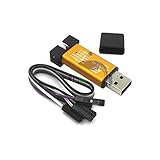
- ★Support automatic upgrades, full range of STM32 SWD & full range of STM8 SWIM download
- ★Support the full range of STM32 SWD debugging interface
- ★A simple 4-wire interface (including power), fast, & stable
- ★Interface definition marked on the casing! Do not need to refer to the manual
- ★Package Includes:1PCS Emulator Downloader Programming Unit(Note:Random Color),Comes with 20CM Dupont Lines to easier connection
In research published in 2023, EURECOM’s E-Spoofer study reported four attacks involving malicious pairing and session downgrade. The evaluation covered M365, Essential, and Mi 3 scooters, five BLE subsystem boards, and eight BLE firmware versions. The researchers described attack paths possible from Bluetooth proximity or through a malicious application colocated with Mi Home. These findings concern the ecosystem’s attack surface; they are not a recommendation to interfere with another person’s scooter.
EURECOM’s E-Trojans assessment published in 2025 broadened the analysis to the BMS, DRV, BLE subsystem, and Mi Home app and reported four critical vulnerabilities, including a remote-code-execution flaw in the BMS. The reported impacts included safety, security, availability, privacy, and battery behavior.
“For instance, our undervoltage ransomware can permanently reduce the autonomy of an M365 battery by 50% in three hours while asking for a ransom.” — Marco Casagrande and Daniele Antonioli, EURECOM, 2025 E-Trojans research
The 50% autonomy reduction in three hours was a security-research demonstration against an M365 battery, not an ordinary result of installing legitimate custom firmware. It should not be presented as a normal side effect of custom configuration. The practical lesson is to avoid unknown firmware, keep connected phones and apps trustworthy, isolate test equipment, and never test a modification on a scooter that someone else relies on for transportation.
What should a responsible firmware project optimize for?
| Project goal | Reasonable success test | What to prioritize | What not to assume |
|---|---|---|---|
| Restoration | The scooter returns to a known, compatible firmware state without persistent errors. | Original records, official documentation, matching recovery files, and conservative testing | That a successful write automatically proves the scooter is safe to ride. |
| Diagnostics | BLE, DRV, and BMS versions and error conditions are identified accurately. | Logging, board identification, and separating subsystem faults | That changing firmware is necessary to diagnose every fault. |
| Configuration | A supported parameter changes while startup, braking, battery behavior, and error reporting remain normal. | Reversible changes and a known-good restore plan | That more power, speed, or a different region setting improves safety or range. |
| Security research | A documented, authorized test produces reproducible findings without exposing a road-going scooter. | Isolation, authorization, disclosure, and protection of battery and rider safety | That a research exploit is equivalent to a routine owner modification. |
What should you buy before attempting hands-on recovery?
Do not buy recovery hardware until the exact controller board and recovery route are known. For a documented M365-family DRV recovery, the central item is an ST-LINK V2 programmer or similar programmer. Supporting items named by the recovery documentation include Dupont jumper wires, alligator clips, ST-LINK drivers, Python, and optional fine soldering equipment.
- Required only when the workflow calls for it: an ST-LINK V2 or similar programmer.
- Connection accessories: Dupont wires and alligator clips, selected for the board’s documented connection points.
- Software preparation: the appropriate ST-LINK drivers, Python, and the model-specific recovery scripts.
- Optional electrical tools: soldering equipment if the exact board instructions require a permanent or more secure connection.
The programmer is not a universal Xiaomi scooter unlock device. It is a tool for a particular class of direct controller-recovery work, and the repository’s scripts and wiring diagrams remain essential. A programmer without correct board identification can make a bad situation worse.
What is the safest decision process before flashing?
- Define the goal. Decide whether the goal is an official update, diagnosis, restoration, configuration, or authorized security research.
- Identify the hardware. Confirm the exact model variant, BLE board, DRV board, BMS board, and firmware versions.
- Save the baseline. Record the serial number, region, mileage, errors, original package information, and any available stock firmware details.
- Choose the least invasive route. Use Xiaomi’s official updater for stock maintenance, a supported app only when compatibility is documented, and wired programming only when recovery requires it.
- Verify package metadata. Match the target subsystem, board identifier, model rules, encryption state, and checksum.
- Plan recovery before writing. If no compatible stock or recovery path is available, do not start the modification.
- Isolate electrical work. Disconnect the battery and discharge the controller before making board connections.
- Test conservatively. Confirm startup, error status, firmware versions, controls, and battery behavior before making additional changes or riding in traffic.
The strongest hands-on result is not a headline speed number. It is a scooter whose hardware is known, whose firmware target is documented, whose original state can be restored, and whose safety-critical behavior has been checked after the change.
The Bottom Line
Bottom line: Xiaomi scooter firmware hacking is safest when treated as hardware identification and recovery work, not as a universal speed unlock. Start with Xiaomi’s official update path, inventory the BLE, DRV, and BMS boards and versions, verify package metadata, and use an ST-LINK V2 only when a documented M365-family wired recovery procedure matches the controller.
The Tool Desk
Outbyte Driver Updater FREEFix the driver behind crashes, sound loss and screen glitchesFind Drivers →Outbyte PC Repair FREEClear out junk files and repair common Windows errorsFree Scan →Quick Recap
Product prices and availability are accurate as of the date/time indicated and are subject to change. Any price and availability information displayed on Amazon at the time of purchase will apply.




