Quick wins for a faster PC:
Repair Windows errors before they cause bigger problemsFix Now →Scan for outdated or missing drivers - takes under a minuteDriver Scan →Probably not as a simple software update. CarPlay Ultra is not just a redesigned version of Apple CarPlay on the center touchscreen. It is a deeper vehicle integration that can extend Apple’s interface to the instrument cluster and other driver displays, while also interacting with climate controls, radio, cameras, parking features, performance settings, and driver-assistance information.
That means the automaker—not Apple alone—must support the car’s displays, electronics, controls, and software. As of August 9, 2026, Aston Martin is the only automaker with a confirmed production rollout. Hyundai, Kia, and Genesis have committed to bringing CarPlay Ultra to their vehicles, but Apple has not published a complete model list or a firm launch schedule for those brands.
As an Amazon Associate I earn from qualifying purchases.
What is CarPlay Ultra?
Regular CarPlay primarily uses the car’s center display to show iPhone apps such as Maps, Music, Messages, Phone, and compatible third-party apps. The vehicle continues to run its own instrument cluster and most of its native controls separately.
CarPlay Ultra is designed to cover much more of the cabin’s digital interface. Depending on the vehicle, it can show Apple Maps, media information, widgets, vehicle data, and other content in the instrument cluster as well as on the center screen. It can also provide access to car functions through the touchscreen, physical controls, knobs, and Siri.
#1 Best Overall

- 【9 Inch Large Display】The 9 inch CarPlay screen for car features a full HD touchscreen, providing clearer maps, calls, and music controls. The wide display improves visibility, making driving safer and more convenient while offering a smarter upgrade for any vehicle.
- 【Wireless CarPlay & Android Auto】This portable CarPlay screen supports wireless CarPlay and Android Auto, letting you easily access navigation, calls, messages, and music without cables. Enjoy hands-free control through your smartphone while staying focused on the road.
- 【GPS Navigation & Voice Control】The CarPlay screen offers built-in GPS navigation support and voice control compatibility. Quickly find routes, play music, and send messages with Siri or Google Assistant, ensuring smarter, safer driving without distractions.
- 【Mirror Link & Multiple Audio Options】The CarPlay screen supports phone mirror link plus 4 audio output modes: FM transmission, AUX, Bluetooth, and built-in speaker. This portable car play screen ensures flexible, high-quality sound in any car audio system.
- 【Easy Plug & Play Installation】The portable CarPlay screen connects via cigarette lighter and installs in seconds with a stable suction-cup base. No complicated wiring is required—just plug and play for a simple, reliable, and convenient car upgrade.
Potentially integrated functions include:
- Speed, fuel level, tire pressure, and engine temperature
- Driver-assistance information
- Climate and heating controls
- Radio and audio settings
- Parking systems and camera views
- Performance modes and vehicle configuration settings
- Automaker-specific gauges, themes, colors, and layouts
The exact experience is customized by each manufacturer. Aston Martin’s implementation, for example, includes its own gauge designs, heating and ventilation controls, 3D camera views, parking functions, and dynamic vehicle settings. A different brand may expose different controls or use a different visual design.
Which cars have CarPlay Ultra?
Aston Martin
Aston Martin is the first confirmed production partner. The system initially appeared on the DBX707 and is available across the brand’s new core range, subject to model and market availability.
Apple’s original rollout covered new Aston Martin orders in the United States and Canada beginning May 15, 2025. Some existing Aston Martin vehicles may also qualify, but only if they have the company’s latest next-generation infotainment system. Aston Martin says eligible vehicles receive the update through its dealers.
That does not mean every Aston Martin equipped with ordinary CarPlay can be upgraded. Owners should give the dealer the vehicle identification number and ask specifically whether that car has the required next-generation infotainment hardware and software.
Hyundai, Kia, and Genesis
Apple announced on May 15, 2025, that Hyundai, Kia, and Genesis had committed to bringing CarPlay Ultra to their vehicles. The announcement did not name the first models, specify model years, state pricing, or explain whether existing cars would be eligible for an update.
A May 2026 report suggested that at least one major new Hyundai or Kia model could receive CarPlay Ultra in the second half of 2026. However, Apple and Hyundai had not publicly confirmed the specific vehicle described in that report. Treat that as a reported expectation rather than a guaranteed launch date.
Rank #2

- Krunia Anniversary Celebration Offer: Join our celebration! Purchase any Krunia product and email us at [email protected] to know the details on how to get one of these exciting gifts: a 256GB Memory Card or another CarPlay screen
- Wireless Apple CarPlay & Android Auto Screen: Enjoy seamless wireless carplay and android auto connectivity for hands-free calls, music, and messaging. Access real-time navigation via Apple Maps, Google Maps, or Waze with live traffic updates. This portable CarPlay screen for car ensures smooth voice control and effortless integration, making it a versatile car tablet for daily commutes
- Ultra-Fast Responsiveness: Powered by 5G Wi-Fi and bluetooth 5.0, this car play screen delivers 1.35x smoother performance and 25% faster touch response than competitors. Ideal for wireless carplay and android auto, it provides a lag-free experience, whether you're using GPS navigation or streaming audio through your car’s sound system
- Vivid IPS Touchscreen: Featuring 550 cd/m² brightness, 1000:1 contrast ratio, and 16.7 million colors, this car tablet reduces glare and offers 18% brighter visuals. Its vibrant, tablet-like display stands out from standard car screens, enhancing visibility for navigation and multimedia
- Crystal-Clear Resolution: With a 1600x600 resolution—one of the highest in carplay/android auto screens—this display provides up to 1.5x sharper clarity than rivals. Perfect for GPS navigation and backup camera views, it ensures every detail is crisp and easy to read
What about Porsche?
Porsche has previously been associated with next-generation CarPlay efforts, but Porsche has not publicly confirmed CarPlay Ultra availability for a specific production model. Its recent infotainment announcements describe updated Porsche Communication Management systems, Porsche App Center access, Alexa, and regular wireless CarPlay.
Do these 3 things before closing this tab:
1Fix the driver behind crashes, sound loss and screen glitches2Clear out junk files and repair common Windows errors3Scan for outdated or missing drivers - takes under a minuteA Porsche with wireless CarPlay or a newer PCM system should not automatically be described as having CarPlay Ultra. The two products are different.
Can a car with regular CarPlay be upgraded?
In most cases, there is no reason to expect a retrofit. CarPlay Ultra needs access to more than the center display. The automaker must connect it to the instrument cluster, vehicle data, physical controls, climate system, cameras, performance settings, and other factory systems.
Whether an upgrade is technically possible depends on the vehicle’s:
- Display and instrument-cluster hardware
- Electronic architecture and communication interfaces
- Infotainment computer
- Software and security systems
- Available control inputs
- Automaker support for that exact model, trim, market, and model year
A vehicle with a large touchscreen, a fully digital gauge cluster, or over-the-air updates still may not be compatible. Those features do not automatically provide the software connections Apple needs.
Recommended Free Tools
The Aston Martin example is deliberately narrow: Apple confirmed an update for vehicles that already have Aston Martin’s latest next-generation infotainment system. Apple did not say that ordinary Aston Martins with standard CarPlay—or cars from other brands with standard CarPlay—can receive Ultra.
Rank #3

- CarPlay and Android Auto: This plug-in device connects to your phone via Bluetooth and WiFi. To use CarPlay, connect an iPhone; to use Android Auto, connect an Android phone. Simply connect it to your smartphone and access map navigation, calling, email, notifications, music, and more.
- Online Maps and Real-Time GPS Navigation with Voice Control: When connected to a smartphone, the portable Apple CarPlay display delivers precise real-time positioning and zero-delay GPS navigation. Supports real-time navigation via apps like Google Maps and Waze (non-preinstalled apps require phone connection). Equipped with the latest voice control technology, it enables map navigation, calls, emails, notifications, music, and more through Siri/Google Assistant.
- OTA Updates: Keep your device up to date with over-the-air firmware updates, so you’re always one step ahead. This wireless CarPlay screen automatically pushes new system updates, ensuring long-term compatibility between your phone and Apple CarPlay, Android Auto, and other in-car electronics.
- Night Vision Backup Camera: A waterproof rear-view camera with night vision capabilities that connects to your in-car display. The backup camera accurately and clearly records your entire driving journey, providing you with comprehensive safety protection. The rear-view camera cable works in sync with your backup lights, making installation extremely convenient.
- Phone Mirroring Connection and Four Audio Outputs: This 9-inch CarPlay screen supports mirroring for both iOS and Android phones. The Q9S double-DIN car stereo integrates CarPlay functionality while supporting Bluetooth audio, built-in speakers, FM radio, and an AUX port. Enjoy clear, stable music even in noisy environments. Connecting your phone via Bluetooth to the car's Bluetooth system for audio playback through the car speakers is the optimal choice.
What iPhone does CarPlay Ultra require?
Apple’s published requirements are:
| Requirement | Details |
|---|---|
| iPhone | iPhone 12 or later |
| Software | iOS 18.5 or later |
| Vehicle | A vehicle specifically supporting CarPlay Ultra |
| Setup connection | A network connection so the iPhone can download additional CarPlay Ultra assets |
An iPhone 12 or newer cannot make an unsupported car compatible. The phone only satisfies one part of the requirement; the vehicle still needs the automaker’s integration.
How setup works in a supported car
- Turn on the vehicle and confirm that Siri is enabled on the iPhone.
- Put the vehicle into its CarPlay or wireless-pairing mode.
- On the iPhone, open Settings > General > CarPlay.
- Select the vehicle. During initial wireless pairing, it may appear under Settings > General > CarPlay > Available Cars.
- Keep the iPhone connected to a network while setup downloads the required CarPlay Ultra assets.
Aston Martin says Ultra activates automatically when the vehicle is switched on after the one-time iPhone setup. The precise pairing process can still vary by manufacturer and market.
Why CarPlay Ultra may not appear
Your car supports CarPlay, but not Ultra
Apple lists more than 800 vehicles that support ordinary CarPlay. That is a separate compatibility list. Regular CarPlay on the center display does not prove that the car supports Ultra.
Outdated Drivers Are Slowing You Down
One free scan finds every outdated or missing driver and matches the right update for your exact hardware.Free scan · exact hardware matchPC Slower Than It Used to Be?
A free scan shows the junk files, broken settings and background clutter dragging Windows down - then fixes them in one click.Free scan · Windows 10 & 11Your car has a digital instrument cluster
A digital cluster is only a hardware feature. The manufacturer must allow CarPlay Ultra to operate in that cluster and connect it to the vehicle’s data and controls. Many cars with digital gauges will continue to show their factory interface while running regular CarPlay on the center screen.
Your car receives over-the-air updates
OTA capability does not guarantee compatibility. An update can change software, but it cannot add missing display hardware, vehicle-network connections, control modules, or safety-certified integration. Even where an update is possible, the automaker must explicitly support the exact vehicle.
The iPhone is too old
Apple specifies an iPhone 12 or later for CarPlay Ultra. An older iPhone may still run regular CarPlay, but it does not meet Apple’s published Ultra requirement.
Rank #4

- 【Wireless Apple Carplay & Android Auto】Enjoy seamless wireless carplay and android auto connectivity for your phone's music, map navigation, messages, hands-free Phone Call etc. This portable CarPlay screen for car ensures smooth voice control and effortless integration, making it a versatile car tablet for daily commutes
- 【OTA Updates】Keep your device up to date with over-the-air firmware updates, so you’re always one step ahead. This wireless CarPlay screen automatically pushes new system updates, ensuring long-term compatibility between your phone and Apple CarPlay, Android Auto, and other in-car electronics
- 【Phone Mirroring Link & Four Audio Outputs】This 9-inch CarPlay screen supports mirroring for both iOS and Android phones. The double-DIN car stereo integrates CarPlay functionality while supporting Bluetooth audio, built-in speakers, FM radio, and an AUX port. Enjoy clear, stable music even in noisy environments. Connecting your phone via Bluetooth to the car's Bluetooth system for audio playback through the car speakers is the optimal choice
- 【Real-time GPS Navigation & Backup Camera】The portable Apple carplay screen provides accurate real-time location and GPS navigation without delay when connected to your phone. Allows you to use popular mapping apps such as Google Maps and Waze to provide real-time navigation ( phone connection required). The backup camera accurately and clearly records your entire driving journey, providing you with comprehensive safety protection
- 【Vivid IPS Touchscreen】With a 1280 x 720 resolution, Featuring 550 cd/m² brightness, 1000:1 contrast ratio, and 16.7 million colors, this car tablet reduces glare and offers 18% brighter visuals. Its vibrant, tablet-like display stands out from standard car screens, enhancing visibility for navigation and multimedia
Pairing stalls or the vehicle is missing
Check the following before treating it as a hardware fault:
- The iPhone has an internet connection during setup.
- Wi-Fi is enabled for wireless CarPlay.
- Siri is enabled.
- The vehicle is in its wireless CarPlay or Bluetooth-pairing mode.
- The infotainment system has the latest manufacturer software.
- The manufacturer has enabled Ultra for the exact model and market.
Can a wireless CarPlay adapter add Ultra?
No. Wireless adapters can convert a wired CarPlay connection into wireless regular CarPlay, or solve some connectivity problems. They cannot add instrument-cluster support or control factory climate, performance, parking, camera, or safety systems.
The same applies to changing the CarPlay wallpaper or rearranging icons. In regular CarPlay, those options are available through Settings > General > CarPlay > [your car] > Customize. Settings such as Wallpaper, Appearance, Driving Focus, Suggestions in CarPlay, and Show Album Art can make standard CarPlay look newer, but they do not indicate that the vehicle has CarPlay Ultra.
What to ask a dealer before buying
Do not settle for the statement that a vehicle “has CarPlay.” Ask the salesperson to identify whether it has CarPlay Ultra or only standard Apple CarPlay.
Before ordering or buying, get these details in writing:
What’s actually slowing this PC down?
Pick the symptom - the matching free tool is one click away.
- The exact make, model, trim, and model year covered.
- Whether the vehicle supports CarPlay Ultra rather than regular CarPlay.
- Whether Ultra is standard, optional, or included only with a specific infotainment package.
- Whether the system is available in your country or market.
- Whether existing vehicles can receive it through an OTA update, a dealer-installed update, or not at all.
- Whether any required update carries a charge.
FAQ
Will every car with Apple CarPlay get CarPlay Ultra?
No. CarPlay Ultra requires automaker integration with the vehicle’s instrument cluster, displays, controls, and electronic systems. Standard CarPlay compatibility is not enough.
Best Value
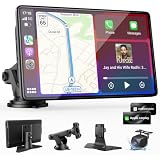
- 【Wireless Apple CarPlay & Android Auto – Easy Upgrade for Your Car】Connect wirelessly through Bluetooth 5.0 and 5GHz WiFi to access Apple Maps, Google Maps, Waze, calls, messages, music, and voice control on the 9-inch display. Use Siri or Google Assistant for hands-free operation while driving. Navigation uses your phone’s GPS, so keep your phone connected or download offline maps for areas with weak signal. OTA updates help maintain compatibility and stable performance.
- 【1080P Backup Camera with Night Vision】The included 1080P backup camera features night vision, a 170° wide-angle lens, adjustable parking guidelines, and an IP67 waterproof design. The 19.7 ft (6 m) camera cable provides flexible installation for most sedans, SUVs, and trucks, with enough length to reach the rear of most vehicles, providing a clear rear view for safer reversing, parking, and maneuvering.
- 【9-Inch HD Touchscreen – Clear Maps & Backup Camera Views】The 9-inch HD touchscreen provides clear navigation, backup camera views, and driving information with 1024×600 resolution, 650 nits brightness, and a 1000:1 contrast ratio. Designed to operate in temperatures from -4°F to 167°F (-20°C to 75°C), the display stays reliable through hot summers and cold winters. Adjustable brightness and volume settings help maintain visibility in different lighting conditions, day or night.
- 【Flexible Audio Options – Bluetooth, FM, AUX & Built-in Speaker】Choose the audio connection that works best for your vehicle. Play navigation prompts, calls, and music through your car speakers using Bluetooth, FM transmitter, or AUX connection. When an external audio connection is not available, the built-in speaker provides direct audio playback from the device, giving you more flexibility for different vehicle setups.
- 【Mirror Link with AirPlay & Miracast】Support for AirPlay, Miracast, and compatible screen mirroring lets passengers watch videos, view photos, or stream content from their phone directly to the 9-inch display. Perfect for road trips or parked use, adding entertainment beyond standard CarPlay and Android Auto. (Disconnect CarPlay/Android Auto before using screen mirroring.)
Can an iOS update add CarPlay Ultra to my current car?
Not by itself. The iPhone must meet Apple’s requirements, but the car also needs compatible hardware and software supported by its manufacturer.
Which automakers currently support CarPlay Ultra?
Aston Martin has the confirmed production rollout. Hyundai, Kia, and Genesis have announced commitments, but Apple has not published a complete model-by-model availability list or firm schedule for them.
Can a wireless CarPlay adapter upgrade my car to Ultra?
No. An adapter can improve or add wireless connectivity for ordinary CarPlay. It cannot integrate CarPlay with the instrument cluster or factory vehicle controls.
The Bottom Line
If your car is not an Aston Martin with the required next-generation infotainment system, there is currently no confirmed CarPlay Ultra upgrade path. Do not infer compatibility from regular CarPlay, a digital instrument cluster, wireless connectivity, or OTA updates.
For a new vehicle, confirm the exact model, trim, model year, market, and infotainment package. The important question is not whether the car supports Apple CarPlay; it is whether the manufacturer explicitly supports CarPlay Ultra for that particular vehicle.
Quick Recap
Product prices and availability are accurate as of the date/time indicated and are subject to change. Any price and availability information displayed on Amazon at the time of purchase will apply.




