Free tools Windows power users keep installed
One-click scans. No signup required.
If your car radio is on but there’s no sound, first check volume, mute, and playback, then compare the radio with another audio source. Those simple tests help distinguish a paused or disconnected device from a speaker, reception, power, or infotainment fault. Because fuse and reset procedures vary by vehicle, use the owner’s manual for your make, model, and year.
Start with power, volume, mute, and playback
Make sure the vehicle is in the ignition state required for the audio system. Switch the system on, raise its volume, and check both the dashboard and steering-wheel mute controls. Confirm that playback is not paused and that the selected source is actually playing. A connected phone or player may be off, unpaired, or idle even while the car’s display is lit. Renault and Kia list these as possible causes of no sound in their manuals: Renault Radio Connect R & GO 3 manual and Kia audio-system manual.
Compare the radio with another source
Try FM or AM radio and, if available, Bluetooth or USB. If one source works and another does not, the fault is more likely in the silent source’s connection or playback than in the entire audio system.
If Bluetooth audio is silent
Check that the phone is connected to the car, selected as the active source, and playing audio. Depending on the system, useful steps may include toggling Bluetooth off and on, restarting the phone, or deleting and pairing the device again. Kia’s guidance describes these as device- and system-specific troubleshooting steps.
What’s actually slowing this PC down?
Pick the symptom - the matching free tool is one click away.
#1 Best Overall

- Seamless Bluetooth Connectivity: Car stereo with Bluetooth technology allows you to enjoy hands-free calling and high-quality wireless music streaming from your iPhone and Android devices.
- Powerful, Clear Audio Performance: Equipped with a built-in MOSFET amplifier, this Pioneer car stereo delivers up to 50 watts per channel to four speakers for rich, dynamic sound across your entire vehicle.
- High-Quality Music Playback via USB: Enjoy clear, detailed sound from your favorite tracks using the front USB input—compatible with FLAC, MP3, and WMA formats.
- Compact 1-DIN Design: Single din radio is designed with a super-short chassis to make installation easy, even in vehicles with limited dash space, without compromising on performance.
- Simple Sound Customization: Dedicated Direct EQ Keys let you adjust bass, treble, and balance settings on the Pioneer stereo to match your personal listening style.
If USB audio is silent
Reconnect the USB device, check its connector for contamination, and connect it directly rather than through a hub or extension. Confirm that the device and its audio format are supported by the vehicle. The exact compatibility rules depend on the infotainment system.
Check whether one speaker or side is silent
If sound comes from only one side, look in the vehicle’s sound settings for balance or sound-position controls and make sure they are centered. Incorrect left-right balance can make a working system seem partly silent. If the setting is correct but a speaker still produces no sound, a disconnected speaker or short circuit may be involved; Renault’s manual advises dealer service for these faults.
Rank #2
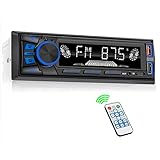
- 【Bluetooth Upgrade for Older Vehicles】Upgrade your vehicle with this single DIN Bluetooth radio and enjoy wireless music without replacing your entire car audio system. The Bluetooth car stereo pairs with a compatible smartphone to stream playlists, podcasts, and audiobooks through your vehicle’s speakers, giving daily commutes and road trips a more convenient, cable-free soundtrack.
- 【Hands-Free Calling & Push-to-Talk】The built-in microphone and dedicated answer/end button let you hear calls through your car speakers and talk without holding your phone. Once Bluetooth is connected, press the push-to-talk button to access a supported phone voice assistant for calls or music, helping reduce phone handling while driving.
- 【FM Radio with 18 Presets】This FM car radio covers 87.5–108 MHz and supports automatic and manual station search. Save up to 18 favorite stations, while the memory function keeps them ready for quick access to music, news, weather, talk shows, sports, and local traffic information.
- 【5 Ways to Play & Multiple Audio Formats】Enjoy music through Bluetooth, FM radio, USB, AUX input, or TF/microSD card. This car stereo supports MP3, WMA, APE, FLAC, and WAV files, giving you flexible listening options with or without mobile data. Rear RCA outputs also support connection to a compatible external amplifier or powered subwoofer.
- 【50W x 4 Output, EQ & 7-Color Lighting】This single DIN car stereo delivers up to 50W x 4 maximum output across four channels. Choose from Pop, Rock, and Classic EQ presets to match different music styles, then select one of seven LED button colors to complement your dashboard and personalize your driving space.
Distinguish poor radio reception from no audio output
If other sources play normally but radio stations are weak or unavailable, investigate reception rather than treating it as a general sound failure. Renault lists distance from a transmitter, engine interference, and a damaged or disconnected antenna as possible causes. Try a stronger local station; suspected antenna damage or engine-related interference calls for qualified service. An antenna issue is not a good first explanation when every source is silent.
If the display and audio system are both off
First confirm that the system is switched on and that the vehicle is in the required ignition state. A blown audio-system fuse can cause a no-power symptom, but its location and rating are specific to the vehicle. Consult the fuse chart in the owner’s manual; Kia’s guidance directs readers with a fuse-related power fault to a repair shop. Do not install a generic fuse or guess at the rating.
PC Slower Than It Used to Be?
A free scan shows the junk files, broken settings and background clutter dragging Windows down - then fixes them in one click.Free scan · Windows 10 & 11Outdated Drivers Are Slowing You Down
One free scan finds every outdated or missing driver and matches the right update for your exact hardware.Free scan · exact hardware matchRank #3

- 【High Quality Car Stereo Player】- Our double din car stereo size with 7.01"(L)*3.94"(W)2.56"(H), please check the size of your car's radio before ordering. 7inch double din car stereo with 1024*600 Full HD touch screen gives you a fantastic experience. You can enjoy the stream music and the clear picture with your family. Hope you have a good time.
- 【Double Din Car Stereo Phone Mirror Link】- Support mirrorlink and navigation function for most the android cell phone and iPhone, you can connect your smartphone to car audio via a smartphone data cable, easily connect and sync any content (such as video, music, GPS Navigation etc) to the car player displayed on a large screen. Note: the stereo player is not a GPS unit, it gets GPS navigation function by connecting to the cellphone.
- 【7 inch Double Din Car Radio With Bluetooth 5.0 and FM 】- Bluetooth 5.0 and microphone allow you to answer callings, listen to music and media sounds from devices with Bluetooth function. Take Phone Call Hands Free - Free both your hands by dialing and listening to a call on radio by BT connection. It will ensure the safety of your way. High-quality FM radio stereo receiver, three kinds of channel search mode, listen to music, news and traffic information, anywhere and enjoy yourself.
- 【Car Stereo Double Din Inputs】- USB /SD/AUX input. car audio receivers support vast USB, TF Card(Up to 32G) storage equipment, you can download the songs and videos you like into the storage equipment to play. AUX audio input, support external aux(3.5mm plug) to input into the audio, such as navigation, MP3, MP5. Charging function, the USB interfaces are support of cellphones' charging, no worries about having no power. Support Remote Control.
- 【Standard Double Din Stereo with Backup Camera】- Parking has never been easier with this premium double din car stereo which supports front and rear camera, for a safer and time-efficient experience! Simply shift into reverse and the system powers on the camera automatically, for optimal visibility no matter the weather conditions! If you encounter any operation or other problems, please contact us (click "Contact Seller" on your order page)
Use only the restart or reset procedure for your vehicle
Volvo Sensus models
Volvo Cars Support’s 2024 guidance applies to the specific Sensus model years listed on its Sensus troubleshooting page, not to every Volvo or every car. For the listed models, it advises stopping the vehicle, locking it, and allowing it to enter sleep mode; the page says this takes about 30 minutes. It also describes a center-display factory reset, which resets vehicle settings and requires phones to be paired again. Follow the page and your vehicle’s own instructions before using that option.
Kia infotainment systems
Kia manuals describe pressing the infotainment reset button with a suitable tool, such as a pen or paperclip, when the system is slow or unresponsive. This is not a universal reset method; consult the manual for the exact system, and contact a dealer if the problem continues.
Rank #4

- Push To Talk - Connect to your Smartphone’s Android and IOS assistant with the push of a button via Bluetooth. This unit Lets you access information, accept commands, and keep driving
- Switchable Tuner - The selectable tuner function allows you to adjust this receiver's tuner to receive radio broadcasts in the US & Europe
- Bluetooth - Answer/make calls and be hands-free with no distractions. The built-in microphone picks up your voice and your car speakers let you hear the person on the other side. Play and control your music and apps like Spotify/Pandora wirelessly
- Auxiliary - Compatible with the audio output from smartphones as well as MP3 players
- Inputs - The USB port gives you the option to have a vast library of audio files at your fingertips. The auxiliary input is a convenient way to hook up to your MP3 player. Advanced Bluetooth supported profiles include A2DP, AVRCP and HFP
When to get professional help
Seek qualified service if a speaker remains silent after checking balance, or if a speaker short circuit, antenna damage, engine-related interference, or a persistent infotainment fault is suspected. Use the owner’s manual or a repair shop to confirm any fuse or reset procedure. Do not disconnect the car battery as a generic troubleshooting step: the cited manufacturer guidance does not establish that as a universal fix, and some resets can erase settings or paired-device information.
Quick Recap
Best Value

- Wired and Wireless CarPlay & Android Auto with Voice Control: The double din car stereo supports wireless apple car play and android auto. Connecting Phone wireless automaticly, as soon as you start the car. You can get directions from GPS navigation apps from phone link like Google Maps and Waze, planing the route for you, put on your personal playlist on Spotify (from phones), have Siri / Google Assistant (from phones) call a friend, etc. Let AI deal with the stress and focus on the wheel!
- High Fidelity Sound Quality with Built-in DSP: Built in DPS with 4.2 channels Pre Amplifier with max 240W output, FR, FL, RR, RL, adjusting music effect wherever position. 2 Subwoofer speakers outputs that delivers outstanding sound quality and breathtaking bass effects. With 10 band EQ Audio Equalizer that allows to adjust the music effect as like. To reduce the effect to music quality of overheating, adds a large heat sink in unit and increase the space for heat disspation.
- High-Quality Bluetooth Connection with Independent Bluetooth 5.3 Module & Extra Antenna: Independent Bluetooth 5.3 Module with extral Bluetooth antenna, improving transmission efficiency, reducing static noise, hands free calling and audio streaming of the car play screen. Powerfull upgraded smart chip, faster connection, lower delay of signal. Built-in microphone and external microphone interface, make phone calls or voice command more stable, clearly and smoother, while you stay focused on the road.
- Immersive 7-Inch IPS Touchscreen& Wired Mirror Link:Effortlessly connect compatible devices, enabling to enjoy videos and other content on the expansive 7-inch IPS HD touchscreen. With a dazzling resolution of 1024x600, every image and video comes to life with stunning clarity, vivid colors, and breathtaking detail. Attention: This stereo comes NO Wi-Fi hotspot function!
- Safety Driving Effortless SWC Control Features: equipped with Steering Wheel Control (SWC) integration, offers enhanced convenience and safety by allowing you to control various functions directly from your steering wheel. Effortlessly adjust volume, change tracks, and activate voice commands without taking hands off the wheel. Ensures a smoother and more intuitive driving experience, enabling to stay focused on the road ahead while enjoying seamless control over car's entertainment system.
Product prices and availability are accurate as of the date/time indicated and are subject to change. Any price and availability information displayed on Amazon at the time of purchase will apply.
The Tool Desk
Outbyte Driver Updater FREEFix the driver behind crashes, sound loss and screen glitchesFind Drivers →Outbyte PC Repair FREERepair Windows errors before they cause bigger problemsFix Now →



