The most reliable fix for Audi Bluetooth not working is to delete the old pairing on both the phone and the MMI, restart both devices, and pair again from the Audi screen while parked. Before resetting anything, identify whether the problem is discovery, PIN confirmation, phone permissions, music streaming, wireless CarPlay or Android Auto, or the MMI itself.
Audi menu names vary between older MMI 2G and 3G systems, MIB1 and MIB2, and newer MIB3 and Digital Stage systems. Use the vehicle-specific owner manual for your model year when a label differs from the examples below. Do not use a phone or infotainment reset while driving.
First, identify what is actually failing
Audi Bluetooth can appear to be broken even when only one function is unavailable. Hands-free calling, contact synchronization, Bluetooth music, wireless CarPlay and Android Auto do not always use the same settings or connection path.
| Symptom | Start with |
|---|---|
| The Audi does not appear on the phone | Turn Bluetooth off and on, enable Bluetooth visibility in the MMI, remove old devices, and start pairing from the Audi screen. |
| A PIN appears but pairing fails | Confirm that the same PIN is shown on both screens, then delete the old pairing on both sides and try again. |
| The phone connects and immediately disconnects | Restart the phone and MMI, remove competing pairings, update the phone, and test a second phone. |
| Calls work but music does not | Enable Media audio on Android, select the Audi as the media source, and verify that the specific Audi supports Bluetooth music rather than calling only. |
| Contacts or messages are missing | Accept synchronization permissions, check the Audi entry in the phone Bluetooth settings, and unlock an iPhone after restarting it. |
| Wireless CarPlay stopped working | Check the Audi entry under iPhone CarPlay settings, cycle the CarPlay setting, and recreate the pairing before considering a network reset. |
| No phone can connect | Treat the problem as potentially vehicle-side and arrange Audi-specific diagnosis instead of buying a random Bluetooth receiver. |
Before trying the fixes
- Park first. Keep the vehicle stationary with the ignition and infotainment system switched on during setup.
- Keep the phone close to the vehicle. Open the phone’s Bluetooth settings so it is ready to discover or confirm the Audi.
- Disconnect other Bluetooth devices. Earbuds, watches, another car, or a previously connected phone can take the active connection.
- Identify the MMI layout. Note the Audi model, model year, and whether the car uses an older MMI 2G/3G system, MIB1/MIB2, or a newer MIB3/Digital Stage interface.
- Do not start with a factory reset. The first steps below are reversible and solve more pairing problems with less disruption.
Top 10 fixes for Audi Bluetooth
1. Check the basic Bluetooth pairing conditions
Switch Bluetooth off on the phone, wait a few seconds, and switch it back on. Leave the Bluetooth settings screen open. On the Audi, make sure Bluetooth is enabled and that the MMI is allowing the vehicle to be discovered or is otherwise ready to create a new connection.
Free tools Windows power users keep installed
One-click scans. No signup required.
#1 Best Overall
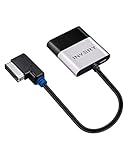
- [UPGRADE YOUR CAR WITH BLUETOOTH MUSIC STREAMING] Please confirm the compatibility before purchasing. If you're not sure whether it's compatible, please contact us. Compatible for Audi MMI 3G, 3G+ from 2009 year+, Audi Concert/Symphony, VW RNS 510 from 2009 year+, VW 3G for RNS 315 from 2009 year+, VW Premium 8 systems from 2009 year+. NOT compatible for Audi MMI/AMI 2G ranged from 2004 year to 2009 year. NOT compatible for Audi Navigation Plus. Doesn't support phone call.
- [POWERED BY QUALCOMM CSR8675 CHIPSET] Adopted powerful Qualcomm CSR8675 chipset for better sound quality experience. Support 24Bit audio processing and 120MHz DSP, support APTX, APTX-LL, APTX-HD high-quality transmission format
- [PLUG, PAIR, PLAY] Just plug our adapter into AMI/MDI connector usually found in glove box or center console, pair the bluetooth, and play music. Enjoy bluetooth music streaming, no more installation required
- [SUPPORT STEERING WHEEL SONG BUTTON CONTROL] Using steering song buttons to control music previous/next tracks. Driving safer while changing songs
- [SUPPORT HEAD UNIT RADIO BUTTON CONTROL] Using head unit radio buttons to control music. Only support Apple Music playlist display, NOT support Spotify/Pandora playlist display
Keep the ignition and infotainment system on while pairing, and make sure the phone is not actively connected to another Bluetooth device. If another phone is already in the Audi, disconnect it temporarily. A phone that keeps reconnecting to earbuds or a different vehicle can prevent the Audi pairing request from completing.
2. Start the pairing from the Audi MMI
Do not rely only on searching from the phone. On many later Audi systems, the general route is:
PHONE or SETTINGS > Connected devices > Telephone 1 or Telephone 2 > New connection.
- Open the MMI phone or connected-devices screen.
- Choose New connection, Connect new device, or the closest equivalent shown by your system.
- Select the phone when it appears.
- Compare the generated PIN on the Audi and phone.
- Confirm the matching PIN on both screens.
- Accept the remaining prompts for contacts, call history, messages, and media where appropriate.
Those labels are examples, not a universal Audi button sequence. Older systems may use a different connection manager, while newer 2025 and 2026 Audi models use substantially different MMI hardware and interfaces. If the menu does not match, follow the owner manual for that VIN and model year rather than trying an unofficial reset combination.
3. Delete old pairings on both the phone and the Audi
A clean re-pair is often more effective than repeatedly attempting the same failed connection. Delete the Audi entry from the phone first:
- On iPhone, open Settings > Bluetooth, tap the information button beside the Audi, and choose Forget This Device.
- On Android, open Settings > Connected devices > Bluetooth, select the Audi gear or settings icon, and choose Forget, Unpair, or Forget device. The label varies by Android version.
Then open the Audi MMI’s connected-devices or connection-manager list, select the phone, and remove or delete it. Remove unused phones as well. An old phone may reconnect first, or the MMI may have reached its stored-device capacity. After both sides are clean, turn Bluetooth off and on again and repeat the MMI-led pairing process.
4. Restart the phone and the MMI
Restart the phone completely rather than merely closing its Bluetooth settings. Then switch the Audi off, leave the vehicle, lock it, and allow the infotainment system to shut down before starting the vehicle again. Retry the pairing after the MMI has restarted.
A restart can clear a temporary Bluetooth process or a stuck connection. It will not repair an MMI that repeatedly freezes, reboots, or loses several communication functions. Those symptoms point toward a software or vehicle-side fault and should be treated separately from an ordinary failed pairing.
Outdated Drivers Are Slowing You Down
One free scan finds every outdated or missing driver and matches the right update for your exact hardware.Free scan · exact hardware matchPC Slower Than It Used to Be?
A free scan shows the junk files, broken settings and background clutter dragging Windows down - then fixes them in one click.Free scan · Windows 10 & 115. Confirm the PIN and grant the right permissions
When the Audi displays a PIN, the numbers must match on both screens. If they do not match, cancel the attempt rather than accepting it. If the PIN is correct but the connection still fails, delete the old records again and retry promptly while both screens are active.
Accept the prompts for contacts, call history, messages, and media if you want those functions. If calls work but contacts or messages are absent, open the Audi entry in the phone’s Bluetooth details and check the available synchronization controls. On some iPhone and Audi combinations, contact synchronization requires the relevant Bluetooth synchronization options to be enabled. After an iPhone restart, unlock the phone before expecting its address book to transfer.
Rank #2

- [UPGRADE YOUR CAR WITH BLUETOOTH MUSIC STREAMING] Seamlessly stream high-quality wireless music from your smartphone to your car‘s original audio system,providing a better experience of streaming music.
- [PLUG & PLAY] NO INSTALLATION REQUIRED.Simply connect the adapter to your vehicle’s AMI/MDI connector (typically located in the glove box or center console), pair via Bluetooth, and start streaming. Ultra-fast auto-reconnection – the adapter automatically pairs with your phone when you start the car.
- [Universal Bluetooth Compatibility] Designed for universal compatibility with all iOS and Android devices. directly compatible with Audi (3G & 2G AMI), Mercedes-Benz (Media & Music Interface), and Volkswagen Music Interface systems.Please note that phone calls are not supported.
- [STEERING WHEEL & HEAD UNIT CONTROLS SUPPORTED] Use your car‘s original steering wheel buttons or radio controls to play/pause and skip tracks. Drive safely while enjoying full control of your music without touching your phone.
- [Note]:Before purchasing, please confirm that the product's adapter interface matches your car's original port to ensure compatibility and connectivity.
Permission labels differ between iOS versions, Android versions, and Audi MMI generations. A successful call connection does not prove that contact or message synchronization has been approved.
6. Separate phone calls from Bluetooth music
Calls working does not necessarily mean Bluetooth music is supported or enabled. The Audi may have established a hands-free telephone connection while the media connection is disabled, unavailable, or not selected as the active source.
The Tool Desk
Outbyte Driver Updater FREEScan for outdated or missing drivers - takes under a minuteDriver Scan →Outbyte PC Repair FREERepair Windows errors before they cause bigger problemsFix Now →On Android, open the Audi device settings under Bluetooth and make sure both Phone audio and Media audio are enabled. In the MMI, open the media source selector and choose the connected phone or Bluetooth audio source instead of radio, USB, or another input.
Some older Audis support hands-free calling but do not provide native Bluetooth music streaming. In that case, repeatedly deleting the pairing will not add a missing media function. Check the original equipment and the owner manual before buying an accessory.
7. Test a second phone
Pair a known-working iPhone or Android phone after removing the original pairing from the MMI. This is a diagnostic test, not proof that one brand of phone is universally compatible.
- If the second phone works: concentrate on the original phone’s saved Bluetooth record, permissions, operating-system version, device name, or competing connections.
- If the second phone also fails: the problem is more likely to be the Audi’s stored device list, MMI software, compatibility, or vehicle hardware.
Do not replace an Audi module solely because one phone fails. Use the second-phone result to isolate the side of the connection that needs attention.
8. Update the phone and Audi infotainment software
Install available operating-system updates on the phone. Also check Audi or dealer channels for software updates for the vehicle’s infotainment system. Updates can address known phone-compatibility and MMI problems, but an update should not be assumed to be the cause of every Bluetooth failure.
Software features and update procedures vary by vehicle equipment and model year. Audi systems in 2025 and 2026 are not interchangeable with the menus or behavior of an older MMI system. Give the dealer the VIN and describe exactly what changed, especially if the problem started immediately after a phone or vehicle software update.
What’s actually slowing this PC down?
Pick the symptom - the matching free tool is one click away.
9. Troubleshoot CarPlay and Android Auto separately
CarPlay and Android Auto can involve Bluetooth, Wi-Fi, USB data, phone permissions, and separate vehicle compatibility requirements. A failure in one does not automatically mean the Audi’s ordinary hands-free Bluetooth is defective.
Rank #3

- 1.NEWNEWLIU wireless Bluetooth 5.0 module is fully compatible with Audi's 3G multimedia interface system. Before purchasing, please confirm whether the user's vehicle model has an AMI interface multimedia interface (which is usually located in the armrest box or passenger storage box), and ensure that your multimedia interaction system is a 3G system. (Note: Only 3G system can be used, not 2G). If the LED light does not light up after the product is powered on, it means that the product is not compatible with your device.
- 2.Bluetooth 5.0 stable transmission, upgraded sound quality. Using CSR chip, supporting Bluetooth 5.0 technology, with fast transmission speed, wide coverage, and better sound quality than FM channel Bluetooth products. Built in audio isolation module effectively reduces noise interference and improves sound quality purity.
- 3.Compact design that does not take up space. The compact body avoids occupying storage space, and the accompanying wiring harness does not require drilling, ensuring non-destructive installation. No need for USB power supply, balancing practicality and aesthetics
- 4. Intelligent automatic connection, plug and play. Activate the AUX mode in the multimedia interactive system and connect your smartphone to this Bluetooth adapter. When you connect your car stereo to other Bluetooth devices or MP3 players, it can play music.Please confirm that your car is equipped with AMI Audi music interface.
- 5.This is a plug and play wireless Bluetooth music adapter designed specifically for Volkswagen, Audi, with the original AMI integrated system Suitable for Apple, Android, or other Bluetooth enabled devices.
Wireless Apple CarPlay
- On the iPhone, open Settings > General > CarPlay and select the Audi if it is listed.
- Check that CarPlay is allowed for the Audi. If the saved entry appears stuck, use the option to forget the car and create the connection again.
- Cycle the relevant CarPlay setting in the Audi MMI off and on if that control is available.
- Delete the Audi Bluetooth pairing on both sides and recreate it from the MMI if necessary.
Audi has documented intermittent wireless CarPlay behavior for some configurations after iOS updates. That does not mean every post-update problem has the same cause, so use the applicable vehicle and phone instructions rather than assuming a universal iOS fault.
Use an iPhone network reset only as a later troubleshooting step or when directed by applicable support guidance. On iPhone, the route is generally Settings > General > Transfer or Reset iPhone > Reset > Reset Network Settings. This removes saved Wi-Fi networks and other network configuration, so it is not an appropriate first response to a simple Bluetooth pairing error.
Wired Apple CarPlay
For wired CarPlay, use an intact, data-capable cable rather than a charge-only cable. Keep the iPhone unlocked during setup, try another USB port if the Audi has one, restart both the phone and vehicle, and inspect the phone port for visible debris without inserting anything that could damage it.
Do these 3 things before closing this tab:
1Fix the driver behind crashes, sound loss and screen glitches2Repair Windows errors before they cause bigger problems3Scan for outdated or missing drivers - takes under a minuteIf the original cable is damaged or unreliable, a USB data cable for Audi CarPlay can be a sensible replacement. It is a cable fix for a wired CarPlay connection, not a solution for native Audi Bluetooth pairing.
Wireless Android Auto
Wireless Android Auto requires a compatible vehicle and phone, along with the Bluetooth, Wi-Fi, and location conditions required by the phone and Android Auto version. Confirm that the specific Audi supports the wireless feature, remove the old Audi pairing, restart both devices, and follow the Android Auto setup prompts from the MMI. If ordinary hands-free calling works but Android Auto does not, troubleshoot Android Auto compatibility and permissions separately.
10. Escalate when the MMI or vehicle communication system is the problem
Arrange Audi-specific diagnosis when:
- Bluetooth is unavailable or greyed out for every phone.
- No phone can connect after old pairings have been removed and both devices have been restarted.
- The MMI repeatedly freezes, reboots, or loses its phone settings.
- Several communication features fail together, such as hands-free calling, contacts, media, and smartphone integration.
- The problem began after a vehicle software change or other infotainment work.
When contacting an Audi dealer or qualified automotive infotainment service, provide the VIN, model year, MMI generation if known, phone model and operating-system version, the exact symptom, and whether a second phone also failed. Audi technical bulletins show that some complaints are specific to a phone application, firmware version, MMI generation, or model year. A generic Bluetooth receiver, factory reset, or replacement module cannot reliably solve every one of those conditions.
Independent reader supportYour contribution helps us test, update, and keep practical guides available for everyone.Quick decision guide by symptom
Audi Bluetooth is not visible on the phone
Confirm that the MMI’s Bluetooth function and discoverability are enabled. Turn the phone’s Bluetooth off and on, remove unused Audi devices, and start a new connection from the MMI. If the Bluetooth control is greyed out or missing, skip repeated phone resets and move toward vehicle diagnosis.
The Audi appears, but the PIN will not confirm
Check that the same generated PIN is displayed on both screens. Cancel the attempt, forget the Audi on the phone, remove the phone from the MMI, disconnect the phone from other Bluetooth devices, and retry while the phone and MMI are both waiting for confirmation.
The phone pairs but disconnects immediately
Restart both devices, delete competing pairings, install available phone updates, and test a second phone. If every phone disconnects, record whether the MMI is freezing or rebooting; that changes the likely cause from a phone record to an MMI or software issue.
Calls work, but music does not
Enable Media audio on Android, choose the Audi Bluetooth source in the MMI, and check whether the vehicle supports Bluetooth music at all. An older Audi with hands-free calling but no Bluetooth media may need an AMI-based accessory or a model-specific retrofit, not a new pairing attempt.
Contacts or messages do not appear
Accept synchronization prompts, inspect the Audi Bluetooth permissions on the phone, and unlock an iPhone after restarting it so the address book can transfer. Some message and contact functions depend on the phone, permissions, Bluetooth implementation, and Audi equipment.
Recommended Free Tools
Rank #4

- [Audi System Fit]:The Daohaodeli Bluetooth 5.0 wireless module is fully compatible with Audi’s MMI 2G, 3G, and 3G+ multimedia systems. Before purchasing, please confirm your vehicle is equipped with an AMI port, which is typically located in the armrest or glove box
- [Superior Sound]:Experience stable Bluetooth 5.0 connectivity and upgraded sound quality. Built with a CSR chip, this adapter provides faster transmission, wider signal range, and better sound than FM-based Bluetooth products. An integrated audio isolation module effectively reduces interference for cleaner, purer audio
- [Easy Installation]:Compact, space-saving design with non-destructive installation. Its small size won’t take up valuable storage space, and the included wiring harness requires no drilling or modifications. No USB power supply is needed, combining practical functionality with a clean, low-profile appearance
- [Auto Connection]:Intelligent auto-connect with simple plug-and-play operation. Just activate AUX mode on your MMI system and pair your smartphone with the adapter. It supports music playback from any Bluetooth device or MP3 player connected to your car stereo. Please confirm your vehicle has an Audi AMI port before purchasing
- [Compatibility]:This plug-and-play wireless Bluetooth music adapter is specially designed for Volkswagen, Audi, and Mercedes‑Benz vehicles equipped with the factory AMI system. It is compatible with Apple, Android, and all other Bluetooth‑enabled devices, including the iPhone 7 and Samsung Galaxy S8
What not to do first
- Do not perform a factory reset as the first fix. It can remove personalized settings without repairing a compatibility or hardware fault. Reserve it for a model-specific procedure after simpler steps fail.
- Do not pull a fuse based on an unofficial universal reset instruction. Audi electrical systems and MMI generations differ, and an incorrect power interruption can create additional problems.
- Do not replace the Bluetooth module immediately. A failed phone permission, stale pairing, unsupported music function, or software issue can produce similar symptoms.
- Do not buy a generic Bluetooth receiver when no phone can connect. An accessory may add audio through a compatible input, but it will not repair a failed MMI communication system.
- Do not assume a generic OBD2 scanner can diagnose infotainment faults. Many basic readers may not access Audi-specific MMI modules, so a scanner is a later-stage diagnostic option rather than a first-line Bluetooth fix.
Why the exact Audi model year matters
Audi Bluetooth behavior differs substantially between MMI 2G/3G, MIB1/MIB2, and newer MIB3 or Digital Stage systems. Some vehicles support two connected phones, while others have different limits or different phone and media menus. A procedure documented for a 2020 A4 or A6, for example, should not be copied unchanged into an older A4 or a 2025 or 2026 Audi with newer MMI hardware.
Use Audi’s current online owner-manual portal or the manual supplied for the vehicle as the authoritative source for menu labels, supported phone functions, and reset procedures. When the manual and a generic online button sequence disagree, the vehicle-specific manual takes priority.
Source note: The troubleshooting sequence follows Audi owner-manual and technical-bulletin guidance, together with Apple and Google support recommendations. Exact menus, supported media functions, software availability, and accessory fit remain vehicle- and MMI-specific.
Frequently Asked Questions
Why does my Audi Bluetooth work for calls but not music?
The hands-free phone connection and Bluetooth music connection are separate functions. On Android, open the Audi Bluetooth device settings and enable both Phone audio and Media audio, then select the Audi Bluetooth source in the MMI. If the Audi is an older model with hands-free calling only, it may not support native Bluetooth music and may require a compatible AMI accessory or retrofit.
How do I reset Audi Bluetooth?
There is no universal Audi Bluetooth reset shortcut for every MMI generation. The safest general reset is to forget the Audi on the phone, remove the phone from the MMI connected-device list, restart the phone and vehicle, and pair again from the MMI while parked. Use a factory or network reset only when the vehicle-specific instructions call for it.
Why does my phone not see my Audi?
Make sure Bluetooth is enabled and discoverable in the MMI, turn Bluetooth off and on on the phone, disconnect the phone from other Bluetooth devices, remove old pairings, and start a new connection from the Audi PHONE or Connected devices menu. If the Bluetooth control is missing or greyed out, the problem may be vehicle-side.
Will a Bluetooth adapter fix Audi Bluetooth that stopped working?
Usually not. An AMI Bluetooth adapter can add music to certain older Audis that have an AMI port but lack native Bluetooth music streaming. It does not repair a modern Audi MMI that cannot pair with any phone, and compatibility must be checked by model year, MMI generation, connector, and equipment.
When should I take my Audi to a dealer for Bluetooth problems?
Escalate when no phone can connect after a clean re-pair, Bluetooth is greyed out, the MMI freezes or reboots, several communication features fail together, or the problem began after vehicle software work. Bring the VIN, phone details, software versions, and the result of testing a second phone.
Quick wins for a faster PC:
Fix the driver behind crashes, sound loss and screen glitchesFind Drivers →Repair Windows errors before they cause bigger problemsFix Now →Scan for outdated or missing drivers - takes under a minuteDriver Scan →The Bottom Line
Bottom line: Start with a parked, MMI-led clean re-pair: verify Bluetooth visibility, delete old records on both sides, restart the phone and Audi, confirm the PIN, and grant the required permissions. Then separate calling, music, CarPlay, and Android Auto problems. If multiple phones fail or the MMI is unstable, stop buying accessories and obtain model-specific Audi infotainment diagnosis.
Quick Recap
Product prices and availability are accurate as of the date/time indicated and are subject to change. Any price and availability information displayed on Amazon at the time of purchase will apply.