Install a Yakry camera by first identifying the exact model, then test the kit, mount the camera and monitor, provide separately fused power and ground, connect any reverse trigger, and verify the image before sealing or hiding wiring. Yakry sells wireless car kits, RV/trailer systems, wired multi-camera kits and magnetic designs, so the model manual—not a generic wire-color chart—controls the final connections.
Use this guide as the workflow. For model-specific diagrams and button sequences, consult the manual for your Y24, Y34, Y27-N, Y142 or other exact model.
As an Amazon Associate I earn from qualifying purchases.
Safety first
- Secure the vehicle, apply the parking brake and disconnect power before permanent wiring.
- Never stand behind the vehicle while testing the reverse circuit; use a helper and keep the vehicle immobilized.
- Keep the monitor out of the windshield view, controls and airbag deployment paths.
- Protect wiring from exhaust heat, sharp edges, water, hinges and moving suspension parts.
- Use an appropriately fused source and treat the camera as an aid—not a replacement for mirrors, direct observation or a spotter.
- Check local inspection and license-plate rules before drilling or covering lighting.
Improper installation can affect warranty coverage; the supplied documentation also calls for a post-installation test. Installation and testing guidance.
The Tool Desk
Outbyte Driver Updater FREEFix the driver behind crashes, sound loss and screen glitchesFind Drivers →Outbyte PC Repair FREEClear out junk files and repair common Windows errorsFree Scan →1. Identify your Yakry system
Yakry’s product range includes wireless, wired, RV, magnetic and multi-camera configurations. Yakry product range. Find the model number on the monitor, camera, box or manual before connecting anything.
#1 Best Overall

- Dual Antennas Design with Enhanced Stability: Y27 RV backup camera features 2026 unique dual-antenna design and chip, offering a more stable signal and a 50% higher refresh rate. The signal can reach up to 825ft in open areas, with a working range of up to 320ft on vehicles.
- Easy DIY Installation in Just 30 Minutes: Y27 wireless backup camera comes with a Furrion bracket and pigtail wire for easy installation on RVs, 5th wheels, trucks, trailers, travel trailers, campers, buses, and other vehicles. We provide a YouTube video with professional instructions for Y27 RV backup camera wireless system.
- Expandable with 4 Channels: Add up to 4 cameras to the HD 1080P monitor with Y27 RV camera system wireless item, and switch between them with ease. Enjoy a wide viewing angle, 8 infrared lights, and clear images.
- Multi Functional Recording System: Our wireless backup camera system doubles as a dash cam with its recording function. The touch key makes it easy to use, while the IP69K waterproof rating ensures reliable performance in all weather conditions.
- Versatile Usage Options: Backup camera for RV system can be used for reversing/rear view or full-time constant view.
| System | How to recognize it | Installation difference |
|---|---|---|
| Wireless car kit | One rear camera, separate monitor, wireless transmitter or antennas | No long video cable; camera still needs suitable power and ground |
| Wireless RV/trailer kit | 7-inch monitor, rear-mounted camera, possible Furrion-style bracket | Camera is powered at the RV/trailer rear; monitor is powered in the tow vehicle |
| Wired single-camera kit | RCA or dedicated video lead | Video cable must be routed from the rear to the monitor |
| Wired dual-camera kit | Two cameras, extension leads and CH or split-screen controls | Each camera must use the matching monitor input |
| Magnetic/rechargeable kit | Removable magnetic camera or rechargeable/solar-assisted parts | May need little or no permanent vehicle wiring; follow that model’s charging instructions |
2. Check compatibility before installation
- Read the exact manual and wiring diagram. Voltage limits differ; some listings describe 12–24-volt operation, but do not generalize that range to every model. Y22 documentation and Y142 documentation.
- Decide whether you want reverse-only activation, continuous rear view, manual viewing or split-screen operation.
- Check for a conventional reverse-light circuit, factory camera-prep connector, Furrion bracket or electronically monitored/CAN-bus lighting.
- Make sure the proposed camera position will not obstruct the plate, lamps, hatch, tailgate or cargo.
3. Gather tools and inventory the kit
Have Phillips and flat screwdrivers, trim tools, a digital multimeter or 12-volt test light, wire stripper/crimper, heat-shrink or electrical tape, cable ties, split loom, a fuse tap with the correct fuse, a drill if required, sealant and eye protection. Included brackets, antennas, power leads and extension cables vary by model; the Y34 list, for example, includes a 7-inch monitor, camera, antennas, pedestal, power cord and lighter adapter. Y34 contents and instructions.
- Lay out the monitor, camera(s), brackets, antennas, power adapters, trigger wires and cables.
- Compare them with the manual and inspect connectors for bent pins or damaged insulation.
- Perform a temporary bench or driveway test before drilling or removing trim.
4. Understand the connections
This conceptual map applies only where the exact model provides these connections:
Rank #2
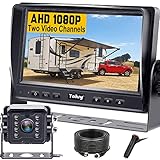
- ►【Easy Installation in 8 Mins】The waterproof camera and HD monitor are powered by one power supply, No need to power the camera and monitor separately, just connect the monitor to a cigarette lighter adapter/Acc/fuse etc, then wire the camera and monitor. Plug and Play - Much less installation effort than wireless rear camera systems.
- ►【Wired Back up Camera, Stable Signal Transmission】The wired reversing camera kit has more stable transmission and will not lose signal at any time. If your wireless backup camera is always intermittent and delayed, a wired camera is a reliable companion for every drive. The rv backup camera connects directly to the monitor via a 66ft cable and is widely used on trailer, truck, tractor, bus, rv, van, suv and more.
- ►【Clear Night Vision & 150° Non-fisheye distortion camera】True IR night vision greatly enhances the image, and the back up camera works even with minimal light around, allowing you to identify objects in the dark. 150 Degree Wide Viewing Angle - Non-fisheye distortion camera, great for lane changing and nighttime backing up and parking in narrow alleys.
- ►【7 inch IPS HD Monitor & Anti-Glare Sunshade】The 7" IPS display offers clearer and more vibrant color images, along with a wider viewing angle that maintains image consistency from various directions. Compare other screens, it reduces glare and flicker during long drives, making it easier on the eyes. Additionally, the backup camera for truck includes a sunshade for improved visibility in strong sunlight.
- ►【"Real Neck Saver" with Parking Guidelines and Image Flip】Reliable parking lines and image flip for fast and perfect reversing without having to turn around all the time, no more neck pain. Even if you sometimes have trouble figuring out the steering, just switch to the "mirror" view on the monitor, making you at ease when reversing.
Monitor power   → accessory socket or fused ignition source
Camera power    → reverse-light positive or approved 12V source
Camera ground   → specified negative wire or clean chassis ground
Reverse trigger → monitor trigger input, when provided
Video cable     → camera to monitor on wired systems
Wireless link   → camera transmitter to monitor receiver
“Wireless” normally describes video transmission, not electrical power. A wireless camera still needs an approved power and ground connection unless it is specifically rechargeable or solar-assisted. Y24 instructions.
5. Install the camera and monitor
Choose and test the camera position
- Cars and pickups: use a central license-plate-area or similarly protected location. Keep the lens clear of the plate, hitch, spare tire, tailgate and exhaust heat.
- RVs and trailers: use the designated camera-prep location when available. A Furrion-style bracket or adapter is model-specific; pre-wiring does not guarantee correct polarity, voltage or pairing. Y34 RV instructions.
- Leave connector slack and adjustability. Do not seal exterior holes until the picture and angle are confirmed.
Mount the monitor
Use the supplied dashboard or windshield mount where permitted. Keep the display stable without blocking forward visibility or an airbag. Route its lead away from pedals, steering and shifter mechanisms. The Y24 manual describes both mounting approaches and these visibility precautions. Y24 mounting instructions.
Rank #3

- Split-Screen Dual Camera System: Maximize Safety & Coverage, watch both rv backup camera feeds simultaneously on a split-screen display—perfect for monitoring rear/front views, blind spots, or hitching trailers. Eliminate guesswork and prevent accidents with real-time dual perspectives
- Effortless Installation In 30 Minutes: No Tools or Expertise Needed. Plug-and-play wiring and universal mounting brackets for back up camera allow you to do the installation yourself. Save money on installation - clear instructions guide you step by step and 24/7 professional guidance
- 7" HD 1080P & Anti-Glare Sunshade: A large 7-inch screen with ultra-sharp resolution ensures every detail is visible, even in bright sunlight. Infrared night vision up to 50 feet for safe backing up in the dark
- IP69 Waterproof & All-Weather Ready: The backup camera for truck built to Last for Trucks/RVs/Tractors/Trailers. The IP69 waterproof camera made of metal to withstand rain, mud, dust and high pressure washdowns
- Zero-Latency Wired Backup Camera: Real-Time Rearview Eliminates Blind Spots During Reversing and Lane Changes. No Wireless Signal Loss or Lag— "Wired" Guaranteed Reliability You Can Trust
6. Wire power, trigger and video
Power the monitor
- For diagnosis or a reversible installation, plug the supplied lighter/accessory adapter into a live 12-volt socket.
- For permanent wiring, use an ignition-switched, fused source approved by the manual, with a sound ground and overcurrent protection close to the source.
- Confirm the monitor starts before completing rear wiring.
Do not guess polarity or fuse size. A lighter adapter is a useful baseline because it isolates monitor-power problems from vehicle fuse-box work. Y24 power options.
Power the camera
For reverse-only operation, connect the camera positive lead to the wire that becomes live only when reverse is selected and connect its negative lead to the specified ground or a clean chassis ground. Verify the vehicle wire with a meter or test light; colors are not universal.
Rank #4

- Dual Antenna Display - Stronger Signal and Extended Range: With the dual antenna design, this 7 inch display increases signal strength by 50%, ensuring a more stable and reliable connection. The system boasts a working range of 320ft on vehicles and up to 830ft in open areas, even under tough conditions.
- Easy Installation - Setup for almost Vehicles (Furrion Compatible): This wireless backup camera system offers easy installation for most vehicles, eliminating the need for complicated wiring. If your vehicle is pre-wired for Furrion, the setup becomes even simpler, making it the ideal solution for RV, truck, trailer, and camper owners.
- Recording Function - Easy Trip Documentation: With an SD card inserted, this system doubles as a driving recorder. Capture your trips, parking maneuvers, and road activities with ease, providing added security and peace of mind on the road. Ideal for long journeys or for RV/trailer owners who like to keep records of their travels.
- Expandable 4-Channel System - Add More Cameras for Full Coverage: This system supports up to 4 cameras, giving you the flexibility to expand your setup. Add side cameras, front cameras, or extra rear cameras for a wider around your vehicle. Monitor can be easily mounted either on your dashboard or windshield.
- 1080P HD Image Quality - Crystal Clear Views: Enjoy 1080P HD image quality for a sharp, clear view of your surroundings. Whether you're backing up your RV, navigating a tight parking space, or monitoring traffic behind you, the superior video quality ensures you see everything in detail for safer driving.The image is clear even at night.
Some models permit ignition-switched or constant power for continuous viewing. Constant power can drain the battery, and continuous operation is model-dependent. Generic Yakry wiring guidance.
Free tools Windows power users keep installed
One-click scans. No signup required.
Connect a reverse trigger when supplied
On systems such as the Y142, a separate blue trigger lead tells the monitor to change inputs. It may not power the camera. Connect it to the verified reverse-light signal exactly as shown in the model diagram. Y142 wiring and trigger instructions.
Best Value

- Effortless Magnetic Installation – No Tools Needed: No more complicated setups! Our magnetic wireless backup Camera offers tool-free installation with a very strong magnet. Simply attach to any metal surface and go! Works great for cars, trucks, and RVs, it installs in minutes for a seamless, hassle-free driving experience.
- 5-Inch HD Monitor with Wide Viewing Angle: Enhance your safety with the 5-inch HD monitor that delivers crisp, crystal clear picture. The wide-angle lens eliminates blind spots, improving parking and reversing visibility. Perfect for those who prioritize better driving safety and clear visuals.
- Solar-Powered for Energy Efficiency & USB Charging: Stay powered without worrying about battery life! Our solar-powered backup camera offers energy-efficient operation and reduces your carbon footprint. Plus, USB charging ensures you're never out of power. A full charge lasts for 25 hours—ideal for long trips and daily commuting.
- Advanced Night Vision for Safe Driving: Drive with confidence, even at night. Our advanced night vision technology ensures clear visibility with great picture in low-light conditions, making parking and reversing safer. Perfect for night driving, this system helps you avoid accidents and maneuver safely in the dark.
- Waterproof Design for All-Weather Reliability: Built to handle any weather, our waterproof backup camera offers reliable performance in rain, snow, or shine. Its rugged design ensures continuous protection, enhancing vehicle safety no matter the conditions. Perfect for any outdoor adventure.
Route wired video
- Connect each camera to the correct monitor input; on dual systems, match Camera 1 and Camera 2.
- Route extension cables beside protected harnesses, not across hinges, seat tracks, suspension or hot exhaust.
- Use loom and ties, avoid crushing cable under trim, and leave service loops at the camera, hatch and monitor.
The Y142 supports supplied extension cables, channel selection and split-screen viewing. Y142 installation details.
Pair wireless components
- Power the monitor and camera and select the intended channel.
- If no image appears, follow the exact model’s pairing procedure; button sequences differ.
- Power-cycle both units, then check antenna seating and orientation.
Loss of power, an unpaired camera, interference and weak signal are documented Y27-N causes of no or unstable video. Y27-N troubleshooting.
Independent reader supportYour contribution helps us test, update, and keep practical guides available for everyone.7. Test, align and weatherproof
- Confirm monitor power, camera power and a stable image with the engine running.
- Select reverse and verify automatic switching if your model supports it.
- Check night or low-light visibility, image orientation and the complete intended rear area.
- Adjust the bracket, brightness, contrast and parking guidelines where the model provides those controls. Guideline adjustment is not universal. Generic Yakry controls.
- Open and close hatches or articulate the trailer while watching for cable tension.
- Only now tighten hardware, seal exterior penetrations, add loom and reinstall trim without pinching wires.
Wireless, wired and RV trade-offs
| Choice | Advantages | Limitations |
|---|---|---|
| Wireless | No long video cable; convenient for pickups, trailers and difficult trim | Still needs camera power; interference, distance and metal structures can affect reliability |
| Wired | Stable connection suited to multi-camera and permanent installations | Long cable routing, protection and trailer or hatch slack are required; Yakry describes Y142 transmission as zero-latency |
| Reverse-light power | Camera operates only while reversing | Requires correct circuit identification and may interact with monitored lighting |
| Ignition-switched power | Rear view can be available while driving without an always-live circuit | Requires fuse-box access and careful wiring |
| Constant power | Continuous monitoring on compatible models | Battery-drain risk if left powered |
Troubleshooting by symptom
| Symptom | Checks and recovery |
|---|---|
| Monitor is dead | Test the accessory socket, adapter fuse, plug seating, ignition state, selected fuse and ground. Start with the supplied adapter before diagnosing a hardwire. |
| Monitor on, “No Signal” or blank | Check camera power and ground, channel selection, pairing, input choice and every connector. Temporarily power the camera from a known-good, correctly fused 12-volt source; if video returns, vehicle reverse wiring is the likely fault. |
| Image appears in reverse but is black | The trigger may be working while camera power is absent. Check camera positive, ground, channel and video connector separately. |
| No automatic reverse switching | Measure for reverse-only voltage at the trigger, verify the correct monitor lead, confirm camera power, channel priority and that the model supports automatic switching. Y142 trigger example. |
| Flickering or dropouts | Reseat power, ground and antennas; look for interference, damaged cable, excessive distance or metal obstruction. Y27-N fault guidance. |
| Upside-down, mirrored or poorly framed | Reposition the camera, use the model’s flip/mirror control if available, and realign physically before trusting parking lines. |
| Works on a temporary source but not the vehicle | Recheck reverse-wire identification, polarity and ground. Pulse-width-modulated or CAN-bus lighting may need a vehicle-specific interface or professional installation. |
Final checklist
- Exact model manual and voltage requirements confirmed.
- Camera and monitor tested before permanent routing.
- Power, ground, trigger and video functions verified independently.
- Image is stable, correctly oriented and properly framed.
- Automatic reverse view tested in a controlled area.
- Wires are fused, protected, secured and clear of heat and movement.
- Monitor does not obstruct visibility or airbags; camera does not obstruct plate or lighting.
Frequently Asked Questions
Does a wireless Yakry camera need wiring?
Usually yes. Wireless normally removes the video cable between camera and monitor; the camera still needs an approved power and ground connection unless that particular model is rechargeable or solar-assisted.
Can I connect every Yakry camera to the reverse-light wire?
No. Reverse-light power is common for reverse-only operation, but wiring and voltage limits are model-dependent. Follow the exact diagram and verify the vehicle circuit with a meter.
The Bottom Line
Identify the model first, separate camera power from monitor power and reverse triggering, test the complete system before hiding wiring, and weatherproof only after the image and automatic switching work reliably.
Quick Recap
Product prices and availability are accurate as of the date/time indicated and are subject to change. Any price and availability information displayed on Amazon at the time of purchase will apply.




