“Park assist” can mean anything from a beeping proximity warning to a system that steers the car into a parking space. Some versions also control speed, braking, or gear changes. The name alone does not tell you what your vehicle will do: check the owner’s manual for your exact model year and equipment, and stay ready to monitor and control the car.
What does park assist mean?
Park assist is an umbrella term for driver aids that help with parking. A vehicle may have one or several distinct features:
- Parking-distance warnings alert you to nearby objects, often with beeps or a display.
- A backup camera shows a view behind the vehicle; it is a viewing aid, not the same function as a proximity warning.
- Rear automatic braking can apply the brakes when the vehicle is reversing and a potential collision is imminent. It is not active parking assistance.
- Active parking assistance may detect a suitable space and steer through some or all of a parking maneuver.
National Highway Traffic Safety Administration (NHTSA) guidance treats these as different technologies, not interchangeable names. What is fitted and how it operates depend on the vehicle’s make, model, year, trim, and market.
How do parking sensors and warnings work?
Proximity sensors estimate distance
Some parking-distance systems use ultrasonic sensors mounted around the vehicle. They emit sound beyond ordinary hearing and use returning echoes to estimate how close an object is. Depending on the vehicle, the system may communicate that estimate through beeps, a visual display, or both. Volkswagen’s technical documentation, for example, describes tones that become more frequent as an obstacle gets closer and a visual display on some configurations.
Quick wins for a faster PC:
Scan for outdated or missing drivers - takes under a minuteDriver Scan →Repair Windows errors before they cause bigger problemsFix Now →Fix the driver behind crashes, sound loss and screen glitchesFind Drivers →#1 Best Overall

- When the product is working, the sensor emits ultrasonic waves. When encountering an obstacle, the ultrasonic waves are reflected. The sensor receives the reflected signal and transmits it to the control box. Through calculation, the control box obtains the distance between the vehicle and the obstacle, and reminds the driver to pay attention through the display and sound, etc., to avoid danger. It is a good helper for us to drive the car!
- 1: When reversing, activate the rear 4 sensors and the front 2 sensors to detect and alarm. During normal driving, when braking, the 4 sensors in front of the car are activated to assist the driver to safely pass through narrow passages. When you release the brake, the parking sensor will work for about 15 seconds before stopping.
- 2: The product alerts the driver through sound, numbers, and light bars at the same time.
- 3: Probe behind the car to prevent collision, probe in front of the car to prevent rubbing.
- 4: On the display, there are 8 light bars representing each sensor, allowing the driver to distinguish the orientation of obstacles.
Sensor placement, coverage, and operating characteristics vary. NHTSA’s technical appendix documents multiple ultrasonic configurations, so there is no single range or coverage pattern that applies to every vehicle. A warning system can help you judge proximity, but it does not establish that a path or parking space is clear.
A camera gives a view, not a complete picture
A backup camera provides an image of the area behind the vehicle. It is a separate aid from parking-distance sensors and from automatic braking. Use the view alongside direct checks of your surroundings; do not assume the camera shows every obstacle or the full area around the car.
Rank #2
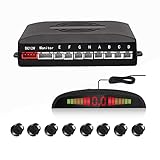
- 【High Quality Parking Radar】This Car Parking Radar System consists of 8 Ultrasonic sensors, digital control box, and LED display, making the job of parking any vehicle much easier.
- 【Intuitive Display】This parking radar not only makes beep sound warning, but aslo shows you distance data. Beep sound warning will be more frequent when distance is getting closer. Prevent future dangerous and costly collisions.
- 【Easy to Install】Easy to install, with full detailed English manual. Perfectly fit your car with universal hole saw. With a drill head, convenient to drill hole on the bumper of the car. The sensors cable length: Front sensors cable: 6m/20ft; Reversing sensors cable: 2.3m/7.5ft.
- 【Multi Color to Select】Multi Color to Select (Black/Red/Grey/White/Fiat Red/Champagne Gold/Blue/Silver). 8 Weather Proof Sensors + LED Distance Display.
- 【Warranty Period】High Quality and 3 Year Warranty
How does active parking assistance park a car?
Many active systems use sensors to scan for a suitable space as the vehicle passes it. If the system recognizes one, it may guide the driver into position and steer during the parking maneuver. The driver’s part varies by system: some require the driver to select gears and manage the accelerator and brake, while others can control more of those actions.
- Activate the feature as described in the owner’s manual. The system’s search and start procedure is vehicle-specific.
- Drive past potential spaces at the speed and position the manual specifies. The system can only assess spaces within its supported conditions.
- Follow the prompts. A system may identify a space and ask you to stop or move to a starting position.
- Complete the maneuver while supervising. Depending on the system, you may need to shift into reverse or drive and operate the accelerator and brake while the car steers.
- Interrupt or cancel if needed. Know how to pause or take over before starting; some systems can be interrupted by taking hold of the steering wheel.
These are common elements, not a universal sequence. Consult the vehicle manual for the exact controls, prompts, supported maneuvers, and cancellation method.
Windows Errors? Fix Them Before They Spread
Repair common Windows errors and clear accumulated junk for a smoother, more stable PC - no reinstall needed.Free scan · no reinstallOutdated Drivers Are Slowing You Down
One free scan finds every outdated or missing driver and matches the right update for your exact hardware.Free scan · exact hardware matchRank #3

- [Auto Tow Bar Recognition]:58 KHz OE quality sensor with full detection coverage,ensures accurate detection,even with a tow-bar or rear protrusions installed,eliminating false alerts
- [Adjustable Alarm Volume]:Customise the alarm volume to your preference (low,medium,high),ensure that you have a clear understanding of the distance to nearby obstacles every time you reverse
- [Extended Detection Range]:The system can extend its detection range by 20 cm or 40 cm to accommodate rear protrusions,such as spare tyres,providing comprehensive coverage
- [Self Test Function for Faulty Sensors]:Identifies and alerts you to any sensor issues to prevent accidental collisions and keep you safe on the road
- [58KHz OE Standard Sensor]:At the heart of the PS-02 lies Promata 58KHz OE-quality ultrasonic sensor,providing superior coverage and accuracy compared to traditional 40KHz sensors.With its enhanced capabilities,this rear parking sensor kit ensures reliable detection of obstacles,even in the tightest spaces
What does the system control?
“Automatic parking” does not mean every car controls every part of the maneuver. Manufacturer examples show why the control list matters:
| Documented example | Controls described | Driver involvement described |
|---|---|---|
| Chevrolet Automatic Parking Assist | Steering | The driver selects forward and reverse and brakes or accelerates as needed. |
| GMC Enhanced Automatic Parking Assist, when equipped | Steering, braking, and gear changes | Capabilities are specific to the equipped system; check the applicable owner’s manual for operation. |
| Hyundai Remote Smart Parking Assist 2, in the 2025 U.S. owner’s manual | Steering, speed, and gear shifts for supported maneuvers, including remote operation | Availability and operation are specific to the vehicle and supported maneuver. |
| Volkswagen technical documentation | Automatic steering during a maneuver | The driver carefully operates the accelerator and brake. |
These examples describe particular implementations, not a promise about every vehicle with a similar feature name. For a vehicle you own or are considering, check the manual for whether the system steers, brakes, accelerates or controls speed, and changes gears—and what actions remain yours.
Rank #4

- Automatically detects obstacles behind the car when reversing, automatically turns on and on.
Can you trust automatic parking?
Use it as an aid, not as a substitute for judgment or attention. NHTSA says drivers remain responsible when using driver-assistance technologies and recommends reviewing the vehicle owner’s manual. Tesla’s Model S manual puts the limitation plainly: “Never depend on Autopark to find a parking space that is legal, suitable, and safe.” It also tells drivers to keep checking their surroundings and be ready to brake.
Conditions that can interfere with operation include poor visibility and dirty, damaged, or obstructed sensors or cameras, according to the Tesla manual. Other systems may specify different limitations. A feature may not identify every obstacle or every unsuitable space, so monitor the vehicle and surrounding area and be prepared to stop or take over.
Best Value

- When the product is working, the sensor emits ultrasonic waves. When encountering an obstacle, the ultrasonic waves are reflected. The sensor receives the reflected signal and transmits it to the control box. Through calculation, the control box obtains the distance between the vehicle and the obstacle, and reminds the driver to pay attention through the display and sound, etc., to avoid danger. It is a good helper for us to drive the car!
- 1: When reversing, activate the rear 4 sensors and the front 2 sensors to detect and alarm. During normal driving, when braking, the 4 sensors in front of the car are activated to assist the driver to safely pass through narrow passages. When you release the brake, the parking sensor will work for about 15 seconds before stopping.
- 2: The product alerts the driver through sound, numbers, and light bars at the same time.
- 3: Probe behind the car to prevent collision, probe in front of the car to prevent rubbing.
- 4: On the display, there are 8 light bars representing each sensor, allowing the driver to distinguish the orientation of obstacles.
How to compare park assist in two vehicles
Compare the capabilities and driver responsibilities rather than relying on the feature name. For each model year and trim, use the owner’s manual to check:
- Whether the vehicle provides warnings only or can actively steer.
- Whether it controls braking, acceleration or speed, and gear selection.
- Which parking maneuvers it supports, such as parallel or perpendicular parking, and whether remote operation is included.
- How to start, supervise, pause, cancel, or take over the maneuver.
- What sensor, visibility, space, or other operating limits the manufacturer specifies.
Can an aftermarket parking sensor kit add park assist?
An aftermarket ultrasonic sensor kit may add basic proximity alerts to a vehicle that lacks them, but it is not equivalent to factory active parking assistance. Active systems may depend on integrated steering and vehicle controls as well as sensing hardware. Check compatibility and installation requirements for the specific kit and vehicle; the existence of a kit category does not establish a particular product’s performance or fit.
Where to check your vehicle’s instructions
For general guidance, consult NHTSA’s Driver Assistance Technologies. Transport Canada also explains active parking assistance in its overview at Parking Assistance Systems. For actual controls, prompts, and limitations, use the owner’s manual for your precise model year and configuration; agency guidance and another manufacturer’s example cannot determine what your car is equipped to do.
Quick Recap
Product prices and availability are accurate as of the date/time indicated and are subject to change. Any price and availability information displayed on Amazon at the time of purchase will apply.




