Recommended Free Tools
Google Maps can show estimated battery use, charging stops, and your predicted battery percentage on arrival—but only for supported EVs and integrations. It does not provide a universal live battery gauge for every electric car.
The experience depends on whether you use Google Maps through Android Auto, Google Maps built into the vehicle, or the phone app. Start by adding your exact EV to Google Maps, then check whether Battery predictions is supported.
What “battery level” means in Google Maps
Google Maps may display several different battery-related figures:
- Current battery level: Your EV’s actual state of charge, supplied automatically only in supported vehicle integrations. Otherwise, you may enter it manually.
- Estimated battery usage: Google’s prediction of how much energy the planned trip will consume.
- Battery on arrival: The estimated percentage remaining when you reach the destination.
- Arrival-battery target: A preferred minimum percentage for the destination, where supported.
- Charging recommendation: A suggested charging station and estimated charging time when the trip cannot be completed on the current charge.
For phone-based Maps and many Android Auto setups, the arrival figure is an estimate based on your vehicle profile and starting charge—not a continuously updated reading from the car. Google says its phone-app trip estimate does not maintain a live vehicle connection or adjust to real-time driving conditions. Google Maps support
What’s actually slowing this PC down?
Pick the symptom - the matching free tool is one click away.
#1 Best Overall
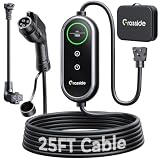
- Universal J1772 Compatibility: Designed with a standard J1772 connector, this J1772 charger works with most J1772 electric vehicles and PHEVs, including BMW, Mercedes-Benz, Hyundai, Kia, Nissan, Rivian, Ford, Chevy, Volkswagen, Toyota and more. Note: Tesla vehicles require a J1772 to Tesla adapter (not included)
- Flexible Outlet Compatibility: This portable EV charger comes with a NEMA 6-20 plug and a NEMA 5-15/5-20 to 6-20 adapter. Supports Level 1 (8–12A) and Level 2 (16A). Max 12A (1.44kW) on 120V NEMA 5-15/5-20 outlets, and full 16A (3.84kW) with a 240V NEMA 6-20 outlet. One charger is designed to cover home, garage, and travel charging needs with reliable performance
- Adjustable Smart Charging Control: Customize charging safely with adjustable current settings (8A/10A/12A/16A) to match different circuits. The 0–12 hour delay timer helps schedule overnight charging during lower electricity rates. Integrated LCD display shows real-time voltage, current, power, and charging status for clear monitoring without apps. Note: Press 'A' or 'T' for 3s to set and confirm.
- Home Charging & Travel Backup: For daily home use while remaining fully portable for travel. This level 1 ev charger includes a durable 25FT ev charging cord, providing flexible reach for garage or driveway charging. Charge overnight to take advantage of lower utility rates—potentially saving up to $500 annually on electricity costs. The included carrying case makes storage easy and keeps a dependable backup charger available in your trunk for road trips or visiting friends
- Engineered For Safety & Durability: Built for dependable daily use, this electric car charger features an IP65 waterproof rating for all weather operation. Equipped with a UL-listed cable, fully rubberized connector, and advanced protection against overcurrent, overheating, and electrical faults. Designed to ensure safe, stable, and long-term charging performance in demanding environments
Which Google Maps setup do you use?
| Setup | Battery information | Starting percentage | Automatic charging stops | Live vehicle connection |
|---|---|---|---|---|
| Google Maps phone app | Vehicle profile and trip-energy estimates on supported versions | Usually entered manually | More limited than in-car navigation | No general live connection |
| Android Auto | Estimated usage, starting battery, and estimated arrival battery on supported EVs | Usually entered manually | Yes, for supported EVs | Automatic in some vehicles |
| Google Maps built into the car | Battery-on-arrival estimates and charging assistance where supported | May be supplied by the vehicle | Yes, where supported | Supported vehicles can share vehicle data |
| Apple CarPlay | Do not assume the Android Auto workflow is available | Varies | Not established by the Google documentation used here | Vehicle-specific |
Google announced on March 30, 2026, that AI-powered battery predictions were rolling out to more than 350 Android Auto EV models, initially across more than 15 brands in the United States. That figure is a rollout announcement, not a guarantee that the feature is available for every model, trim, country, or account. Google’s announcement
Check whether your EV supports battery predictions
Before planning a long trip around the feature, verify all of the following:
- Your car supports Android Auto or has Google built in.
- Your exact make, model, year, and trim can be selected in Google Maps.
- Your vehicle profile displays Battery predictions as a supported feature.
- Google Maps is version 25.44 or later for the compatible-EV trip battery-usage feature.
- The feature is available in your country.
- Your phone uses the same Google account connected to the car.
- Google built-in has an active data connection, where required.
A vehicle can appear in Google Maps without supporting battery predictions. Availability depends on the model and trim, country, app version, manufacturer integration, software rollout, and account configuration. Android Auto compatibility guidance
Add your EV to Google Maps
- Open the Google Maps app on your phone.
- Tap your profile picture or initial.
- Tap Settings.
- Tap Your vehicles.
- Under Engine type, choose Electric.
- Tap Add vehicle.
- Select your EV’s make, model, year, and trim.
- Review the listed plugs and adapters, then confirm the compatible options.
- Tap Save.
Choose the exact trim where possible. Battery capacity, charging capability, and efficiency can vary between versions. Incorrect plug information can also make charger filtering less useful. Google’s setup instructions
The Tool Desk
Outbyte PC Repair FREEClear out junk files and repair common Windows errorsFree Scan →Outbyte Driver Updater FREEFix the driver behind crashes, sound loss and screen glitchesFind Drivers →Show estimated battery on arrival with Android Auto
- Save your EV profile in Google Maps on your phone.
- Connect the phone to a compatible Android Auto vehicle.
- Confirm the vehicle profile if Android Auto prompts you.
- Open Google Maps on the vehicle display.
- While parked, enter a destination.
- Review the trip overview for estimated battery usage.
- If Maps indicates that charging is needed, tap Add charging.
- Enter the vehicle’s current battery percentage when prompted.
- Review the starting percentage, estimated arrival percentage, proposed charging stops, and revised trip time.
- Accept, edit, or remove the suggested stops.
Some supported vehicles can send battery information automatically, but many Android Auto users must enter their starting state of charge. Google also says that, where supported, you can set a preferred arrival-battery percentage and have Maps adjust its charging recommendations. Android Auto battery-prediction instructions
Rank #2

- Complete Package Contents: Power plug 1; Cable 1; Control box 1 (equipped with an LCD color display, current switch button, and time-setting buttons). The charging gun interface adopts a universal 5-hole US standard design. A US standard plug adapter will also be provided for compatibility with Level 1 household power outlets
- Advanced Portable Charger Features: The Charger is engineered for modern new energy vehicles, such as all-electric, extended-range, and hybrid models, and is compatible with the National Standard 5pin AC charging interface. It automatically stops charging once the battery is full and offers flexible charging options including scheduled start and customizable duration limits. Built in safety mechanisms protect against overvoltage, overheating, and overload, while an intuitive display shows real-time metrics like current, voltage, power, and temperature. Suitable for both home and commercial use, the charger can be permanently installed or carried on the go for flexible charging convenience
- Simple Operation Instructions: To begin normal charging, first ensure the electrical outlet and wiring are functioning properly, then connect the charger to the power supply. Modify the charging current or make time reservation as needed, then connect the vehicle for charging
- Customizable Charging Settings: Initial Interface - Press and hold 3 seconds to enter TIME settings menu - Click once to add 2 hours, 8 hours maximum; Press and hold Initial Interface Set Delayed Time touch key 3 seconds to enter Current settings menu, Click once to select charging current, Long press 3 seconds to confirm
- Safety Guidelines and Specifications: The charging current of the Toptoo charger must not exceed the rated current of your power outlet. Before use, ensure the power outlet is not worn out or of poor quality. Do not use damaged or counterfeit outlets, as they may overheat and pose safety risks. Toptoo is not responsible for accidents caused by improper charging setups including non-compliant wiring or electrical standards
Use Google Maps built into your EV
Google built-in is different from running Maps from a connected phone. In supported vehicles, the car can provide vehicle-specific information to Maps. The system may show battery on arrival, continuously update the estimate during navigation, alert you when charging is needed, and automatically add charging stops.
To plan a trip, open Google Maps on the vehicle display, enter a destination, and review the route. If the destination cannot be reached on the current charge, Maps may add a charging stop. You can also add one yourself by tapping Add stop and selecting a charging station. Charging time may be included in the trip duration. The recommended minimum time depends on the battery level at arrival, the vehicle’s charging capability, and the station’s charging speed. Google built-in EV guidance
Vehicle-data sharing and functionality vary by automaker, model, region, language, and data connection. Google Maps does not replace the vehicle’s battery-management or charging-preconditioning systems. Google’s vehicle-data and privacy information
Do these 3 things before closing this tab:
1Scan for outdated or missing drivers - takes under a minute2Repair Windows errors before they cause bigger problems3Fix the driver behind crashes, sound loss and screen glitchesFind charging stations that fit your EV
After adding an electric vehicle profile, the phone app can filter stations by compatible plug:
- Search for charging stations.
- Tap Any plugs or Your plugs under EV plugs.
- Select the compatible results.
Depending on the interface and vehicle, in-car Maps can also filter by payment network, charging speed, compatible plug, and station power output. Google built-in charging-station guidance
Rank #3

- 【Reliable Safety with PBE & LRC Tech】Powered by ELEGRP's exclusive PBE technology, this level 2 EV charger provides reliable protection against surges, leakage, and overloads—trusted by over 300 million households since 2000. The J1772 charger features advanced LRC tech for better conductivity, cooler operation, and stable charging speed
- 【Dual Charging Model】Charging speed depends on your outlet type. Use the NEMA 6-20 plug for Level 2 240V fast charging at up to 3.84kWh (11-14 miles/hr). For slower Level 1 charging 120V, use the included 5-15 adapter, offering 1.44kWh (4-5 miles/hr)
- 【Max 25FT Reach &and IP67 Weatherproof Reliability】 Our 25FT portable cable offers the maximum length allowed by NEC safety standards for garage, wall, or outdoor use. This electric car charger is IP67 waterproof and built for cold weather, from -21°F to 121°F, including heavy rain, or snow
- 【U.S.-Based Expert Support & and 2-Year Warranty】Get real help from our U.S.-based support team, available Mon–Sat (5 AM–3 PM PT) for fast, professional assistance. Every ELEGRP charger is backed by a 2-year replacement warranty, so you can charge your vehicle with confidence
- 【Universal J1772 Compatibility】Compatible with all SAE J1772 certified EVs, BEVs, and PHEVs. For Tesla owners: a J1772-to-NACS adapter (sold separately) may be required. Please verify your car compatibility before purchase and contact our support team with any questions
A compatible plug does not guarantee that the connector works, the station is available, the site accepts your payment method, or your EV can receive the station’s maximum advertised power. Check station details and, for an important trip, the operator’s app before relying on a low-battery arrival.
How Google estimates EV battery use
Google says its 2026 Android Auto predictions use vehicle information and Maps data such as vehicle weight, battery size, traffic, road elevation, and weather. The result is a planning estimate, not a promise. Traffic and weather can increase consumption beyond the initial prediction. Google’s battery-prediction announcement Android Auto support
The actual result can also be affected by:
- Cold temperatures, rain, or strong headwinds
- High speeds and stop-and-go traffic
- Steep hills
- Cabin heating or air conditioning
- Roof racks, heavy cargo, or towing
- Battery preconditioning and charging behavior
- An incorrectly selected trim or battery configuration
- An inaccurate starting-percentage entry
If the predicted percentage keeps changing during navigation, that is generally the estimate responding to updated route conditions, traffic, weather, or actual energy use. It still should not be treated as a guaranteed remaining charge.
Independent reader supportYour contribution helps us test, update, and keep practical guides available for everyone.When battery predictions are missing
If you added the EV but cannot find the feature, work through this order:
- Update Google Maps to at least version 25.44.
- Open Profile picture → Settings → Your vehicles and confirm that Electric is selected.
- Delete and re-add the exact make, model, year, and trim.
- Confirm the plug and adapter information.
- Reconnect Android Auto and confirm the vehicle profile.
- Look again for the Battery predictions supported-feature indicator.
- Check whether the feature is available in your country and vehicle software.
- Confirm that the phone and car use the expected Google account.
If Battery predictions still does not appear, the vehicle may not expose the data Google needs, or the rollout may not have reached your model or account. Use the car’s native EV navigation instead of assuming that Android Auto support alone guarantees battery predictions.
Rank #4
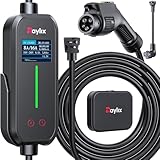
- [2026 INTELLIGENT CHARGING UPGRADE — PRECISION CONTROL MEETS SMART SCHEDULING] After surveying 100K+ U.S. EV owners, the Raylix R&D team found that nearly all drivers recognized the necessity of adjustable current and scheduled charging. Our upgraded J1772 charger features 4-level adjustable current (8A/10A/12A/16A) and a 1–12 hour smart delay timer. Whether you're charging overnight or during off-peak hours, enjoy smarter energy use, lower costs, and total convenience—on your schedule.
- [ONE CHARGER, ALL J1772 EVs/PHEVs READY!] Compatible with all SAE J1772 electric vehicles and plug-in hybrids—whether it’s Ford, GM, Nissan, Audi, BMW, Kia, Hyundai, Honda, Chevy, or more. Perfect for home or on-the-road charging, our 16A Level 1 & 2 charger ensures your EV is always powered and ready for any journey.
- [CHARGE 4× FASTER — NO MORE WAITING] In a rush? Our 16A Level 1 & 2 charger delivers charging speeds up to 4× faster than standard 8A Charger Level 1. Whether it's an early commute, a spontaneous trip, or last-minute errands, your EV will be ready when you are.
- [LEVEL 1 & 2 PORTABLE CHARGER — CHARGE ANYWHERE, ANYTIME] Designed for maximum flexibility, Raylix Level 1 & 2 EV charger features both 5-15 and 6-20 plug compatibility. Whether you're charging in your garage, at a friend's house, or at a roadside motel. NEMA 6-20 plug for Level 2 ev charging (240V, 16A, 3.68kW, 9-12 miles/hr) and a NEMA 5-15 adapter for Level 1 ev charging (120V, 12A, 1.44kW, 3-5 miles/hr) NOTE: In compliance with North American electrical safety standards, the charger automatically limits current to 12A when using a 5-15 outlet—protecting both your vehicle and your home’s electrical system.
- [AT-A-GLANCE CHARGING COMMAND: TOTAL CONTROL, INSTANTLY] While most ev chargers solutions confine vital data to in-car screens, the Raylix tesla charger breaks free with its enhanced TFT color display. This Raylix-exclusive feature delivers crystal-clear, real-time updates—voltage, current, power load, AND critical charging temperature—directly on the unit. Just one glance gives you complete charging insight. It’s not just information; it's the empowering peace of mind and satisfying control that transforms every charge into a masterfully managed experience.
Google Maps compared with other EV navigation options
| Option | Best for | Trade-off |
|---|---|---|
| Google Maps | Familiar navigation, traffic data, charger search, and integrated Android Auto planning | Model and region restrictions; charger data and battery estimates may be imperfect |
| Native vehicle navigation | Automaker-specific battery data and, on some cars, charging preconditioning | Interface and charger database vary by brand |
| Dedicated EV route planner | Long or remote trips, arrival buffers, backup chargers, and detailed consumption settings | Additional setup, app switching, and potentially different feature tiers |
For difficult journeys, consider a dedicated planner such as A Better Routeplanner or PlugShare. These services may offer different vehicle integrations and features; check their current availability and terms separately.
Google’s eco-friendly routing is not the same as EV battery-prediction routing. Google says energy-efficient routing does not include charging stops. Google eco-friendly routing support
Plan with a safety margin
- Do not plan to arrive at zero percent unless you have no practical alternative.
- Keep an arrival buffer for weather, traffic, hills, HVAC use, and unexpected detours.
- Identify a backup charger on long or remote routes.
- Verify that a critical charger is operating and accepts your payment method.
- Do not enter destinations or change settings while driving.
- Use the vehicle’s instrument cluster and native warnings as the authority for the actual battery state.
Frequently Asked Questions
Can Google Maps show my EV’s live battery percentage?
Only in supported vehicle integrations, particularly some Google built-in vehicles and select Android Auto setups. In many cases, Maps uses a manually entered starting percentage and estimates the battery on arrival instead of reading a universal live state of charge.
Why does Google Maps ask for my current battery percentage?
Android Auto uses the starting percentage to estimate trip energy use, arrival charge, and whether a charging stop is required.
Does Google Maps automatically add charging stops?
It can in supported Android Auto and Google built-in configurations when Maps predicts that the destination cannot be reached on the current charge. You can also add a station manually.
Quick wins for a faster PC:
Clear out junk files and repair common Windows errorsFree Scan →Scan for outdated or missing drivers - takes under a minuteDriver Scan →Repair Windows errors before they cause bigger problemsFix Now →Can I choose a minimum battery percentage at arrival?
Google supports a preferred arrival-battery percentage in some Android Auto configurations. Availability depends on the vehicle and region.
What should I use if Google Maps does not support my EV?
Use the vehicle’s native EV navigation, the manufacturer’s app, or a dedicated EV route planner. These may provide more vehicle-specific battery data and backup-charging options.
Quick Recap
Product prices and availability are accurate as of the date/time indicated and are subject to change. Any price and availability information displayed on Amazon at the time of purchase will apply.




