PC Slower Than It Used to Be?
A free scan shows the junk files, broken settings and background clutter dragging Windows down - then fixes them in one click.Free scan · Windows 10 & 11Outdated Drivers Are Slowing You Down
One free scan finds every outdated or missing driver and matches the right update for your exact hardware.Free scan · exact hardware matchTo update your Hyundai’s navigation or infotainment software, first identify the exact system through Hyundai’s official update portal. If your vehicle supports an over-the-air (OTA) update and the required connected service is active, follow the prompt in the car. Otherwise, use Hyundai Navigation Updater on a PC and install the files from the USB drive or SD card specified for your system. The correct package, storage medium, and menu path vary by model, year, market, and infotainment system.
How do I find the right Hyundai software update?
- Open Hyundai’s US update portal and look up the vehicle by VIN or vehicle type.
- Confirm the market, model year, and infotainment system shown in the result. The portal separates navigation systems from display audio systems without navigation.
- Check the vehicle’s current software version, then compare it with the update listed for that exact system. Do not choose a package based on model name alone; update listings and availability can change.
Hyundai’s US portal listed navigation updates dated July 8, 2026, and June 15, 2026, when checked on October 8, 2026. Those are listing dates, not evidence that either package applies to every Hyundai.
Should I use OTA or a USB/SD card?
| Route | When it applies | What to expect |
|---|---|---|
| OTA update | Only if the vehicle and infotainment system are equipped for OTA. The cited Hyundai ccNC owner’s manual requires a Bluelink subscription and network connection. | Wait for the in-car update notification and follow its prompt. Navigation, Bluelink, camera, and infotainment functions may be disabled during installation. If wireless updating is unavailable or errors occur, the cited manual directs owners to use USB. |
| Manual PC-to-USB/SD update | Use the vehicle-specific instructions on Hyundai’s update portal for the required files and storage medium. | Download the update with Hyundai Navigation Updater on a PC, transfer it to the required media, then start the update in the vehicle’s system menu. |
OTA is not available on every Hyundai. The cited manual describes that feature as available “if equipped”; the portal also provides manual update guidance. Requirements and procedures can differ by region and system generation.
How do I update Hyundai software with USB or SD?
- Install Hyundai Navigation Updater on a PC. Use Hyundai’s regional update portal or the portal for your market to select the vehicle and download the package it offers.
- Prepare the specified storage. Follow the vehicle’s instructions for USB or SD rather than assuming one format works for all models. Hyundai’s 2025 EU Navigation User Guide recommends a 64 GB exFAT USB drive for the systems covered by that guide and notes that some systems require USB Type-C. These specifications are not universal Hyundai requirements.
- Connect the prepared media to the vehicle. Use the port or card slot identified in the vehicle-specific instructions.
- Open the update menu shown for that system. Depending on the generation, Hyundai guides show paths such as Settings or Setup → General → Version info/Update or SW Info/Update → Update. Follow the matching guide; menu labels are not consistent across systems.
- Keep power and storage steady until completion. Hyundai advises ensuring sufficient battery charge for applicable manual updates and warns against power loss or removing storage during installation. Do not stop the process early.
What should I expect during installation?
Plan to update when you do not need navigation, the camera, Bluelink, or other affected infotainment functions. For the cited OTA configuration, Hyundai’s manual states: “The infotainment system is disabled while the system update is in progress.” Completion time varies with circumstances, so Hyundai does not establish one fixed duration in the cited guidance.
Do these 3 things before closing this tab:
1Clear out junk files and repair common Windows errors2Fix the driver behind crashes, sound loss and screen glitches3Repair Windows errors before they cause bigger problems#1 Best Overall

- 【Car Radio Stereo for Hyundai Elantra 2011-2013】 This Android car radio is for hyundai elantra 2011 2012 2013 radio with 9 inch touch screen. This Android car stereo with Android 13 system, 2G+64G, plug and play, easy to install. Please find us to get online help and user manual. Note: If your car comes with an amplifier control cable, it needs to be pulled out separately and connected to our power line ACC, otherwise it will be no sound
- 【Hyundai Elantra Radio with CarPlay and Andriod Auto】 This screen for hyundai elantra 2013 supports wireless and wired apple carplay and android auto. After connecting the phone to the 9 inch car stereo, you can access map, GPS navigation, phone contacts, email, notification, music and more while you stay focused on the road. You can also wake up Siri or Google assistant through voice control to get help from them. Note: does not support Samsung phones
- 【Car stereo with Buletooth FM Hi-Fi EQ MIC】This hyundai elantra 2012 accessories supports hands-free calling, bluetooth music player, auto loading phonebooks. After connected with external microphone, you can speak easily and the people you are calling can hear clearly from you. FM radio provides with 18 preset stations, channels (FM 87.50-108.0 MH). You can listen to the news, listen to radio music ets. EQ Hi-Fi function brings you high-fidelity sound, original immersive sound
- 【GPS navigation stereo with WiFi Split Function】This hyundai elantra 2013 radio with built-in GPS navigation, supports both online and offline gps navigation. It comes with Here We Go app, you just need to download the offline map you need, and you can go wherever you want even when there is no network. After connecting to WiFi, you can download apps from the play store, such as YouTube, Tiktok, Spotify and more. With split screen function, you can use both functions at the same time
- 【Backup Camera & Steering Wheel Control】 The 9 inch touch screen 2013 hyundai elantra head unit with backup camera, which can automatically displays the image on the unit's screen when reversing your car. Help you drive safer and park easier. This Android touchscreen car radio also suppports steering wheel control, remember to learn steering wheel control in setting(8888)
Hyundai’s owner-manual warning for the cited update instructions is: “Do not drive until the update is complete.” Follow the warning and instructions shown for your vehicle.
What if the update is missing or fails?
- No update appears: Recheck the VIN or vehicle-type selection, model year, market, infotainment system, and current software version. Update availability is vehicle-specific.
- OTA is unavailable or reports an error: For the cited ccNC manual configuration, Hyundai directs owners to use USB. Check the matching vehicle and regional instructions before proceeding.
- The screen or instructions do not match: Consult Hyundai support for your market or a local Hyundai dealer. Hyundai’s cited owner-manual guidance identifies a dealership as an alternative for an update.
Does this update cover all Hyundai software?
No. These instructions address navigation and infotainment updates documented by Hyundai’s update portal and cited owner manuals. They do not establish that updates for every vehicle-control module or powertrain system can be installed by the owner. For other software or a procedure that does not match your vehicle, contact Hyundai support or a dealer.
Quick Recap
Best Value

- Applicable Models: Cable does NOT support the original car with amplifier (Purchase If Needed). This upgraded dash kit is for hyundai elantra 2011 2012 2013. Please check if the power cable port on the detail page matches your original car before purchasing
- 4+128G Android & In-Cell Screen: The latest Android system comes with 4GB RAM and 128GB ROM for more apps installed. This in-Cell screen with 1280 x 720 ultra-high resolution supports split screen and 1080P video playback. It improves light transmission and color contrast by approximately 20% and expands the viewing angle to 178°. Switch between 15 different desktop themes. Supports EQ options. Satellite navigation supports GPS/BeiDou/Galileo/Glonss for a wider coverage area
- CarPlay & Android Auto & Mirror Link: Wireless connection for voice-assisted controls and easier access to your phone's music, navigation, calls, messages and more. Syncs to the onboard screen via WiFi hotspot or phone's original USB cable. For Samsung, some cannot use Android Auto and Mirror Link; For Huawei, some cannot use Android Auto
- AHD Camera & Steering Learn: For hyundai elantra head unit, a night vision waterproof AHD backup camera is equipped. Supports the steering wheel button function, allowing you to control the car audio system easily while driving
- More Functions: Inefala has the online/offline navigation for hyundai elantra radio upgrade. Connect to a WiFi hotspot to download apps like YouTube, Tiktok and more to enrich your car life. Bluetooth 5.0 supports hands-free calling, phone book download and music playback. Stable FM/RDS radio can preset 54 stations, providing channel broadcast, weather forecast and real-time road conditions
Rank #4
![[Fuluku] 2+64GB 9' Android 15 Car Stereo for Hyundai Elantra 2011-2013](https://m.media-amazon.com/images/I/51RTk9E8gXL._SL160_.jpg)
- Plug & Play Radio: This android car radio for Hyundai Elantra 2011 2012 2013. Before purchasing, please check the model and year of your car, as well as the shape and size of the center console
- Keep OEM Features: The upgraded touch screen retain factory features including steering wheel controls, door information, driving data displaying, amplifier function, factory joystick control, original reversing camera, etc
- Android System & Better Display: This aftermarket car radio comes with a 4-core CPU, 2GB RAM + 64GB ROM and the latest Android system. 9-inch capacitive touchscreen with 2.5D tempered glass protection, 28 user interface themes for a personalized look
- Wired & Wireless Carplay & Android Auto: Connect your smartphone to the android radio dash kit via Bluetooth or USB cable, which allows you to make phone calls, play music, access map, and so on. And Siri or other voice assistants will help you voice control
- GPS Navigation & WIFI: In-dash car stereo with a GPS navigation system, supports both offline and online maps. Android head unit can connect to WiFi or mobile hotspots, allow install or delete android apps from Application Store, as the same as smart phone
Rank #3
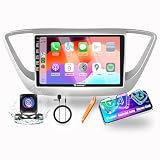
- CarPlay/Android Auto: Seamlessly integrate the user's experience on IOS devices or Android devices with this app. Using a voice assistant can avoid distracting the driver, allowing the driver to do multiple things with his voice without taking his eyes off the road. more convenient and safe;
- Other Functions: Navigation, Video, Music, BT, Wifi, Steering wheel control(SWC)... There are plenty of other functions. Based on the powerful Android system and hardware, it has the ability to expand far beyond OEM equipment, allowing your car to connect the world through the Internet;
- Stability: With years of production and sales experience, we continuously collect customer opinions and suggestions to continuously improve the production process and gradually improve the quality of components. At the same time, we constantly keep up with the times and install user-friendly apps for our products, making them stable and user-friendly;
- Warranty & Notes: One year warranty; After-sales are guaranteed, if you have any questions, please contact the seller for support at the first time; your consultation is always welcomed;
- Suitable For Hyundai Accent 2018 2019 2020 2021 2022, if Applicable
Rank #2

- 【In-Cell Touchscreen】For Hyundai Elantra 2019 2020 android car radio is equipped with an all-new upgraded Incell full touchscreen. By integrating touch sensors directly into the panel, making it 10-20% thinner and lighter. Its light transmittance exceeds 95% (vs. 90-92% for traditional screens), with brighter visuals and 20-30% faster touch response thanks to a shorter signal path.
- 【4G +128G】 Powered by the latest Android system, along with 4GB RAM and 128GB ROM for Hyundai Elantra radio dash kit it ensures smooth, responsive operation. The 1280×720 Incell touchscreen stands out: crisper, brighter, and more vivid than regular displays, plus it offers split-screen support.
- 【Wireless Carplay/Android Auto & Mirror Link】 This in-dash navigator for Hyundai Elantra supports CarPlay, Android Auto, and MirrorLink, allowing you to connect your iPhone or Android device to the car stereo wirelessly via Bluetooth. Additionally, it offers MirrorLink screen-sharing via WiFi or a USB cable. You can control maps, music, and make calls through the factory steering buttons.
- 【GPS Navigation & WIFI】For Hyundai Elantra car stereo supports online and offline maps. You can also use voice guidance and real-time traffic information. Connect to the internet via WIFI hotspot or tethering, and browse the web, stream online content, download apps on the device.
- 【EQ & Bluetooth & FM/RDS 】The built-in EQ lets you customize studio-quality sound by precisely adjusting frequency response for optimal acoustics. Bluetooth supports wireless music streaming and crystal-clear hands-free calls. FM/RDS radio displays song titles and station info, letting users catch favorite morning shows or local news while driving—every drive sounds just right.
Product prices and availability are accurate as of the date/time indicated and are subject to change. Any price and availability information displayed on Amazon at the time of purchase will apply.