Flyme Auto is Meizu’s automotive cockpit operating system for bringing selected phone apps, tasks, data, and hardware capabilities into a compatible car. It goes beyond conventional screen projection, but it does not universally install every mobile app or work in every vehicle.
Launched with the Meizu 20 series in March 2023, Flyme Auto has since expanded into Flyme Auto 2 and the related Flyme Link connectivity system. Its current story is also an automotive-business story: ECARX says Flyme Auto OS has passed two million production-vehicle deployments and has announced an agreement to acquire the full Flyme software portfolio, subject to closing conditions.
As an Amazon Associate I earn from qualifying purchases.
The short answer
Flyme Auto is Meizu’s automotive cockpit operating system, not merely a wireless screen-mirroring tool. It was designed to let a compatible phone and vehicle share applications, data, computing resources, hardware capabilities, navigation tasks, voice control, and selected vehicle functions. In practice, that can mean transferring a supported mobile app into the car, automatically reconnecting after pairing, sending a phone address to the vehicle, using phone-assisted vehicle updates, and accessing car-specific services such as Alipay and Aicy voice assistance.
Quick wins for a faster PC:
Scan for outdated or missing drivers - takes under a minuteDriver Scan →Repair Windows errors before they cause bigger problemsFix Now →Fix the driver behind crashes, sound loss and screen glitchesFind Drivers →However, Flyme Auto does not mean that every Android or iPhone app runs natively in every compatible vehicle. App availability, phone support, software version, network connection, vehicle trim, and market all matter. The most accurate description is a vehicle-specific cockpit platform with deep phone integration and an expanding app environment.
#1 Best Overall
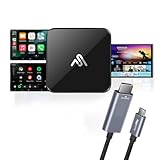
- Upgrade to Wireless Freedom: Instantly convert your wired Apple CarPlay or Android Auto into a wireless experience for a more comfortable drive.
- Dual Connection Made Simple: Enjoy wireless streaming for everyday use or switch to the included USB-C to HDMI cable when you prefer a stable wired setup.
- Stream Apps, Videos & Maps: Mirror your smartphone and access Netflix, YouTube, Spotify, GPS navigation, and more directly on your car’s infotainment screen.
- Quick Plug & Play Setup: No tools or complicated steps. Just plug in, connect your phone, and start enjoying apps and entertainment in minutes.
- Entertainment on Every Ride: Perfect for road trips or daily commutes—keep passengers entertained and make your car feel like a mini theater on wheels.
Flyme Auto debuted alongside the Meizu 20 series on March 30, 2023. Since then, the platform has expanded into Flyme Auto 2, Flyme Link connectivity, and a larger automotive software business. Meizu’s original launch announcement framed the phone as an active part of the vehicle’s computing environment rather than just a source of projected content.
What Flyme Auto actually does
Traditional phone-to-car systems generally mirror or relay a limited selection of phone functions. Flyme Auto takes a broader approach: the car and phone are treated as two parts of one connected software ecosystem.
At launch, Meizu described capabilities including:
- Transferring selected mobile applications into the vehicle’s cockpit.
- Automatically reconnecting the phone and car after initial pairing.
- Continuing tasks between the phone and the vehicle, such as moving an address or activity from one device to the other.
- Using the phone to help deliver vehicle software updates.
- Sharing some phone and vehicle hardware capabilities.
- Finding the vehicle’s location from the phone.
- Running car-specific applications and services.
- Supporting Alipay payments and the Aicy voice assistant.
Meizu’s larger idea was that the smartphone could contribute data, applications, processing power, and connected services to the car. The company called this expanded software architecture a mobile domain—effectively an additional computing domain alongside the traditional automotive domains of power, chassis, body, cockpit, and autonomous driving. The company’s description of Flyme Auto’s architecture explains why it was positioned as an operating-system platform rather than a phone-projection feature.
Free tools Windows power users keep installed
One-click scans. No signup required.
How mobile apps reach the car
There are several different mechanisms behind the Flyme Auto app experience, and they should not be treated as identical.
Launch-era app transfer
The original Flyme Auto concept allowed supported applications and tasks to move from a paired phone into the car. The phone could provide the application ecosystem while the car supplied its screen, controls, connectivity, and vehicle context. Automatic reconnection was intended to make the process feel more like resuming a session than repeatedly setting up a new connection.
That does not establish universal support for every app. The 2023 material did not provide evidence that every Android or iOS application could be installed or operated in every Flyme Auto vehicle. A more accurate statement is that Flyme Auto can extend supported mobile applications and capabilities into the cockpit.
Flyme Auto 2 and Borderless Applications
Current Flyme Auto 2 materials describe a more ambitious application model. The official Flyme Auto site presents a Borderless Applications function that can download applications through the vehicle’s browser. It also demonstrates a mobile space where users can download third-party mobile applications into the car, install them independently, and keep their data separated from the rest of the cockpit environment.
This is a platform capability, not a promise of an unlimited or identical app store across all vehicles. The official Flyme Auto site cautions that actual results can vary by phone platform, vehicle model, configuration, network, testing environment, and user behavior. Its Flyme Auto 2 materials demonstrate the concept but do not amount to a universal compatibility list for every named third-party application.
Rank #2

- 🚘【CarPlay Adapter】CarPlay is a powerful assistant driver. It allows you to use your phone functions more intelligently and safely while driving. Allows you to access map navigation, phone contacts, email, notifications, music and more with the help of an intelligent voice assistant. While keeping your hands free, realize completely safe driving operation.
- 🚘【Perfect Fit】This carplay Adapter is suitable for MX-5 2016-2020/CX-3 2016 -2019/CX-5 2015 -2020/CX-9 2016 -2020/fits 2 2016 -2019/fits Mazda 3 2014-2018/fits Mazda 6 2016-2020/fits FIAT 124 2017-2021. If your car does not have an MZD connection device, it will not work. (The replacement part number is TK78-66-9U0C K1414 00008FZ34)
- 🚘【Wired Carplay&Android Auto】A safer way to use your phone while driving, It supports Siri for IOS and Google Assistant voice control for Android, which helps you focus on the road and enjoy the fun along the way while getting directions, making calls, sending and receiving messages.
- 🚘【Shopping Notes】If the software is not v70.00.021 or higher, you need to upgrade the firmware before starting the installation. If you use an older version of the CMU software, the CarPlay/Android Auto compatible USB hub may not be recognized. (Before upgrading the firmware, you should remove the SD card and insert it after the upgrade is complete, otherwise GPS or navigation will not work properly.)
- 🚘【Easy Installation】Please feel free to contact us if you have any questions after watching our detailed installation instructions and video tutorials, I will provide after-sales technical support within 24 hours to help you solve installation and operation problems.
For buyers, the practical question is therefore not simply, “Does this car have Flyme Auto?” Ask instead:
- Which Flyme Auto version is installed?
- Which phone brands and operating-system versions are supported?
- Which apps are available in that vehicle and market?
- Can apps be transferred from the phone, installed through the car browser, or only used through a projected interface?
- Are downloaded app data and permissions handled in the way you expect?
Flyme Auto is not the same as Flyme Link
Meizu also introduced Flyme Link in November 2023. The names are easy to confuse, but the products serve different purposes.
| System | What it is | Typical role |
|---|---|---|
| Flyme Auto | An automotive cockpit operating system and software platform. | Provides the vehicle’s connected cockpit experience, native car applications, phone integration, voice features, and other software functions. |
| Flyme Link | A broader phone-to-car connectivity solution. | Lets a phone share selected tasks, data, computing resources, hardware capabilities, and ecosystem services with a vehicle that may retain its existing in-car system. |
| Apple CarPlay and Android Auto | Phone-projection and phone-integration platforms from Apple and Google. | Provide supported phone apps and functions through a compatible vehicle display; they are not the same software stack as Flyme Auto. |
Meizu said Flyme Link could work with a wider range of vehicle systems without replacing the existing in-car software. Announced functions included three-finger task transfer and address transfer to the vehicle. The company said the phone could share computing power, data, hardware, and ecosystem resources with the car. Meizu identified the Geely Galaxy E8 as Flyme Link’s first integrated model and said the technology would later be adapted for the Lynk & Co 06 EM-P and Lynk & Co 09.
The Galaxy E8 specification material lists both the Galaxy Flyme Auto intelligent cockpit system and Flyme Link, along with other connectivity systems such as Huawei HiCar and Carlink. That illustrates an important point: a vehicle can include Flyme Auto and Flyme Link as related but separate layers, while also supporting other phone-connectivity technologies.
Which cars use Flyme Auto?
Availability is heavily dependent on market, model, trim, and production year. Flyme Auto has primarily been associated with Chinese-market vehicles and Chinese automotive software programs; a vehicle sold under the same name in another region may not use the same cockpit software.
Lynk & Co 08
Flyme Auto debuted in production deployment with the Lynk 08. Meizu and ECARX—also known as Yikatong in related materials—presented it as an automotive-grade cockpit platform combining vehicle computing, software, and smartphone integration. Meizu’s certification announcement for Flyme Auto identifies the Lynk 08 as the first vehicle deployment.
Polestar 4 in China
In June 2023, Meizu announced a strategic relationship with Polestar and said that a Polestar OS cockpit system built on Flyme Auto would be used in the Polestar 4 for the Chinese market. That should not be generalized to every Polestar 4 worldwide. Regional versions, later production changes, and software configurations can differ. The original Polestar partnership announcement is specifically the basis for the China-market qualification.
What’s actually slowing this PC down?
Pick the symptom - the matching free tool is one click away.
Later Lynk & Co programs
ECARX’s 2025 results announcement described Flyme Auto 2 as part of a more integrated computing and software stack. The company said the advanced solution was first used on the Lynk & Co 10 EM-P and was planned for replication in the Lynk & Co 07 and 08 EM-P models. These announcements indicate continued expansion, but they do not mean that every vehicle in a model family has the same Flyme Auto version or feature set.
Rank #3

- Upgrade to Wireless CarPlay & Android Auto The 2 in 1 Wireless CarPlay and Android Auto Adapter converts your factory wired system into a wireless experience. It’s perfect for families using both iPhone and Android phones, allowing effortless switching without unplugging or swapping cables. This adapter is compatible with over 1,000 vehicle models—supporting 800+ with wired CarPlay and 500+ with wired Android Auto. Works with iPhone 6 or later and Android 11 or above devices.
- Fast Easy Setup & Auto Reconnection No app or complicated setup required. Just pair once via Bluetooth and enjoy automatic reconnection in under 3 seconds every time you drive. Powered by advanced 2.4GHz + 5GHz dual-band chips, this 2 in 1 CarPlay Adapter connects quickly—your maps, music, and calls are ready almost instantly.
- OEM-Level Wireless Performance & Vehicle Control Our car adapter maintains the full functionality and preserves the seamless experience of your original CarPlay or Android Auto system—including Apple Maps, Google Maps, Spotify, Siri, and Voice Assistant—while supporting factory controls such as touchscreen, steering wheel buttons, rotary knobs, and voice commands.
- Ultra-Compact & Flush-Fit – Clean Look, No Clutter Teeran Android Auto & CarPlay wireless adapter comes in a compact, space-saving design, about the size of a U.S. dollar coin, helping keep your car interior neat and clutter-free. The tapered design plugs in tightly and sits flush with the USB port. Once installed, the device is nearly invisible—no dangling wires, no bulky clutter, no loose connections. Includes both USB-A and USB-C extension cables to fit hidden or angled ports in different car layouts.
- Smarter & Safer – Built for Real-World Driving Designed to handle everyday use, this Android CarPlay adapter offers efficient heat dissipation vents and is certified to operate between -20°C to 70°C. Built-in protection helps prevent overheating, short circuits, and voltage surges—reducing concerns about performance or safety on long summer drives. Tested for vibration resistance to support stable performance on bumpy roads.
Flyme Auto’s current status and ECARX’s planned acquisition
It is now outdated to describe Flyme Auto simply as a standalone Meizu phone feature. The platform was created by Meizu and related DreamSmart businesses, but its corporate status is changing.
On June 22, 2026, ECARX announced a definitive agreement to acquire the entire Flyme software business portfolio, including Flyme Auto and the cross-device Flyme operating system. The transaction involves the acquisition of 100% of a newly carved-out entity from DreamSmart-related sellers. The transaction documents describe an RMB2 billion structure: RMB1.8 billion in equity acquisition consideration plus a subsequent RMB200 million capital injection. ECARX separately described the equity purchase as approximately RMB1.8 billion, or about US$266 million.
The agreement was not necessarily completed on the announcement date. ECARX said closing remained subject to customary conditions, including due diligence, intellectual-property transfer, retention of key talent, and the absence of a material adverse change. It also said Flyme would operate as an independent software division after completion and that existing users would continue receiving updates for the foreseeable future. Read the transaction announcement and conditions before treating the acquisition as closed.
ECARX’s June 2026 announcement also claimed that Flyme Auto OS had already been deployed in more than two million production vehicles across multiple original-equipment-manufacturer partners. That is a substantial scale claim, but it is a company-provided deployment figure rather than an independently audited vehicle-registration total. The careful wording is: ECARX said Flyme Auto OS had passed two million production-vehicle deployments.
Why the platform matters to car companies
Flyme Auto reflects the shift from an infotainment screen toward a software-defined vehicle cockpit. In a conventional arrangement, a vehicle manufacturer supplies the car operating system and the phone supplies a limited set of projected apps. Flyme Auto attempts to make the phone, cockpit, cloud services, and vehicle hardware behave as a coordinated computing environment.
That model gives automakers a route to richer phone continuity without designing every consumer application from scratch. It also gives a software supplier a role in native vehicle functions, app distribution, voice interaction, updates, and device interoperability. For automakers, Tier 1 suppliers, and mobility-software partners, Flyme Auto automotive software is therefore better understood as a licensing, integration, and custom-development opportunity than as a gadget that an individual owner can install at home.
ECARX’s 2025 and 2026 statements suggest that Flyme Auto is moving toward an integrated, AI-enabled cockpit software stack rather than remaining only a phone-connectivity layer. The strategic question is whether the platform can deliver consistent updates and app compatibility across many vehicle programs while preserving the vehicle maker’s control over safety-critical systems and the user experience.
What Flyme Auto does not mean
It is not a universal Android app installation system
Flyme Auto 2’s browser-based and mobile-space demonstrations show that some third-party mobile applications can be downloaded and installed in supported environments. They do not prove that every app will work. Apps may depend on phone sensors, Google services, payment certification, vehicle controls, screen dimensions, regional availability, or permissions that the car does not provide.
Rank #4

- Compatible with wired-only Android Auto systems
- Requires Android 11+
- Multifunctional button for easy phone pairing and switching
- Connects unlimited phones, perfect for road trips
- Plug & play setup, no tech skills needed
It is not automatically available because a car has a large touchscreen
A large display, an Android-based head unit, or a wireless phone connection does not by itself add Flyme Auto. The system is integrated into specific vehicle software programs. Check the exact vehicle, trim, market, and software version.
It is not a guaranteed replacement for CarPlay or Android Auto
Flyme Auto and Flyme Link are different from Apple CarPlay and Android Auto. ECARX’s acquisition materials say Flyme Auto has native compatibility with existing Apple and Android mirroring solutions. That supports treating CarPlay and Android Auto as complementary compatibility layers—not as proof that Flyme Auto is identical to either system.
It is not something a generic adapter can install
How to check a specific vehicle before buying
Because Flyme Auto features vary by deployment, use this checklist rather than relying on a model name or a salesperson’s general statement.
- Confirm the exact market. Ask whether the vehicle is a China-market configuration or an export version. The same model name can have a different cockpit system outside China.
- Confirm the exact software name. Determine whether the car has Flyme Auto, Flyme Auto 2, Flyme Link, another phone-connectivity system, or a combination of them.
- Ask for the supported-phone list. Confirm the required phone brand, operating-system version, Flyme account requirements, Bluetooth or Wi-Fi requirements, and whether an iPhone is supported for the specific functions you want.
- Ask how apps work. Find out whether the desired app is transferred from the phone, projected, downloaded through Borderless Applications, or installed in the mobile space. These are different experiences.
- Test the functions you actually need. Check navigation handoff, calls, music, voice commands, payment functions, task continuation, and vehicle-location features in the exact car.
- Check update policy. Ask whether software updates are delivered over the air, through a phone-assisted process, at a dealer, or through a regional service channel.
- Check language and account support. Features such as Aicy, Alipay, app stores, and cloud services may be designed around particular languages, accounts, and markets.
- Read the privacy and permissions screens. A system that shares phone data, app sessions, location, and hardware capabilities deserves the same permission review as any other connected device.
There is no single universal Flyme Auto setup path that can safely be prescribed for every car. The pairing menus and account requirements are vehicle-specific. Use the vehicle’s current manual and the manufacturer’s delivery software, and do not assume that instructions for a Meizu phone or one Lynk & Co model apply to another vehicle.
Independent reader supportYour contribution helps us test, update, and keep practical guides available for everyone.What happened to the Meizu phone connection?
The Meizu 20 series was launched alongside Flyme Auto and served as the clearest example of the original phone-as-a-car-computer idea. A Meizu 20 smartphone may therefore appear in launch coverage and ecosystem discussions, but buying that phone alone does not add Flyme Auto to a vehicle.
Phone availability also changes by country and marketplace. A dependable current Amazon US listing was not established for the Meizu 20, so treat it as a historical or marketplace-dependent search term rather than a current recommendation. More importantly, verify the phone and vehicle combination before assuming that a particular Flyme feature will work.
Recommended Free Tools
Strengths and limitations
| Potential strength | Important limitation |
|---|---|
| Deeper continuity between phone tasks and the vehicle. | Supported phones, apps, and functions vary by vehicle and software version. |
| Can combine native vehicle software with phone applications and data. | It is not simply a universal app store or a guaranteed native runtime for every mobile app. |
| May share computing resources and hardware capabilities across devices. | Connectivity, permissions, network conditions, and regional accounts affect the experience. |
| Flyme Auto 2 expands the platform with browser-based and independently installed app concepts. | Official demonstrations do not establish identical support across all production cars. |
| Compatibility with existing mirroring systems can make the cockpit more flexible. | Flyme Auto should not be confused with CarPlay, Android Auto, or Flyme Link. |
| ECARX says the platform has reached more than two million production vehicles. | The figure is company-reported, not an independently audited registration count. |
Bottom line
Flyme Auto’s important innovation is not simply putting more phone apps on a dashboard screen. It is the attempt to make the smartphone a participant in the vehicle’s software and computing architecture. The original 2023 system promised app transfer, task continuity, shared hardware, voice services, and phone-assisted vehicle functions. Flyme Auto 2 pushes further with a browser-based application model and a mobile space for supported third-party apps.
Best Value

- Please note before purchasing ▶ This product cannot be used if your vehicle does not have factory-installed wired CarPlay capability or if your vehicle already features built-in wireless CarPlay functionality. Additionally, all BMW vehicles cannot be used.
- Switch to wireless CarPlay ▶ Convert your car's wired CarPlay connection to wireless, freeing yourself from tangled cables for a clean, clutter-free experience. Enjoy easier driving with CarPlay or Android Auto, using voice assistants, voice navigation, music, phone calls, and more.
- Enhanced in car entertainment ▶ Built-in Netflix, YouTube, you can stream online audio and video from Netflix and YouTube,you have the option to insert a TF card (Maximum 512G)to pre-download the audio or video content you desire. How to connect to the network: In the product system's network settings, search for your phone's hotspot or WiFi and connect. Note: Before connecting to the network, be sure to disconnect CarPlay/Android Auto. Additionally, video smoothness depends on your mobile network connection.
- Broad Compatibility ▶ Compatible with factory wired carplay car, compatible with most smartphones and bluetooth devices, as well as most vehicles (cars, pickup trucks, large trucks, and commercial vehicles). Android 12.0 System, support Android 11, iOS10 and above. If your car's screen does not support touch functionality, we do not recommend using this product.
- High Speed Chip ▶ The latest Bluetooth chip ensuring stable and fast performance while using CarPlay, Plug and play, it also has a memory function, which can automatically reconnect to the previous device every time it is opened.
For consumers, the key qualification is compatibility: Flyme Auto is vehicle-specific, market-specific, and app-specific. For the automotive industry, it has become a broader cockpit software business. ECARX’s reported two-million-vehicle deployment figure and its announced agreement to acquire the full Flyme software portfolio show that the platform is no longer just a Meizu phone feature—but the acquisition remains subject to closing conditions as described in ECARX’s announcement.
Frequently Asked Questions
Can I add Flyme Auto to my existing car?
No. Flyme Auto is integrated into selected vehicle software systems. A generic Android Auto or CarPlay adapter can add wireless access to an existing compatible system, but it cannot install Flyme Auto in an unrelated vehicle.
Does Flyme Auto run every Android or iPhone app?
No universal app guarantee exists. Flyme Auto supports selected applications and capabilities, while Flyme Auto 2 demonstrates browser-based downloads and an isolated mobile space for supported third-party apps. Compatibility varies by vehicle, phone platform, software version, network, market, and application.
Do these 3 things before closing this tab:
1Fix the driver behind crashes, sound loss and screen glitches2Clear out junk files and repair common Windows errors3Scan for outdated or missing drivers - takes under a minuteWhat is the difference between Flyme Auto and Flyme Link?
Flyme Auto is the automotive cockpit operating system and software platform. Flyme Link is a related phone-car connectivity solution intended to share tasks, data, computing resources, and hardware capabilities with vehicles that may retain their existing in-car system.
Which cars support Flyme Auto?
The best-documented deployments include the Lynk 08, China-market Polestar 4 software based on Flyme Auto, and later Lynk & Co programs described by ECARX. Availability depends on the exact market, trim, production date, and software version.
Is Flyme Auto still a Meizu product?
Meizu created Flyme Auto, but ECARX announced a definitive agreement on June 22, 2026, to acquire the entire Flyme software portfolio, including Flyme Auto. The announcement said closing remained subject to customary conditions, so it should be described as a pending acquisition unless completion is separately confirmed.
The Bottom Line
Bottom line: Flyme Auto is a connected automotive cockpit platform that goes beyond ordinary phone mirroring, but it does not universally run every mobile app or retrofit into any car. Check the exact vehicle, market, Flyme Auto version, phone, and supported-app list before treating any advertised feature as available to you.
PC Slower Than It Used to Be?
A free scan shows the junk files, broken settings and background clutter dragging Windows down - then fixes them in one click.Free scan · Windows 10 & 11Crashes, No Sound, or Screen Glitches?
Random freezes, missing sound and display glitches usually trace back to one bad driver. Find and replace yours safely.Free scan · under a minuteQuick Recap
Product prices and availability are accurate as of the date/time indicated and are subject to change. Any price and availability information displayed on Amazon at the time of purchase will apply.




