Recommended Free Tools
The first fix to try is to forget and rebuild the CarPlay connection: Settings > General > CarPlay > your vehicle > Forget This Car. Delete the iPhone from the car’s connected-device list too, restart both sides, and pair them again. This often clears a stale profile without erasing the iPhone.
If Apple CarPlay stopped working after updating to iOS 26, the first fix to try is to delete the car’s saved CarPlay connection and pair it again. On your iPhone, open Settings > General > CarPlay, tap your vehicle, choose Forget This Car, then remove the iPhone from the vehicle’s Bluetooth or connected-devices menu and set up CarPlay again.
As an Amazon Associate I earn from qualifying purchases.
This often clears a stale pairing profile without erasing your iPhone or resetting all of its settings. It is not a guaranteed fix for every iOS 26 CarPlay problem, however. The update may have exposed or coincided with a pairing, cable, USB-port, wireless-network, restriction, or vehicle-firmware problem.
Crashes, No Sound, or Screen Glitches?
Random freezes, missing sound and display glitches usually trace back to one bad driver. Find and replace yours safely.Free scan · under a minutePC Slower Than It Used to Be?
A free scan shows the junk files, broken settings and background clutter dragging Windows down - then fixes them in one click.Free scan · Windows 10 & 11The easy CarPlay fix: forget the car and pair it again
- Restart the iPhone. Turn it off completely, wait a moment, and turn it back on.
- Restart the vehicle’s infotainment system. Use the vehicle’s normal shutdown or restart procedure. Some systems restart when the vehicle is turned off and locked; others have a dedicated power button.
- On the iPhone, open Settings > General > CarPlay.
- Tap the name or icon for your vehicle.
- Tap Forget This Car and confirm.
- In the vehicle’s infotainment menus, open the Bluetooth, phone, or connected-devices list and delete the iPhone there too. The iPhone-side Forget This Car command is Apple’s documented step; deleting the reciprocal vehicle-side entry is a practical way to remove the old pairing from both ends.
- Pair the iPhone with the vehicle again. Follow the prompt on the car’s display and approve any CarPlay, Bluetooth, contacts, or notification permissions that you want to use.
After pairing, select the CarPlay logo on the vehicle display if the interface does not open automatically.
#1 Best Overall

- Universal Compatibility: Perfectly compatible with any devices with a 3. 5mm aux port. Such as Apple iPhone, iPod, iPad, Headphones, Hi-Fi, Car Stereos, Tablet, Laptop, Smartphones, MP3 Player, Speaker and any other audio-playing devices. (ATTENTION: Incompatible with Life proof Cases And Otter Box cases)
- Unparalleled Sound Quality: Polished 24K gold-plated connectors ensure reliability and eliminate signal loss and noise possible, offer clear and stereo sound to your devices.
- Ultra Durable And Tangle-Free: With an 15000+ ultra-durable bend lifespan several times longer than original audio cables. You can wind it without having to worry about knots or kinks.
- Easy Carrying And Storage: Double shielding significantly enhances protection against interference, and with the specially designed organizer, no messy or tangled cable any more.
- What You Get - Sync wire 3.3 ft. Nylon Braided Aux Cable, 3 Years Free Card, User Guide and Customer Service
Update the iPhone before troubleshooting further
Open Settings > General > Software Update and install the newest version offered for your iPhone. The latest release identified in Apple’s security-release documentation for this article is iOS 26.6, released July 27, 2026. The version available on your iPhone is the final authority because availability can vary by device model and rollout status.
An update can fix compatibility bugs, but it does not prove that the update caused every CarPlay failure. Apple’s iOS 26 release notes document at least one CarPlay-related fix involving CarPlay template apps and artwork in full-screen Now Playing. That is narrower than a general fix for all connection failures.
Reports from iOS 26 beta users and community forums describe other connection problems, including cases resolved by updating, changing cables, or forgetting and pairing the vehicle again. Those reports can suggest useful troubleshooting patterns, but they do not establish one universal iOS 26 bug, cause, or success rate.
Check the connection type
For wireless CarPlay
Wireless CarPlay needs more than an ordinary Bluetooth pairing. Check all of the following:
- Bluetooth is turned on in Settings > Bluetooth.
- Wi-Fi is turned on in Settings > Wi-Fi.
- The iPhone is connected to the vehicle’s CarPlay Wi-Fi network.
- After selecting that network, Auto-Join is enabled.
- The vehicle’s infotainment system is awake and set to its phone or CarPlay source.
If the connection is established but CarPlay does not appear, tap the CarPlay logo on the vehicle’s screen. If the vehicle has separate settings for Bluetooth pairing and wireless CarPlay, complete both parts of the setup rather than pairing only through the phone menu.
For wired CarPlay
Connect the iPhone directly to the USB port designated for CarPlay. Many vehicles have multiple USB ports, but only one supports the data connection required for CarPlay. If the interface does not launch, select the CarPlay logo on the vehicle display.
Rank #2

- ELIMINATE CABLE BENDING IN TIGHT SPACES: Our 90-degree right-angle design prevents stress and damage. Perfect for cramped car AUX connections or resting a gaming controller comfortably against your body without bulky, annoying interference.
- PRISTINE HI-FI STEREO SOUND WITHOUT STATIC: Engineered with pure copper cores and triple shielding for lossless audio. Enjoy your music or immersive gaming without lag, distortion, or the frustrating crackling background noise of standard cords.
- HEAVY-DUTY NYLON BRAIDING FOR MAXIMUM LIFESPAN: Built to withstand heavy daily use. This robust, tangle-free 3.5mm auxiliary cable features reinforced connectors tested for 20000+ bends, completely preventing fraying and unexpected breaks.
- FAILSAFE UNIVERSAL 3.5MM PLUG & PLAY: Seamlessly links to standard audio jacks. Instant, zero-driver setup for Car Stereos, PS5/PS4/Xbox Controllers, Home Speakers, Headphones, PCs, and Tablets. Upgrade your current audio setup effortlessly.
- CRUCIAL COMPATIBILITY NOTE & 24-MONTH SUPPORT: Designed for native 3.5mm ports. Modern devices without a jack require a separate adapter (not included). Nanxudyj stands by your purchase with 24-month dedicated support for a flawless experience.
Then test the physical connection:
- Unplug and reconnect both ends of the cable.
- Try another USB port that the vehicle identifies as supporting CarPlay.
- Try another suitable, data-capable USB cable.
- Inspect the iPhone port and cable connectors for lint, looseness, bent contacts, or visible damage.
A cable can charge an iPhone while failing to carry the data connection CarPlay needs. Therefore, charging by itself does not prove that the cable is suitable for CarPlay. Apple does not specify one universal cable model for every iPhone and vehicle combination.
Free tools Windows power users keep installed
One-click scans. No signup required.
If your iPhone uses USB-C and the vehicle is designed for wired CarPlay, test a direct USB connection rather than relying on an adapter. Some combinations of USB-C adapters, cables, and vehicle systems can interfere with CarPlay. Match the cable to both the iPhone connector and the vehicle’s CarPlay USB port before buying anything.
If your existing cable is suspect, a replacement CarPlay data cable can be a reasonable diagnostic accessory—but it should come after forgetting and re-pairing the vehicle, not instead of those free steps.
Make sure Siri and CarPlay are allowed
CarPlay depends on Siri, so verify that Siri is enabled in the iPhone’s settings. The exact wording can vary slightly by iOS version, but look in Settings > Apple Intelligence & Siri or Settings > Siri & Search and enable the available Siri options.
Also check whether Screen Time restrictions have disabled CarPlay:
What’s actually slowing this PC down?
Pick the symptom - the matching free tool is one click away.
- Open Settings > Screen Time.
- Tap Content & Privacy Restrictions.
- Tap Allowed Apps.
- Make sure CarPlay is enabled.
If the iPhone belongs to a family member, company, or school, a device-management policy may also restrict CarPlay. In that situation, the person or organization managing the iPhone may need to change the policy.
Rank #3

- 【Multi-function Dongle】This USB C to 3.5mm aux cable cord can easily connect your Type C devices to car stereo, home stereo, speaker, headphones or any device with standard 3.5mm audio jack or Aux-in port and offers you the freedom of listening to music.
- 【Hi-Fi Sound Quality】This usb c to 3.5mm aux cable cord adopted an advance DAC Smart Chip, offer high-definition audio, powerful noise reduction, you can get higher fidelity sound from it.
- 【Relief Strain Design】This Cable Can withstand More Than 12000 Bending Tests, Nylon Braided style not only let it look upscale and attractive but also provids maximum's durability.
- 【Wide Compatibility】 Wider compatibility than others type c to 3.5mm adapters, compatible with most of the type c phones : iPhone 16 16 Pro 16 Plus 16 Pro Max, iPhone 15 15 Pro 15 Plus 15 Pro Max, iPad pro, iPad Air, iPad mini 6, Mac book, Samsung Galaxy S24 S24+ S24 Ultra, S23 S23+ S23 Ultra, S22 S22+ S22 Ultra, S21 S21+ S21 Ultra, S20 Ultra S20 Z Flip S20+ S10 S9 S8 Plus, Note 20 10 10+ 9 8, Google pixel 4 3 2 XL, One plus 6T 7 7Pro and more.
- 【Plug and Play】This Type C to 3.5mm aux cable cord No need to install software, drive, or complex connection mode, plug and play. You may encounter compatibility issues when using this product. Please contact our customer service for technical support.
Check the vehicle’s software
CarPlay is a joint connection between the iPhone and the vehicle’s head unit. An iOS update cannot repair a defective USB port, incompatible infotainment firmware, or a vehicle software problem.
Check the vehicle manufacturer’s support site, owner’s manual, or infotainment settings for a firmware update. The update method varies widely: some vehicles update over the air, some require a USB drive, and some require a dealer or authorized service center. Use instructions for the exact vehicle, model year, stereo system, and region.
Do not assume that an iPhone update means the car should automatically receive a matching update. Vehicle support and firmware availability are manufacturer-specific.
The Tool Desk
Outbyte Driver Updater FREEScan for outdated or missing drivers - takes under a minuteDriver Scan →Outbyte PC Repair FREEClear out junk files and repair common Windows errorsFree Scan →Use a simple test to locate the fault
If the fresh pairing and basic checks fail, test the two sides separately:
| Test | What the result suggests |
|---|---|
| Try your iPhone in another compatible vehicle | If it works elsewhere, the original vehicle, USB port, cable, or head unit is more likely to be the problem. |
| Try another compatible iPhone in the same vehicle | If the second phone also fails, investigate the vehicle, its firmware, USB port, or infotainment system. |
| Try another cable and USB port with wired CarPlay | If one combination works, the original cable or port is the likely cause. |
| Try wired and wireless separately, where both are supported | If only one mode fails, focus on that mode’s cable, USB port, Bluetooth, Wi-Fi, or vehicle settings. |
Compatibility can depend on the country or region, iPhone model, vehicle, and stereo system. A phone that works in one car does not necessarily work with every aftermarket or factory-installed head unit.
What not to do yet
Do not begin by erasing the iPhone, downgrading iOS, using a generic repair utility, or choosing Reset All Settings. Those actions are disproportionate before the pairing, cable, restriction, and firmware checks are complete.
Rank #4

- NO MORE DETACHED SHELLS: Glued connectors fail. We use a mechanical screw-lock design instead. The aluminum housing threads directly onto the core, ensuring it never slides off when yanked from tight car stereos or heavy audio gear.
- ELIMINATE STATIC & BUZZING: Tired of crackling audio when moving the wire? We pair 24K gold contacts, a pure copper core, and dual shielding to block interference, delivering crisp, uninterrupted stereo sound to your car or headphones.
- STAIN & ODOR FREE: Sick of cords absorbing sweat and stinking, or turning into a fuzzy mess in your bag? Our hydrophobic braid repels liquids—coffee simply beads up. Wipe it instantly clean. Zero pilling, and easily survives 20,000+ bends.
- FIT WITH BULKY CASES: Stop removing thick phone covers to plug in. We engineered a remarkably slim aluminum housing. It slides straight through the tightest protective cutouts, securing a flush connection every time without the daily hassle.
- SEAMLESS 3.5MM FIT (AUDIO ONLY): Connects perfectly to car stereos, headphones, and home speakers. Note: This 3-pole TRS cord strictly transmits audio. It lacks mic or inline volume controls. Backed by our 3-year brand support.
Reset All Settings is not a targeted CarPlay repair. It can remove or restore a range of preferences, including network, privacy, location, keyboard, and Apple Pay settings. Erasing the iPhone is even more disruptive and should not be used as a first-line CarPlay fix.
Do these 3 things before closing this tab:
1Clear out junk files and repair common Windows errors2Fix the driver behind crashes, sound loss and screen glitches3Repair Windows errors before they cause bigger problemsLikewise, generic PC optimization or device-repair software is not part of Apple’s documented CarPlay troubleshooting path. CarPlay problems usually concern the iPhone profile, wireless handshake, cable, USB port, Siri restrictions, or vehicle head unit—not a need to optimize a computer.
Should you buy a wireless CarPlay adapter?
Only consider a wired-to-wireless CarPlay adapter if your vehicle already supports wired CarPlay and you specifically want wireless operation. An adapter does not repair a vehicle that cannot establish wired CarPlay, and compatibility is model-specific. It is an optional workaround, not the easy fix for an iOS 26 pairing failure.
Before buying one, confirm the exact vehicle, model year, head-unit version, iPhone connector, and whether the vehicle supports wired CarPlay. If wired CarPlay itself is currently broken, restore that connection first.
Independent reader supportYour contribution helps us test, update, and keep practical guides available for everyone.When to contact Apple or the automaker
Contact the automaker, dealer, or infotainment service provider when:
- Multiple compatible iPhones fail in the same vehicle.
- The vehicle’s CarPlay USB port does not detect any known-good data connection.
- The vehicle has a known infotainment update or service bulletin.
- Bluetooth, Wi-Fi, or the entire head unit is malfunctioning—not just CarPlay.
Contact Apple Support when the same iPhone fails to connect in multiple compatible vehicles after updating, restarting, forgetting the car, checking Siri and restrictions, and testing the appropriate connection method.
Best Value
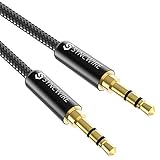
- Ultra Durable & tangle-free - with an 15000+ ultra-durable bend lifespan several times longer than original audio cables. You can wind It without having to worry about knots or kinks.
- Universal compatibility- Works with any Device equipped with standard 3. 5mm audio jack or aux-in port, connects smartphone, MP3 player, or tablet to car stereo or portable speakers
- Fit - Syncwire aux cable is designed to fit almost all aftermarket cases, excluding life proof cases & OtterBox cases.
- Unparalleled sound quality - polished Gold-plated connectors ensure reliability and eliminate signal loss and Noise possible.
- What you get - Syncwire 6. 5 ft Nylon braided aux cable, 3 years free card, user guide and customer service
When requesting help, note the iPhone model, iOS version, vehicle make and model year, wired or wireless connection type, cable and adapter used, whether another phone works, and any error message. Those details help separate an iPhone issue from a vehicle or accessory issue.
The practical cable takeaway
A replacement cable is worth considering only when wired CarPlay is involved and the original cable may be damaged, unreliable, incompatible, or unable to carry data. Choose one that matches the iPhone’s connector and the vehicle’s CarPlay USB port, and prefer a direct connection when the vehicle and iPhone support it. Buying a cable cannot fix wireless CarPlay, a disabled CarPlay restriction, or a vehicle head-unit fault.
Frequently Asked Questions
How do I reset CarPlay after the iOS 26 update?
Open Settings > General > CarPlay, tap your vehicle, and choose Forget This Car. Then delete the iPhone from the vehicle’s Bluetooth or connected-devices menu, restart both sides, and pair them again.
Is iOS 26 responsible for all CarPlay connection failures?
No. Some users may have experienced connection problems after an iOS 26 release or beta, but the available evidence does not establish one universal iOS 26 CarPlay bug. The cause may also be a stale pairing, cable, USB port, restriction, wireless setting, or vehicle firmware.
Can a cable charge my iPhone but still fail with CarPlay?
Yes, if it carries data and matches both connectors. Charging proves only that power is passing through; CarPlay also needs a reliable data connection. Try another suitable cable and the vehicle’s designated CarPlay USB port.
How can I tell whether the iPhone or car is causing the problem?
Test your iPhone in another compatible vehicle and another compatible iPhone in your vehicle. If multiple phones fail in one car, contact the automaker or dealer. If the same iPhone fails in multiple vehicles, contact Apple Support.
The Bottom Line
Start with the free fix: update and restart both devices, choose Settings > General > CarPlay > your vehicle > Forget This Car, delete the iPhone from the vehicle, and pair again. If that fails, separate wired and wireless checks, verify Siri and Screen Time, test another cable or phone, and investigate vehicle firmware before considering any reset or accessory purchase.
Quick wins for a faster PC:
Fix the driver behind crashes, sound loss and screen glitchesFind Drivers →Repair Windows errors before they cause bigger problemsFix Now →Quick Recap
Product prices and availability are accurate as of the date/time indicated and are subject to change. Any price and availability information displayed on Amazon at the time of purchase will apply.




