Free tools Windows power users keep installed
One-click scans. No signup required.
Google I/O 2025 pointed Android Auto in a new direction: Gemini is replacing the old voice-assistant experience with more natural conversations and broader in-car tasks, while Google is expanding car apps beyond navigation, messaging and music. Games and parked entertainment are part of that expansion, but the announcement did not mean every Android Auto user immediately received video apps.
The distinction matters. Android Auto projects compatible phone features to a compatible car display. Cars with Google built-in and Android Automotive OS run Google-powered software inside the vehicle itself. Their app catalogs, hardware requirements and rollout schedules are different.
As an Amazon Associate I earn from qualifying purchases.
This article separates what Google announced on May 13, 2025, from the documented position as of August 12, 2026.
PC Slower Than It Used to Be?
A free scan shows the junk files, broken settings and background clutter dragging Windows down - then fixes them in one click.Free scan · Windows 10 & 11Crashes, No Sound, or Screen Glitches?
Random freezes, missing sound and display glitches usually trace back to one bad driver. Find and replace yours safely.Free scan · under a minuteWhat Google announced at I/O 2025
Google described Android Auto as part of a broader Android-for-Cars strategy rather than only a projection system for maps and music. The headline announcements were:
#1 Best Overall

- Fits 2014 2015 2016 Toyota Corolla 11th Gen, including L, LE, LE Eco, LE Plus, LE Premium, LE Eco Plus, LE Eco Premium, S, S Plus, S Premium & Special Edition. Upgrade your Corolla with the Dasaita G13 Android Car Stereo featuring a 10.33" HD touchscreen, a physical control knob, and Plug & Play installation. This radio replacement retains factory Steering Wheel Controls, Backup Camera, Parking Sensors, Factory Amplifier, Door Alerts, A/C & Fuel Vehicle Information, and OEM USB/AUX ports.
- Wireless Apple CarPlay & Android Auto with Voice Control — Enjoy a smarter Corolla drive with wireless Apple CarPlay and Android Auto via Bluetooth 5.0. Connect your phone for music, calls, navigation and compatible apps. Use Siri or Google Assistant for hands-free control. Works with factory steering wheel controls, including call buttons and volume +/- keys, so you can manage audio and calls while keeping your hands on the wheel during daily driving or road trips.
- Android 13 Car Stereo with Qualcomm Processor & 256GB Storage — Upgrade your Corolla with Dasaita head unit powered by Android 13, Qualcomm 8-core processor, and 8GB RAM for fast, smooth performance. Run navigation, music, calls, and apps simultaneously with ease. Store more apps, videos, and files with 256GB ROM. Stay connected anywhere with built-in 4G LTE (SIM card supported) or 5G WiFi hotspot for online streaming and real-time traffic updates.
- 10.33" QLED HD Touchscreen & Physical Volume Knob — Enjoy a bright 10.33" 1600×720 QLED touchscreen with a fully laminated display for clear, responsive viewing. The physical volume knob provides quick, intuitive volume adjustment without navigating through the screen. Split-screen mode lets you view navigation and audio side by side, so you can follow the map while enjoying your music.
- Premium Audio & Entertainment with DTS — Experience enhanced sound with DTS surround, TDA7808 amplifier, 4V audio output and optical output. Independent speaker time-delay control lets you fine-tune the sound stage to match your listening preferences. HDMI output supports compatible gaming consoles and streaming devices for additional in-car entertainment.
- Gemini for Android Auto: a more conversational assistant for calls, messages, places, directions and other in-car tasks.
- Gemini Live: a free-flowing, back-and-forth conversation mode rather than a single question followed by one answer.
- More parked-car apps: Google said it was expanding app categories to include games and video for waiting or charging time.
- A larger car-app ecosystem: Google highlighted the Car App Library, app quality tiers and the Car Ready Mobile Apps Program for developers.
Google said Gemini would come to Android Auto in the following months and to cars with Google built-in later in 2025. That was a rollout plan, not a statement that the feature was available on every compatible vehicle at the conference.
Gemini on Android Auto: what it actually does
Gemini is intended to make voice interaction in the car less rigid. Instead of memorizing narrow commands, a driver can phrase a request more naturally and follow up with additional questions. Google’s documented examples include:
- Making a phone call
- Sending a text message
- Finding a place
- Starting navigation
- Controlling music
- Asking for travel guidance
- Brainstorming during a drive
- Practicing a speech through Gemini Live
Gemini Live is the more significant change in everyday use. It is designed for an ongoing conversation, so the user can continue talking without treating every sentence as an isolated command. For example, a driver might ask for ideas for a weekend trip, ask Gemini to narrow the suggestions, and then request directions to one of the destinations.
That does not turn Gemini into a fully autonomous driving system. It remains a voice assistant operating through the phone and car interface. Navigation, mobile data, vehicle compatibility and Google’s regional availability rules still apply.
How to start Gemini in Android Auto
Google’s current Android Auto documentation lists three ways to start Gemini:
- Say “Hey Google”.
- Tap the microphone button on the Android Auto display.
- Press and hold the steering-wheel voice-command button, if the vehicle provides one.
Gemini Live can be started with a voice command and then used as a conversational session. The exact button behavior can vary by vehicle, steering-wheel controls and head unit.
Important limitation: Gemini can be wrong
Google describes Gemini in Android Auto as new and evolving and warns that it may hallucinate or provide inaccurate information. Do not rely on it for critical, emergency or safety-related information while driving. A natural-sounding response is not proof that the answer is correct.
Do these 3 things before closing this tab:
1Fix the driver behind crashes, sound loss and screen glitches2Clear out junk files and repair common Windows errors3Scan for outdated or missing drivers - takes under a minuteGoogle also warns that anyone in the vehicle may hear Gemini’s responses, including content that may not be appropriate for children.
Rank #2

- For Toyota Tundra 2007 2008 2009 2010 2011 2012 2013 / Sequoia 2008-2018 Radio Upgrade – Built as a 10.1 inch IPS touch screen stereo replacement head unit for drivers who want to replace the outdated factory radio with a larger display, smarter connectivity, and easier daily control. A practical car radio upgrade kit for navigation, music, calls, and reversing.
- 【Wired & Wireless CarPlay / Android Auto】 For Toyota Tundra 2007-2013 / Sequoia 2008-2018 Stereo with Wired & 5G Wireless CarPlay and Android Auto – Get directions, answer calls, play music, send messages, and use apps more conveniently on the road. Ideal for commuting, road trips, and hands-free driving when you want phone functions on a larger screen.
- 【Android 15 + 4-Core + 2GB+64GB】 Android 15 Head Unit with 4-Core CPU and 2GB RAM + 64GB ROM – Delivers smoother app switching, stable daily use, and enough storage for offline maps, playlists, videos, and essential apps. A better radio replacement for drivers upgrading from a factory system that feels slow, limited, or outdated.
- 【GPS + Dual-Band WiFi + Everyday Entertainment】 Built for Navigation and Online Use – Supports offline and online GPS navigation, dual-band WiFi 2.4G/5G, web browsing, app downloads, music playback, and 4K video playback. Whether you use Google Maps, Waze, streaming apps, or downloaded maps, this car stereo upgrade helps make every trip easier and more connected.
- 【10.2" IPS 1280x800 Screen + AHD Backup Camera】 10.2 Inch IPS 1280x800 Touch Screen with AHD 1080P Backup Camera – The 2.5D display gives a clearer view for maps, calls, and music control than lower-resolution screens, while the IP67 waterproof 170° rear camera with night vision helps you park with more confidence in garages, driveways, and tight spaces.
Video apps: announced in 2025, but not a universal Android Auto feature
The phrase “video apps on Android Auto” needs careful qualification. At I/O 2025, Google said it was expanding the in-car app catalog to include video and games, particularly for parked or charging downtime. The safety principle is straightforward: video is for when the vehicle is parked, not for watching while driving.
However, the announcement did not establish that every Android Auto-compatible car would receive a general video catalog. App support depends on the platform, the vehicle or receiver, the phone’s Android version, Google’s rollout and the app’s compliance with driver-distraction rules.
The later Android Auto video rollout
Google’s 2026 Android-for-Cars developer announcement said Android Auto would begin rolling out parked video playback to compatible vehicles later in 2026 for phones running Android 17 or newer. YouTube was given as an example of an app that could offer smooth 60-frame-per-second HD playback. Google also said adaptive video apps should require relatively little additional work for the parked use case.
Quick wins for a faster PC:
Fix the driver behind crashes, sound loss and screen glitchesFind Drivers →Clear out junk files and repair common Windows errorsFree Scan →That announcement still does not mean universal availability. “Compatible vehicles” is doing important work in the sentence. A vehicle can support ordinary Android Auto projection without supporting every new parked-app capability. Google Play filtering, vehicle software, OEM compatibility and regional availability can all affect whether a video app appears.
At the July 13, 2026 documentation state, Google’s parked-app guidance listed games in the Android Auto parked-app category but listed video apps under Android Automotive OS. In other words, the later Android Auto video rollout had been announced, but readers should not treat a general-purpose Android Auto video catalog as an already universal feature.
What you can and cannot do with video
- Watching video while driving: Not supported. Video apps must be restricted when driver-distraction controls are active.
- Watching while parked: This is the intended use case, where supported by the vehicle, phone, platform and app.
- Listening while driving: Some implementations may allow audio-only continuation or optimized audio controls, but this depends on the specific vehicle and app.
- Using a video app in every Android Auto car: Not guaranteed.
Do not interpret a listing for an Android Auto adapter, a compatible phone or a large car display as proof that the hardware adds video playback. An adapter can change how a phone connects; it does not independently unlock Google’s future app categories.
Android Auto, Android Automotive OS and Google built-in are not the same thing
Many confusing headlines use these names interchangeably. They describe related but separate experiences.
| Platform | Where the software runs | What determines feature availability |
|---|---|---|
| Android Auto | On a compatible Android phone, with the interface projected to a compatible car display or aftermarket receiver | Phone, Android version, data connection, vehicle or receiver, cable or wireless connection, app support and regional rollout |
| Android Automotive OS | Inside the vehicle’s infotainment hardware | Vehicle software, manufacturer integration, Google Play availability, app requirements and parked-app policies |
| Cars with Google built-in | An embedded Google-powered experience supplied as part of the vehicle | Vehicle model, manufacturer, market, software version and available Google Play apps |
Android Automotive OS is the underlying vehicle operating system. “Google built-in” generally refers to cars that include Google’s embedded services and apps as part of the factory infotainment experience. A car can have Google built-in without using Android Auto for the same function, and an Android Auto-compatible car does not automatically have Google built-in.
Rank #3
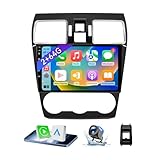
- 【Vehicle Compatibility】 The car stereo is compatible with Subaru Forester WRX Impreza 2016 2017 2018(With Silver Air Vent). Please check the car console and the year before buying. If you are not clear, please provide the following details: 1. Your car's model and year, 2. A picture of your car console
- 【 Android 13 Car Radio】The head unit runs on Android 13 as its main operating system, turning your car radio into a large tablet. Featuring 2GB + 64GB of storage, it ensures smooth performance for navigation, music, and more. The 9-inch touch screen with 1280x720 resolution provides a sharp and clear display. With the Play Store preinstalled, you can install many apps after connecting to Wi-Fi,
- 【Wireless CarPlay & Android Auto】 Wireless CarPlay and Android Auto work seamlessly, allowing for hands-free calls, navigation, music, and app use without cables. Simply connect to your smartphone via Bluetooth/Wi-Fi/USB to access the GPS navigation system, make phone calls, enjoy music while focusing on the road through the car's CarPlay screen, having a more convenient and safer driving experience
- 【GPS Navigation & WIFI &Bluetooth】Built-in GPS module supports both offline and online navigation. When connected to WiFi, you can get real - time traffic information. You can answer/make hands-free Bluetooth phone calls, listen to Bluetooth music without distractions
- 【Bluetooth & FM/RDS Radio】This car radio replacement features built-in Bluetooth, enabling hands-free calls, phone book syncing, and wireless music streaming for a convenient and safe driving experience. The FM/RDS radio offers stable reception and allows you to preset your favorite stations, keeping you informed with real-time news, sports updates, and weather forecasts while you're on the road
Why Google built-in cars appeared to get video first
Google had already made Prime Video available through Google Play on selected Renault, Polestar and Volvo cars with Google built-in. Google also highlighted parked entertainment options such as the Vivaldi browser on selected embedded systems.
Those examples show Google’s broader automotive video strategy, but they do not prove that Prime Video was universally available through Android Auto in 2025. The app catalog on an embedded vehicle system can be different from the apps available through phone projection.
Google reported more than 250 million cars supporting Android Auto at I/O 2025. In May 2026, it reported that cars with Google built-in had expanded to more than 100 models from 16 brands. These figures are not directly comparable: the first describes Android Auto-compatible cars and receivers, while the second describes vehicles using Google’s embedded platform.
What your phone and car need for Android Auto
Before thinking about Gemini or parked video, confirm that the basic Android Auto connection works.
Wired Android Auto requirements
Google’s setup documentation specifies:
- An Android phone running Android 9.0 or later
- An active mobile data plan
- A compatible car or aftermarket stereo
- A high-quality USB cable capable of carrying data
Android Auto is integrated into supported Android phones. In most cases, you do not install a separate Android Auto app from Google Play simply to use the car-display experience.
If the connection drops, the display repeatedly disconnects or Android Auto starts charging without projecting, the cable is a sensible first thing to replace. A cable that charges a phone is not necessarily reliable for continuous data projection.
For wired users, a high-quality USB cable for Android Auto is the appropriate kind of accessory to consider. Keep it short where practical, avoid damaged connectors and use a cable suited to the ports on both the phone and the vehicle. This can improve connection reliability, but it cannot add Gemini or parked video support to an incompatible car.
The Tool Desk
Outbyte PC Repair FREERepair Windows errors before they cause bigger problemsFix Now →Outbyte Driver Updater FREEFix the driver behind crashes, sound loss and screen glitchesFind Drivers →Wireless Android Auto requirements
Wireless projection requires more than Bluetooth pairing. Google’s requirements include:
- A compatible Android phone with an active data plan
- 5 GHz Wi-Fi capability
- A compatible car or aftermarket receiver
- Support for wireless Android Auto in the relevant region and device configuration
Google documents wireless compatibility for phones running Android 11.0, subject to its regional and device requirements. Compatibility is not determined by the phone alone; the vehicle or head unit must also support wireless Android Auto.
Rank #4

- Vehicle Compatibility: This Android car stereo is a plug-and-play radio designed specifically for Honda Civic 2006 2007 2008 2009 2010 2011, making installation quick and hassle-free. Before ordering, please check your vehicle's production year and dashboard shape. If you have any questions about compatibility, feel free to reach out—we're happy to help
- High-Performance Android 13 Head Unit: Equipped with a 4-core processor, 2GB RAM, and 64GB ROM, this Android 13 system ensures fast response, smooth multitasking, and stable performance for daily driving. Factory steering wheel controls are retained and can be easily set up through manual SWC learning after installation, providing a safer and more convenient driving experience
- Apple CarPlay & Android Auto:Built-in wireless Apple CarPlay and Android Auto let you easily pair your smartphone and use maps, music, calls, and more with voice commands—all hands-free. With built-in Bluetooth 5.0, enjoy faster transmission, a more stable connection, and seamless syncing with apps like Maps and Spotify for a smoother, safer driving experience
- 9'' QLED Touchscreen & 1080P Rear Camera: Features a high-definition 1280×800 QLED screen with vivid colors, sharp image quality, and responsive touch control for an intuitive, theater-like experience. Includes an waterproof backup camera with 170° ultra-wide viewing angle and 1080P AHD signal, delivering crystal-clear footage day and night to greatly improve parking safety and reduce blind spots
- Installation Support & Warranty Professional: Engineer guidance available to assist with installation, setup, and any product-related questions. Our customer support team is responsive and ready to help—ensuring a smooth experience from purchase to daily use
An Android Auto wireless adapter can be useful for a vehicle or receiver that supports wired Android Auto but does not offer built-in wireless projection. It is not a universal upgrade. Check the adapter’s compatibility with the exact vehicle or stereo, phone and connection mode before buying, and do not buy one solely because a product listing mentions Gemini, AI or video.
When an aftermarket receiver makes sense
If a vehicle has no compatible factory display, replacing the head unit may be an option. An Android Auto-compatible aftermarket receiver can provide the required display and projection hardware, but installation, steering-wheel controls, backup-camera integration, wireless support and parked-app capabilities vary by model.
Verify the exact receiver’s Android Auto mode and installation fitment. “Has a USB port” is not the same as “supports Android Auto,” and “supports Android Auto” is not the same as “supports every new Android Auto parked app.”
Quick compatibility checklist
Before troubleshooting or shopping, confirm all of the following:
- ☐ Your phone runs a supported Android version.
- ☐ Your phone has an active data plan.
- ☐ Your car or stereo is listed as Android Auto-compatible.
- ☐ For wired use, the USB cable carries data and is in good condition.
- ☐ For wireless use, both the phone and car or receiver support wireless Android Auto and 5 GHz Wi-Fi.
- ☐ For future parked video, your phone, vehicle, region and app meet the rollout requirements; Android 17 or newer alone is not enough.
Games and the new parked-car app model
Games are another part of Google’s expansion beyond the traditional navigation, communication and audio categories. The use case is waiting in a parked vehicle, such as during charging or while a passenger is waiting—not playing while the car is moving.
Google’s developer material presented new in-car experiences across Android Auto, cars with Google built-in and Android Automotive OS. It also emphasized app quality tiers, the Car App Library and the Car Ready Mobile Apps Program. These tools are intended to help developers create apps that meet automotive usability and distraction requirements instead of simply mirroring a phone app onto a dashboard.
Recommended Free Tools
The result is a curated app model. A phone app does not automatically become eligible for a car display, and a car-compatible app may expose only certain functions while the vehicle is moving. Google Play and vehicle compatibility systems can filter what appears.
Independent reader supportYour contribution helps us test, update, and keep practical guides available for everyone.What the 2025 announcement means for drivers
If you already use Android Auto
Gemini is the most immediately relevant part of the announcement. Once available for your account, phone, language, region and vehicle setup, it can make calls, messages, navigation requests and music control more conversational. You do not need a special “Gemini Android Auto adapter.”
For video and games, check the Android Auto app catalog on the actual connected system rather than relying on a headline or an online accessory listing. Availability can change as Google rolls out support and as vehicle manufacturers update their software.
If you want wireless projection
First determine whether the car or receiver already supports wireless Android Auto. If it does not, a compatible wireless adapter may help only when the vehicle supports the adapter’s wired-to-wireless conversion model. It will not upgrade the vehicle’s processor, add Google built-in or guarantee parked video.
Best Value

- Vehicle Compatibility: This upgrade android radio fit for Ford F150 2009 2010 2011 2012 and 2013 2014 STX XL models. Plug and Play. You don't need to purchase the other extral parts to install it
- High-Performance Android 13 Head Unit: Powered by an 8-core processor, 4GB RAM and 64GB ROM, this Android 13 head unit delivers lightning-fast app loading, seamless multitasking and lag-free performance, bringing a flawless upgrade to your vehicle. It also retains factory features like steering wheel controls, ensuring a smarter and more enjoyable driving experience
- Apple CarPlay & Android Auto: Built-in wireless Apple CarPlay and Android Auto let you easily pair your smartphone and use maps, music, calls, and more with voice commands—all hands-free. With built-in Bluetooth 5.0, enjoy faster transmission, a more stable connection, and seamless syncing with apps like Maps and Spotify for a smoother, safer driving experience
- 9'' QLED Touchscreen & 1080P Rear Camera: Features a high-definition 1280×800 QLED screen with vivid colors, sharp image quality, and responsive touch control for an intuitive, theater-like experience. Includes an waterproof backup camera with 170° ultra-wide viewing angle and 1080P AHD signal, delivering crystal-clear footage day and night to greatly improve parking safety and reduce blind spots
- Installation Support & Warranty Professional: Engineer guidance available to assist with installation, setup, and any product-related questions. Our customer support team is responsive and ready to help—ensuring a smooth experience from purchase to daily use
If you are shopping for a new car
Ask the dealer which platform the vehicle has:
- Does it support phone-projected Android Auto?
- Does it have Google built-in?
- Which apps are available in the vehicle’s Google Play catalog?
- Are parked video apps supported on this exact trim and market?
- What happens to video playback when the vehicle shifts out of Park?
- Are wireless Android Auto and wired Android Auto both supported?
Do not assume that a newer model with a large screen has the same app capabilities as another vehicle from the same brand. Factory software, processor hardware, market and trim can matter.
Timeline: from I/O announcement to documented rollout
- May 13, 2025: Google announced Gemini for cars, planned Android Auto availability, Gemini Live, expanded games and video categories, and more than 250 million Android Auto-compatible cars.
- 2025 developer context: Google discussed new in-car app experiences, app quality tiers, the Car App Library and the Car Ready Mobile Apps Program.
- 2025 onward: Selected cars with Google built-in gained parked entertainment options, including Prime Video on selected Renault, Polestar and Volvo vehicles.
- May 2026: Google described the next-generation Android Auto and said parked video playback would begin rolling out later in 2026 to compatible vehicles for phones running Android 17 or newer.
- July 13, 2026: Google’s developer documentation described parked-app filtering and Android Automotive OS video-app requirements. Its Android Auto parked-app category listed games but not general video apps at that documentation state.
- August 12, 2026: Gemini was documented for Android Auto, including calls, messages, navigation, music control and Gemini Live. Video remained dependent on parking, compatibility and rollout status.
Safety rules that should not be blurred by the marketing
- Never watch video while driving. Video apps are intended for parked use and must be restricted when driving-distraction controls are active.
- Do not treat Gemini as an authority. It can produce inaccurate information. Verify important details using appropriate sources and do not use it for safety-critical decisions behind the wheel.
- Use voice interaction responsibly. Even hands-free tasks can distract a driver. Set navigation, music and messages before moving when possible.
- Remember passengers can hear the assistant. Gemini’s responses may include content unsuitable for children.
- Check the exact vehicle and region. Compatibility varies across phones, cars, receivers, languages, markets and software versions.
- Do not confuse an accessory with a platform upgrade. A cable can improve a wired connection and an adapter can change projection mode, but neither creates Google built-in or guarantees new app categories.
Bottom line
Google I/O 2025 was important because it repositioned Android Auto as the beginning of a larger in-car platform strategy. Gemini brings more natural voice interaction and Gemini Live to the assistant experience. Games and video show Google’s intention to make parked charging and waiting time more useful.
But the accurate headline is not “every Android Auto car now has Gemini and video.” Gemini became documented for Android Auto with calls, messages, directions, music and conversational use. Video was announced as a parked feature, with later rollout tied to compatible vehicles and Android 17 or newer, while embedded Google built-in cars followed a separate path.
For drivers, the practical advice is simple: verify the exact phone, vehicle or receiver, connection mode, app and region. Buy a cable or wireless adapter to solve a specific connection problem—not because its packaging promises capabilities that only Google and the vehicle manufacturer can provide.
What’s actually slowing this PC down?
Pick the symptom - the matching free tool is one click away.
Frequently Asked Questions
Can I watch YouTube or another video app while driving with Android Auto?
No. Video playback is intended for parked use and must be restricted when driving-distraction controls are active. Some supported implementations may allow audio-only continuation, but that depends on the vehicle and app.
Does Android 17 automatically add video apps to Android Auto?
No. Google said parked video playback would begin rolling out later in 2026 to compatible vehicles for phones running Android 17 or newer. Android 17 is a requirement for that announced rollout, not a guarantee that every car or region supports it.
Does a wireless Android Auto adapter add Gemini or video support?
No. A compatible adapter can help a vehicle that supports wired Android Auto use wireless projection, but it does not add Gemini, Google built-in, Android Automotive OS or parked video capability.
What is the difference between Android Auto and Google built-in?
Android Auto projects supported phone features to a compatible car display. Google built-in is an embedded Google-powered infotainment system installed in selected vehicles. Their software, apps and availability are separate.
The Tool Desk
Outbyte PC Repair FREERepair Windows errors before they cause bigger problemsFix Now →Outbyte Driver Updater FREEFix the driver behind crashes, sound loss and screen glitchesFind Drivers →The Bottom Line
Android Auto’s I/O 2025 shift is real, but its features are not interchangeable or universal. Gemini is the practical near-term upgrade; games and video belong primarily to carefully controlled parked use. Confirm compatibility before buying hardware, and never use video—or rely on Gemini—for safety-critical decisions while driving.
Quick Recap
Product prices and availability are accurate as of the date/time indicated and are subject to change. Any price and availability information displayed on Amazon at the time of purchase will apply.




