Recommended Free Tools
The 2025 Miami Grand Prix was held on Sunday, May 4, 2025, at Miami International Autodrome in Miami Gardens, Florida. In the United States, the race was distributed through ESPN and ABC—not Apple TV as an exclusive F1 service. The precise ESPN race-broadcast listing began at 3:55 p.m. Eastern, while Formula 1’s official timetable listed the on-track Grand Prix start at 4:00 p.m. ET.
Apple users could follow the weekend through the ESPN app on iPhone, iPad and Apple TV, watch through an ESPN-supported web browser on a Mac, and use the official F1 app for live timing and companion data. Apple’s exclusive U.S. F1 arrangement began with the 2026 season, so it does not apply retroactively to this 2025 race.
How the 2025 Miami Grand Prix was available in the U.S.
For the 2025 event, U.S. viewers needed an authorized ESPN or ABC access route. ESPN’s official coverage materials listed ABC, ESPN+, Disney+, ESPN Deportes, ESPN networks, ESPN3, the ESPN app, and ESPN’s digital and social channels across the weekend. The exact outlet varied by session, so downloading one app did not necessarily provide every practice, Sprint, qualifying session or race broadcast.
For the Grand Prix itself, ESPN’s detailed platform schedule listed:
#1 Best Overall

- 1) Sports.TV is the home for the ultimate sports and competition junky.
- 2) Stream hundreds of hours of games, analysis, recaps, highlights and more across our free channel lineup!
- 3) We've got all of your favorite sports covered, including lacrosse, MMA, billiards, table tennis, e-gaming, soccer, baseball, basketball, football and so much more.
- 4) Get even more sports and entertainment with our library of free on demand movies and TV shows.
- 5) Come discover your favorite new sport on Sports.TV!
- Pre-race coverage: 2:30 p.m. ET
- Race broadcast: 3:55 p.m. ET on ABC, ESPN+ and Disney+
- Formula 1 timetable start: 4:00 p.m. ET
The five-minute difference is a scheduling distinction, not a contradiction: ESPN’s listing referred to the broadcast window, while Formula 1’s timetable referred to the scheduled on-track start.
Because this was a 2025 event, the instructions below are best understood as the correct way Apple-device owners could have followed that race weekend. They should not be used as a current 2026 rights guide without checking the latest official F1 and Apple information.
2025 Miami Grand Prix weekend schedule
Miami was on Eastern Time and four hours behind UTC during the event. Formula 1’s timetable gave the session times below; ESPN’s U.S. listings generally began five minutes earlier to accommodate broadcast coverage.
| Day | Session | Miami local time | ESPN U.S. listing |
|---|---|---|---|
| Friday, May 2 | Free Practice 1 | 12:30 p.m. | 12:25 p.m. ET |
| Friday, May 2 | Sprint Qualifying | 4:30 p.m. | 4:25 p.m. ET |
| Saturday, May 3 | Sprint | 12:00 p.m. | 11:55 a.m. ET |
| Saturday, May 3 | Qualifying | 4:15 p.m. | 3:55 p.m. ET |
| Sunday, May 4 | Grand Prix | 4:00 p.m. | 3:55 p.m. ET broadcast listing; 4:00 p.m. ET on-track start |
Formula 1’s official event page contains the original timetable, while ESPN’s coverage announcement identifies the U.S. networks and digital platforms used for the weekend: Formula 1’s 2025 Miami Grand Prix timetable and ESPN’s official U.S. coverage announcement.
The Tool Desk
Outbyte Driver Updater FREEScan for outdated or missing drivers - takes under a minuteDriver Scan →Outbyte PC Repair FREEClear out junk files and repair common Windows errorsFree Scan →Watching on an iPhone or iPad
The primary Apple-device route for the U.S. broadcast was the ESPN app. Install the current ESPN app from the App Store, sign in before the session, and use the app’s live or schedule listings to locate the authorized feed. Depending on the particular ESPN service or TV package, you may need either participating TV-provider authentication or an eligible ESPN subscription.
- Update iOS or iPadOS and install the current ESPN app.
- Open the app before the session and sign in.
- Choose the live Formula 1 event from the ESPN schedule.
- If prompted, authenticate with the participating TV provider or eligible ESPN subscription.
- Start early enough to confirm that the feed plays before pre-race coverage or the session begins.
Installing the app by itself did not unlock every live ABC or ESPN program. Access depended on the rights and authentication attached to the viewer’s location and subscription. ESPN’s supported-device documentation is the appropriate reference for current app and device compatibility.
Using the official F1 app as a companion
The official Formula 1 app was useful alongside the ESPN video feed. Its App Store listing described live timing, schedules, results, news, highlights and telemetry-related features for eligible F1 TV subscribers. It was a good choice for sector times, gaps, standings and session information, but it should not be described as the confirmed U.S. live-race video provider for the 2025 Miami Grand Prix.
Rank #2

- Fence Mount for Game Changer Mounting Kit: Easily attach iPhones, GoPros, insta 360 X5 or cameras to any fence for Capture every baseball, softball, football, Tennis moment! This fence phone mount ensures without missing plays—perfect for parents and fans. Seamlessly compatible with most devices
- Capture Charge On-the-Go: Eliminate battery anxiety! Our game changer mount has a built-in pouch for your power bank, enabling simultaneous recording and charging, perfect for tournaments
- Sun and Rain Protection: Conquer sun and rain! for gamechanger streaming kit features an adjustable flip-down visor to prevent overheating, rain-resistant design for device safety, keep recording reliably in any conditions
- Quick Easy Mounting Kit: One-Touch Open, Installation takes only a minute, gamechanger fence mount securely attaches to any fence no tools needed. Perfect for fast setup/removal during games, this fence mount for iPhone.Skip complex tools, enjoy hassle free recording
- Portable Storage Bag: This mevo fence mount comes with a handy storage bag for easy carrying. Toss it in your gear bag and take it anywhere, as a fence mount for phone, it’s designed for convenience, it’s perfect for travel to games
In other words, use ESPN or ABC for the authorized U.S. video broadcast, and use the official Formula 1 app for timing and companion information. The app’s available features can vary by subscription and region.
Watching on Apple TV
ESPN listed Apple TV fourth generation and later among its supported devices. An Apple TV owner could therefore install and use the ESPN app on the television, provided the account had the required TV-provider authorization or eligible ESPN access.
- Open the App Store on the Apple TV.
- Search for and install the ESPN app.
- Open ESPN and follow the on-screen sign-in or activation instructions.
- Confirm that the account is authorized before the event begins.
- Use the app’s live schedule to select the applicable Miami session.
Apple TV 4K for watching the race on a TV was an optional large-screen setup for viewers already invested in Apple’s ecosystem. It was not a prerequisite for the 2025 Miami Grand Prix, did not include ESPN access by itself, and did not guarantee an ESPN or ABC subscription. iPhone, iPad, Mac and other supported platforms remained alternatives. If you purchase through a product link on this page, the site may receive compensation; the hardware and broadcast access are separate purchases.
ESPN also documented SharePlay functionality involving iPhone, iPad and Apple TV, although device and operating-system requirements applied. SharePlay was not necessary for ordinary viewing and should be treated as an optional feature rather than a guaranteed way to share every live broadcast feed.
Watching on a Mac
A Mac user could use ESPN’s web-based viewing route in a supported browser. Visit ESPN’s official site, sign in with the required provider or ESPN credentials, and select the live event from the Formula 1 or schedule section. A browser was the simplest Apple-computer option because it avoided relying on a dedicated macOS app.
Free tools Windows power users keep installed
One-click scans. No signup required.
Browser features and compatibility can vary by operating system, browser version, account type and regional rights. For that reason, test the sign-in and video playback before the session rather than waiting until the scheduled start. ESPN’s platform and device support pages are more reliable than assuming that every feature works identically on every Mac.
AirPlay and casting: useful, but not guaranteed
Apple-device owners may want to mirror an iPhone, iPad or Mac to a television. AirPlay or casting can be convenient when the ESPN app, browser, Apple TV and software versions support the particular feed, but it should not be treated as a universal guarantee. Some live sports services restrict mirroring or handle it differently from ordinary video.
The safer setup was to use the ESPN app directly on a supported Apple TV when possible. If using AirPlay, update both devices, place them on the same network, open the authorized ESPN feed first, and verify playback before the broadcast. If mirroring fails, switch to the ESPN app on Apple TV or use the browser directly on the Mac.
Rank #3
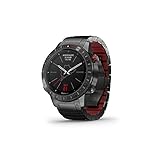
- Premium-crafted tool watch features a 46 mm diamond-like carbon coated titanium case and bezel with ceramic inlay and a specialized tarmac and red scheme
- Purpose-built with a domed sapphire lens and always-on display plus a tachymeter bezel to help measure speed; hybrid titanium Quick Fit bracelet with red silicone links and butterfly clasp
- Preloaded with more than 250 racetracks around the world, with select tracks that you can display on a customized watch face
- Race Activity app measures your performance with auto lap, GPS-based speed and distance, lap splits and race history functions
- Smartwatch functionality, including streaming music, Garmin Pay contactless payments, estimated wrist-based heart rate, daily activity tracking, sleep monitoring and smart notifications compatible with Apple and Android devices
Quick troubleshooting checklist
If the stream will not play
- Update the app and device software. Install the latest available ESPN app and update iOS, iPadOS, tvOS or the browser-supported macOS environment.
- Sign in before the event. Do not wait until the lights are about to go out to discover that the account has expired or needs reauthorization.
- Check the access type. ESPN installation is not the same as ESPN or TV-provider authorization. Confirm that the package includes the applicable live channel or event.
- Check the session’s outlet. The weekend was distributed across multiple ESPN and ABC outlets; not every session appeared in exactly the same place.
- Verify regional availability. U.S. rights and authentication rules do not automatically apply in other countries, and local availability can differ even within a platform.
- Try a supported alternative. Move from AirPlay to the ESPN app on Apple TV, or from an app to ESPN in a Mac browser.
- Check the official schedule. Broadcast windows can begin shortly before Formula 1’s listed session or on-track start.
Do not confuse the 2025 race with the 2026 rights arrangement
Apple and Formula 1 announced a five-year U.S. partnership in October 2025 beginning with the 2026 season. Apple’s current F1 pages therefore describe 2026 coverage on Apple TV. That later arrangement does not mean that the May 4, 2025 Miami Grand Prix streamed exclusively on Apple TV.
Do these 3 things before closing this tab:
1Repair Windows errors before they cause bigger problems2Fix the driver behind crashes, sound loss and screen glitches3Clear out junk files and repair common Windows errorsFor a current-season question, check Apple’s official announcement about its U.S. F1 partnership and the latest Formula 1 schedule and coverage information. The broadcaster, app availability, authentication requirements and device support can change by season and territory.
Frequently Asked Questions
Was the 2025 Miami Grand Prix exclusively on Apple TV?
No. In the United States, the 2025 race used ESPN and ABC distribution, with ESPN+ and Disney+ also listed in ESPN’s detailed platform schedule. Apple’s exclusive U.S. F1 arrangement began with the 2026 season.
What time did the 2025 Miami Grand Prix start?
ESPN’s precise U.S. broadcast listing began at 3:55 p.m. Eastern on Sunday, May 4, 2025. Formula 1’s official timetable listed the on-track Grand Prix start at 4:00 p.m. ET.
Could I watch the 2025 Miami Grand Prix with the F1 app?
The official F1 app was suitable for live timing, schedules, results, news, highlights and companion data for eligible users. It should not be treated as the confirmed U.S. live-race video provider for this event.
Did downloading ESPN provide free access to the race?
No. The ESPN app supported Apple devices, but live access required the appropriate TV-provider authentication or eligible ESPN subscription, and availability depended on the viewer’s region and the specific session.
The Bottom Line
The correct Apple-device route for the 2025 Miami Grand Prix was ESPN or ABC access through the ESPN app, Apple TV, or a Mac browser, with the F1 app available for timing and companion data. The race aired on May 4, 2025; Apple’s exclusive U.S. F1 arrangement belongs to the 2026 season and should not be applied retroactively.
Quick Recap
Product prices and availability are accurate as of the date/time indicated and are subject to change. Any price and availability information displayed on Amazon at the time of purchase will apply.




