PC Slower Than It Used to Be?
A free scan shows the junk files, broken settings and background clutter dragging Windows down - then fixes them in one click.Free scan · Windows 10 & 11Outdated Drivers Are Slowing You Down
One free scan finds every outdated or missing driver and matches the right update for your exact hardware.Free scan · exact hardware matchThe 15 Car Gadgets That Transform Your Drive, From Smart Dashboards to Enhanced Night Vision are most useful when they solve a specific problem: recording incidents, adding phone-friendly navigation, exposing vehicle data, improving tire readiness, or extending visibility. The best first purchase depends on vehicle compatibility and need; no accessory replaces attentive driving, mirrors, physical checks, or manufacturer service.
The 15 gadgets below are divided into five groups: smart dashboards and connectivity; recording and visibility; driver-awareness and safety aids; maintenance and roadside preparedness; and emerging thermal night vision. Some are consumer accessories, some require vehicle-specific fitment or installation, and some are OEM or professional technologies rather than normal retail purchases.
As an Amazon Associate I earn from qualifying purchases.
This is a feature-and-use-case guide, not a hands-on product test or a crash-reduction ranking. Product prices, retailer stock, current model status, subscription terms, and vehicle fitment should be checked again immediately before purchase.
Key takeaways
- The Garmin Dash Cam 67W records at 1440p and covers a documented 180-degree field of view, making a wide-angle dash camera a practical evidence-recording upgrade.
- Garmin’s Dash Cam Tandem combines a 1440p exterior camera with an interior lens using NightGlo night vision, GPS, incident detection, voice control, and parking surveillance.
- Apple CarPlay can provide navigation, messages, music, Siri, and wireless connectivity, but an aftermarket head unit and a wireless adapter solve different compatibility problems.
- The OBDLink MX+ can read and clear check-engine codes and monitor live data, but the usable dashboard depends on the vehicle network, operating system, and compatible app.
- A tire inflator adds air; a TPMS monitor reports pressure. A TPMS diagnostic tool is a separate professional or enthusiast category that can read sensor data and program certain universal sensors.
- Backup cameras and driver-assistance warnings are aids rather than substitutes for mirrors, visual checks, safe driving, or attention; automotive thermal night vision remains mainly an OEM and specialist technology.
Which car gadgets are actually worth buying?
The most worthwhile car gadgets are the ones that address a specific, recurring problem without creating a new distraction. A dash camera can preserve evidence, CarPlay can reduce phone handling, an OBD2 adapter can reveal vehicle data, and an inflator can help restore tire pressure away from a service station.
#1 Best Overall

- 4-Channel Dash Cam for Complete Vehicle Coverage: This dash cam is equipped with four Full HD 1080P cameras, capturing footage of the front, rear, left, and right sides of your vehicle simultaneously. The adjustable front cameras enhance visibility and offer flexible recording angles, including interior footage.
- Time-Lapse Recording & Parking Mode: With time-lapse recording, 60 minutes of footage is compressed into 1 minute, saving memory card space. Activate parking mode with the optional ACC hardwire kit (sold separately) for security when your vehicle is parked.
- Enhanced Night Vision & WDR Technology: The dash cam features advanced night vision and Wide Dynamic Range (WDR) technology for clear, balanced footage, even in low-light conditions. Eight infrared lights ensure optimal visibility, and WDR adjusts exposure to capture detailed images in varying lighting.
- Optional GPS for Real-Time Vehicle Tracking: Purchase the GPS logger (sold separately) to add location, speed, and time tracking, providing a visual representation of your vehicle's route. This feature is perfect for documenting travel details in case of incidents.
- 5GHz Wi-Fi & App Integration: Share videos easily via Wi-Fi using the mobile app for both iOS and Android devices. This feature allows for quick video downloads and sharing on your preferred platforms.
The 15 gadgets below are divided into five groups: smart dashboards and connectivity; recording and visibility; driver-awareness and safety aids; maintenance and roadside preparedness; and emerging thermal night vision. Some are consumer accessories, some require vehicle-specific fitment or installation, and some are OEM or professional technologies rather than normal retail purchases.
This is a feature-and-use-case guide, not a hands-on product test or a crash-reduction ranking. Product prices, retailer stock, current model status, subscription terms, and vehicle fitment should be checked again immediately before purchase.
15 car gadgets compared
| # | Gadget | Best use | What it adds | Compatibility or installation | Best fit |
|---|---|---|---|---|---|
| 1 | Wide-angle dash camera | Recording the road and incidents | 1440p video, 180-degree field of view, GPS, storage, power management, and parking mode | Windshield mounting and vehicle power; storage and parking-power requirements vary | Most drivers who want road evidence |
| 2 | Dual-lens interior/exterior dash camera | Recording the road and cabin | 1440p exterior video, interior NightGlo night vision, GPS, incident detection, voice control, and parking surveillance | Camera placement, cabin coverage, storage, and parking-power setup require checking | Rideshare drivers, families, and privacy-conscious buyers who need cabin coverage |
| 3 | LTE-connected dash camera | Remote awareness while parked | Live view, location tracking, theft alerts, and parking notifications | LTE service and a possible subscription; cellular coverage and power requirements matter | Owners who value remote parking alerts |
| 4 | Aftermarket CarPlay head unit | Modernizing an older or incompatible dashboard | Navigation, messages, music, Siri, and a phone-centered interface | Vehicle-specific fitment, wiring, phone, and head-unit compatibility; installation may be complex | Drivers whose factory system lacks suitable phone integration |
| 5 | Wireless CarPlay adapter | Removing the cable from an existing setup | Wireless connection for compatible wired CarPlay | Works only when the vehicle already supports compatible wired CarPlay | Drivers satisfied with the factory screen and system |
| 6 | Bluetooth OBD2 scanner | Reading diagnostic information | Check-engine codes, code clearing, and live data through a phone or computer | OBD2 vehicle compatibility and a supported iOS, Android, or Windows app | DIY owners who want basic diagnostics |
| 7 | OBD2 digital dashboard | Watching live vehicle data | Real-time engine information and enhanced diagnostics in a compatible app | Requires both a suitable adapter and software that supports the vehicle data | Enthusiasts who want a configurable data display |
| 8 | Portable head-up display | Displaying speed or directions near the forward view | Projected information intended to reduce glances toward a lower screen | Model, phone, app, and vehicle integration vary; Garmin’s consumer HUD products are discontinued | Used-market researchers, not buyers seeking a current Garmin recommendation |
| 9 | Magnetic phone mount and wireless charger | Hands-free navigation and charging | Visible phone placement and wireless charging when supported | Phone, case, mount position, and charging-adapter compatibility; the view and controls must remain clear | Drivers who use phone navigation legally and hands-free |
| 10 | Digital tire-pressure monitor | Making tire pressure easier to see | Displayed pressure readings from a monitor or added sensors | Sensor, display, valve-stem, and vehicle-system compatibility vary | Drivers who want more visible pressure information |
| 11 | Portable cordless tire inflator | Adding air during roadside or routine checks | Portable inflation for tires and equipment | Battery platform, power, hose, and pressure-setting requirements vary | Drivers who want an emergency and maintenance tool |
| 12 | TPMS diagnostic and sensor tool | Servicing tire-pressure sensors | Sensor ID, battery status, temperature, pressure, and programming for common universal sensors | Tool and sensor compatibility; more involved than a consumer pressure monitor | Tire shops, serious DIY users, and enthusiasts |
| 13 | Aftermarket backup camera | Improving the rearward view while reversing | Video of the area behind the vehicle | Camera, display, wiring, mounting, and vehicle integration; mirrors and physical checks remain necessary | Vehicles with poor rear visibility or no suitable factory camera |
| 14 | Blind-spot or rear-cross-traffic warning system | Adding alerts around difficult-to-see areas | Warnings for possible vehicles in blind spots or crossing behind the car | Sensor placement and calibration vary; warning is not the same as intervention or automatic braking | Drivers who understand the limits of aftermarket alerts |
| 15 | Automotive thermal night vision | Detecting heat signatures in low-light driving scenarios | Automotive-qualified thermal imaging for night vision, ADAS, pedestrian detection, and autonomous-vehicle development | OEM, developer, or specialist integration rather than plug-and-play consumer installation | Vehicle manufacturers, Tier 1 suppliers, and specialist developers |
Smart dashboards and connectivity
Can you add a smart dashboard to an older car?
Possibly, but an older car needs either a compatible aftermarket head unit or an existing compatible system; the vehicle’s age alone does not establish fit. Check the dashboard opening, wiring, steering-wheel controls, camera integration, phone model, and connection method before buying.
What’s actually slowing this PC down?
Pick the symptom - the matching free tool is one click away.
1. Aftermarket CarPlay head unit
An aftermarket CarPlay head unit is the most substantial way to modernize a dashboard that lacks suitable phone integration. Apple describes CarPlay as supporting navigation, messages, music, Siri, and wireless connectivity, and says an aftermarket system can add CarPlay to some current vehicles. Apple’s CarPlay overview is the right starting point for understanding the supported functions.
A head unit changes the in-dash interface, so fitment matters more than a generic claim that the unit is universal. Verify the vehicle-specific installation kit, wiring harness, steering-wheel-control support, backup-camera compatibility, and whether the desired CarPlay connection is USB or wireless. A professional installation may be sensible when the vehicle has integrated controls or a complex factory system.
2. Wireless CarPlay adapter
A wireless CarPlay adapter is useful only when the vehicle already has compatible wired CarPlay. The adapter does not add CarPlay to a vehicle whose factory system lacks it; the adapter changes the connection path from a cable to a wireless link.
Apple’s connection instructions distinguish USB and wireless setup paths. Confirm that the car’s existing wired CarPlay works reliably first, then check the adapter’s phone, vehicle, USB-port, and firmware requirements. An adapter is usually the cleaner upgrade when the factory screen and controls already meet the driver’s needs; a head unit is the more appropriate category when the factory system itself is the limitation.
The Tool Desk
Outbyte PC Repair FREEClear out junk files and repair common Windows errorsFree Scan →Outbyte Driver Updater FREEScan for outdated or missing drivers - takes under a minuteDriver Scan →3. Bluetooth OBD2 scanner
A Bluetooth OBD2 scanner turns a phone, tablet, or computer into a basic diagnostic interface. OBDLink documents the MX+ as able to read and clear check-engine codes, monitor live data, and work with iOS, Android, and Windows. OBDLink states U.S. coverage for 1996-and-newer cars and light trucks, but owners should still verify the exact vehicle before purchase.
The scanner can tell a driver what diagnostic code is present; clearing a code does not repair the underlying fault. Record the code and symptoms before clearing anything, and treat live data as information for diagnosis rather than proof that a vehicle is safe to drive. OBDLink’s MX+ documentation lists the adapter’s supported functions and stated coverage.
4. OBD2 digital dashboard
An OBD2 digital dashboard displays real-time engine information through compatible software, but the dashboard experience depends on both the physical adapter and the app. An adapter that connects successfully may still expose only the data that the vehicle network and software support.
Rank #2

- UPSCALED 4K FRONT + 1080P REAR DUAL DASH CAM: The ROVE R2-4K DUAL records the road ahead and behind at the same time. The front camera captures at 2.5K (QHD) and intelligently upscales to 4K (2160P) for higher-detail playback, while the rear camera records at Full HD 1080P. This is upscaled 4K, not native 4K, engineered to show sharper everyday detail than standard 1080P dash cams, so you can read license plates, signs, and surroundings in front and rear footage.
- SONY STARVIS 2 IMX675 SENSOR + SUPER NIGHT VISION: The front camera uses a Sony STARVIS 2 IMX675 5MP image sensor with a wide F1.5 aperture (F1.8 rear) and HDR to pull in more light for clearer low-light footage. This advanced sensor enhances nighttime clarity, helping capture license plates, road signs, and surrounding vehicles with greater reliability when driving after dark, through tunnels, or in dusk and dawn conditions.
- ULTRA FAST 5.8GHz WIFI/ UP TO 20MB/s DOWNLOAD SPEED: With its built-in dual-band 5.8GHz and 2.4GHz WiFi, you can use the ROVE dash cam app to view and manage dash cam recordings instantly on your iPhone and Android smartphone. Using the ROVE app, download your recorded videos directly to your smartphone at up to 20 MB/sec, then easily share them on social media with friends and family. Additionally, manage camera settings and update the latest firmware over-the-air via the ROVE App.
- CAR CAMERA WITH GPS: The new front and rear dashcam comes with built-in GPS, which enables you to view real-time live speed and compass on the 3” IPS wide camera screen. It records precise driving routes, locations, and speed stamps directly on the video so you can watch dashcam videos with GPS data using ROVE's free GPS Player on your PC or Mac & get additional evidence when you need it.
- FEATURES WITH STATE-OF-THE-ART TECHNOLOGY INCLUDED: Experience peace of mind with this front and rear car dash cam. It comes with a free 128GB microSD card and offers advanced features such as an f1.5 aperture, motion detection, G-sensor, seamless loop recording, emergency video lock, screen saver, live speed and compass direction, voice guidance, ring of threads for optional CPL filter, a built-in supercapacitor for extended product life, support for up to 1TB microSD cards, and many more.
OBDLink’s compatible-app documentation describes digital dashboards, real-time engine data, and enhanced diagnostics. This setup suits an enthusiast who wants configurable information on a phone or tablet; it is less attractive if a driver would spend more attention watching gauges than watching the road.
5. Portable head-up display
A portable head-up display projects information such as speed or directions into the driver’s forward viewing area. The concept can reduce the need to look down, but a current purchase requires careful model and software verification.
Garmin’s consumer HUD and HUD+ were discontinued in 2015, and Garmin’s mobile navigation apps were discontinued in 2018. Garmin’s original HUD announcement explains the category, while Garmin’s HUD support page is relevant to compatibility history. Treat Garmin HUD hardware as a used-market warning, not as a current Garmin buying recommendation.
6. Magnetic phone mount and wireless charger
A magnetic phone mount and wireless charger is a simple connectivity accessory for hands-free navigation, provided the phone can be securely mounted and charged. The reviewed mount listing specifies phone and case compatibility limits and notes that an adapter may be required for maximum charging performance, so check those details rather than assuming every phone or case will work.
Place the mount where it does not obstruct the windshield view, instrument cluster, airbag deployment area, controls, or access to the factory screen. A mount can support hands-free use; it does not make manually handling a phone safe or lawful in every jurisdiction.
Recommended Free Tools
Recording and visibility
What is the best car gadget for recording a drive?
A dash camera is the most direct choice when the goal is a record of the road, an incident, or activity around a parked vehicle. Select the camera layout based on whether forward evidence alone is enough or whether cabin coverage and remote alerts matter.
7. Wide-angle dash camera
A wide-angle dash camera balances road coverage with a relatively straightforward installation. Garmin documents the Dash Cam 67W as a 1440p camera with a 180-degree field of view. Its buyer-relevant checklist includes resolution, field of view, GPS, storage, power management, and parking mode; those specifications matter more than a vague promise of a sharper picture.
A 1440p wide-angle dash cam is a reasonable category to compare when the driver wants front-facing recording. Check whether the vehicle’s power setup supports the desired parking mode, whether a suitable memory card is required, and how footage is retrieved. A dash camera records evidence; a dash camera does not make the vehicle autonomous or replace attentive driving.
8. Dual-lens interior/exterior dash camera
A dual-lens dash camera records both the road and the cabin, which makes it more useful than a front-only model when interior events matter. Garmin’s Dash Cam Tandem combines a 1440p exterior lens with an interior lens using NightGlo night vision, along with GPS, incident detection, voice control, and parking surveillance. A dual-lens dash camera is therefore a stronger fit for drivers who need interior and exterior coverage rather than simply the widest forward view.
Free tools Windows power users keep installed
One-click scans. No signup required.
Garmin vice president of worldwide consumer sales Dan Bartel described the product by saying, “The Dash Cam Tandem offers remarkably clear nighttime recordings inside the car unlike any other dash camera on the market today.” That is a vendor claim, not independent testing, so buyers should not treat the statement as a guarantee of night performance.
Rank #3

- 2.5K Front + 1080P Rear Recording: S60 records 25601440P front video and 1080P rear video to help capture what happens ahead of and behind your car. The front 170 wide-angle lens helps cover more of the road during daily drives or unexpected events
- WDR Night Vision: The starlight night vision sensor and 6-layer glass lens help improve video clarity in low-light conditions. WDR helps balance bright headlights and darker areas, making footage easier to review at night, in tunnels, parking lots, and other changing light conditions
- Loop Recording & G-Sensor Lock: Loop recording replaces older unprotected clips when the card is full. SD card is not included, and the dash cam supports cards up to 256GB. If a sudden impact, hard braking, or collision is detected, the G-sensor locks the current clip to help protect important footage
- Optional 24-Hour Parking Monitor: S60 supports a 24-hour parking monitor with time-lapse recording. This feature requires a compatible Type-C hardwire kit, not included
- 2" IPS Screen & 360 Suction Mount: The 2" IPS screen lets you check the camera view and adjust basic settings directly on the device. The 360 suction mount makes it easier to adjust the camera angle and remove or reinstall the unit
Interior recording also increases privacy responsibility. A dual-lens camera can capture passengers, bystanders, license plates, and locations. Before activating interior or parking recording, check the recording, consent, storage, and data-sharing rules that apply in the relevant jurisdiction.
9. LTE-connected dash camera
An LTE-connected dash camera adds remote functions that a local-storage camera cannot provide by itself. Garmin’s Dash Cam Live category includes live view, location tracking, theft alerts, and parking notifications; cellular connectivity may require a subscription, and the owner should verify current service terms before purchase.
This category makes sense for a driver who wants to check a parked vehicle or receive an alert away from the car. It is less compelling when the driver only needs a local incident record, because cellular service, account requirements, coverage, and parking power add complexity and possible ongoing cost.
Do these 3 things before closing this tab:
1Fix the driver behind crashes, sound loss and screen glitches2Clear out junk files and repair common Windows errors3Scan for outdated or missing drivers - takes under a minuteDriver-awareness and safety aids
Do backup cameras and blind-spot gadgets replace visual checks?
No. A backup camera provides a rearward video view, while blind-spot and rear-cross-traffic systems provide warnings or, in some factory-integrated designs, may intervene under defined conditions; neither category eliminates the need for mirrors, physical checks, safe speed, and attention.
10. Aftermarket backup camera
An aftermarket backup camera can make the area behind a vehicle easier to see while reversing, especially when the vehicle has poor rear visibility or no suitable factory camera. NHTSA describes backup cameras as rearward-view systems that help during reversing, but NHTSA explicitly says they are not a replacement for mirrors or turning around to check the surroundings.
Before buying, confirm where the image will appear, whether the display accepts the camera’s signal, how the camera will be powered, and whether installation requires routing wiring through the vehicle. Use the camera as one view in a deliberate reversing check, not as permission to reverse without looking around.
11. Blind-spot or rear-cross-traffic warning system
An aftermarket blind-spot or rear-cross-traffic warning system can alert a driver to a possible vehicle in a difficult-to-see area, but warning and control are different categories. NHTSA distinguishes blind-spot warning, rear-cross-traffic warning, blind-spot intervention, and rear automatic braking; an aftermarket product that only warns should not be described as if it controls the vehicle.
Sensor position, calibration, weather, traffic geometry, and vehicle integration affect the usefulness of any warning system. Do not imply that an aftermarket kit performs like a factory-integrated system unless the manufacturer provides evidence for that exact vehicle and installation. NHTSA’s driver-assistance terminology is useful for separating alerts from interventions and automatic braking.
NHTSA’s terminology matters because the label “self-driving” collapses very different technologies. In a March 22, 2022 advisory, NHTSA announced $1.25 million for a yearlong digital campaign to explain advanced driver-assistance technologies. NHTSA Deputy Administrator Dr. Steven Cliff said, “Vehicles equipped with lifesaving technologies can prevent or reduce the severity of a crash, but they are most effective when drivers learn how to use them.”
Independent reader supportYour contribution helps us test, update, and keep practical guides available for everyone.Maintenance and roadside preparedness
What car gadget helps with tire problems?
A portable inflator and a digital tire-pressure monitor solve different problems: the inflator adds air, while the monitor measures or reports pressure. A TPMS diagnostic tool belongs in a third category because it services or programs sensors rather than simply helping a driver check a tire.
Rank #4
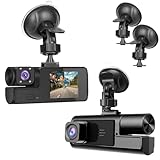
- 【1080P Front and Inside Dash Cam 】Super Clear 1920*1080P pictures can be provided by the small cam. The car camera can reocrd videos front and inside of the car at the same time.
- 【 Dash Camers for Car Easy Installation】Just install the dashcam on the windshield, then plug the power cable into the car cigarette lighters. Please clean the windshield, so the sunction cup can be fixed tightly on the windshield.
- 【 Dash Cam Front and Inside Built-in G-sensor】If the dash camera detects a sudden shake/collision, it will lock the related video. So the important video will not be overwritten. Accident scene can be truly restored. This locked video will not be re-written even SD card is full.
- 【 Loop Recording with Night Vision】 The SD Card will start to record automatically when car started on. If SD Card is recorded full, the newest video will recover the oldest video. And the night vision sensor strats to work in the night.
- 【Suitable for Various Cars】This car das cam is suitable for kinds of cars, like vehicle, truck, bus and farm harvester.
12. Digital tire-pressure monitor
A digital tire-pressure monitor makes pressure information easier to see through a dedicated display or added sensors. The category can complement the vehicle’s factory TPMS, but a consumer monitoring kit should not be confused with a workshop tool used to diagnose or program tire-pressure sensors.
Compare sensor type, display location, valve-stem compatibility, temperature reporting, battery life, and whether the monitor requires a separate receiver. Always compare the displayed reading with the vehicle manufacturer’s recommended cold-tire pressure, not with a generic pressure number or the maximum pressure molded into the tire sidewall.
13. Portable cordless tire inflator
A portable cordless tire inflator is a practical roadside-preparedness tool for restoring pressure when a tire is low but still serviceable. DEWALT identifies the DCC020IB as a portable 20V MAX cordless inflator for tires and equipment. DEWALT’s inflator information and the DCC020IB instruction manual should be checked for operating requirements and model details.
A portable cordless tire inflator does not diagnose a puncture or guarantee that a damaged tire is safe. Use the vehicle manufacturer’s cold-tire pressure specification, inspect the tire, and stop driving when damage, a persistent leak, or unsafe condition requires professional attention. Buyers should also verify whether the battery is included and whether they already own the required battery platform.
14. TPMS diagnostic and sensor tool
A TPMS diagnostic tool is intended for tire shops, serious DIY users, or enthusiasts who need more than a pressure reading. Continental’s VDO TPMS Go can read sensor ID, battery status, tire temperature, and pressure, and can program common universal sensors.
Quick wins for a faster PC:
Scan for outdated or missing drivers - takes under a minuteDriver Scan →Clear out junk files and repair common Windows errorsFree Scan →A TPMS diagnostic tool is not the economical choice for every driver because its value depends on actually servicing sensors or managing sensor replacement. Confirm supported sensor types and vehicle coverage before buying; a tool that reads one sensor family may not program every sensor used by a particular vehicle.
Emerging thermal night vision
Do car night-vision cameras really work?
Automotive thermal night vision is materially different from ordinary low-light or infrared dash-camera recording because thermal systems are designed to identify heat signatures. The technology can support night vision, ADAS, pedestrian detection, and autonomous-vehicle development, but it is not currently a routine plug-and-play gadget for most drivers.
15. Automotive thermal night vision
Teledyne FLIR documents Tura as a 640 × 512 automotive-qualified thermal camera for night vision, ADAS, pedestrian detection, and autonomous vehicles. The product is best understood as an OEM, developer, or specialist component that requires vehicle-system integration rather than a camera that a typical owner clips onto a windshield.
Teledyne FLIR OEM says its thermal sensors have been installed in more than one million vehicles for night-vision systems; that figure is a current company claim, not an independently audited market statistic. The company also describes a dataset containing more than 26,000 annotated thermal and RGB images in connection with automotive thermal-perception development. Both figures are tied to Teledyne FLIR OEM pages accessed August 13, 2026: the automotive thermal-imaging overview and the Tura product page.
For a consumer, the practical conclusion is straightforward: do not confuse a dash camera’s infrared-assisted cabin recording with an automotive thermal ADAS system. Thermal night vision is an emerging capability to watch in factory vehicles and specialist development, not an ordinary Amazon accessory recommendation.
How should you choose the right gadget?
| If your main problem is… | Start with… | Check before purchase | Do not assume… |
|---|---|---|---|
| Disputes or incidents on the road | Wide-angle dash camera | Resolution, field of view, GPS, storage, power management, and parking mode | A recording camera prevents crashes or proves every detail automatically |
| Need for cabin and road evidence | Dual-lens dash camera | Interior night recording, privacy rules, storage, and parking power | Interior recording is legal or appropriate in every location |
| Remote awareness of a parked car | LTE-connected dash camera | Cellular coverage, subscription, alerts, and continuous power | LTE functions work without service or an account |
| Outdated phone integration | Aftermarket CarPlay head unit | Vehicle fitment, wiring, controls, camera support, and phone compatibility | Every head unit fits every dashboard |
| Good factory CarPlay but unwanted cables | Wireless CarPlay adapter | Existing wired CarPlay, USB port, phone, and adapter compatibility | An adapter adds CarPlay to a vehicle that does not already have it |
| Check-engine light or live engine data | Bluetooth OBD2 scanner | Vehicle coverage, app support, and the limits of the available data | Reading or clearing a code repairs the fault |
| Low tire pressure away from a compressor | Portable cordless tire inflator | Battery, power, hose, and the vehicle’s cold-pressure specification | A filled tire is safe when it has a puncture or structural damage |
| Hard-to-see areas while reversing | Backup camera | Display, wiring, camera position, and a complete visual-check routine | The camera replaces mirrors or looking behind the vehicle |
| Future OEM-level low-light perception | Automotive thermal night vision | Vehicle integration and professional availability | A thermal OEM camera is a plug-and-play consumer dash camera |
Installation, privacy, and safety checklist
- Confirm compatibility first. Match the vehicle, model year, factory head unit, phone, operating system, OBD2 network, sensor type, battery platform, or display before ordering.
- Define what the device actually does. A camera records, an OBD2 adapter reports data, a TPMS monitor reports pressure, and an inflator adds air. These functions are not interchangeable.
- Separate warnings from interventions. A blind-spot or rear-cross-traffic warning alerts the driver. Blind-spot intervention and rear automatic braking are different technologies with different integration requirements.
- Keep sightlines and controls clear. Position phone mounts, HUDs, displays, cameras, and cables so they do not obstruct the forward view, instruments, controls, or airbag deployment areas.
- Plan the power path. Parking surveillance, LTE connectivity, and some installed cameras may need a suitable continuous-power or power-management arrangement. Verify the exact device requirements to avoid draining the vehicle battery.
- Use the correct tire pressure. Set pressure using the vehicle manufacturer’s cold-tire specification. Do not use a generic number as a substitute for the vehicle’s recommendation.
- Protect recorded data. Dash cameras may capture passengers, bystanders, license plates, and location information. Check local rules on recording and consent, then decide how footage is stored, shared, retained, and deleted.
- Verify volatile details at publication or purchase time. Retail inventory, prices, subscriptions, app support, firmware, model status, and affiliate availability can change after a manufacturer page is published.
The Bottom Line
The strongest everyday upgrades are usually a dash camera, compatible CarPlay solution, Bluetooth OBD2 scanner, or portable tire inflator, depending on the problem being solved. Choose a dual-lens dash camera when cabin coverage matters, a wireless CarPlay adapter only when wired CarPlay already works, and a professional TPMS or thermal system only when your service or development needs justify the added complexity. Every safety gadget remains an aid—not a replacement for attention and visual checks.
Quick Recap
Product prices and availability are accurate as of the date/time indicated and are subject to change. Any price and availability information displayed on Amazon at the time of purchase will apply.




