Quick wins for a faster PC:
Clear out junk files and repair common Windows errorsFree Scan →Scan for outdated or missing drivers - takes under a minuteDriver Scan →A car 360-degree camera does not place a camera above the roof. It uses several wide-angle cameras around the vehicle, then software corrects and stitches their feeds into a simulated bird’s-eye view. The result can make low-speed parking, tight maneuvering, and trailer alignment much easier—but it remains a driver aid, not a perfect view of everything around the car.
The “magic” of a car 360-degree camera is computer vision, not a camera floating above the roof. A surround-view, panoramic-view, or bird’s-eye camera system combines live video from several wide-angle cameras mounted around the vehicle, corrects their distortion, and stitches the feeds into a simulated overhead view.
As an Amazon Associate I earn from qualifying purchases.
That view can make parking, tight turns, trailer alignment, and low-speed maneuvering much easier. It is still only a visibility aid, however—not a perfect distance-measuring tool, an autonomous collision-avoidance system, or a replacement for mirrors and direct observation.
What is a car 360 camera?
A true car 360 camera system normally uses cameras at the front, rear, and both sides of the vehicle. The front camera may be near the grille, the rear camera near the tailgate or license-plate area, and the side cameras are often mounted beneath or near the side mirrors or front fenders.
#1 Best Overall

- 4-Channel Dash Cam for Complete Vehicle Coverage: This dash cam is equipped with four Full HD 1080P cameras, capturing footage of the front, rear, left, and right sides of your vehicle simultaneously. The adjustable front cameras enhance visibility and offer flexible recording angles, including interior footage.
- Time-Lapse Recording & Parking Mode: With time-lapse recording, 60 minutes of footage is compressed into 1 minute, saving memory card space. Activate parking mode with the optional ACC hardwire kit (sold separately) for security when your vehicle is parked.
- Enhanced Night Vision & WDR Technology: The dash cam features advanced night vision and Wide Dynamic Range (WDR) technology for clear, balanced footage, even in low-light conditions. Eight infrared lights ensure optimal visibility, and WDR adjusts exposure to capture detailed images in varying lighting.
- Optional GPS for Real-Time Vehicle Tracking: Purchase the GPS logger (sold separately) to add location, speed, and time tracking, providing a visual representation of your vehicle's route. This feature is perfect for documenting travel details in case of incidents.
- 5GHz Wi-Fi & App Integration: Share videos easily via Wi-Fi using the mobile app for both iOS and Android devices. This feature allows for quick video downloads and sharing on your preferred platforms.
Four cameras are common on passenger vehicles, while some systems use five or six cameras. Larger vans, RVs, trucks, and commercial vehicles may need additional cameras because their bodies are longer or have larger areas close to the vehicle that are difficult to see from the driver’s seat.
The screen may offer several views:
- A simulated overhead or bird’s-eye view
- Individual front, rear, or side-camera views
- Split-screen combinations, such as rear plus overhead
- Three-dimensional or rotating perspective views
- Trailer, hitch, or curb-oriented views on systems that support them
Activation varies by vehicle. The system may appear automatically when reverse is selected, when the vehicle is moving below a certain speed, when the driver presses a camera button, or when a turn signal triggers a side view. Exact controls and speed limits depend on the vehicle and system.
How a 360-degree camera system works
1. Several wide-angle cameras capture overlapping areas
Each camera sees only part of the scene. Wide-angle or fisheye lenses provide a broad field of view, and the camera positions are chosen so neighboring images overlap around the vehicle.
That overlap is essential. The processor needs shared visual details—such as pavement markings, curb edges, and other objects—to align one camera’s image with the next. Without enough overlap, the system could not create a convincing continuous view.
2. The processor corrects lens distortion
Fisheye lenses bend straight lines, especially near the edges of the image. The system’s control unit applies a distortion-correction profile for each camera before combining the feeds.
It also uses information about the vehicle: the camera mounting locations, camera angles, body dimensions, and the geometry of the area around the car. This lets the software place the different images in relation to the vehicle rather than simply displaying four unconnected video feeds.
3. Software aligns and stitches the images
After correcting the feeds, the processor merges them into a composite image. The overhead vehicle graphic is a computational reconstruction of the surrounding pavement and objects, not a photograph taken from above.
Recommended Free Tools
When calibration is accurate, the joins between cameras can appear nearly seamless. Depending on the system, the processor can also switch among multiple perspectives in real time, including a conventional front or rear view and a simulated three-dimensional view.
4. The display shows the result in real time
The finished image usually appears on the factory infotainment screen, although an aftermarket kit may use a separate monitor or a video interface connected to the original display.
The result is most useful at low speed. It gives the driver a wider view of the vehicle’s immediate surroundings while parking or maneuvering, but it does not turn the camera system into a sensor that can guarantee the vehicle is clear of every obstacle.
Why drivers find 360 cameras useful
Parking in tight spaces
The most obvious benefit is seeing how the vehicle sits within a parking space. An overhead view can help you judge the relationship between the car and parking lines, curbs, garage walls, bollards, and adjacent vehicles.
Free tools Windows power users keep installed
One-click scans. No signup required.
It is especially helpful for areas that are difficult to see from the normal seating position, including the front corners and the lower edges along both sides of the vehicle. A conventional rear camera cannot show those areas at the same time.
Rank #2

- True 4-Channel 360° Coverage – IIWEY N6 simultaneously records STARVIS 2K (1440p) video from the front, rear, and both sides for all-around coverage. Ultra-wide viewing angles (170° front/rear, 150° sides) and adjustable side cameras help reduce blind spots, while infrared night vision improves nighttime visibility. Vision Enhance tech helps capture clearer license plates and lane markings at intersections—ideal for commuting, rideshare, and fleet use. (CPL Filter: ASIN B0G4R35S76).
- Note: This Dash Cam is Wired and Does Not Have A Built-In Battery. This dash camera must be connected to vehicle power source when in use, you can use the car charger included in the box, or you can buy the hardwire kit to connect to car fuse to use (ASIN: B0DHJNRPB9, for 24/7 parking mode). Please confirm this requirement before purchase to avoid misunderstanding.
- 48-Hour Parking Surveillance (Hardwire Required) – Two smart modes guard your vehicle with the ignition off. 1,Time-Lapse at 1/3/5 fps records continuously for up to ~48 hours while conserving storage. 2,Impact Detection auto-captures and locks a 10-second clip on bumps or tampering. Parking Mode requires the IIWEY hardwire kit (ASIN B0DHJNRPB9; sold separately, not included). If no need Parking Mode, the included car charger is sufficient for daily driving use.
- Wi-Fi 6 (5.8 Ghz) Speed + Built-In GPS – Up to ~20 MB/s for fast in-app preview/download and quick sharing (also supports 2.4 GHz). GPS logs speed and route for playback on map in the iOS/Android app or PC viewer. Tip: long-press “◀” to enable Wi-Fi; auto-off after ~5 min helps reduce heat and power draw. N6 dash cam and hardwire kit fit for turck, car, suv and etc.
- Loop Recording + 128 Gb Card Included – Ready to use out of the box. Seamless loop saves in manageable segments and overwrites the oldest files when full, so recording never stops. G-Sensor Emergency Lock protects critical clips from overwrite during sudden braking or collisions.
Maneuvering SUVs, trucks, vans, and RVs
A large vehicle can hide obstacles that are close to the body but below the driver’s normal sightline. A surround-view system can make low-speed turns and positioning easier by showing more of the area around the vehicle.
The advantage is not limited to luxury cars. It can be particularly valuable on wide trucks, long vans, motorhomes, and commercial vehicles where body length and blind areas make precise maneuvering more demanding. Commercial-oriented systems may provide side-by-side views or additional camera coverage rather than relying on four cameras alone.
Aligning a trailer or hitch
Some systems include a trailer or hitch-oriented view. This can help the driver line up the tow coupling when connecting a trailer and maintain a better view while reversing into position.
The Tool Desk
Outbyte Driver Updater FREEScan for outdated or missing drivers - takes under a minuteDriver Scan →Outbyte PC Repair FREERepair Windows errors before they cause bigger problemsFix Now →A surround-view display does not remove the need to check the hitch, safety chains, electrical connector, and trailer surroundings directly. It simply provides another useful perspective during a difficult low-speed task.
Seeing more than a backup camera
A conventional backup camera is primarily designed to show the area directly behind the vehicle. That is valuable on its own, but it leaves the driver to rely on mirrors and direct observation for the front and sides.
A 360-degree system expands the coverage by combining front, rear, and side feeds. The difference is not that the system sees infinitely far or literally sees every point around the vehicle; it is that several camera views are presented as one coordinated picture of the immediate area.
The limitations: why “360 degrees” does not mean no blind spots
A surround-view image should be treated as an aid to observation. It is not an absolute safety guarantee, and responsible driving still requires checking the area around the vehicle before moving.
The image is not a perfect distance measurement
Objects near the edges of a camera’s coverage can appear stretched, shifted, or disconnected from the neighboring image. Tall objects can look unusual in a top-down reconstruction, and the apparent position of a person or obstacle may differ from its actual position.
Do not use the displayed image to estimate a gap down to the inch. If an object appears close, stop and verify the distance directly rather than relying on the screen.
Camera seams can create visual errors
The software must transition between separate lenses and viewpoints. A curb, painted line, or object near a seam may appear misaligned or briefly disappear from the composite view. The effect can be more noticeable when an object is very close to the vehicle or sits near the edge of a camera’s coverage.
Dirt, rain, snow, glare, and darkness matter
A dirty camera lens can obscure an entire section of the view. Rain, snow, road spray, condensation, low light, and direct glare can also reduce image quality. A system that looks excellent on a clean, dry day may provide a less useful image in poor weather.
Clean the camera lenses as part of normal vehicle care, but do not assume that a clean lens compensates for darkness or severe weather. Check the surroundings using mirrors and direct observation as well.
Rank #3

- ❗❗❗NOTE: This product must be powered by the original cigarette lighter charger; it cannot be powered by a USB cable or a Type-C cable. IIWEY N5 dash cam equipped with a 3" IPS screen, FHD 1080P+1080P+1080P+1080P, which can record 360° all-round including front, rear, sides, and interior. It also features a 2.5K+1080P+1080P+1080P mode for diverse needs. In addition, N5 is equipped with 170° super wide-angle front and rear cameras and 150° wide-angle side cameras, providing a wide field of view.
- ❗❗❗NOTE: N5 dash cam DON'T HAVE GPS function. The 128GB SD card has been installed in the card slot. It connects to your cellphone via built-in WiFi, no Bluetooth. The rear camera must be wired and connected to the front camera for use. It uses a super-capacitor instead of a battery, so please keep the dash cam connected to a power source while in use, we recommend to use the included car charger, or you can use our HARDWIRE KIT (ASIN B0DHJNRPB9, sold separately).
- 【Loop Recording & Free 128GB SD Card】N5 Dashcam comes with a 128GB Micro-SD card. (supports up to 256GB) Loop recording will start immediately once you turn on the engine. No seconds will be missing. The video will be saved in segments, and the storage space will be automatically detected. When memory is full, the earliest recorded video will be automatically deleted to achieve seamless loop recording.
- 【5GHz WiFi & Free App Control】❗❗❗NOTE: There are currently two free apps available: iiwey and viidure. You can find both apps on the Google Play Store and the Apple Store. The N5 dashcam boasts built-in 5GHz WiFi for 4x faster connectivity than 2.4GHz (with 2.4GHz support). It pairs with a free app for Android or iOS, enabling seamless control, video preview, download, and sharing.
- 【WiFi Using Note】Please note that each time you want to connect the APP to the dash cam, you need to long press the " ◀ " button to turn on WiFi before you can connect. ❗❗❗If the WiFi is not connected to the APP for more than 5 minutes, the dash cam will automatically turn off the WiFi function. This measure is to prevent the dash cam from overheating.
The driver remains responsible
Before moving, check all around the vehicle, use the mirrors, and look over your shoulder when appropriate. Take particular care with children, pets, pedestrians, low objects, and anything that may be hidden by the vehicle body.
A 360 camera can reduce visual blind areas during low-speed maneuvers. It cannot promise that every obstacle will be visible, and it is not a substitute for careful control of the vehicle.
Factory-installed versus aftermarket 360 camera systems
Factory-installed systems
Original-equipment systems are designed around a particular vehicle’s dimensions, camera locations, wiring, infotainment display, and software. The image geometry and vehicle outline are integrated into the vehicle from the beginning, which generally makes the system more cohesive than a generic retrofit.
PC Slower Than It Used to Be?
A free scan shows the junk files, broken settings and background clutter dragging Windows down - then fixes them in one click.Free scan · Windows 10 & 11Crashes, No Sound, or Screen Glitches?
Random freezes, missing sound and display glitches usually trace back to one bad driver. Find and replace yours safely.Free scan · under a minuteFactory installation does not mean calibration is never needed. A damaged or replaced camera, mirror damage, body repair, or work that changes a camera’s mounting position can affect the existing calibration.
Aftermarket retrofits
An aftermarket kit can add surround-view capability to some vehicles that did not receive it from the factory. A typical kit may include:
- Four or more fisheye cameras
- A dedicated image processor
- A factory-screen interface or separate monitor
- Vehicle wiring and video connections
- Calibration targets or tools
- Optional DVR or recording hardware
For example, the iBEAM TE-360-3D documentation describes four cameras, distortion correction, 3D and 360-degree image merging, calibration tools, dynamic view switching, and DVR support. It also specifies a maximum vehicle length of 24 feet. That kind of limit matters for buyers of long vans, RVs, and commercial vehicles.
A sedan-oriented retrofit such as the Tadi Brothers 360 Degree Car Camera System is another example of the category: four cameras, a display, and a processor that creates a bird’s-eye image. Product price, availability, included hardware, and shipping information can change, so verify those details before ordering.
Do these 3 things before closing this tab:
1Repair Windows errors before they cause bigger problems2Fix the driver behind crashes, sound loss and screen glitches3Clear out junk files and repair common Windows errorsThese examples should not be treated as universal recommendations. A genuine retrofit is not automatically a plug-and-play weekend accessory. The cameras must be mounted consistently, wiring must be routed safely, the screen must integrate with the vehicle, and the processor must be calibrated for that specific vehicle.
As an Amazon Associate I earn from qualifying purchases.
If you are comparing products, search for an aftermarket car 360 camera system rather than a generic “360 camera.” The latter can return action cameras, panoramic cameras, and dash cameras that do not create a vehicle surround view. Confirm that the product includes multiple vehicle-mounted cameras and a processor that produces a bird’s-eye or surround-view display.
Independent reader supportYour contribution helps us test, update, and keep practical guides available for everyone.Why calibration is the part buyers should not overlook
Calibration tells the system where each camera is mounted relative to the vehicle and how that camera’s lens projects the scene. The processor uses that information to place the feeds correctly and draw the vehicle’s position within the composite view.
Incorrect calibration can result in:
- Visible breaks or discontinuities between camera views
- A vehicle outline that does not match the real body position
- Curbs or obstacles appearing in the wrong location
- Camera views that do not line up when the vehicle moves
Calibration is therefore a functional safety consideration, not a cosmetic adjustment. It may involve marked calibration mats, targets, software, and a documented procedure. If a camera is moved, replaced, or mounted differently after bodywork, the system may need to be calibrated again. The exact procedure differs by manufacturer and kit.
For that reason, professional installation can be sensible even when the hardware appears straightforward. The installer may need to remove trim, route wiring away from moving or hot components, connect the video interface, and complete the calibration process on level ground.
Rank #4
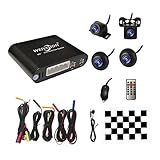
- Please be noted: this system should Professional Installation,this unversal model, the car side mirror should drill a 20mm hole to install the side camera.
- 4 Super wide angle(above 170 degree) Cameras, Waterproof IP69, Night vision
- Provide the driver a clear 360 degree bird's-eye view around vehicle, Universal for almost vehicles (Except long vehicles such as buses)
- Eliminate most of the blind spots, makes much easier for parking and passing the narrow road
- Seamless Splicing Technology, Auto image mosaic, Parking monitoring with shock sensor, auto record, the video format is MP4, you can view the video on PC or mobile.
What to check before buying a car 360 camera system
- Vehicle compatibility: Verify the make, model, model year, body style, and whether the system works with your existing screen or head unit.
- Camera count and mounting locations: Confirm how many cameras are included and where they must be installed. A front-and-rear camera pair is not the same as a four-camera surround-view system.
- Calibration method: Look for included targets, calibration mats, software, or a documented installer procedure. Avoid assuming that the system will align itself automatically.
- Display integration: Determine whether the kit uses the factory infotainment display, a separate monitor, or a video interface. Check what happens to existing backup-camera and parking-sensor displays.
- Vehicle-size limits: Check maximum vehicle length and body-type restrictions. A system designed for a sedan may not provide adequate coverage on an RV or long commercial van.
- Weather and night performance: Compare camera weather protection, low-light capability, illumination, and lens placement. Ratings and real-world performance vary by product.
- Recording features: A DVR can record video, but recording capability is separate from the quality and accuracy of the live surround view.
- Installation requirements: Budget for trim removal, wiring, display integration, and calibration. Do not rely on a universal installation time or cost; both depend heavily on the vehicle and kit.
- Safety expectations: Choose the system as a low-speed visibility aid, not as autonomous collision avoidance.
Do you need a full 360 system?
Not every driver does. A full surround-view retrofit makes the most sense when you regularly park in tight spaces, drive a large vehicle, maneuver close to walls or curbs, or align a trailer and want a coordinated view of the vehicle’s sides as well as its rear.
A simpler rear camera may be enough if your main goal is seeing behind the vehicle. For example, Garmin’s BC 50 is a wireless backup-camera option that mounts at the license plate and transmits to compatible Garmin navigation devices. It is designed as a rear-view solution and can support longer vehicles and trailers; an optional night-vision version is available. It should not be described as a 360-degree bird’s-eye camera.
What’s actually slowing this PC down?
Pick the symptom - the matching free tool is one click away.
Choose the simpler option when you mainly need rear visibility and do not need a stitched view around the front and sides. Choose a true surround-view system when the additional coverage justifies the installation and calibration work.
How to tell a true 360 system from a wide-angle dash cam
Product names can be misleading. Before buying, look for all of the following:
- Multiple cameras mounted around the vehicle, usually front, rear, left, and right
- A dedicated processor or control unit that merges the feeds
- A stated bird’s-eye, surround-view, panoramic-view, or 3D vehicle view
- Vehicle-specific camera placement and calibration instructions
- A display or interface that can show the stitched view in real time
A dash cam with front and rear lenses, a 360-degree action camera, or a single ultra-wide camera may record a broad scene, but that does not automatically make it a vehicle surround-view system.
Bottom line: useful “magic,” with realistic expectations
A car 360 camera works by combining several overlapping wide-angle camera feeds, correcting lens distortion, and stitching the results into a simulated overhead view. It can be genuinely useful for parking, tight maneuvering, large vehicles, and trailer alignment because it shows areas that a conventional rear camera cannot.
What’s actually slowing this PC down?
Pick the symptom - the matching free tool is one click away.
The technology is most valuable when the driver understands its boundaries. Keep the lenses clean, verify compatibility, insist on proper calibration, and use the display alongside mirrors and direct observation. The best system is not the one that promises to eliminate every blind spot; it is the one that gives you a more useful low-speed view without encouraging you to stop looking.
Frequently Asked Questions
Is a car 360 camera actually mounted above the roof?
No. A true surround-view system does not use a camera above the vehicle. It combines several wide-angle cameras mounted around the car and uses software to create a simulated overhead image.
When does a 360-degree camera turn on?
Most systems are most useful at low speeds while parking, reversing, turning in tight spaces, or aligning a trailer. Activation and any speed limit vary by vehicle and system.
Can a 360 camera see every obstacle around a car?
No. Dirt, rain, snow, glare, darkness, camera obstruction, image seams, and lens distortion can affect the display. Apparent distances and object positions may also differ from reality.
Free tools Windows power users keep installed
One-click scans. No signup required.
Can I add a 360 camera to an older car?
It can be, but compatibility and installation are vehicle-specific. A retrofit normally requires multiple cameras, safe wiring, display integration, and calibration. Professional installation may be appropriate, especially when trim removal or factory-screen integration is involved.
Is a wide-angle backup camera the same as a 360 camera?
No. A conventional backup camera mainly shows the area behind the vehicle. A true 360 system combines front, rear, and side cameras and produces a coordinated surround or bird’s-eye view.
The Bottom Line
Bottom line: A 360-degree car camera is a multi-camera, software-stitched visibility aid that can make parking and maneuvering easier. It does not literally see everything, measure distance perfectly, or replace mirrors and direct observation. Factory systems are usually better integrated; aftermarket kits can work well when compatibility, installation, and calibration are handled correctly.
Quick Recap
Product prices and availability are accurate as of the date/time indicated and are subject to change. Any price and availability information displayed on Amazon at the time of purchase will apply.




