Short answer: The VIOFO A329S is the strongest premium all-rounder; the Garmin Dash Cam X310 is the best compact single-camera choice; the Vantrue E1 Pro is the value-oriented 4K pick; and the Miofive S1 Ultra is the best fit for drivers who want 4K coverage at both the front and rear.
There is no universal winner. The right dash cam depends on whether you prioritize nighttime detail, rear coverage, simple installation, parking protection, local phone transfers, or connected services. The recommendations below are based on published testing from TechRadar, Car and Driver, Road & Track, Consumer Reports, and MotorTrend—not on in-house testing by CarCody.
Disclosure: CarCody may earn a commission if you buy a product through a commercial link on this page. That does not change how the cameras are ranked. Prices, retailer bundles, stock, firmware, subscriptions, and included accessories can change, so verify the current listing before buying.
As an Amazon Associate I earn from qualifying purchases.
Our 2026 dash-cam picks at a glance
| Category | Pick | Why it stands out | Best for |
|---|---|---|---|
| Best overall premium model | VIOFO A329S | 4K up to 60 frames per second, Sony STARVIS 2 sensor, HDR, fast Wi-Fi 6 transfers, expandable storage, and flexible parking modes | Drivers who want the most complete high-end system |
| Best compact premium single camera | Garmin Dash Cam X310 | Small design, built-in screen, 4K HDR, GPS, voice control, and a polished phone app | Drivers who want a simple front camera from a mainstream brand |
| Best value-oriented 4K front camera | Vantrue E1 Pro | Compact 4K recording with GPS, Wi-Fi, HDR, voice control, and LTE readiness | Buyers who want modern features without a premium multi-camera setup |
| Best front-and-rear dash cam | Miofive S1 Ultra | 4K recording from both the front and rear cameras, with a useful set of accessories included | Drivers who want evidence from both directions |
How these dash cams were tested
The phrase “expert tested” refers to the publications whose test programs support the recommendations. CarCody did not personally install or operate these cameras.
TechRadar says it tests dash cams in daylight and at night, at different driving speeds, over several weeks and thousands of miles. Its evaluation includes footage quality, voice assistants, driver-assistance features, audio controls, and whether emergency-save functions work as expected. Its July 28, 2026 roundup names the VIOFO A329 as its best all-rounder, while also recommending models such as the Garmin Dash Cam Mini 3, 70mai Dash Cam 4K T800, Vantrue Nexus 5S, and Garmin X310.
#1 Best Overall

- UPSCALED 4K FRONT + 1080P REAR DUAL DASH CAM: The ROVE R2-4K DUAL records the road ahead and behind at the same time. The front camera captures at 2.5K (QHD) and intelligently upscales to 4K (2160P) for higher-detail playback, while the rear camera records at Full HD 1080P. This is upscaled 4K, not native 4K, engineered to show sharper everyday detail than standard 1080P dash cams, so you can read license plates, signs, and surroundings in front and rear footage.
- SONY STARVIS 2 IMX675 SENSOR + SUPER NIGHT VISION: The front camera uses a Sony STARVIS 2 IMX675 5MP image sensor with a wide F1.5 aperture (F1.8 rear) and HDR to pull in more light for clearer low-light footage. This advanced sensor enhances nighttime clarity, helping capture license plates, road signs, and surrounding vehicles with greater reliability when driving after dark, through tunnels, or in dusk and dawn conditions.
- ULTRA FAST 5.8GHz WIFI/ UP TO 20MB/s DOWNLOAD SPEED: With its built-in dual-band 5.8GHz and 2.4GHz WiFi, you can use the ROVE dash cam app to view and manage dash cam recordings instantly on your iPhone and Android smartphone. Using the ROVE app, download your recorded videos directly to your smartphone at up to 20 MB/sec, then easily share them on social media with friends and family. Additionally, manage camera settings and update the latest firmware over-the-air via the ROVE App.
- CAR CAMERA WITH GPS: The new front and rear dashcam comes with built-in GPS, which enables you to view real-time live speed and compass on the 3” IPS wide camera screen. It records precise driving routes, locations, and speed stamps directly on the video so you can watch dashcam videos with GPS data using ROVE's free GPS Player on your PC or Mac & get additional evidence when you need it.
- FEATURES WITH STATE-OF-THE-ART TECHNOLOGY INCLUDED: Experience peace of mind with this front and rear car dash cam. It comes with a free 128GB microSD card and offers advanced features such as an f1.5 aperture, motion detection, G-sensor, seamless loop recording, emergency video lock, screen saver, live speed and compass direction, voice guidance, ring of threads for optional CPL filter, a built-in supercapacitor for extended product life, support for up to 1TB microSD cards, and many more.
Car and Driver’s 2026 roundup names the VIOFO A329S its best overall camera and the Vantrue E1 Pro its best-value model. Its testing considers questions that matter in an actual purchase, including nighttime resolution, GPS and speed data, interior-camera needs, parking functionality, insurance considerations, and legality.
Road & Track tested cameras in rain, city traffic, and on rough pavement. It names the Miofive S1 Ultra its top pick and the Garmin X310 its premium choice. Consumer Reports evaluated models from Redtiger, Rove, Rexing, Nextbase, and VIOFO for video quality, audio quality, versatility, and ease of installation; some of its detailed ratings may require membership. MotorTrend reports testing eight name-brand cameras plus one wild card in a long-term 2026 Subaru Outback Wilderness, including timed setup comparisons.
Those methods are useful because a specification sheet cannot reveal everything. Windshield glare, motion blur, night exposure, app reliability, cable routing, and the time required to install a rear camera often matter more than a product box’s largest resolution number.
1. VIOFO A329S: Best overall premium dash cam
Choose the VIOFO A329S if you want the strongest combination of image quality, transfer speed, parking features, and storage expansion. It is the recommendation for buyers who would rather pay for a capable platform than replace a basic camera later.
The A329S uses a Sony STARVIS 2 IMX678 sensor and supports 4K recording at up to 60 frames per second, along with HDR and a 140-degree field of view. It also includes built-in GPS, voice control, and Wi-Fi 6. The faster wireless standard is most useful for transferring clips locally to a phone; it is not the same thing as an internet connection or remote viewing.
The storage options are unusually flexible. VIOFO lists support for a microSD card up to 512GB and an external SSD up to 4TB. That matters when recording at high resolution or using more than one camera channel. In the two-channel configuration, the system records 4K video from the front and 2K from the rear. Check the exact channel configuration before ordering because the product name alone does not tell you whether a listing includes the rear camera.
Parking recording is another reason to choose the A329S. VIOFO lists buffered and low-power parking modes, but those features require the camera to remain powered after the ignition is turned off. Depending on the installation, that generally means using a compatible hardwire kit rather than relying on the standard cigarette-lighter socket.
What to like
- Excellent high-end specification set, including a STARVIS 2 sensor and HDR.
- 4K front recording can run at up to 60 frames per second.
- Wi-Fi 6 can make local clip transfers less frustrating.
- Up to 512GB microSD storage plus optional external SSD support up to 4TB.
- Buffered and low-power parking options for properly powered installations.
- Available in configurations that add rear coverage.
What to consider
- It is a premium purchase, especially once you add a rear camera, high-endurance storage, and a power kit.
- A two-channel installation requires routing a cable through the vehicle.
- Parking mode is not plug-and-play unless the camera has a suitable constant-power source.
- Do not confuse the current A329S with the older A329. VIOFO’s older A329 product page is marked discontinued and directs buyers toward the A329S.
Best fit: A driver who wants high-quality front footage, optional rear coverage, fast phone transfers, and the ability to store a large amount of video.
2. Garmin Dash Cam X310: Best compact premium single-camera option
Choose the Garmin Dash Cam X310 if you want a small, polished front-facing camera with a built-in screen and a familiar companion app. It is less ambitious than a multi-camera system, but that simplicity is part of its appeal.
Garmin lists 4K video, 4K HDR, a 140-degree diagonal field of view, GPS, incident detection, voice control, and support through the Garmin Drive app. The built-in screen is useful for aiming the camera and reviewing basic footage without depending entirely on a phone.
Windows Errors? Fix Them Before They Spread
Repair common Windows errors and clear accumulated junk for a smoother, more stable PC - no reinstall needed.Free scan · no reinstallCrashes, No Sound, or Screen Glitches?
Random freezes, missing sound and display glitches usually trace back to one bad driver. Find and replace yours safely.Free scan · under a minuteThe X310 accepts 8GB to 512GB Class 10 or faster microSD cards. For a camera recording high-resolution video, use a card designed for sustained recording rather than a cheap general-purpose card. The card should still match Garmin’s approved specifications.
Garmin’s connected features need careful explanation. Vault cloud storage and Parking Guard are subscription-dependent features that also require the appropriate setup. Garmin sells an OBD-II constant-power accessory for compatible cameras, which can simplify powering a camera after the ignition is switched off. Neither a subscription nor an OBD-II adapter should be treated as universal: confirm compatibility with the exact camera, vehicle, country, and service terms.
What to like
- Compact design with a built-in display.
- 4K HDR recording, GPS, voice control, and incident detection.
- Garmin Drive app support.
- Broad stated storage range of 8GB to 512GB for Class 10 or faster cards.
- Optional connected and constant-power features for drivers who want a more integrated setup.
What to consider
- The X310 is a single-camera solution by itself, so it does not provide rear evidence unless you build a compatible multi-camera setup.
- Cloud and Parking Guard features depend on subscription and setup requirements.
- Parking recording still requires reliable power after the vehicle is parked.
- Garmin warns that some jurisdictions regulate or prohibit dash cameras or related recording. The owner is responsible for checking local rules.
Best fit: Someone who values compact hardware, a screen, straightforward app support, and premium front-facing video more than rear coverage or massive storage expansion.
Rank #2

- [4K+1080P Front & Rear Recording] REDTIGER F7NP dash cam captures every detail with stunning 4K front and 1080P rear video. Featuring the advanced STARVIS 2 sensor plus the 170° front and 140° rear wide-angle lens, this dash camera delivers sharper images, balanced lighting, and reliable evidence day or night. Ideal for commuting, road trips, rideshare drivers, and new drivers.
- [STARVIS 2 Sensor & WDR Night Vision] Equipped with the advanced STARVIS 2 sensor, F1.5 large aperture, and 6-layer optical lens, F7NP 4K dual dash cam delivers clear, high-contrast footage in any lighting. WDR and HDR technology balance highlights and shadows, ensuring sharp night vision and crisp details day or night, providing reliable evidence and enhanced safety for every drive.
- [Built-in 5.8GHz WiFi & Smart App] Connect your smartphone to the dashcam’s built-in 5.8GHz WiFi to enjoy ultra-fast downloads up to 20MB/s. Using Redtiger Cam app, you can preview, download, and replay videos in real time, check GPS ata (route, speed, and location), and manage settings effortlessly, making it simple to review footage and share important moments.
- [Loop Recording & Free Memory Card] This car camera supports seamless loop recording to ensure continuous coverage without interruption. Older files are automatically overwritten when storage is full, while important events are safely locked. A free memory card is included, giving you ample space for 4K recordings and allowing you to use the camera right out of the box.
- [24/7 Parking Mode* & G-Sensor] Enjoy round-the-clock protection with two parking modes: time-lapse recording for continuous low-bitrate monitoring and G-sensor mode that records when collision is detected. The car security camera with G-sensor automatically locks important clips, ensuring crucial evidence is safely preserved even while your vehicle is parked.(*Hardwire kit needed.)
3. Vantrue E1 Pro: Best value-oriented 4K front camera
Choose the Vantrue E1 Pro if you want a small front camera with 4K video and modern connectivity at a value-oriented position. Car and Driver selected it as its best-value model in its 2026 tested roundup.
What’s actually slowing this PC down?
Pick the symptom - the matching free tool is one click away.
Vantrue describes the E1 Pro as a compact 4K camera with GPS, Wi-Fi, HDR, voice control, and LTE readiness. That combination makes it attractive for drivers who want more than basic 1080p recording without immediately moving to a premium front-and-rear system.
“LTE ready” needs to be read literally. It does not automatically mean the camera can be watched remotely from anywhere. Remote access may require a specific accessory, cellular service, a subscription, and availability in the buyer’s region. Confirm all of those requirements before paying extra for connected functionality.
The E1 Pro is best understood as a front-camera value choice, not as a complete multi-angle security system. If your priority is proving what happened behind you as well as ahead of you, the extra installation and cost of a rear camera may be justified.
What to like
- Small form factor.
- 4K front recording with HDR.
- GPS, Wi-Fi, and voice control.
- LTE-ready design for buyers who may want connected features.
- Strong value positioning in Car and Driver’s 2026 testing.
What to consider
- LTE readiness is not the same as guaranteed live remote viewing.
- Verify the current cellular accessory, service, subscription, and geographic requirements.
- It is primarily a front-camera recommendation, so it is not the best choice for drivers who specifically need rear or interior coverage.
- Check the current storage and parking-mode requirements before selecting a bundle.
Best fit: A commuter or first-time buyer who wants compact 4K front coverage and useful connectivity without paying for a higher-end expandable system.
4. Miofive S1 Ultra: Best front-and-rear 4K setup
Choose the Miofive S1 Ultra if rear coverage is as important to you as front coverage. Road & Track names it its top pick after testing cameras in rain, city traffic, and rough-road conditions.
The S1 Ultra is a dual-camera kit with 4K recording from the front and 4K recording from the rear. Miofive’s listed package includes a 64GB microSD card, rear-camera cable, dual USB car charger, pry tool, and manual. That makes it a more complete out-of-box package than a front camera that requires several immediate add-ons.
The trade-off is installation. A rear camera needs a cable routed from the front of the vehicle to the back, usually through trim panels and around the hatch or trunk area. The cable must be routed safely and kept clear of airbags, hinges, and moving parts. If you do not want to remove trim or work near vehicle wiring, professional installation is a reasonable choice.
A 64GB card is a useful starting point, but two 4K channels consume storage quickly. Check Miofive’s current card requirements and supported capacity before replacing the included card. Also verify the exact parking-mode and power features of the current bundle rather than assuming that every dual-camera kit includes the same constant-power equipment.
The Tool Desk
Outbyte PC Repair FREEClear out junk files and repair common Windows errorsFree Scan →Outbyte Driver Updater FREEFix the driver behind crashes, sound loss and screen glitchesFind Drivers →What to like
- 4K front and 4K rear recording.
- Useful included accessories, including a 64GB card, rear cable, charger, pry tool, and manual.
- Strong fit for collision evidence involving vehicles approaching from behind.
- Road and Track’s top pick after testing in varied driving conditions.
What to consider
- Rear-camera wiring makes installation more involved than a front-only camera.
- Two 4K channels fill storage faster than a single front camera.
- Verify the current bundle, storage limits, app behavior, and parking-power requirements before purchase.
- The rear camera does not eliminate the need to position the front camera correctly or keep the windshield clean.
Best fit: Drivers who want the strongest possible front-and-rear coverage and are willing to spend more time on cable routing.
Side-by-side comparison
| Camera | Coverage and resolution | GPS | Parking and power | Storage | Connectivity | Installation |
|---|---|---|---|---|---|---|
| VIOFO A329S | 4K front; two-channel version adds 2K rear | Yes | Buffered and low-power modes; requires suitable constant power for recording while parked | Up to 512GB microSD plus optional external SSD up to 4TB | Wi-Fi 6 for local transfers; not automatically remote viewing | Front-only is simpler; rear and parking setups add wiring |
| Garmin X310 | 4K HDR front camera | Yes | Parking Guard and related connected features require specified setup and subscription; constant power may require an accessory | 8GB–512GB Class 10 or faster microSD | Garmin Drive app; Vault and Parking Guard are subscription-dependent | Compact front installation; OBD-II power accessory available for compatible cameras |
| Vantrue E1 Pro | 4K front camera | Yes | Confirm the current parking-mode implementation and power requirements | Verify current approved card capacity and endurance rating | Wi-Fi; LTE-ready, but remote use requires additional verification | Simple front-camera installation |
| Miofive S1 Ultra | 4K front and 4K rear | Verify the current specification | Verify the current parking-mode and constant-power requirements | Includes a 64GB microSD card; check current supported capacity | Verify current app and connectivity details | Rear cable routing makes installation more involved |
How to choose the right dash cam
Do not judge nighttime performance by “4K” alone
4K gives a camera more pixels to work with and can make distant signs or license plates easier to inspect in good conditions. It does not guarantee readable plates at night.
Nighttime results also depend on the sensor generation, lens aperture, HDR behavior, exposure control, motion blur, windshield glare, camera angle, and compression. A car moving across the frame may still produce a blurred plate even when the camera records in 4K. Look for independent nighttime footage and test observations instead of treating resolution as a complete quality score.
The A329S’s Sony STARVIS 2 sensor and HDR support, and the X310’s 4K HDR specification, are useful indicators of the hardware approach. They are not promises that every nighttime frame will be perfect.
Free tools Windows power users keep installed
One-click scans. No signup required.
Rank #3

- [4K+1080P Dual Recording] REDTIGER F7N TOUCH captures your drive journey in stunning 4K UHD resolution with STARVIS 2 sensor 170° wide-angle view for the front dash cam and 1080P FHD resolution 140° wide-angle for the rear car camera. Equipped with WDR and HDR technology, the enhanced super night vision ensures better visibility even in low-light situations, providing you with reliable recordings day and night.
- [Voice Control & Touch Screen] F7NTOUCH dashcam features voice commands, allowing for hands-free control of your 4K car camera, which enhances safety by minimizing distractions. The dual camera dash cam also has smart touchscreen that can lock emergency video, turn on wifi, and capture scenery with one click. Redtiger also retains the buttons, multiple control methods are integrated.
- [Built-in GPS & 5.8GHz WiFi] Both Android and IOS users can connect to dashcam WiFi via the REDTIGER Cam app. Although the dash cam is installed wired, you can enjoy wireless control on your smartphone, faster 20MB/s download speed and share your driving experiences in real-time with friends and insurance companies. Car recorder built-in GPS provides traceable location, speed, and accurate route in the recordings.
- [Loop Recording & G-Sensor] REDTIGER F7N TOUCH dual channel dash cam automatically overwrites the oldest footage when the memory is full, ensuring endless recording with the included 128GB card. With a built-in G-sensor that detects sudden movements or impacts, it automatically locks and protects the associated footage when an event is detected on the road, ensuring it won't be overwritten during loop recording.
- [24-hour Parking Monitoring*] REDTIGER Car dashboard camera offers G-Sensor Parking Mode that automatically record when it detects any collisions or sudden motion while vehicles is parked. Time Lapse Parking Mode provides continuous surveillance by offering a condensed overview of any events that may occur during parking periods. *Please note that the parking monitoring function requires a separate hardwire kit.
Decide whether you need one, two, or more channels
- Front only: The least expensive and simplest installation. It is often enough for a driver primarily concerned with incidents ahead.
- Front and rear: Adds evidence when another vehicle hits you from behind or approaches during a lane change, but requires a long cable run and more storage.
- Interior or multi-angle: Useful for rideshare drivers, fleet operators, or specific family-monitoring needs. It also increases privacy and audio-recording concerns. TechRadar identifies the Vantrue Nexus 5S as a four-angle option.
The Garmin X310 and Vantrue E1 Pro make the most sense for front-only buyers. The Miofive S1 Ultra is the straightforward dual-4K choice. The A329S is the more expandable option when you want to choose a channel configuration and storage system.
Understand what parking mode actually requires
Parking mode is not merely a menu setting. The camera must remain powered after the ignition turns off. Depending on the model and vehicle, that may require a hardwire kit, an OBD-II constant-power adapter, or another appropriately protected power solution.
Buffered parking recording can preserve footage immediately before and after a detected event. That is useful because the impact itself may not be the only important moment. However, no parking system can promise to capture every incident. Results depend on the power connection, camera settings, storage health, detection method, vehicle vibration, and how an event occurs.
VIOFO lists optional HK4 and HK6 hardwire kits for relevant cameras, including the A329S. Garmin offers an OBD-II constant-power accessory for compatible cameras. Match the accessory to the exact model and vehicle; do not assume that a kit with a similar connector is safe or compatible.
Recommended Free Tools
Buy storage for sustained recording
High-resolution video and multiple channels consume storage quickly. A high-endurance card is a sensible accessory for a dash cam because it is designed for repeated writing, but it still needs to match the camera manufacturer’s approved capacity and speed requirements.
A high-endurance microSD card for dash cams is especially relevant for the Garmin X310, which specifies 8GB to 512GB Class 10 or faster cards, and for the A329S, which supports up to 512GB microSD storage. Format the card using the camera’s own menu when the manual recommends it, and replace cards that begin producing corrupted files, recording errors, or missing clips.
The A329S can also use an external SSD up to 4TB. An external SSD for the VIOFO A329S may make sense for buyers recording multiple channels or keeping a large archive, but confirm the current drive compatibility and cable requirements before purchase.
Know the difference between Wi-Fi and internet access
Wi-Fi on a dash cam usually creates a local connection between the camera and your phone. That is useful for downloading a clip without removing the memory card. It does not necessarily allow you to watch the vehicle from another city.
Quick wins for a faster PC:
Fix the driver behind crashes, sound loss and screen glitchesFind Drivers →Clear out junk files and repair common Windows errorsFree Scan →Scan for outdated or missing drivers - takes under a minuteDriver Scan →The A329S uses Wi-Fi 6 for faster local transfers. The X310 works with the Garmin Drive app, while Garmin’s Vault and Parking Guard are connected features with subscription and setup requirements. The E1 Pro is described as LTE-ready, but remote access still depends on the required accessory, cellular service, subscription, and regional availability.
Unless the manufacturer confirms a cellular or internet gateway, treat Wi-Fi as local file transfer—not live remote viewing.
Independent reader supportYour contribution helps us test, update, and keep practical guides available for everyone.Accessories worth budgeting for
High-endurance memory card
Plan for a compatible high-endurance microSD card if the camera does not include one, if the included card is too small, or if you are recording multiple channels. Check the manufacturer’s current maximum capacity and speed recommendation first. A larger card is not automatically better if the camera cannot reliably support it.
Hardwire kit or OBD-II power adapter
For parking mode, the most relevant add-on is a model-compatible constant-power solution. A VIOFO HK4 hardwire kit or HK6 kit may be appropriate for compatible VIOFO models. For compatible Garmin cameras, a Garmin OBD-II constant-power adapter can provide an alternative to working at the fuse box.
Do these 3 things before closing this tab:
1Fix the driver behind crashes, sound loss and screen glitches2Clear out junk files and repair common Windows errors3Scan for outdated or missing drivers - takes under a minuteHardwiring is not universally plug-and-play. It may involve a fuse tap, trim removal, grounding, low-voltage cutoff settings, and vehicle-specific knowledge. If you are not comfortable identifying an appropriate circuit or routing cables around airbags, use a qualified installer.
Rear camera and external storage
A rear camera adds meaningful coverage but also adds cable routing, storage demand, and another mounting position to check. The Miofive S1 Ultra includes a rear camera and cable. The A329S can be configured as a two-channel system with 4K front and 2K rear recording.
An external SSD is a more specialized purchase. It is most relevant to the A329S because VIOFO lists support for a drive up to 4TB. Verify that the current SSD, cable, file system, and power arrangement are supported before relying on it as your main recording medium.
Installation: the details that affect the footage
- Position the front camera high and near the center of the windshield. Keep it behind the rear-view mirror where possible, without blocking the driver’s view or interfering with sensors.
- Clean and dry the glass. Dust, fingerprints, and a greasy windshield can create glare and reduce contrast at night.
- Set the lens angle before hiding the cable. The road should dominate the frame, with enough sky to avoid an overly dark exposure but not so much that the ground and vehicles become too small.
- Route cables away from airbags and moving components. Do not place a cable where it could interfere with an A-pillar airbag, steering controls, pedals, a hatch hinge, or a window mechanism.
- Test before finalizing the adhesive mount. Confirm that the camera powers on, records, saves a sample clip, and connects to the app before tucking away all the wiring.
- Test parking mode separately. Turn the vehicle off, lock it, wait for the camera’s stated activation behavior, and confirm that the selected parking mode records without draining the battery.
For a rear camera, expect more work. The cable must pass through the cabin and into the trunk or hatch area without being pinched. A professional dash-cam installation is worth considering when parking mode is important but fuse-box or trim-panel work is outside your comfort level.
Rank #4
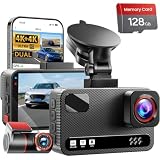
- 4K Front + 4K Rear — This front-and-rear dashcam features dual-channel recording, capturing footage simultaneously from both the front and rear cameras. The front camera records at a resolution of 3840x2160P, while the rear camera also records at 3840x2160P. Equipped with a 170° wide-angle lens in the front and a 150° wide-angle lens in the rear, it delivers clearer footage, balanced exposure, and reliable evidence—day or night
- Starlight-Level Sensor & Super Night Vision — With an f/1.5 large aperture and a 5-element optical lens, this dashcam captures clear, high-contrast video in any lighting conditions. WDR technology balances highlights and shadows, ensuring this dashcam delivers clear image quality with vivid colors and sharp details, even in poor lighting conditions
- Built-in 5.8GHz/ Download Speeds of Up to 20MB/s — With built-in dual-band 5GHz and 2.4GHz Wi-Fi, you can instantly view and manage your dashcam recordings on iPhone and Android smartphones via the dashcam app. You can preview, download, and play back videos in real time, view GPS data, and easily manage settings, making it simple to review recordings and share important moments
- Advanced Features — This dashcam offers a range of advanced features, including photo capture via the app, voice guidance, emergency video lock, loop recording, a collision sensor, and GPS positioning. Made from materials that withstand both extreme cold and heat, the device reliably records clear video across a wide temperature range
- 24/7 Parking Mode — In time-lapse recording mode, the device provides continuous monitoring over long periods. If an event occurs while the vehicle is parked, the collision sensor will record a full 1-minute video clip and securely lock it in the event folder, providing complete video evidence of the incident. (Requires the hard-wiring kit, ASIN: B0H8Y69RQC)
Common problems and what they usually mean
The camera has no parked footage
First check whether the camera lost power when the ignition turned off. Then check that the parking mode is enabled, the hardwire or OBD-II adapter is compatible, the low-voltage cutoff is configured correctly, and the memory card is healthy. A motion or impact event outside the camera’s detection range may also produce no saved clip.
License plates are unreadable at night
Reduce windshield glare, clean the glass, adjust the camera angle, and inspect original files rather than compressed social-media copies. If the plate is moving quickly or reflecting headlights, motion blur and exposure may be the limiting factors—not simply resolution.
Phone transfers are slow or the camera will not connect
Stay near the camera, connect to its local Wi-Fi network through the manufacturer’s app, and disable phone settings that automatically switch away from a Wi-Fi network without internet access. Remember that local Wi-Fi does not provide internet connectivity.
The camera stops recording or reports card errors
Back up important clips, format the card using the camera’s recommended process, and check that the card is within the approved capacity and speed range. If errors return, replace it with a compatible high-endurance card. Multi-camera 4K recording is particularly demanding on storage.
Legal, privacy, and insurance considerations
Dash-cam rules vary by jurisdiction. Windshield-obstruction laws may limit where a camera can be mounted. Audio recording can trigger consent requirements, and recording identifiable people or license plates may create privacy issues depending on where and how the footage is used.
Before installation, check the rules that apply where you drive, not just where you bought the camera. Garmin expressly tells users to understand applicable jurisdictional restrictions and places responsibility for compliance on the user. If you drive across state or national borders, the strictest applicable rule may matter for a particular recording.
Do not assume a dash cam automatically lowers insurance premiums. Any discount or evidentiary benefit depends on the insurer, policy, jurisdiction, and claim circumstances. Ask your carrier directly rather than buying a camera based on a promised discount.
Which dash cam should you buy?
- Buy the VIOFO A329S if you want the best premium balance of front video quality, optional rear coverage, fast local transfers, parking modes, and expandable storage.
- Buy the Garmin Dash Cam X310 if you want a compact, polished front camera with a screen, GPS, voice control, and Garmin’s app ecosystem.
- Buy the Vantrue E1 Pro if you want a compact 4K front camera at a value-oriented position and are willing to verify the details of any LTE-connected setup.
- Buy the Miofive S1 Ultra if front-and-rear 4K recording matters more than the simplicity of a front-only installation.
Before checkout, confirm the exact camera channel configuration, included memory card, maximum supported storage, power accessory, subscription requirements, warranty and return terms, and whether the product is legal to mount and operate where you live. Recheck those details because retailer bundles and manufacturer specifications can change.
Do these 3 things before closing this tab:
1Repair Windows errors before they cause bigger problems2Scan for outdated or missing drivers - takes under a minute3Clear out junk files and repair common Windows errorsFrequently Asked Questions
Is the VIOFO A329 the same as the A329S?
No. The older VIOFO A329 product page is marked discontinued and directs buyers toward the A329S. Check the exact model name and channel configuration before ordering, especially when comparing retailer listings.
Does a 4K dash cam guarantee readable license plates at night?
No. Resolution is only one factor. Sensor quality, HDR, lens aperture, exposure, motion blur, windshield glare, camera position, and compression also affect whether a plate can be read.
Does dash-cam Wi-Fi let me view my car remotely?
Usually not. Dash-cam Wi-Fi commonly creates a local connection for downloading clips to a phone. Remote viewing requires a confirmed cellular or internet gateway, along with any required accessory, service, subscription, and regional support.
Can parking mode work without hardwiring the camera?
Only if the camera receives power after the ignition is turned off through another suitable solution, such as a compatible OBD-II constant-power adapter or battery system. A standard switched power socket generally stops powering the camera when the vehicle is parked.
Recommended Free Tools
Will installing a dash cam reduce my insurance premium?
There is no automatic discount. Any insurance benefit depends on your insurer, policy, jurisdiction, and claim circumstances. Confirm directly with your carrier.
The Bottom Line
Bottom line: The VIOFO A329S is the most capable all-round recommendation for 2026, but it is not the right answer for everyone. Choose the Garmin X310 for compact premium simplicity, the Vantrue E1 Pro for value-oriented 4K front coverage, or the Miofive S1 Ultra when 4K rear evidence is the priority. Whichever you buy, budget for reliable storage, install it without obstructing your view or airbags, and verify the legal and power requirements for your vehicle and location.
Quick Recap
Product prices and availability are accurate as of the date/time indicated and are subject to change. Any price and availability information displayed on Amazon at the time of purchase will apply.




