To update Kia navigation or infotainment software, use Kia’s official update portal to find the package for your vehicle, then follow the instructions for its specific system. Depending on the model, market and infotainment platform, installation may use a USB drive, an SD card or an eligible Kia Connect over-the-air update. Start with Kia’s regional update portal and confirm your vehicle before downloading; a model name alone may not identify the right package.
1. Find the update for your Kia
Open Kia’s official update portal for your region and search by VIN or vehicle type where those options are available. On Kia’s US portal, confirm the model and model year before downloading. Kia warns that choosing the wrong vehicle can prevent installation. Available packages and procedures can differ by market, year and infotainment system.
Use Kia’s US update portal if your vehicle is covered there; owners elsewhere should use the portal for their market. Follow the vehicle lookup and instructions on that regional site rather than downloading a package found through an unofficial source.
2. Choose the update method your system supports
| Method | What it involves | Important qualification |
|---|---|---|
| Manual update | Download through Kia Navigation Updater where instructed, prepare the specified USB drive or SD card, then install it using the vehicle’s update menu. | The required media and steps depend on the infotainment system. Not every Kia uses USB. |
| Over the air (OTA) | An eligible connected vehicle may receive an update wirelessly. | OTA availability varies by vehicle and market. Check Kia’s eligibility information and regional guidance; do not assume your car supports it. |
Kia’s US infotainment user guide describes different procedures for Standard Gen4, Gen5, Gen5W, Premium Gen2/Gen5 and ccNC systems. Use the guide that matches your system; a common menu sequence is not universal.
#1 Best Overall

- Navigation SD Card 2025 KMV666EZ1C,Compatible with Mazda 3,CX30 (2024),Cx5(2024-2025),Cx90(2023-2025),GPS Latest Maps -10 Year After-Sales Service
- Please Note:this latest navigation card is designed for the Mazda 3/CX-30 2024 , 2024-2025 CX-5, and 2023-2025 CX-90.USA/CAN/MEX Correct fit is crucial. We strongly recommend verifying compatibility before purchase to ensure optimal performance. Please let us know the VIN of your car and we will promptly confirm if this navigation card is the right match for your vehicle.
- Please Note:The Navi card can be used only in one car, once it is installed to the navigation system for the first time, it will be locked with cars VIN. Navigation system Navi cards cannot be used/switched from one vehicle to another
- Important notes: the map version preloaded on our navigation card is already the latest official version available among all OEM suppliers at present
- Regarding map update year: In 2024. Each map is built upon an initial foundational database, and subsequent updates are made on top of this base every year. The database for this map is from 2023, hence some cards may display that particular database year. However, the navigation card's map is updated to 2024 Q2. Thank you for your understanding
3. Prepare the correct USB drive or SD card
Follow the media specification shown for your exact vehicle and system. Kia’s US guide calls for a USB 3.0 Type-A flash drive with at least 64 GB capacity, formatted as exFAT, for Standard Gen5W and Display Audio 2.0 systems. That specification does not apply to every Kia. Other systems may use an SD card; regional Kia notices distinguish between systems that use USB and those with an SD card.
- Confirm the required media type and format in the instructions for your vehicle before buying or formatting a drive.
- Use Kia Navigation Updater when the portal directs you to it, and select the correct destination if more than one storage device is connected.
- Do not disconnect the media while files are being downloaded; Kia warns that interrupted downloads can corrupt files and cause update failure.
4. Install the package in the vehicle
- Download the package for the confirmed vehicle using Kia’s portal and Navigation Updater when required.
- Prepare the USB drive or SD card exactly as specified in the matching Kia instructions.
- With the vehicle in the state required by its instructions, insert the prepared media and open the update menu for your infotainment platform. Kia lists platform-specific paths; one common family is Settings or Setup > General > SW Info/Update > Update. Menu labels and steps vary, so use the platform-specific guide rather than treating this example as universal.
- Read the on-screen prompts and allow the installation to finish. Kia says, “The update can only be performed while the navigation system is turned on.” Keep the system powered; loss of power or removing the media during installation may impair operation. Kia also cautions that shifting into reverse or stopping the engine during an update may hamper normal updating. Ensure adequate battery power and follow the instructions displayed for your vehicle.
- When the process completes, check the software version if the instructions for your platform call for it. The version-information menu varies by system.
How long does a Kia software update take?
Kia’s official FAQ estimates around 20 to 40 minutes, depending on the product and update size. This is an estimate, not a guaranteed duration for every vehicle or release. Do not interrupt the update simply because it is taking longer than expected; follow the prompts for your system.
Rank #2

- Compatible Models: 2024 ma*da 3 and CX-30, 2024-2025 CX-5, 2023-2025 CX-90 with MZD Connect SD Card Slot
- Offline GPS Navigation: Includes updated map coverage for the USA, Canada, and Mexico, providing dependable route guidance without relying on cellular service
- Reliable in Weak Signal Areas: Supports stable navigation in tunnels, mountain roads, rural routes, and remote areas where mobile signals may be limited
- Simple Plug and Play Setup: Insert the navigation card while the engine is off, restart the vehicle, and the system automatically activates without professional installation or complex settings
- Vehicle Binding Protection: The card binds to the vehicle after activation to help prevent use in another vehicle and includes technical guidance for setup and troubleshooting
Can Kia software update over the air?
Some eligible Kia Connect vehicles may receive updates automatically. Kia Europe says delivery time can depend on network conditions and vehicle status, and Kia’s US guide links to a list of OTA-supported vehicles. Eligibility and availability vary by vehicle and market, so check the relevant regional Kia information rather than assuming wireless updates are available.
Independent reader supportYour contribution helps us test, update, and keep practical guides available for everyone.What if the update fails?
If the download or installation fails, check that the package matches the vehicle and model year, that the media and destination drive match Kia’s instructions, and that the media was not disconnected during download or installation. Do not try unofficial update files. For a persistent error or a vehicle that will not complete the update, contact Kia Customer Care in your region or a Kia dealer.
Recommended Free Tools
Rank #3

- Latest Map Version: Equipped with the latest maps of the United States, Canada, and Mexico, ensuring your navigation system always has the most up-to-date and accurate route information.
- Wide Compatibility: Compatible with 2024-2025 Ma.zda 3, CX-30, CX-50, CX-70 and MX-5 models, easily upgrading your vehicle's navigation system.
- Quick Installation: Plug and play, no complicated operations required, easily upgrade your vehicle's navigation system to the latest version, making your driving experience smoother and smarter.
- Improved Driving Experience: By updating map data, you ensure you receive the latest road information, traffic signs, and real-time changes, improving driving safety.
- High Quality Guarantee: Utilizing high-performance storage chips, it provides reliable read speeds and stability, ensuring you can rely on the navigation system for accurate guidance on every journey.
This guide covers Kia navigation and infotainment updates. It does not necessarily describe other vehicle software work, such as recall repairs or dealer-installed control-module programming; contact Kia or a dealer about those.
Quick Recap
Best Value

- Vehicle Fitment: 2021-2023 ma*da 3 and CX-30, 2022-2024 CX-50, 2022-2023 MX-30, and 2021-2023 CX-5 and CX-9, with CX-5 and CX-9 requiring Connect System 2 and a 10.25 in display, while 2021 ma*da 3 and CX-30 require VIN verification
- Offline North America Maps: Preloaded map data covers the continental United States, Canada, and Mexico for navigation in tunnels, mountain roads, rural areas, and other low-signal locations without relying on a phone connection
- Integrated Display Guidance: On equipped vehicles, navigation guidance can appear on the center display and may also show in the instrument cluster or Active Driving Display, while HUD, speed-limit, road-sign, and voice-guidance functions depend on vehicle equipment, map data, and system settings
- Plug and Play Installation: With the vehicle turned off, insert the card into the navigation SD card slot, start the vehicle, and allow the system to initialize, keeping the card installed while navigation is in use
- Vehicle Pairing and Setup Help: Some compatible systems associate the card with the first vehicle where it is initialized, so confirm fitment before installation and contact ytfLYuan for setup or compatibility assistance
Rank #4
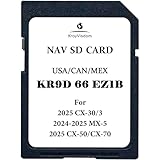
- Offline Navigation, Ready for the Road: Keep navigation available without relying on cellular data, Wi-Fi, or a phone connection. Preloaded USA, Canada, and Mexico maps make KR9D66EZ1B a practical companion for road trips, rural drives, and low-signal areas
- Built Into the Driving Experience: Bring navigation to your compatible in-vehicle display instead of adding another screen or phone mount to the dashboard. Supported vehicles may also show route guidance on the instrument cluster or Head-Up Display when factory equipped
- Plug In and Get Going: No phone pairing, app setup, or map download required. With the vehicle turned off, insert the KR9D66EZ1B card into the compatible navigation SD slot, start the vehicle, and access navigation through the built-in system
- Keep Your Phone Out of the Navigation Loop: Navigation runs independently from your smartphone, so your route does not depend on a cellular data connection or maintaining a phone-to-vehicle navigation session throughout the drive
- Made for Road Trips Across North America: From everyday commuting to long-distance travel, preloaded coverage for the United States, Canada, and Mexico keeps familiar navigation available across borders without depending on mobile data for map access
Product prices and availability are accurate as of the date/time indicated and are subject to change. Any price and availability information displayed on Amazon at the time of purchase will apply.




