Quick wins for a faster PC:
Scan for outdated or missing drivers - takes under a minuteDriver Scan →Repair Windows errors before they cause bigger problemsFix Now →Fix the driver behind crashes, sound loss and screen glitchesFind Drivers →You can turn a parked car into a surprisingly capable temporary office with four essentials: a stable work surface, reliable power, an internet connection, and an ergonomic layout. The best setup is modular, quick to deploy, and designed for working between appointments, outside a job site, at a trailhead, or in another legal parking area—not for working while the vehicle is moving.
The non-negotiable rule: only type, read, make video calls, or adjust devices when the vehicle is fully parked. Put the transmission in Park, engage the parking brake, and finish your work before driving again. NHTSA reported 3,208 deaths and more than 315,000 injuries in crashes involving distracted driving in 2024. Texting is especially dangerous because it combines visual, manual, and cognitive distraction.
As an Amazon Associate I earn from qualifying purchases.
Start with a parked-only safety rule
A car desk, laptop tray, voice assistant, or hands-free device does not make it safe to work while driving. Any activity that takes your attention away from driving can be distracted driving. Pull into a safe, legal location before reading email, typing, joining a meeting, handling a phone, or changing navigation and connectivity settings.
The Tool Desk
Outbyte Driver Updater FREEFix the driver behind crashes, sound loss and screen glitchesFind Drivers →Outbyte PC Repair FREERepair Windows errors before they cause bigger problemsFix Now →Before beginning work:
- Park legally in a visible location whenever possible.
- Shift into Park and engage the parking brake.
- Keep the laptop, phone, cables, and other equipment away from the pedals, steering wheel, airbags, gear selector, and driver controls.
- Make all device adjustments before moving.
- End the session and stow equipment before returning to traffic.
Security matters too. Do not leave a laptop, tablet, phone, power station, or bag visible when you leave the vehicle. Take the keys, close and lock the doors and windows, and choose a well-lit location when possible. NHTSA specifically identifies laptops and tablets as commonly stolen valuables.
#1 Best Overall

- Car Passenger Seat Organizer in Front, Middle Seat Car Organizer in Back – designed by High Road in 2002, the CarHop is a versatile car seat organizer that can be used as a car travel essential for road trips or car office organizer - a large padded main compartment keeps files and laptops safely contained and food and drinks chilled for hours when used as a car cooler
- Car Front Seat Storage Organizer and Backseat Organizer with Cup Holder and Insulated Compartment – inside bin with moveable divider can be used as a center console cooler, general car storage bin or car work organizer, inside compartment measures 11 x 13 x 9" - NOTE: for car cooler, use cold packs (no ice) for up to 8 hours of chilled storage
- Sturdy Car Organizer with Cup Holders, Car Tray Table and Side Storage – 4 pockets on each side of the car organizer provide work storage in the front and storage for 2 passengers in the back - front compartment converts from a car cup holder to storage bin, and lid sides flip up or down to use as a car desk or play tray
- Durable, Strong and Stable - structured lid panel holds up to 30 lbs of weight, sturdy side panels and inside divider keep the car storage organizer open and upright, 600D polyester fabric won't rip or tear, seatbelt strap secures it to the seat and it's booster seat height makes it easy to reach when used on road trips for kids of all ages - measures 18" long, 10" wide and 10" high
- Carry In, Carry Out Convenience - removable shoulder strap makes it easy to bring to picnics or sporting events and carry in and out of the car for cleaning, folds down for storage when not in use, Patented. Based in Portland Maine, High Road has developed problem-solving car organizers for American cars since 1990
Do not use idling as your office power plan
Leaving a gasoline or diesel engine running for hours wastes fuel and produces emissions. More importantly, never run an internal-combustion engine in a garage, carport, or another enclosed or partially enclosed space. Carbon monoxide can accumulate without an obvious warning.
If you need climate control, use the vehicle only in a safe, open-air location and follow the vehicle manufacturer’s guidance. An electric vehicle may be able to provide accessory power more efficiently, but its outlets and USB ports still have limits. Do not assume that every EV outlet can sustain a high-wattage load indefinitely.
The four-part mobile-office setup
A functional car office is less about filling the cabin with gadgets and more about solving four practical problems:
- Surface: Where will the laptop and accessories sit securely?
- Power: How will the laptop and phone stay charged?
- Connectivity: How will you get a dependable internet connection?
- Ergonomics: Can you work without hunching over the laptop?
Build the smallest setup that matches your work. A commuter answering email may need only a folding tray, USB-C charger, and phone hotspot. A field technician may need a dedicated vehicle desk, external keyboard, hotspot, document storage, and portable battery.
Choose a stable car desk or laptop tray
The most important physical upgrade is a hard, stable surface. A laptop should not sit directly on your lap or soft upholstery: fabric can obstruct the cooling vents and allow heat to build up. A suitable tray should have a flat surface, an anti-slip ledge or retention feature, and dimensions that fit your computer.
For occasional use, a car laptop desk or steering-wheel laptop tray is compact, inexpensive, and easy to store. It is useful for short email sessions, paperwork, or reviewing documents while parked. A steering-wheel tray is not automatically ergonomic, however. It can put the screen too low, restrict legroom, and encourage rounded shoulders.
For longer sessions, consider a rear-seat tray, passenger-seat desk, or a professionally mounted mobile workstation. A named example is AutoExec’s Reach Desk, which is designed for laptop or tablet use and includes workspace and storage compartments. A professional vehicle desk can be more stable and spacious, but it costs more and may be less convenient to move between vehicles.
Recommended Free Tools
Rank #2
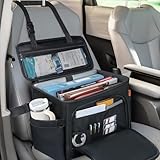
- ★Multifunctional Storage Pocket: Designed specifically for the front seat of your car, this multifunctional storage pocket effectively utilizes the space in front of the seat. It features multifunctional pockets for neatly organizing your phone, tablet, documents, cables, umbrella, and water bottle, freeing your car from clutter and making your driving space tidier and more convenient
- ★High-quality Material: This ANILD front seat storage bag is made of high-quality material and includes a highly sturdy foldable PP support panel, ensuring the bag's three-dimensional shape, durability, and resistance to deformation and tearing
- ★Easy Installation: This product comes with an adjustable strap that can be securely fixed to the driver's seat. Whether you use it yourself, or equip it for your children or passengers, it can provide a safe and reliable portable storage area to keep every trip organized
- ★Detachable and Adjustable Shoulder Strap: This front seat organizer is designed with flexibility and convenience in mind. It features a detachable, adjustable shoulder strap that instantly transforms from a fixed car organizer into a portable bag, allowing you to easily carry all your belongings between vehicles or occasions. When you're done using it, it easily folds down to a compact size for simple and efficient storage
- ★Universal Car Design: The ANILD front seat organizer is the ultimate road trip companion, perfectly compatible with a variety of vehicles, from sedans to trucks. It helps you organize and eliminate clutter in your vehicle. No matter where your destination is, your journey can start calmly and arrive easily
Before buying any tray or desk, check:
- Maximum laptop width, depth, and weight.
- Whether the laptop’s ventilation openings remain unobstructed.
- Whether the tray interferes with seat belts, seat controls, airbags, or the steering wheel.
- Whether it can be removed before the vehicle is driven.
- Whether accessories such as a mouse, notebook, or external keyboard will fit.
Do not permanently mount anything near an airbag deployment area or modify a seat, dashboard, or restraint system without qualified professional advice.
Arrange the cabin for better ergonomics
A vehicle cabin is a compromise. The seat and steering wheel were designed for driving, not for hours of computer work. OSHA’s computer-workstation guidance recommends keeping the monitor at or just below eye level, aligning the head and neck with the torso, relaxing the shoulders, keeping elbows close to the body, maintaining straight wrists, supporting the lower back, and supporting the feet.
For a laptop used as your primary computer, OSHA recommends applying desktop-workstation principles: raise the display and use a separate keyboard and pointing device. It also recommends changing posture, taking frequent breaks, and minimizing the duration of laptop work in a vehicle.
A practical parked-car layout
- Place the laptop on a hard tray or desk rather than directly on your lap.
- Raise the screen as much as the cabin permits without blocking your view or creating a hazard.
- Use a compact external keyboard and mouse for sessions longer than brief email work.
- Keep the keyboard close enough for your elbows to remain near your torso.
- Keep your wrists neutral rather than bent upward or sideways.
- Use the seat’s lumbar adjustment or a small cushion to support your lower back.
- Keep both feet supported and avoid twisting your torso toward the screen.
- Reposition the car to reduce glare instead of leaning or craning your neck to see the display.
- Alternate between typing, calls, reading, and short walks.
A compact Bluetooth keyboard is one of the most useful comfort upgrades. The Logitech MX Keys Mini, for example, connects through Bluetooth, can switch between up to three devices, charges through USB-C, and is rated by its manufacturer for up to 10 days of typical battery life or up to five months with backlighting disabled. Those are manufacturer specifications, not independent test results. Pair it with a small wireless mouse if trackpad use causes wrist or shoulder strain.
Free tools Windows power users keep installed
One-click scans. No signup required.
Plan laptop power before the battery is low
First determine how your laptop charges. Many newer models support USB-C Power Delivery. If yours does, a properly rated USB-C vehicle charger is usually simpler and more efficient than converting the car’s 12-volt power to AC and then converting AC back to USB-C.
A 100-watt USB-C charger is a useful upper-end category for compatible laptops, but wattage must match the computer manufacturer’s requirements. A high-wattage label alone does not guarantee that the laptop will charge at full speed. Check:
- The laptop’s required input wattage.
- Whether the car’s USB-C port supports charging or only data and low-power accessories.
- The maximum output of the vehicle’s 12-volt socket or accessory circuit.
- Whether the charger can deliver its advertised output when multiple devices are connected.
An Anker 100W, three-port GaN charger is an example of a compact travel charger in this category. It is important to distinguish a wall charger from a vehicle charger: a wall-only USB-C charger cannot be connected directly to a 12-volt socket. You need a compatible vehicle adapter, an inverter, or a power station with an appropriate AC outlet.
When a portable power station makes sense
For longer parked sessions, a portable power station provides a buffer and avoids keeping the engine running solely to power electronics. The Jackery Explorer 300 v2 lists a 288-Wh LiFePO4 battery, 300 watts of continuous AC output, 100-watt USB-C output, a 12-volt car port, and a three-plus-two-year warranty.
Do these 3 things before closing this tab:
1Repair Windows errors before they cause bigger problems2Scan for outdated or missing drivers - takes under a minute3Clear out junk files and repair common Windows errorsThose specifications do not translate into a guaranteed number of work hours. Runtime changes with laptop load, conversion losses, temperature, screen brightness, charging behavior, and other connected devices. The most efficient arrangement is generally to charge a USB-C laptop directly from a suitable USB-C output rather than use the power station’s AC inverter and a wall charger.
Rank #3

- Car Seat Organizer Front Seat - versatile car organizer for work can be used as a vehicle organizer for truck, for general car paperwork organization, as a car file folder organizer or as a home health nurse car organizer - holds laptop computers up to 12" wide and 8.75" high and file folders and papers up to 12" wide - Note: does not fit 8.5 x 14" legal sized paper unless folded
- Car File Organizer with Divider Panels and Storage Pockets - 2 full width panels hold 12" wide file holders, 2 small movable front dividers can be positioned to create bottle and cup holders, a tissue holder or to organize general work supplies, 2 stretch front pockets hold a cell phone, pens, charging cord and smaller items, 3 front pockets hold business and reward cards - NOTE: each divider panel has heavy-duty hook and loop strips to adhere well to the inside cloth lining, please watch our video for details on how to assemble and install the panels
- Portable Office Organizer - side handles make it easy to move the car front seat organizer to the back seat for passenger access, structured side and bottom panels provides weight support and keep it open and upright while carrying
- Multipurpose Traveling Office Organizer - the angled hard cover doubles as a car desk with 2 elastic corner straps to help secure writing pads, smaller laptops and tablets - side and back straps secure the car organizer to the seat for 2-way attachment, to position the organizer to face the driver, feed the seatbelt through the strap on the right side, to have the organizer face front, feed the seatbelt through the strap on the back
- Quality Materials and Durable Construction - heavy duty 500D oxford polyester on the outside, brushed cloth lining inside, structured divider panels with hook and loop sides for attachment, PATENTED. NOTE: panel sides have strong hook and loop to stay securely in place, and are designed to be movable for custom organization - please watch our assembly video and read instructions before installation
Use a power station safely:
- Secure it so it cannot become a projectile during sudden braking.
- Keep ventilation openings clear.
- Route cables away from pedals, hinges, seat rails, and door catches.
- Do not leave lithium-battery equipment in direct summer sun or a sealed, overheated cabin.
- Follow the manufacturer’s limits for charging temperature, storage, and transport.
- Disconnect unnecessary devices to reduce drain.
Build primary and backup internet access
For most people, the simplest connection is a smartphone hotspot. It avoids extra hardware and works well for email, web applications, document editing, and many video calls when cellular coverage is good. Confirm that your mobile plan includes sufficient hotspot data; some plans reduce speed after a threshold or treat hotspot usage differently from on-phone data.
Keep the phone cool and charged, place it where it has a good signal, and avoid burying it under papers or cushions. If the phone becomes hot, the connection may slow or the device may stop charging until it cools.
When to choose a dedicated hotspot
A dedicated cellular hotspot is better when several devices need Wi-Fi, when you want to preserve your phone’s battery, or when the phone must remain available for calls. Verizon describes Jetpack and MiFi-style devices as separate portable products that share a cellular connection with multiple Wi-Fi devices. The hardware and the eligible data plan are separate considerations, and carrier coverage and plan terms vary by location.
Set a unique hotspot password and use WPA2 or WPA3 security when available. A hotspot is not a guarantee of privacy, so keep the operating system, browser, VPN, and security software updated.
Satellite internet for genuinely remote work
Starlink Roam is a more expensive option for remote workers, RV users, campers, and nomads working beyond dependable cellular coverage. It requires compatible hardware, a service plan, power, and a reasonably clear view of the sky. Roam tiers such as 100 GB, 300 GB, and Unlimited have been listed, but pricing and availability depend on location and can change.
Starlink’s in-motion rules are a separate issue. In-motion use is permitted only with approved hardware, applicable plans, and local regulatory approval. A normal parked-car setup should not imply that every Starlink kit is authorized or practical while the vehicle is moving. For most mobile offices, treat satellite internet as a remote-location option, not a replacement for a phone hotspot.
Use a three-level connectivity plan:
- Primary: phone hotspot or dedicated cellular hotspot.
- Backup: a second carrier, public library, coworking space, or nearby café. Use HTTPS and avoid sensitive work on networks you do not trust.
- Remote option: satellite internet when the hardware, power, sky view, plan, and local rules support it.
No connection works everywhere. Coverage, congestion, data limits, weather, and local restrictions can change performance from one parking location to the next.
Outdated Drivers Are Slowing You Down
One free scan finds every outdated or missing driver and matches the right update for your exact hardware.Free scan · exact hardware matchPC Slower Than It Used to Be?
A free scan shows the junk files, broken settings and background clutter dragging Windows down - then fixes them in one click.Free scan · Windows 10 & 11Rank #4

- Made in the USA and designed to be used in a vehicle to support writing and working with a laptop or tablet, making this an ideal tool for the mobile office worker
- Increase productivity by keeping your vehicle organized and efficient with the large work surface and smaller storage compartments located towards the back of the car desk
- The desk is designed to be seat belted into the front passenger seat and is easy to remove or install; Desk size is 25.25" Length x 17" Width x 11" Height, 18 pounds
- The top surface of this desk is covered with the rubber non-skid material to help ensure your laptop, briefcase, or cell phone won't slide while the vehicle is in motion
- Hidden storage compartment below the pullout desktop stows your laptop, tablet, smartphone and folio out of sight
Protect company and personal data
A car office creates two security risks: someone may see or steal the hardware, and an opportunistic network connection may expose data. Use a strong device password, automatic screen locking, full-disk encryption where supported, and multifactor authentication. Lock the screen whenever you step away and never leave an active laptop visible in an unattended vehicle.
A cellular hotspot is generally preferable to an open public Wi-Fi network for confidential work, but it is not a complete security solution. The FTC recommends using encrypted websites, checking for HTTPS, keeping operating systems and security software current, and exercising caution on public Wi-Fi. Follow your employer’s VPN, device-management, and data-handling policies as well.
Optional Windows maintenance
If a Windows laptop used in the field has storage, driver, or performance problems, Outbyte Driver Updater and PC Repair may be considered optional maintenance tools. Outbyte describes Driver Updater as scanning Windows devices and recommending drivers from official sources, while PC Repair includes cleanup, optimization, privacy, and vulnerability-related functions.
For Windows cleanup or performance troubleshooting, Outbyte PC Repair is an optional tool to consider, not a replacement for antivirus software, updates, backups, or professional IT controls.
These tools should complement—not replace—antivirus software, Windows updates, manufacturer support, backups, or professional IT security controls. They cannot improve cellular reception, increase battery capacity, or physically cool an overheating laptop.
Independent reader supportYour contribution helps us test, update, and keep practical guides available for everyone.Create a repeatable setup and teardown routine
A reliable routine is more valuable than a pile of accessories. Use this sequence:
- Park legally in a safe, visible location and engage the parking brake.
- Check that the cabin is comfortable and that no equipment blocks visibility, controls, airbags, or restraints.
- Set up the tray or desk, then place the laptop and accessories.
- Connect power before the laptop battery reaches a critical level.
- Connect the primary hotspot and verify the signal before starting a call.
- Put the phone in a fixed location or enable Do Not Disturb while working.
- Keep water, identification, charging cables, and a small notebook within reach.
- Take a movement break between meetings or after roughly one work block.
- End the work session, close the laptop, and put valuables out of sight before leaving.
Make video calls less awkward
Park with the camera facing away from direct sunlight. Use headphones to reduce echo and keep the microphone away from vents and rattling trim. Test the microphone, camera angle, and cellular connection before joining. Traffic noise, wind, rain, cabin fans, and cellular congestion can still affect call quality, so do not promise a professional result in every location.
Match the equipment to the way you work
| User | Practical setup | What to prioritize |
|---|---|---|
| Occasional commuter | Folding car laptop desk, USB-C vehicle charger, laptop, and phone hotspot | Quick setup, low cost, and easy storage |
| Field technician or salesperson | Dedicated vehicle desk, compact keyboard and mouse, document storage, hotspot, and power bank or power station | Stability, organization, and repeated daily use |
| Digital nomad | Larger power station, dual-carrier connectivity, glare control, privacy screen, and a satellite option | Power reserves, redundancy, and comfort |
| EV owner | Built-in USB-C ports or outlets where supported, plus a compatible charger | Verify accessory-power limits rather than assuming unlimited outlet capacity |
| Long-session user | Rear-seat or passenger-seat desk, external keyboard, mouse, lumbar support, and regular movement breaks | Ergonomics and access to a conventional workstation when possible |
What not to buy—or what not to assume
- Do not assume a car desk is safe while driving. Its purpose is to create a stable surface when parked.
- Do not buy a power station based only on watt-hours. Check USB-C output, AC output, laptop requirements, temperature limits, and physical security.
- Do not assume a hotspot works everywhere. Check coverage, congestion, plan limits, and a backup location or carrier.
- Do not treat Starlink as universally legal or practical in a moving vehicle. Hardware, plan, sky view, power, and local approval all matter.
- Do not treat a privacy screen as complete security. It reduces side viewing angles but does not protect files, accounts, or a stolen computer.
- Do not treat maintenance software as a security program. Updates, encryption, antivirus, backups, and organizational IT controls remain necessary.
Is a car really the ultimate office?
It is an excellent temporary office when mobility matters more than space: between appointments, outside a worksite, during a travel day, or in a location without a nearby building. It is a poor substitute for a desk when you need to work for many consecutive hours, make frequent calls, spread out documents, or maintain a healthy posture.
What’s actually slowing this PC down?
Pick the symptom - the matching free tool is one click away.
Best Value

- 【2-in-1 Multifunctional Design】Combines a foldable steering wheel tray and a seat gap filler organizer into one convenient set—perfect for eating, working, and organizing while inside your car.
- 【Foldable Desk for Work & Meals】Easily attaches to your steering wheel, creating a stable surface for laptops, writing, or eating. Compact and foldable for space-saving storage when not in use.
- 【Seat Gap Filler with Storage Function】Fills the gap between your car seat and center console to prevent items like phones or keys from falling. Also provides extra storage for daily essentials.
- 【Sleek Carbon Fiber Look】Features a modern carbon fiber texture that resists scratches and adds a stylish, premium touch to your vehicle’s interior.
- 【Universal Fit for Most Vehicles】Compatible with most cars, SUVs. Easy to install without tools—ideal for commuters, travelers, and ride-share drivers who need extra functionality on the go.
The best long-session strategy is to use the car as a bridge to a conventional workstation. Work in focused blocks, move between meetings, and relocate to a library, coworking space, or office when the task requires sustained concentration. A well-designed mobile office should make short parked sessions easier—not encourage you to spend the entire day folded over a laptop in the driver’s seat.
Frequently Asked Questions
Can I use a laptop while my car is parked with the engine running?
Only if you are in a safe, open-air location and local rules permit it. Avoid prolonged idling because it consumes fuel and produces emissions. Never run a gasoline or diesel engine in a garage, carport, or partially enclosed area because carbon monoxide can accumulate.
What is the best place to put a laptop in a car?
Use a hard, stable tray or desk on the passenger side or rear seat, depending on the vehicle and the product. Keep it away from airbags, pedals, seat belts, seat controls, and the driver’s controls. A steering-wheel tray is compact but may be less comfortable for longer sessions.
How can I power a laptop in a car without idling?
If the laptop supports USB-C Power Delivery, use a compatible vehicle USB-C charger whose output matches the laptop’s requirements. For longer sessions, a portable power station can provide USB-C or AC power. Secure the power station, keep it ventilated, protect it from heat, and do not assume a fixed runtime.
Is a phone hotspot enough for working from a car?
Often, yes, for one laptop and ordinary office work when coverage and hotspot data are adequate. A dedicated hotspot is more useful for multiple devices or preserving phone battery. Always have a backup plan because coverage, congestion, and data limits vary.
Is Starlink suitable for a mobile office in a car?
Starlink Roam can be useful in genuinely remote areas, but it requires compatible equipment, power, a service plan, and a clear view of the sky. In-motion use has separate hardware, plan, and regulatory requirements. Do not assume a standard Starlink kit is authorized or practical while driving.
The Bottom Line
The ultimate car office is not a laptop balanced on the steering wheel while the vehicle is moving. It is a parked-only, modular setup: a stable desk, correctly matched power, primary and backup internet, basic data security, and enough ergonomic support for the length of the session. Start small, secure everything before driving, and move to a conventional workstation when the car stops being a temporary solution and starts becoming a poor one.
Quick Recap
Product prices and availability are accurate as of the date/time indicated and are subject to change. Any price and availability information displayed on Amazon at the time of purchase will apply.




