Start by identifying your Compustar remote and installed system, then use that system’s manual to check readiness conditions and decode the parking-light feedback. A remote that locks the doors but will not start may be in valet mode; a vehicle that starts and then shuts off may have an engine-sensing issue. The correct troubleshooting path depends on which symptom you see and which system is installed.
First, identify the Compustar system
Find the model number on the remote, installation paperwork, or receipt. Then locate the matching manual in Compustar’s User Manuals directory. Button sequences, battery requirements, and error-code tables vary by remote and system, so do not assume that instructions for one model apply to another.
Check simple start-preparation conditions
Before trying again, check for visible conditions that can prevent a remote start:
- Make sure the hood and trunk are fully closed.
- Make sure the foot brake is not pressed and the ignition is not left in the on position.
- If the vehicle has a manual transmission, follow the reservation-mode procedure in the matching manual.
- Check whether the system is in valet mode, especially if keyless entry works but remote start does not.
These checks address possible interlocks; they do not justify bypassing safety systems or probing wiring. If a condition appears clear but the system still reports it, an installer may need to diagnose the input.
What’s actually slowing this PC down?
Pick the symptom - the matching free tool is one click away.
#1 Best Overall

- Compustar 1WR3R-AM 1B 1-Way, 1000' Remote
- 1-Way
- 1000 foot Range
Use parking-light flashes to distinguish the fault
Watch the parking lights after a failed start and compare the pattern with the manual for your installed system. For example, the Compustar 2WT11R-SS manual describes three initial flashes followed by a code. Its listed codes include:
| Code | Meaning in the 2WT11R-SS manual |
|---|---|
| 1 | Engine running or tach must first be programmed |
| 2 | Key in ignition-on position |
| 3 | Door open for manual transmission |
| 4 | Trunk open |
| 5 | Foot brake on |
| 6 | Hood open |
| 7 | Reservation off for manual transmission |
| 8 | Tach or tachless sensing failure |
| 9 | FT-DAS sensor shutdown |
| 10 | System in valet mode |
This table is specific to the 2WT11R-SS; another system may use different codes. Use your model’s own table rather than interpreting the same number as a universal Compustar code.
Rank #2

- Extended 3000 Foot Range: Stay reliably connected to your vehicle from up to 3,000 feet away across large parking lots, driveways, or apartment buildings.
- Color LCD Display With 4 Buttons: Simple, intuitive layout gives you one tap lock, double tap unlock, and remote engine start or shutdown right at your fingertips
- Secure 2 Way FM Communication: 128 bit FMX encryption sends and confirms every command so you always know your signal reached the vehicle safely and securely
- Long Lasting Replaceable Batteries: Powered by standard AAA batteries with up to 63 days of battery life so you spend less time recharging and more time driving
- Clear Status Monitoring: The backlit display shows real time confirmation of lock, unlock, and remote start commands so system status is always easy to see
If the vehicle starts and then shuts off
A start followed by shutdown is a separate diagnostic case from a vehicle that never starts. The 2WT11R-SS manual lists shutdown codes such as lost engine-sensing signal, lost emergency-brake signal, foot-brake trigger, and hood-pin trigger. Match the shutdown pattern to the correct manual; a reported sensor or installation fault may need professional diagnosis.
Check valet mode and the remote battery
Valet mode
Compustar’s How To’s support materials describe valet mode as disabling remote start while retaining keyless entry. Some remotes display a valet or sleep indicator, but the controls and exit procedure depend on the system. Follow the matching manual instead of trying a guessed button combination.
The Tool Desk
Outbyte PC Repair FREEClear out junk files and repair common Windows errorsFree Scan →Outbyte Driver Updater FREEScan for outdated or missing drivers - takes under a minuteDriver Scan →Rank #3

- 1-Way, 4-Button Remote
- replacement remote transmitter
- Remote ONLY
- Must be programmed to compatible compustar remote start or security system
- Professional Programming recommended.
Remote battery
If the remote has weak or no feedback, check its manual for the battery type before replacing anything. Compustar’s P2BSHLEDR quick reference specifies two CR2025 cells for that two-way remote and says replacement does not require programming. That specification applies to the P2BSHLEDR, not to every Compustar remote.
If it tries to start repeatedly and then fails
Compustar says the most common reason a vehicle starts and immediately shuts off is engine checking. The system monitors voltage or tachometer signals to determine whether the engine started; an incorrect or changed signal can cause the system to stop the start. In its Help Center troubleshooting article, published August 31, 2025, Compustar describes relearning the vehicle’s tachometer signal and advises contacting an installer or dealer if relearning does not resolve the problem.
Rank #4
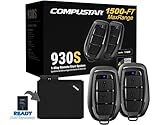
- Compustar CS930-S All-in-One Remote Start Bundle - 1,500-Ft. Max Range Keyless Entry Remote-Start-System
- One (2-Way) & One (1-Way), 3-Button Remotes G17 AM Water-Resistant Remotes with Lock, Unlock, & Remote Start/Stop buttons
- All-in-one 2-way remote start & keyless entry system
- Automatic Transmission Vehicles Only - Diesel-Engine Safe
- Professional Installation is highly recommended. Some vehicles may require extra parts which are sold separately and not included.
That article’s relearning steps are to start the vehicle with the key or push-button, hold the foot brake for about 10 seconds, press and hold the remote-start button for three seconds while continuing to hold the brake, observe the parking-light response, then turn off the vehicle, remove the key, and retry. Compustar cautions that more than one flash may mean installer or dealer help is needed. Use these steps only if they apply to your system and vehicle setup; otherwise follow your system’s manual or contact the installer.
When you call, report the exact remote/system model, whether the vehicle never starts or starts and shuts off, and the parking-light pattern. Also mention recent vehicle changes such as a battery replacement or new LED interior or tail lamps; Compustar identifies these as potentially useful diagnostic context.
Outdated Drivers Are Slowing You Down
One free scan finds every outdated or missing driver and matches the right update for your exact hardware.Free scan · exact hardware matchPC Slower Than It Used to Be?
A free scan shows the junk files, broken settings and background clutter dragging Windows down - then fixes them in one click.Free scan · Windows 10 & 11Best Value

- Compustar 2WG15R-FM 4B 2-Way, 3000' Remote
- 2-Way
- 3000 foot Range
When to contact an installer or dealer
Stop repeated attempts and seek professional diagnosis when the matching manual points to a tach, hood-pin, brake, emergency-brake, or other sensing input and the visible readiness conditions are correct. Contact the installer or a Compustar dealer if the code persists, the manual’s procedure does not resolve the issue, or you cannot identify the installed system. Do not bypass an interlock or make wiring changes based on a generic troubleshooting guide.
Quick Recap
Product prices and availability are accurate as of the date/time indicated and are subject to change. Any price and availability information displayed on Amazon at the time of purchase will apply.




