Recommended Free Tools
To charge your non-Tesla EV at a Tesla Supercharger, confirm in the Tesla app that your exact vehicle and station are eligible, then use a native NACS connection or an approved CCS1-to-NACS DC adapter. Select the matching stall, add payment, start charging, and stop the session in the app.
The answer is yes, but not automatically. Tesla separates Supercharger locations into Tesla-only sites, All EVs sites with built-in Magic Dock adapters, and NACS sites opened to supported automakers. Compatibility can vary by model, software, adapter, station, and region, so the Tesla app is the practical final check before every stop.
As an Amazon Associate I earn from qualifying purchases.
Key takeaways
- A non-Tesla EV can use a Tesla Supercharger only when Tesla has enabled the vehicle and the specific station.
- A native-NACS EV plugs in directly, while a supported CCS1 EV normally needs an approved NACS DC adapter unless the stall has Tesla’s built-in Magic Dock.
- The Tesla app is the standard way to check compatibility, select the correct stall, add payment, start charging, stop charging, and view the site’s price.
- Tesla Supercharger pricing varies by location and may use per-kilowatt-hour or per-minute billing, peak pricing, live pricing, and congestion fees.
- Charging speed depends on the vehicle’s DC charging limit, battery temperature, state of charge, Supercharger generation, weather, and site conditions—not simply the charger’s advertised name.
How to charge your non-Tesla EV at a Tesla Supercharger
To charge your non-Tesla EV at a Tesla Supercharger, first confirm in the Tesla app that both your vehicle and the selected station are eligible. Then use a native NACS cable or an approved CCS1-to-NACS DC adapter, select the matching stall, add payment, start the session, and stop charging in the app when finished.
The Tool Desk
Outbyte PC Repair FREEClear out junk files and repair common Windows errorsFree Scan →Outbyte Driver Updater FREEScan for outdated or missing drivers - takes under a minuteDriver Scan →The short answer is yes, but not automatically. Three conditions must be satisfied: the vehicle must be supported, the particular Supercharger must be open to that vehicle, and the connector hardware must be correct. Tesla’s official non-Tesla Supercharging instructions are the final authority because access can vary by model, software, adapter, station, and region.
#1 Best Overall
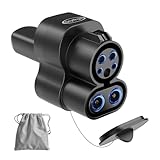
- 【Sturdy Material Superior Construction】Otytkgo ccs1 to nacs charger adapter is made of plastic and metal, ensuring safe charging even during thunderstorms, high temperatures, snowstorms,2 in 1 ccs and j1772 to nacs adapter's built in smart chip ensures safe power off, it can with stand more than 20000 insertions, making it durable. ccs1 to tesla DC adapter is ideal companion for long-term use
- 【Dual Mode Fast Charging】Our ccs1 to tesla adapter solves 2 major charging needs compatible with home j1772 chargers such as charge point and public ccs fast charging stations, no need to carry multiple adapters. say goodbye to looking for charging piles or dealing with charging incompatibility issues, this ccs to tesla adapter can charge anytime, anywhere, truly enjoy charging freedom
- 【Suitable for Tesla Exact Compatible】 The J1772 to tesla adapter is compatible with almost all ccs and j1772 to nacs charging adapter piles.no setup required, plug and unplug smoothly firmly, it will not fall off. Supports up to 250V 80A, the charging efficiency is 30% higher than ordinary synchronous charging, reducing waiting time. j1772 to nacs adapter is only suitable for tesla model 3 Y X S
- 【Plug and Play Easy Installation】This ccs to nacs adapter allows you to easily charge your tesla at any ccs1and j1772 charging station, one-touch plug in to start,weighs 0.9 LBS, size 8.1 x 3.8 x 2.2 ins, comes with acarrying bag,it can be easily stored in the car glove box or trunk. whether you are traveling by car or commuting daily, ccs to tesla is must-have accessory for electric car owners
- 【Security Protection and After-Sales Service】Both j1772 and ccs to tesla adapters are CE, FCC,RoHS certified to ensure compliance with relevant safety standards. We provide 18 month warranty .If you have any questions during purchase of our ccs1and j1772 to tesla adapter, please contact us, we are always here to help you
What do you need before arriving?
You need an eligible EV, an eligible Supercharger, the correct DC charging connection, and a payment method. Downloading and signing into the Tesla app before the trip avoids the most common setup problem: arriving at a station and discovering that the vehicle or stall is not authorized.
| Vehicle or station situation | What you need | How the cable connects |
|---|---|---|
| EV with a native NACS port | An eligible vehicle and an eligible NACS Supercharger | Plug the Supercharger cable directly into the vehicle |
| Supported EV with a CCS1 port | An approved NACS DC adapter supplied by Tesla or the vehicle manufacturer | Connect the adapter to the Supercharger cable first, then plug the adapter into the vehicle |
| Supported CCS1 EV at an All EVs/Magic Dock site | The station’s built-in Magic Dock adapter, if the app authorizes the vehicle | Use the adapter attached to the charging post according to the station’s instructions |
| Unsupported EV or Tesla-only site | No adapter or app workaround makes the session eligible | Use another compatible charging network or station |
Tesla states: Supercharging is only accessible for NACS-equipped vehicles and CCS1-equipped vehicles with an NACS DC adapter provided by Tesla or your vehicle’s manufacturer.
Tesla prohibits third-party adapters for Supercharging and warns that an AC adapter intended for Level 2 or Destination Charging is not a substitute for a DC fast-charging adapter.
Which Tesla Superchargers can non-Tesla EVs use?
Non-Tesla EV access depends on the station category shown by Tesla and the vehicle authorization attached to that station.
Free tools Windows power users keep installed
One-click scans. No signup required.
| Site category | Non-Tesla access | Connection |
|---|---|---|
| Tesla-only Supercharger | Not available to non-Tesla vehicles | Not applicable |
| All EVs Supercharger | Available to supported vehicles where the site and vehicle are authorized | CCS1 vehicles can use the built-in Magic Dock adapter |
| NACS Supercharger opened to a vehicle manufacturer | Available only to supported models and software configurations | Native NACS connection or an approved vehicle-specific adapter |
Do not assume that every Tesla map pin accepts every non-Tesla EV. Open the Tesla app, choose Charge Your EV, add the vehicle details, and use the resulting station list or map to identify compatible locations. Tesla’s manufacturer list includes Acura, Audi, BMW, Ford, General Motors, Genesis, Honda, Hyundai, JLR, Kia, Lucid, Mercedes-Benz, Nissan, Polestar, Porsche, Rivian, Stellantis, Subaru, Toyota, Volkswagen, and Volvo, but a manufacturer appearing on the list does not guarantee access for every model or station.
The U.S. Department of Energy Alternative Fuels Data Center listed 40,089 Tesla Supercharger stations on June 18, 2026 in its charging-network database. That network-level database count does not mean all 40,089 stations are available to every non-Tesla model, and it should not replace the Tesla app’s vehicle-specific result.
What adapter do you need for a Tesla Supercharger?
A CCS1 EV needs an approved CCS1-to-NACS DC fast-charging adapter; a native-NACS EV needs no adapter. Choose an adapter approved for the exact vehicle brand and model rather than one selected only because its connector shape appears to fit.
The North American Charging System is commonly called NACS and is standardized by SAE as J3400. CCS1 and NACS are different North American DC-fast-charging connector systems; the U.S. Department of Energy identifies CCS, CHAdeMO, and NACS as the principal public DC-fast-charging connector types in the United States. Connector appearance alone does not establish charging compatibility.
Quick wins for a faster PC:
Fix the driver behind crashes, sound loss and screen glitchesFind Drivers →Clear out junk files and repair common Windows errorsFree Scan →Scan for outdated or missing drivers - takes under a minuteDriver Scan →Rank #2
![Lectron NACS to CCS Electric Vehicle Adapter with Interlock - (500A/1,000V) - Compatible with Tesla Superchargers - CCS1 EV Fast Charging with Vortex Plus [Check Automaker for Compatibility] - UL 2252](https://m.media-amazon.com/images/I/310Iflz5lIL._SL160_.jpg)
- ACCESS TESLA SUPERCHARGERS NATIONWIDE - Unlock 25,000+ V3 and V4 Tesla Superchargers. This NACS to CCS adapter enables non-Tesla EVs with Supercharger access to easily connect to the Tesla fast charging network
- FIRST UL 2252 CERTIFIED ADAPTER - The Vortex Plus is the first publicly available NACS to CCS adapter certified under UL 2252 by SGS (NRTL). Market-leading safety, thermal and mechanical performance.
- SECURE INTERLOCK DESIGN - Features a built-in interlock mechanism to help ensure a secure connection during high-voltage DC fast charging. Our SAE J3400 (NACS/Tesla) to CCS adapter is built to last for safe high-speed charging.
- UP TO 150 MILES IN 15 MINUTES – 500A / 1000V RATED - Lightning-fast charging performance. Charge up to 150 miles in as little as 15 minutes with the Lectron Vortex Plus. Charging rates vary based on the Tesla Supercharger generation and your vehicle’s specifications
- COMPATIBLE WITH SUPPORTED CCS1 EVs - Our NACS to CCS Adapter is designed exclusively for CCS1 EVs that have Supercharger access through their automaker. Not compatible with Tesla vehicles or AC charging stations. Please refer to the included User Manual for complete operating instructions and compatibility requirements.
Before buying a NACS DC fast-charging adapter, verify the vehicle manufacturer’s approved part, availability, software requirements, and warranty conditions. Ford says all Ford vehicles require a Ford Fast Charging Adapter for Tesla Supercharging and recommends using only adapters sold or provided by Ford or Tesla; Ford’s adapter guidance is the relevant model-specific reference.
GM says eligible Cadillac, Chevrolet, and GMC EV drivers can use a GM-approved NACS DC adapter, locate compatible stations, initiate charging, and pay through the vehicle-brand mobile app. GM also says the adapter is designed for Tesla Superchargers and NACS DC fast-charging stations, not Tesla Level 2 chargers; consult GM’s public-charging information for current eligibility and program details.
Rivian’s NACS DC adapter guide identifies the NACS DC end and CCS1 vehicle end and warns that damage caused by unauthorized or incompatible adapters may not be covered by the vehicle warranty. The safest purchasing route is therefore the automaker or Tesla—not an unverified generic adapter listing.
How do you start a non-Tesla charging session?
Use the Tesla app to authorize the vehicle and the exact stall, then connect the cable in the correct order.
Crashes, No Sound, or Screen Glitches?
Random freezes, missing sound and display glitches usually trace back to one bad driver. Find and replace yours safely.Free scan · under a minutePC Slower Than It Used to Be?
A free scan shows the junk files, broken settings and background clutter dragging Windows down - then fixes them in one click.Free scan · Windows 10 & 11- Open the Tesla app. Select Charge Your EV, enter the vehicle details, and confirm that the station is compatible with the exact vehicle.
- Check the connector and cable reach. Confirm that the vehicle has native NACS, an approved adapter, or access to a Magic Dock. Check the charge-port position and the station layout before parking.
- Add payment. Add a payment method to your Tesla Account. Tesla says limited sites may offer credit-card, mobile-payment, or text-to-pay options, but the app is the standard payment route.
- Park at the selected post. Read the unique identifier printed at the base of the charging post. Select that exact identifier in the app; do not choose a neighboring stall by mistake.
- Remove and connect promptly. Tesla’s instructions say to remove the connector within 30 seconds and plug into the vehicle within one minute, or the session may need to be restarted.
- Use the adapter correctly. With a CCS1 vehicle, connect the approved adapter to the Supercharger cable first. Then plug the adapter into the vehicle’s CCS1 port.
- Start charging. Start the session in the Tesla app, and confirm that the vehicle reports charging before walking away.
How do you stop charging and remove the adapter?
Select Stop Charging in the Tesla app, wait for the session to end, and then disconnect the hardware in the correct order.
- Tap Stop Charging in the Tesla app.
- If an NACS DC adapter is attached, press the adapter’s release button to unlatch it.
- Disconnect the adapter from the vehicle using the switch below the charging cable, following the adapter and vehicle instructions.
- Return the cable and adapter to their proper position so the stall is clear for the next driver.
How much does it cost to charge a non-Tesla at Tesla?
The cost to charge a non-Tesla EV at Tesla depends on the station, time, billing method, vehicle status, and whether the driver has an optional membership. Tesla displays the applicable price in the app; there is no reliable universal price for every Supercharger.
| Price factor | What can change | Where to check |
|---|---|---|
| Billing unit | Per kilowatt-hour or per minute, depending on location | Tesla app and station pricing screen |
| Time of day | Peak and off-peak rates may differ | Tesla app |
| Site conditions | Some locations use live or occupancy-based pricing | Tesla’s live-pricing explanation and the app |
| Session duration | Congestion or occupancy fees may apply at applicable sites | Station terms and the app |
| Membership | An eligible non-Tesla driver may qualify for Tesla-vehicle pricing at eligible Tesla-owned sites | Current membership terms in the Tesla app |
A Tesla Supercharging Membership is optional, not a requirement for eligible non-Tesla charging. Tesla says the membership can allow eligible non-Tesla EV owners to charge at the same price as Tesla vehicle owners at eligible Tesla-owned sites. The membership fee, availability, and terms can change, so check the app immediately before signing up; Tesla’s Supercharging information explains the service without requiring a fixed price claim.
Rank #3

- CHARGE YOUR TESLA & NACS-PORT EV AT CCS FAST CHARGERS: This UL-compliant LENZ adapter lets EVs with a NACS (Tesla-style) charging port to connect to CCS1 DC fast charging stations—ideal for expanding charging options beyond NACS-only plugs.
- BUILT FOR THE NEW WAVE OF NACS VEHICLES (2026+): Supports NACS-port vehicles including Tesla and select 2026+ non-Tesla EVs adopting NACS, such as 2026 Hyundai Ioniq 5, Ioniq 9, 2026 Kia EV6, EV9, 2026 Rivian, and 2026 Toyota bZ models, 2026+ Rivians, and more as NACS adoption expands. NOT Compatible with Tesla Cybertruck.
- DESIGNED FOR CCS1 DC FAST CHARGING STATIONS: Built specifically for DC fast charging with CCS1 connectors commonly found at Electrify America, EVgo, Chargepoint and other publie networks. NOT for Tesla Superchargers. NOT for Level 2 AC charging.
- ENGINEERED FOR DC FAST CHARGING SAFETY: SGS certified to UL 2251 and CSA C22.2 standards. Precision-engineered fit and reinforced locking interface to ensure stable alignment and confident connection. Designed to handle high-voltage DC (up to 500V) and consistent performance at up to 500 kW.
- LENZ CHARGING SOLUTIONS - BUILT FOR REAL-WORLD USE: Engineered for frequent use at public fast chargers and backed by LENZ support. Great for road trips, fleets, and drivers moving into the NACS era who still rely on CCS networks.
For historical context only, General Motors announced a $225 adapter MSRP on September 18, 2024. That GM announcement is not a current price guarantee; verify the current accessory price and availability through the manufacturer before purchasing.
What’s actually slowing this PC down?
Pick the symptom - the matching free tool is one click away.
How fast will a non-Tesla EV charge?
There is no single charging time for all non-Tesla EVs. The vehicle’s maximum DC-input rate and charging curve usually matter more than the Supercharger’s generation or peak label, while battery state of charge, temperature, weather, and site conditions also affect the result.
Tesla directs drivers to the app for each site’s maximum charging speed. A vehicle may charge more slowly than the station’s maximum because the vehicle limits power as the battery fills or because the battery is cold or hot.
As a model-specific example, Hyundai says the 2026 IONIQ 5 takes approximately 24 minutes for 63-kWh configurations or 30 minutes for 84-kWh configurations from 10% to 80% on a NACS V3 or V4 Supercharger. Hyundai also cautions that actual time varies with battery and environmental conditions; the 2026 IONIQ 5 specifications apply only to those stated configurations and conditions.
Independent reader supportYour contribution helps us test, update, and keep practical guides available for everyone.Will the Tesla cable reach a non-Tesla EV?
Usually, but charge-port location and stall geometry matter. Tesla says most cables at NACS Supercharger sites should reach non-Tesla vehicles, although some drivers may need to park over the line; Tesla advises against parking diagonally and asks drivers to obstruct as few posts as possible.
Do these 3 things before closing this tab:
1Repair Windows errors before they cause bigger problems2Fix the driver behind crashes, sound loss and screen glitches3Clear out junk files and repair common Windows errorsNewer V4 Supercharger posts are being deployed with longer cable reach. Before selecting a station, compare the vehicle’s charge-port location with the stall layout and check whether the site uses V4 hardware. A cable that reaches one vehicle’s rear-side port may not comfortably reach another vehicle’s front-side or opposite-side port.
What are the most common mistakes?
- Driving to a Tesla-only site: a Tesla location on a general map is not proof that the station accepts your EV. Confirm access in the Tesla app.
- Using an unapproved adapter: Tesla prohibits third-party adapters for Supercharging. Use only Tesla- or automaker-provided and approved hardware.
- Buying an AC adapter: an adapter for Tesla Destination Charging or Level 2 equipment is not the DC adapter required for Supercharging. Tesla’s Destination Charging information describes a different charging use case.
- Ignoring vehicle software or authorization: an eligible brand does not necessarily mean every model, trim, software version, or station is enabled.
- Selecting the wrong stall: match the post identifier at the base of the charger to the identifier selected in the app.
- Expecting a universal price: review the current station price, billing unit, membership status, and possible congestion fees in the app.
- Expecting a universal charging time: charging speed changes with battery temperature, state of charge, vehicle limits, and station conditions.
- Blocking multiple posts: park as straight as possible and avoid occupying neighboring stalls when cable reach makes the position awkward.
Can Ford, GM, Hyundai, Kia, Rivian, and other EVs use Tesla Superchargers?
Some Ford, GM, Hyundai, Kia, Rivian, and other automaker EVs can use Tesla Superchargers, but eligibility is model-, software-, adapter-, station-, and region-specific. The Tesla app’s result for the exact vehicle and station takes priority over a general manufacturer list.
Rank #4

- NOTE: Verify Compatibility Before Purchase -PLEASE CONFIRM your CCS electric vehicle manufacturer has enabled access to the respective charging network for Tesla Supercharger Protocol(Check Automaker for Compatibility)
- Currently not compatible with Audi, BMW, Mercedes-Benz, Kia, Mazda, MINI, Nissan, Porsche, STELLANTIS, Toyota, Volkswagen, and Honda. NOT compatible with Level 1 or Level 2 AC chargers
- NACS to CCS Adapter with Interlock -for NACS dc adapter is SGS certified to comply with the UL 2252 standard for safety. Heavy-duty design with interlock structure for added stability
- Fast Charging -Compatible with Tesla Supercharger charger adapter rated for 500 amps and 1,000 volts, charge up to 150 miles of range in just 15 minutes(Actual charging speed is determined by the charger's output, your vehicle's battery management system, and environmental conditions)
- Expand Your Charging Options -for CCS charging adapter charges at 25,000+ V3 and V4 Superchargers DC fast charging stations, providing Multiple Charging Options. Designed for daily commuting, road trips charging needs for more convenient charging flexibility
Native-NACS vehicles generally connect directly. CCS1 vehicles generally need the approved automaker adapter unless the selected station has Magic Dock. Automaker charging apps may also handle station discovery, authorization, and payment where integration is available, but the Tesla app remains the standard cross-brand check for compatibility and station access.
Is charging a non-Tesla EV at a Tesla Supercharger worth it?
It can be worthwhile when the station is on your route, the vehicle is authorized, the adapter is available, and the app’s price and cable layout work for your trip. It is less convenient when the station is Tesla-only, the vehicle needs an unavailable adapter, the charge port is difficult to reach, or a competing fast charger offers a better location or price.
Use this decision checklist before leaving:
- Is the exact vehicle listed as compatible in the Tesla app?
- Is the selected station marked for All EVs or opened to the vehicle’s manufacturer?
- Does the EV use NACS, CCS1 with an approved adapter, or a Magic Dock connection?
- Is the adapter approved for the exact vehicle and intended for DC fast charging?
- Does the station’s cable reach the vehicle’s charge port without blocking other stalls?
- Have you checked the current price, billing method, and possible congestion charges?
- Is the Tesla app installed, signed in, and connected to a valid payment method?
Frequently Asked Questions
Can I charge my non-Tesla EV at a Tesla Supercharger?
A non-Tesla EV does not automatically work at every Tesla Supercharger. The exact vehicle and station must be authorized in the Tesla app, and a CCS1 vehicle generally needs an approved NACS DC adapter unless the station has Magic Dock.
What adapter do I need for a Tesla Supercharger?
A supported CCS1 EV needs a Tesla- or automaker-provided NACS DC fast-charging adapter for a compatible Supercharger. Do not use a generic third-party adapter or an AC adapter intended for Tesla Level 2 or Destination Charging.
Do I need the Tesla app to charge a non-Tesla EV?
The Tesla app is the standard payment method for non-Tesla Supercharging: add a payment method to a Tesla Account, select the stall, and start the session. A limited number of locations may offer card, mobile-payment, or text-to-pay options.
How much does it cost to charge a non-Tesla at Tesla?
There is no universal price. Tesla may bill by kilowatt-hour or minute, and rates can vary by location, time, live pricing, congestion fees, and optional Supercharging Membership eligibility.
The Bottom Line
Bottom line: A non-Tesla EV can charge at a Tesla Supercharger only when Tesla has enabled the exact vehicle and station. Native-NACS vehicles plug in directly; supported CCS1 vehicles need an approved NACS DC adapter unless Magic Dock is available. Check compatibility, cable reach, payment, pricing, and stall instructions in the Tesla app immediately before every charging stop.
Quick Recap
Product prices and availability are accurate as of the date/time indicated and are subject to change. Any price and availability information displayed on Amazon at the time of purchase will apply.




