For regular home charging, Tesla recommends a permanently installed Wall Connector; for road trips, use Cybertruck’s navigation and Trip Planner to choose stops and prepare the battery for fast charging. A Mobile Connector is more portable, but Tesla warns that ordinary 120 V charging is especially slow for Cybertruck and is a poor fit in cold weather.
Choose a home charging setup
The best home option depends on whether you want a dedicated daily charger or portable equipment for occasional use. Tesla’s guidance recommends a Wall Connector for home charging, while its Mobile Connector can use compatible outlets. Neither option removes the need to check the electrical requirements of your specific home and equipment.
As an Amazon Associate I earn from qualifying purchases.
Wall Connector: the regular home setup
Tesla recommends its Wall Connector for home charging. The Cybertruck service manual describes it as permanently installed on a 240 V circuit. Circuit capacity and installation requirements depend on the equipment and home, so have a qualified electrician assess the setup rather than treating it as a plug-in appliance. See Tesla’s Wall Connector guidance and the Cybertruck service manual.
Quick wins for a faster PC:
Repair Windows errors before they cause bigger problemsFix Now →Scan for outdated or missing drivers - takes under a minuteDriver Scan →Clear out junk files and repair common Windows errorsFree Scan →Mobile Connector: portable, but outlet-dependent
Tesla’s current Mobile Connector bundle includes a 20-foot cable, NEMA 5-15 and NEMA 14-50 adapters, and a storage bag. Tesla’s general Mobile Connector page lists up to 3 miles of range per hour from a standard outlet and up to 30 miles per hour from a 240 V outlet, depending on the vehicle. Those are general figures, not Cybertruck-specific charging guarantees. Check the current Mobile Connector guidance and Tesla Shop listing for compatibility and equipment details.
#1 Best Overall

- Fast Level 2 Charging – Deliver up to 32 amps of power for quicker charging compared to standard Level 1 chargers, keeping your Tesla ready for every drive. Tesla NACS Compatibility – Built with the official North American Charging Standard (NACS) plug for seamless use with all Tesla models. Portable & Travel-Ready – Compact and lightweight design makes it easy to keep in your trunk as a reliable backup or for road trips. 20-Foot Charging Cable – Extra-long cable provides flexibility to reach your Tesla whether parked in your garage, driveway, or on the go. Durable & Reliable – Premium construction ensures long-lasting performance, backed by Tesla’s trusted charging technology.
For Cybertruck specifically, Tesla says it does not recommend low-power equipment such as a 120 V NEMA 5-15 outlet and Universal Mobile Connector, particularly in low ambient temperatures. Charging at less than 2 kW can replenish the large battery very slowly. If you must use this low-power setup, Tesla advises turning off climate to reduce idle power use. Treat it as a limited fallback, not an equivalent to a dedicated home charger.
Set a routine and check charging status
Tesla strongly recommends leaving Cybertruck plugged in when it is not being used. Set or review the recommended charge limit using the vehicle’s Charging screen or the Tesla mobile app; use the vehicle or app’s guidance rather than assuming one limit suits every daily routine or trip.
Rank #2

- Dual Voltage Level 1 & 2: Charge at 120V/12A (1.44kW, 2-5 miles/hr) with the included NEMA 5-15 adapter or at 240V/16A (3.84kW, 9-12 miles/hr) with the NEMA 6-20 plug. One SEGUMA portable tesla charger gives you two charging options for everyday home charging, backup charging, and travel
- EV Charger for Tesla Vehicle-Seguma 16A mobile ev charger for tesla is specifically designed for Tesla vehicles, engineered with standardized North American Charging Standard (NACS) connector, works flawlessly with Tesla Model-Y/X/3/S/Cybe truck
- Wireless Charging Door Control-The portable mobile car charger for tesla has a button on the connector that wirelessly opens the charging port door, eliminating the need for physical keys or buttons and making charging more convenient
- Intelligent Charging-The Seguma level 1 charger offers protection against leaks, grounding, voltage issues, overcharging, and overheating. It automatically shuts off when your Tesla is fully charged. Tip: Install a home circuit breaker for extra safety
- Extended 25FT Cable-The 25-foot cable allows easy tesla charging at home or public stations. The included portable storage bag lets you take the tesla home charger anywhere, making it ideal for travel, road trips, or visits. Perfect accessory for Model Y
Before walking away, check the charge-port light: blinking green indicates charging, amber indicates reduced current, and solid blue means the vehicle is connected but not currently charging, such as when a schedule delays charging.
If charging current drops unexpectedly
If Cybertruck detects unexpected fluctuations in input power, it automatically reduces charging current by 25% and remembers the lower current at that location. Tesla recommends keeping the reduced setting until the electrical issue is resolved. If the cause is unclear, have the circuit and charging equipment checked by a qualified electrician. Details are in the Cybertruck Owner’s Manual.
Rank #3

- ❤ [Equipped with Nema 14-50 plug, Compatible with 110-120V Nema 5-15p to 14-50r EV Adapter(Not packaged) or the other EV Adapter Cable]: Suggest install the 240V Nema 14-50 plug-in socket. [Kindly Note When Using the 5-15P Adapter]: 1. The RV Adapter cable doesn't work for EV chargers, please order the correct EV adapter cable. 2. It will become slow level 1 ev charging and some cars may drop to 12A, the max charging rate is 1.32-1.8kW(110V*12A-120V*15A).
- ❤ [Features a North American Charging Standard (NACS) Connector for All Tesla EVs/Nacs Connector EVs/PHEVs. For j1772 EVs, This will Require an Tesla to j1772 Adapter]: Compatible with Tesla Models S/X/3/Y & Fits for Nac connector-Kia EV6 2025/EV9, Ariya 2025&2025 loniq 5, not work for j1772 connector cars. [6X Faster Charging with ETL, FCC Listed, Meets the Safety Criteria Defined by: UL2231-1/-2, UL 991, UL 2231, UL 2251, UL1998 and UL 2594]: Say goodbye to slow level 1 ev charger, enjoy safe charging and 6X faster charging.
- ❤ [Up to 7.68kWh High Speed Charging, Adjustable Amperage from 16A to 32A & Requires a 20A to 40A circuit]: Maximum current output of 32 Amps for 40A circuit breaker, 24 Amps for 30A circuit breaker, or 16 Amps for 20A circuit breaker (Please pull out the charging gun, long press "A" button to change the current). You can also adjust the current/amperage by APP before the charging.
- ❤ [2 Operating Modes: Plug-charge(The Default Setting) or APP Start Mode & Smart Touch Screen]: The LED Screen Clearly show the Amperage, charging speed, input voltage, delay time, etc. For the touch buttons: 1. Pull out the charging gun before press the button, otherwise no respond; 2. Long press "Ⓐ" or "Time" button to adjust the amperage from 16A to 32A freely or Set the charging start time; 3. You can do "factory reset" if doesn't charging.
- ❤ [Smart WIFI APP, You can Set the Charging Period]: Check the charging cost, history, fully-charged notification, track the charging status, during off-peak period, etc. ❤ [Wi-Fi Reset/Factory Reset Function, Add New Device Quickly]: If you can't find your device or you have replaced a new phone, just pull out the charging gun, simultaneously long press the Ⓐ button and time adjustment button on the product screen until it shows "Factory Reset", then re-start your device. (Kind note: Switch the router from dual brand (2.4 GHz & 5 GHz) to only 2.4 GHz for the first connection.)
Plan road-trip charging with the vehicle
- Enter your destination in Cybertruck’s navigation and use Trip Planner. Review the suggested charging stops and live charging information in the vehicle or Tesla app. Station access, availability, site conditions, and fees can change, so verify them with current information rather than relying on a static list.
- Navigate to a fast charger. Tesla says routing to a fast charger lets Cybertruck precondition its high-voltage battery. A lower state of charge typically allows faster charging, but actual speed depends on conditions and the station; the available information does not establish a guaranteed stop duration.
- Check the connector before you arrive. The U.S. Cybertruck manual identifies the vehicle’s port as NACS. If a station does not have a NACS cable, use the appropriate Tesla-approved adapter for the vehicle, hardware, station, and market. Tesla’s instructions are to connect the station handle to the adapter, then connect the adapter to the vehicle. Tesla warns not to use third-party DC adapters with Cybertruck. Confirm current compatibility in Tesla’s charging product guidance and the vehicle manual.
- Allow time for charging to begin. Charging normally starts after the connector is fully inserted, the vehicle latches it, and Cybertruck is in Park. The vehicle manages battery heating or cooling as needed; a delay can occur while the battery is conditioned.
- Check current Supercharger fees and site rules. Consult the vehicle or Tesla app for the site’s current fees. Tesla notes that the in-vehicle cost estimate may differ from the final amount, which appears in your Tesla account. Busy sites may charge extra fees after charging is complete. Depending on the market, a high-use site may also limit charging to 80% when you are not using Trip Planner.
Keep home backup separate from ordinary charging
Powershare is a home-backup use case, not a requirement for routine charging. Tesla says home backup can provide up to 11.5 kW and requires Powershare equipment with a Wall Connector or Universal Wall Connector; Tesla notes an exception for a home that already has a Powerwall and Wall Connector. The 11.5 kW figure is Tesla’s stated maximum, not an independently measured output or a promise about backup duration. Check Tesla’s Powershare guidance for eligibility and configuration specific to your Cybertruck and home.
Quick Recap
Best Value
- Compatible with Tesla Gen 2 Mobile Connector Meet Tesla charging standards. Simply attach this adapter to your Mobile Connector, plug it into the corresponding outlet, and begin charging.
- Built-in Temperature Control Chip It’s equipped with a temperature monitoring chip that automatically stops charging if the temperature rises too high, ensuring the safety of your vehicle.
- 17mm/40A Cable Use a 17mm wire diameter cable, which is 40% thicker than Tesla's 12mm. The maximum current supports up to 40A, 25% higher than Tesla's 32A.
- Galvanized Coating End Terminals The end terminals have a galvanized coating that resists corrosion and oxidation, preventing short circuits caused by humid environments.
Rank #4
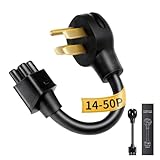
- NEMA 14-50P Adapter for Tesla: Verified for Tesla Gen 2 Mobile Connector. Connects to 4-Prong 240V RV/Range outlets. VISUAL CHECK: 1 round pin on top, 1 FLAT pin at bottom. (NOT for Gen 1 units; NOT for 14-30 outlets because the 14-30 requires an L-shaped bottom pin)
- Durable NEMA 14-50 Adapter Build: Constructed with reinforced premium materials, this nema 14-50 adapter withstands daily charging. The rugged cable and high-quality connector deliver stable 240V power for your Tesla. Outperforms generic nema 14-50 tesla adapter options, ideal for indoor and outdoor use
- Premium Copper-Alloy Materials: Built with copper-alloy pins and reinforced insulation, the WenStorm tesla charging adapter ensures cleaner, safer current for your Tesla. Compatible with all standard nema 14-50 outlet types, this tesla 14-50 adapter guarantees long-term durability for home or travel charging
- Supports Up to 32A Level 2 Charging: Delivering up to 32 Amps at 240V, this tesla 14-50 adapter supports Level 2 charging for all Tesla models using the tesla mobile connector. Perfect for daily home charging, RV parks, or road trips, ensuring consistent power through any properly installed nema 14-50 outlet
- ETL-Certified & Travel-Ready: ETL-listed with nickel-plated, corrosion-resistant pins, the WenStorm tesla charger adapter delivers long-term reliability and durability. Compact, rugged, and weather-resistant, this nema 14-50 adapter is perfect for home use or as a dependable travel backup
Product prices and availability are accurate as of the date/time indicated and are subject to change. Any price and availability information displayed on Amazon at the time of purchase will apply.




