Google Maps rolled back a frustrating Android Auto map-centering change in early February 2025. The January change positioned the driver marker relative to the entire Android Auto display instead of the usable Google Maps panel, making the map look awkward on smaller or split-screen vehicle displays. The change affected Google Maps—not necessarily the Android Auto app—and appeared to be reversed remotely, so most users did not need a special manual fix.
The short version
- What changed: Google Maps changed the reference point used to position the driver’s location marker on Android Auto.
- Why it was annoying: The marker could appear visually off-center when Maps occupied only part of the display.
- When: The change appeared in late January 2025.
- What happened next: A rollback was reported on February 3, 2025.
- What drivers need to do: Usually nothing beyond waiting for the change to reach their device or account.
According to 9to5Google’s February 3, 2025 report, the reversal was still rolling out unevenly. There was no publicly identified Maps version number tied to the change.
As an Amazon Associate I earn from qualifying purchases.
What Google Maps changed in January 2025
The issue was not simply that Google “moved the map.” It changed what Google Maps treated as the center.
Windows Errors? Fix Them Before They Spread
Repair common Windows errors and clear accumulated junk for a smoother, more stable PC - no reinstall needed.Free scan · no reinstallCrashes, No Sound, or Screen Glitches?
Random freezes, missing sound and display glitches usually trace back to one bad driver. Find and replace yours safely.Free scan · under a minutePreviously, the driver’s location was positioned relative to the usable Google Maps interface. In other words, Maps accounted for the area actually available to the map rather than treating every pixel of the Android Auto screen as map space.
#1 Best Overall

- Easy One-Hand Adjustment: Upgraded unique ball plunger arm pivots 240° and extends from 4.13" to 5.75". Push or pull to adjust—no screws, no hassle, always get the perfect angle
- Broad Compatibility: Equipped with a standard 4-hook bracket cradle holder, 1Zero car mount for CarPlay screen fits 7"–11" CarPlay screens, GPS units, dash cams, and more. Delivers a secure, stable mount to enhance your driving experience
- Strong Adhesive Suction Cup: Industry-leading suction with adhesive gel secures firmly to dashboards (with sticky pad) and windshields (with anti-UV film). Easily reusable, just rinse with warm water and air dry to restore stickiness
- Versatile Mounting Alternative: A smart alternative to traditional monitor dashboard mounts, display CD slot mounts, and air vent mounts, perfect for portable CarPlay screens
- Package Includes: Suction cup car mount, sticky dashboard pad, anti-UV film, and installation guide. Everything you need for quick and easy setup, no tools required
The January behavior instead appeared to center the driver’s location against the broader Android Auto display. That distinction became noticeable when the screen included surrounding controls, side panels, or another app in a split-screen layout.
Before: the driver marker was centered within the Maps panel.
After the January change: the marker was centered relative to the full Android Auto display.
A marker can therefore be mathematically centered on the overall screen while looking misplaced inside the map area the driver is actually watching.
Rank #2

- [Wide Compatibility] 1Zero for CarPlay mount for car is compatible with 7"-11" portable CarPlay screens, GPS monitors, dash cams, and various other CarPlay devices. This suction cup bracket holder provides strong and reliable support, keeping your screen secure and steady for a smoother, safer driving experience
- [Flexible & Bendable] The extra long 14-inch arm makes it easy to reach and operate your CarPlay screen. 1Zero mount for CarPlay screen standout feature is the bendable arm tube, which can be shaped freely to achieve the angle you prefer. In addition, the flexible 360° rotating ball head lets you easily adjust the viewing angle for a perfect, clear view
- [Performance & Adhesion] The industrial-grade rubberized aluminum tube arm with a sticky-gel suction cup firmly secures your CarPlay screen to the dashboard or windshield.It keeps the car monitor mount stable even on the bumpiest roads, ensuring safe and steady performance while driving. The suction cup is easily reusable—simply rinse with warm water and air dry to restore its stickiness
- [Installation Notes] Car suction cup bracket holder for windshield and dashboard.The Car Play mount may not be compatible with leather, vinyl, or other soft surfaces. For a stronger hold, we recommend mounting it on the windshield if your car’s dashboard surface is leather, vinyl, or soft material
- [Standard 17 mm Car Mount] Featuring a 17mm ball head.1Zero heavy-duty car mount for CarPlay screens, also work for GPS units, dash cams, and more
Why smaller and split-screen displays made it worse
The change was most conspicuous on narrow or compact head-unit screens. When Maps did not fill the entire display, centering against the full screen could make the usable map appear shifted to one side.
It was also easier to notice while browsing the map without active turn-by-turn navigation. The available reporting described the behavior in that situation; it does not establish that every navigation state or vehicle layout was unaffected.
This was primarily a visual and usability complaint—not evidence that Google Maps was calculating incorrect routes, losing GPS accuracy, or giving unsafe directions. The map could still be technically correct while being less comfortable to read.
Free tools Windows power users keep installed
One-click scans. No signup required.
Perceived centering can also vary with zoom level, map orientation, tilt, overview mode, the vehicle’s aspect ratio, and whether the car supports Android Auto split-screen features. That is why two drivers may not have experienced the change in exactly the same way.
Rank #3
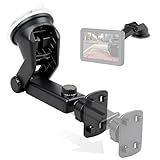
- Standard 4 Tab Bracket Mount: This mount is a direct replacement for standard 4-hole screens, offering a secure cradle for 7"-11" portable wireless Apple CarPlay and Android Auto displays, as well as backup camera monitors
- Tool-Free Installation: Effortlessly replace your original CarPlay mounting bracket in seconds - just simply align, click, and lock the cradle onto your screen for a secure fit
- Optimal Viewing with Full Motion: The 360° rotating head and extendable telescopic arm (4.1"-6.3") design CarPlay display mount - lets you eliminate blind spots and achieve the perfect viewing angle for both navigation and reversing
- Strong Adhesive Suction Cup: Advanced multi-layer suction cup mount with strong adhesive gel locks securely on textured dashboards and windshields, ensuring a stable, wobble-free view on any road
- All-Weather Durability: Crafted from high-strength, heat-resistant ABS with a UV-proof suction cup;EWAY CarPlay dashboard mount is built to withstand summer heat without weakening or leaving sticky residue on your car's interior
Google appeared to reverse the change
On February 3, 2025, 9to5Google reported that Google Maps had begun restoring the earlier positioning behavior. The rollback appeared to return the driver marker to the Maps interface rather than centering it against the entire Android Auto display.
The wording matters: the report described an observed reversal, not a formal Google announcement. No official explanation was identified for why Google introduced the new behavior or why it removed it. There was also no confirmed statement that Google considered the change a bug.
The rollback appeared to be server-side rather than a conventional Android Auto release. Some users reportedly saw the old behavior return while others had not yet received it, suggesting that delivery was staggered or varied by account, device, region, or vehicle setup.
What’s actually slowing this PC down?
Pick the symptom - the matching free tool is one click away.
Do you need to update or reinstall anything?
There was no confirmed universal setting to toggle, and reinstalling Android Auto was not established as a necessary fix. Because the behavior appeared to be controlled by Google Maps and a remote configuration, updating only Android Auto would not necessarily change it.
Rank #4
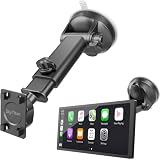
- Strong Sticky Suction Cup Car Mount for CarPlay Screens: Featuring an ultra-strong sticky suction cup, SkyTitan suction cup mount ensures a firm, wobble-free grip on your windshield. Perfect for keeping your device steady while driving
- Standard 4-Tab Bracket Mount: Designed with a sturdy 4-tab bracket adapter, this windshiled mount for CarPlay screens is compatible with most CarPlay screens, or auto android display screens featuring a 4-hole mounting pattern. Ensures a secure and stable hold for your device even on bumpy roads
- Adjustable to Your Desires: With a 360° flexible ball joint and adjustable long arm, SkyTitan for CarPlay screens car mount lets you effortlessly switch between landscape and portrait mode, perfect for optimal viewing in any driving scenario
- Removable & Washable: This suction cup mount for CarPlay can be easily remove from one car to another. And it is washable to retore mint condition
- Note: This product includes only the suction cup car mount base and bracket adapter, no CarPlay screen is included. For optimal performance, please mount on your windshield for maximum hold strength. The suction cup may not adhere properly to leather, vinyl, or soft-textured dashboard surfaces
If the map still looks incorrectly positioned, these are reasonable general troubleshooting steps—not confirmed, guaranteed fixes for this specific rollback:
- Open Google Play and check that Google Maps is up to date.
- Restart the phone and reconnect it to Android Auto.
- Try Google Maps again after some time, since the rollback was not reported as instantly universal.
- If the problem persists, clear the Google Maps cache through Android’s app settings. Avoid clearing storage first unless you understand that it can remove local app data and settings.
Downgrading Maps with an older APK is generally a poor first response. It can remove security updates and other improvements, may introduce compatibility problems, and may not prevent Google Play from updating the app again. There was no evidence that users needed to install a particular older version.
Do not confuse this with later traffic-display complaints
Later user reports in 2026 described separate Google Maps and Android Auto issues, including missing traffic colors and changes to map presentation. For example, one Reddit discussion concerns traffic visualization. Those reports should not be treated as evidence about the February 2025 centering rollback without separate confirmation.
The Tool Desk
Outbyte PC Repair FREEClear out junk files and repair common Windows errorsFree Scan →Outbyte Driver Updater FREEScan for outdated or missing drivers - takes under a minuteDriver Scan →What the rollback tells Android Auto users
The episode illustrates why a small interface change can have an outsized effect in a car. A layout that seems reasonable on a large phone or full-screen display can feel wrong when Android Auto compresses Maps beside controls or another app.
It also shows why identifying the responsible app matters. Although the problem appeared inside Android Auto, the available reporting attributed the change to Google Maps. Checking the Android Auto version alone would therefore not have been a reliable way to diagnose it.
Quick Recap
Product prices and availability are accurate as of the date/time indicated and are subject to change. Any price and availability information displayed on Amazon at the time of purchase will apply.




