The Tool Desk
Outbyte Driver Updater FREEFix the driver behind crashes, sound loss and screen glitchesFind Drivers →Outbyte PC Repair FREERepair Windows errors before they cause bigger problemsFix Now →A “car top-view diagram” can mean either a simple drawing of a car from directly above or the live overhead image produced by a vehicle’s surround-view camera system. This guide explains the camera-generated parking view: what it shows, how to read its guides, and why it should not be treated as an exact map of nearby obstacles. If you need a generic outline or a diagram for a particular vehicle, those are different kinds of reference.
What a car top-view diagram shows
In a surround-view parking system, the top view is an overhead rendering of the vehicle and nearby ground, assembled or processed from cameras mounted around the car. Mazda describes its CX-9 display as combining images from four cameras to show the vehicle from directly above. Citroën/DS describes a real-time image of the vehicle’s close surroundings for low-speed maneuvering, while Nissan says its LEAF bird’s-eye view helps drivers judge the vehicle’s position and predicted course relative to a parking space.
The display is not a conventional photograph taken from above. It is a constructed view designed to help with parking and maneuvering, and its appearance and labels depend on the vehicle and selected view mode.
How to read the display
A top view is often shown alongside a front, rear, side, or wide-angle camera image. Depending on the vehicle, the screen may also include vehicle-width guides, predicted path lines, tire-direction indicators, distance guides, or parking-sensor alerts. These features are not standardized across makes and models.
#1 Best Overall

- 4-Channel Dash Cam for Complete Vehicle Coverage: This dash cam is equipped with four Full HD 1080P cameras, capturing footage of the front, rear, left, and right sides of your vehicle simultaneously. The adjustable front cameras enhance visibility and offer flexible recording angles, including interior footage.
- Time-Lapse Recording & Parking Mode: With time-lapse recording, 60 minutes of footage is compressed into 1 minute, saving memory card space. Activate parking mode with the optional ACC hardwire kit (sold separately) for security when your vehicle is parked.
- Enhanced Night Vision & WDR Technology: The dash cam features advanced night vision and Wide Dynamic Range (WDR) technology for clear, balanced footage, even in low-light conditions. Eight infrared lights ensure optimal visibility, and WDR adjusts exposure to capture detailed images in varying lighting.
- Optional GPS for Real-Time Vehicle Tracking: Purchase the GPS logger (sold separately) to add location, speed, and time tracking, providing a visual representation of your vehicle's route. This feature is perfect for documenting travel details in case of incidents.
- 5GHz Wi-Fi & App Integration: Share videos easily via Wi-Fi using the mobile app for both iOS and Android devices. This feature allows for quick video downloads and sharing on your preferred platforms.
Guides and projected paths
Guidelines help indicate the vehicle’s width or the direction it is expected to travel. Their meaning can change with steering angle or the selected camera view. For example, the 2025 Mazda CX-50 manual describes blue vehicle-width guides and red or yellow projected-path guides. In the specified display, distance annotations are approximately 50 cm, 1 m, and 2 m from the front bumper. Those are model- and display-specific labels, not universal measurements for top-view diagrams.
Other camera views and indicators
Use the accompanying front, rear, or side image when the overhead rendering does not clearly show an area. Sensor indicators, where fitted, are another aid rather than proof that the space is clear. For the exact meaning of lines, colors, icons, and view modes, consult the owner’s manual for the vehicle and model year.
Rank #2

- True 4-Channel 360° Coverage – IIWEY N6 simultaneously records STARVIS 2K (1440p) video from the front, rear, and both sides for all-around coverage. Ultra-wide viewing angles (170° front/rear, 150° sides) and adjustable side cameras help reduce blind spots, while infrared night vision improves nighttime visibility. Vision Enhance tech helps capture clearer license plates and lane markings at intersections—ideal for commuting, rideshare, and fleet use. (CPL Filter: ASIN B0G4R35S76).
- Note: This Dash Cam is Wired and Does Not Have A Built-In Battery. This dash camera must be connected to vehicle power source when in use, you can use the car charger included in the box, or you can buy the hardwire kit to connect to car fuse to use (ASIN: B0DHJNRPB9, for 24/7 parking mode). Please confirm this requirement before purchase to avoid misunderstanding.
- 48-Hour Parking Surveillance (Hardwire Required) – Two smart modes guard your vehicle with the ignition off. 1,Time-Lapse at 1/3/5 fps records continuously for up to ~48 hours while conserving storage. 2,Impact Detection auto-captures and locks a 10-second clip on bumps or tampering. Parking Mode requires the IIWEY hardwire kit (ASIN B0DHJNRPB9; sold separately, not included). If no need Parking Mode, the included car charger is sufficient for daily driving use.
- Wi-Fi 6 (5.8 Ghz) Speed + Built-In GPS – Up to ~20 MB/s for fast in-app preview/download and quick sharing (also supports 2.4 GHz). GPS logs speed and route for playback on map in the iOS/Android app or PC viewer. Tip: long-press “◀” to enable Wi-Fi; auto-off after ~5 min helps reduce heat and power draw. N6 dash cam and hardwire kit fit for turck, car, suv and etc.
- Loop Recording + 128 Gb Card Included – Ready to use out of the box. Seamless loop saves in manageable segments and overwrites the oldest files when full, so recording never stops. G-Sensor Emergency Lock protects critical clips from overwrite during sudden braking or collisions.
Why the overhead image can be misleading
A surround-view display has blind areas and can distort or omit details. Mazda warns that dark areas near the vehicle image and seams where camera images meet may conceal objects. An obstacle visible in a front or rear camera image may not appear in the top view. Camera position or angle changes can also alter the apparent image. Toyota cautions that camera coverage is limited and that its special lens can make displayed distances differ from actual distances.
Image processing, lighting, viewing angle, and the boundaries between camera feeds can all affect what appears on screen. A displayed gap or clear patch should not be treated as a measured clearance. The image supports a driver’s direct checks; it does not replace them.
Free tools Windows power users keep installed
One-click scans. No signup required.
Rank #3

- ❗❗❗NOTE: This product must be powered by the original cigarette lighter charger; it cannot be powered by a USB cable or a Type-C cable. IIWEY N5 dash cam equipped with a 3" IPS screen, FHD 1080P+1080P+1080P+1080P, which can record 360° all-round including front, rear, sides, and interior. It also features a 2.5K+1080P+1080P+1080P mode for diverse needs. In addition, N5 is equipped with 170° super wide-angle front and rear cameras and 150° wide-angle side cameras, providing a wide field of view.
- ❗❗❗NOTE: N5 dash cam DON'T HAVE GPS function. The 128GB SD card has been installed in the card slot. It connects to your cellphone via built-in WiFi, no Bluetooth. The rear camera must be wired and connected to the front camera for use. It uses a super-capacitor instead of a battery, so please keep the dash cam connected to a power source while in use, we recommend to use the included car charger, or you can use our HARDWIRE KIT (ASIN B0DHJNRPB9, sold separately).
- 【Loop Recording & Free 128GB SD Card】N5 Dashcam comes with a 128GB Micro-SD card. (supports up to 256GB) Loop recording will start immediately once you turn on the engine. No seconds will be missing. The video will be saved in segments, and the storage space will be automatically detected. When memory is full, the earliest recorded video will be automatically deleted to achieve seamless loop recording.
- 【5GHz WiFi & Free App Control】❗❗❗NOTE: There are currently two free apps available: iiwey and viidure. You can find both apps on the Google Play Store and the Apple Store. The N5 dashcam boasts built-in 5GHz WiFi for 4x faster connectivity than 2.4GHz (with 2.4GHz support). It pairs with a free app for Android or iOS, enabling seamless control, video preview, download, and sharing.
- 【WiFi Using Note】Please note that each time you want to connect the APP to the dash cam, you need to long press the " ◀ " button to turn on WiFi before you can connect. ❗❗❗If the WiFi is not connected to the APP for more than 5 minutes, the dash cam will automatically turn off the WiFi function. This measure is to prevent the dash cam from overheating.
Using a top view safely while parking
- Confirm the view and its labels. Check which camera mode is active and use the owner’s manual to interpret its lines, symbols, and alerts.
- Look at the relevant camera image. Switch to the front, rear, or side view if it better shows the area you are approaching.
- Check around the vehicle directly. Use mirrors and direct observation as appropriate; do not assume an area is obstacle-free because it appears blank on the screen.
- Move slowly and reassess. Use the display as one aid while maneuvering, and stop if visibility or the apparent distance is uncertain.
Finding the right kind of car top-view diagram
If you are looking for a simple plan-view drawing for a school project, illustration, or template, a camera-system display is not the same thing. If you want to understand a parking-camera screen, identify the vehicle’s make, model, and model year, then find the matching manual section for its surround-view, panoramic-view, or bird’s-eye-view system. A diagram or guide from another vehicle may use different camera coverage, labels, and limitations.
Quick Recap
Rank #4
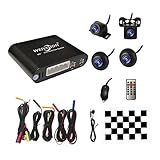
- Please be noted: this system should Professional Installation,this unversal model, the car side mirror should drill a 20mm hole to install the side camera.
- 4 Super wide angle(above 170 degree) Cameras, Waterproof IP69, Night vision
- Provide the driver a clear 360 degree bird's-eye view around vehicle, Universal for almost vehicles (Except long vehicles such as buses)
- Eliminate most of the blind spots, makes much easier for parking and passing the narrow road
- Seamless Splicing Technology, Auto image mosaic, Parking monitoring with shock sensor, auto record, the video format is MP4, you can view the video on PC or mobile.
Examples in manufacturer manuals
- Mazda CX-9 Owner’s Manual: explains the four-camera top view.
- DS 7 Owner’s Handbook: describes the top-view operating principle for low-speed maneuvering.
- 2023 Nissan LEAF Owner’s Manual: describes the bird’s-eye view and its parking-space guidance.
- 2025 Mazda CX-50 Owner’s Manual: gives an example of model-specific view guides and distance annotations.
- Mazda CX-30 Owner’s Manual and 2024 Mazda CX-50 Owner’s Manual: explain image limitations and display warnings.
- Toyota Owner’s Manual, Panoramic View Monitor: describes limits to camera coverage and distance interpretation.
Product prices and availability are accurate as of the date/time indicated and are subject to change. Any price and availability information displayed on Amazon at the time of purchase will apply.




