There is no single “Not a Tesla App” replacement. Not a Tesla App is a Tesla news and information website, not a vehicle-control application, as its privacy policy explains. Most owners asking for an alternative mean an unofficial tool that adds analytics, automation, voice control, road information, phone-key options or in-car entertainment to Tesla’s official app.
The right choice depends on what you want to improve. Tessie is the broadest companion platform, TezLab is more analytics-focused, TeslaMate is the self-hosted route, and tools such as CuePilot, TalktoTesla, codriver and TeslaKee solve narrower problems. Keep the official Tesla app installed: it remains the practical fallback for account management, service, phone-key functions and core vehicle control.
Quick recommendations by use case
| What you want | Natural starting point | Product type |
|---|---|---|
| Broad automation, controls and data | Tessie | Paid companion app |
| Trip, charging and efficiency analytics | TezLab | Paid analytics app |
| Self-hosted vehicle history | TeslaMate | Open-source, self-hosted platform |
| Automatic cabin heating or cooling | CuePilot | Climate-focused service |
| Natural-language commands and alerts | TalktoTesla | AI companion |
| Road alerts and charger context in the car | codriver | Tesla-browser tool |
| More control over passive entry | TeslaKee | Phone-key utility |
| CarPlay, Android apps or expanded screen entertainment | Screenmate-type hardware | Infotainment retrofit |
These are starting points, not permanent rankings. Features, prices, Tesla permissions and vehicle compatibility can change with app, firmware and API updates.
What Tesla’s official app still does best
Third-party tools generally sit on top of Tesla’s existing services rather than replacing every official function. The Tesla app provides the baseline for remote locking and unlocking, climate control, charging status and controls, vehicle location and status, service scheduling, phone-key functionality, software-update notifications and supported Summon-related features. Exact controls vary by model, country, vehicle software and Tesla app version.
Quick wins for a faster PC:
Scan for outdated or missing drivers - takes under a minuteDriver Scan →Clear out junk files and repair common Windows errorsFree Scan →#1 Best Overall
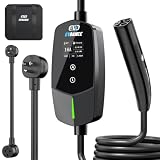
- ⚡ 【Charge Anywhere — One Charger for Every Outlet】 Never worry about outlet compatibility again. The EVDANCE 16A EV Charger supports both Level 1 (110V 12A NEMA 5-15 outlet) and Level 2 (240V 16A NEMA 6-20 outlet) charging, and includes a NEMA 6-20 to 5-15 adapter for ultimate flexibility. Designed for 120V or 240V household outlets with a 20A circuit, it’s perfect for charging at home, work, or while traveling—no electrician or complicated setup required. The 25FT ultra-durable cable gives you the freedom to reach your vehicle from almost anywhere. One charger, endless charging convenience.
- ✅【Exclusive for Tesla — Full NACS Compatibility】Designed for Tesla drivers, this Level 2 home charger works seamlessly with all Tesla models using the NACS connector—including Model 3, Model Y, Model S, Model X, and Cybertruck. Perfect for charging your own vehicle or multiple Teslas in the household. Ideal for home garages, road trips, and guest charging, ensuring every Tesla stays powered and ready whenever you need it.
- ✅【Smart Schedulet Charging — Save While You Sleep】Take full control of your charging routine with the built-in delay timer (1–12 hours). Set it before bed and let your EV charge automatically during off-peak hours, when electricity is cheaper and your home circuit is lighter. Save money, protect your system, and wake up to a full battery — every morning.
- ✅【Adjustable Amperage — Full Control , Total Safety】Select the right amperage — 8A / 10A / 12A / 16A — to suit any outlet and prevent overload. Smart current adjustment ensures safe, stable charging without breaker trips or overheating. Whether at home or on the road, protect your EV and your home with EVDANCE’s intelligent safety system. Charge with confidence.
- ✅【Real - Time LED Display — Clear Status at a Glance】Stay informed at all times. The advanced LED display shows current, voltage, power, delay, and charging status in real time — giving you complete visibility and control. No guessing, no worries — just transparent, efficient charging every time you plug in.
Use an unofficial app as an additional layer, not as your only way into the car. If a third-party service loses access, suffers an outage or misreports a command, the official app gives you a separate control path. It is also the sensible place to manage account security, service appointments and phone-key setup.
Why owners install unofficial Tesla tools
The official app is intentionally general. Owners often want longer-term information and conditional actions that it does not emphasize:
- Complete trip histories, efficiency graphs and battery or range trends
- Charging costs, energy use and exportable records
- Scheduled or condition-based actions and richer notifications
- Siri, Google Assistant, widgets, shortcuts, Apple Watch or Wear OS access
- Monitoring of multiple vehicles for a household or small fleet
- Home-automation integrations and less manual vehicle waking
- Voice-first interaction, road alerts or in-car entertainment
A 2025 comparison of Tesla companion products identifies trip logging, charging details, costs, battery information, voice control, automation and historical data as the main reasons owners look beyond Tesla’s app (comparison source).
Mainstream companion apps
Tessie: the broad all-rounder
Tessie targets owners who want controls, automations, history and access across more than one device or platform. Its feature set is aimed at combining trip and charging records, smart notifications, voice control, scheduled actions, web access, visualizations and exports in one service.
That breadth is useful when you want one interface for many jobs, but it can be unnecessary for an owner who only wants to precondition the cabin. A command-capable, data-rich service also needs more Tesla permissions than a read-only logger, so review exactly what the current authorization flow grants.
Rank #2

- Dual Voltage Level 1 & 2: Charge at 120V/12A (1.44kW, 2-5 miles/hr) with the included NEMA 5-15 adapter or at 240V/16A (3.84kW, 9-12 miles/hr) with the NEMA 6-20 plug. One SEGUMA portable tesla charger gives you two charging options for everyday home charging, backup charging, and travel
- EV Charger for Tesla Vehicle-Seguma 16A mobile ev charger for tesla is specifically designed for Tesla vehicles, engineered with standardized North American Charging Standard (NACS) connector, works flawlessly with Tesla Model-Y/X/3/S/Cybe truck
- Wireless Charging Door Control-The portable mobile car charger for tesla has a button on the connector that wirelessly opens the charging port door, eliminating the need for physical keys or buttons and making charging more convenient
- Intelligent Charging-The Seguma level 1 charger offers protection against leaks, grounding, voltage issues, overcharging, and overheating. It automatically shuts off when your Tesla is fully charged. Tip: Install a home circuit breaker for extra safety
- Extended 25FT Cable-The 25-foot cable allows easy tesla charging at home or public stations. The included portable storage bag lets you take the tesla home charger anywhere, making it ideal for travel, road trips, or visits. Perfect accessory for Model Y
A comparison published in April 2025 listed Tessie Pro at US$12.99 per month, US$129.99 per year or US$299.99 lifetime. Those are historical observations, not confirmed October 2026 prices; check the current plan, billing currency, trial and cancellation terms at Tessie’s site.
TezLab: analytics first
TezLab is the more natural starting point when the main question is “How am I using my Tesla?” rather than “What else can I control?” Its emphasis is on trip tracking, efficiency and energy analysis, charging history, driving trends, cost tracking and community-oriented comparisons where available.
Analytics are only as complete as the data collected. If logging is disabled or interrupted, later charts cannot recreate every earlier drive. Cloud history also creates a privacy decision: a service that records location, charging and driving patterns deserves more scrutiny than a simple remote-control shortcut.
What’s actually slowing this PC down?
Pick the symptom - the matching free tool is one click away.
The same April 2025 comparison listed TezLab Pro at US$5.99 monthly, US$49.99 annually or US$249.99 lifetime. Treat those as dated reference figures, not current offers, and verify the present plan structure on TezLab’s website. App-store and direct-web prices may differ.
TeslaMate: the self-hosted route
TeslaMate is not simply a cheaper subscription app. It is an open-source logging and dashboard project that you host yourself, commonly with Docker on a home server, NAS, Raspberry Pi or similar environment. Its appeal is control over retention, storage and access, plus detailed trip and charging history and possible integration with systems such as Home Assistant.
Rank #3

- ❤ [Equipped with Nema 14-50 plug, Compatible with 110-120V Nema 5-15p to 14-50r EV Adapter(Not packaged) or the other EV Adapter Cable]: Suggest install the 240V Nema 14-50 plug-in socket. [Kindly Note When Using the 5-15P Adapter]: 1. The RV Adapter cable doesn't work for EV chargers, please order the correct EV adapter cable. 2. It will become slow level 1 ev charging and some cars may drop to 12A, the max charging rate is 1.32-1.8kW(110V*12A-120V*15A).
- ❤ [Features a North American Charging Standard (NACS) Connector for All Tesla EVs/Nacs Connector EVs/PHEVs. For j1772 EVs, This will Require an Tesla to j1772 Adapter]: Compatible with Tesla Models S/X/3/Y & Fits for Nac connector-Kia EV6 2025/EV9, Ariya 2025&2025 loniq 5, not work for j1772 connector cars. [6X Faster Charging with ETL, FCC Listed, Meets the Safety Criteria Defined by: UL2231-1/-2, UL 991, UL 2231, UL 2251, UL1998 and UL 2594]: Say goodbye to slow level 1 ev charger, enjoy safe charging and 6X faster charging.
- ❤ [Up to 7.68kWh High Speed Charging, Adjustable Amperage from 16A to 32A & Requires a 20A to 40A circuit]: Maximum current output of 32 Amps for 40A circuit breaker, 24 Amps for 30A circuit breaker, or 16 Amps for 20A circuit breaker (Please pull out the charging gun, long press "A" button to change the current). You can also adjust the current/amperage by APP before the charging.
- ❤ [2 Operating Modes: Plug-charge(The Default Setting) or APP Start Mode & Smart Touch Screen]: The LED Screen Clearly show the Amperage, charging speed, input voltage, delay time, etc. For the touch buttons: 1. Pull out the charging gun before press the button, otherwise no respond; 2. Long press "Ⓐ" or "Time" button to adjust the amperage from 16A to 32A freely or Set the charging start time; 3. You can do "factory reset" if doesn't charging.
- ❤ [Smart WIFI APP, You can Set the Charging Period]: Check the charging cost, history, fully-charged notification, track the charging status, during off-peak period, etc. ❤ [Wi-Fi Reset/Factory Reset Function, Add New Device Quickly]: If you can't find your device or you have replaced a new phone, just pull out the charging gun, simultaneously long press the Ⓐ button and time adjustment button on the product screen until it shows "Factory Reset", then re-start your device. (Kind note: Switch the router from dual brand (2.4 GHz & 5 GHz) to only 2.4 GHz for the first connection.)
What you take on
- Installing and updating the application and its database
- Securing remote access, credentials, ports and certificates
- Backing up data and recovering from storage or hardware failure
- Managing authentication changes, API limits and Tesla compatibility
- Deciding how often data is collected without keeping the vehicle awake unnecessarily
- Providing reliable mobile access when you are away from home
Software may have no conventional monthly charge, but hardware, electricity, storage, maintenance and your time are real costs. TeslaMate suits a technically confident owner who values ownership of the data more than a polished, zero-maintenance phone experience.
Special-purpose tools
CuePilot for climate automation
CuePilot presents itself as an AI-oriented climate companion. Its described scope is cabin heating and cooling, including automated routines and pet-safety-oriented use cases; it does not position itself as a general tool for unlocking, driving, trunk operation or charging control. The site advertised a “free forever” offering in August 2026, which is a vendor claim and should be checked against current terms.
Outdated Drivers Are Slowing You Down
One free scan finds every outdated or missing driver and matches the right update for your exact hardware.Free scan · exact hardware matchPC Slower Than It Used to Be?
A free scan shows the junk files, broken settings and background clutter dragging Windows down - then fixes them in one click.Free scan · Windows 10 & 11Choose it when automatic temperature management is the only missing feature. It is a poor substitute for trip records, charging analysis or broad vehicle automation, and AI or third-party account access may not suit privacy-sensitive owners.
TalktoTesla for voice and proactive alerts
TalktoTesla describes an AI companion that monitors conditions, sends alerts and accepts natural-language requests such as changing climate settings, adjusting a charging limit or locking the vehicle. It says it uses Tesla’s official API and is independent of Tesla; those are vendor statements, not an independent security audit.
Conversational control is convenient, especially for multiple vehicles, but natural-language interpretation introduces ambiguity. Before granting access, confirm which commands are permitted, how confirmations work, what data is retained and how access can be revoked. A reliable price was not established here, so check the current pricing page rather than relying on old summaries.
Rank #4

- WORKS WITH EVERY TESLA + OTHER EVs: Built-in Tesla-style plug (NACS standard) connects directly to Tesla Model S, 3, X and Y - and any EV with a NACS port - no adapter needed. The plug even has a button to pop open your Tesla’s charge port. Non-Tesla J1772 vehicles can charge with a NACS-to-J1772 adapter (not included). The extra-long 25 ft cable easily reaches across a garage or driveway.
- HARDWIRED - PROFESSIONAL INSTALL: This Level 2 charger is hardwired (not plug-in), so a licensed electrician installs it per National Electrical Code. It delivers up to 48A on a dedicated 60A, 240V circuit - enough to charge most EVs fully overnight. Want more speed? Your can set DIP switches 4 and 5 to unlock 50A on a dedicated 70A circuit. Before ordering, check your car’s port type and that your electrical panel can support the circuit.
- CONTROL FROM YOUR PHONE: A stronger built-in antenna keeps the charger online even in a garage or basement. Use the free app to start and stop charging, set the charging speed (6-48A), get reminders, and track how much energy and money each charge uses. Requires a 2.4 GHz home WiFi network.
- SAFETY-CERTIFIED & WEATHERPROOF: Independently tested and certified (UL, ETL, FCC, Energy Star). A fully sealed IP66 / NEMA 4 housing stands up to rain, snow, heat and dust indoors or out, and internal steel shielding protects the electronics for years of reliable use.
- GLOW-IN-THE-DARK HOLSTER: The included high-visibility holster glows in the dark so you can find and dock the plug easily at night. Holds the connector securely when not in use.
codriver for road context
codriver runs in the Tesla browser. It describes live community alerts, charger information, route notes and a secondary voice layer that works alongside Tesla navigation rather than replacing it.
That makes it an in-car information add-on, not a remote-control app. It is a reasonable fit for drivers who want additional road context while retaining Tesla’s routing, but not for someone seeking trip accounting, phone-key functions or climate commands. Check current pricing and browser compatibility directly with the vendor.
TeslaKee for passive-entry control
TeslaKee focuses on passive entry and phone-key behavior. The vendor says policy checks run locally on the phone and are not dependent on a cloud service deciding when the phone acts as a key. That security description should be treated as a vendor claim unless independently validated.
It addresses a narrow security and convenience concern; it is not a replacement for analytics, charging dashboards, navigation or general Tesla automation. Confirm supported phones, vehicles and current pricing before relying on it as a key utility.
Independent reader supportYour contribution helps us test, update, and keep practical guides available for everyone.Hardware is a different kind of alternative
Screenmate, a Teslogic concept reported by Not a Tesla App on November 1, 2024, was presented as a display and infotainment add-on rather than a phone app. The report described Android apps, Apple CarPlay, Android Auto, additional entertainment, a customizable Tesla-control dock, controls for functions such as charging, glove-box operation, mirror folding and seats, video input for devices such as a Nintendo Switch, and optional front-camera integration (report).
Do these 3 things before closing this tab:
1Clear out junk files and repair common Windows errors2Fix the driver behind crashes, sound loss and screen glitches3Repair Windows errors before they cause bigger problemsBest Value

- COMPATIBILITY: Wall Connector is compatible with all Tesla models: Model S, Model 3, Model X and Model Y.
- CHARGING SPEED: Up to 44 miles of range per hour of charge, with up to 11.5 kW / 48 amp output, depending on Tesla model and breaker size.
- CONVENIENCE: Indoor or outdoor installation with variable amperage that allows max output to be customized to an existing power supply and supports any output up to 48A. Possible max output configurations include: 48A, 40A, 32A, 24A, 16A, 12A.
- CONNECTIVITY: Connecting the Wall Connector to a local Wi-Fi network enables over-the-air firmware updates for continual product improvements and remote access control.
- POWER-SHARE: Power-share is ideal for locations that need to charge more than one Tesla at the same time. This functionality allows up to six Wall Connectors to be linked for efficient power management.
The report cited US$599 Kickstarter early-bird pricing, an intended retail price of about US$890 and estimated May 2025 delivery. Those were historical campaign claims, not confirmed October 2026 retail availability. Do not buy without a current manufacturer page confirming supported models and years, installation method, warranty, shipping status, software updates and return terms.
A retrofit can add capabilities that software alone cannot, but it also introduces installation, compatibility, failure, warranty and resale considerations. It belongs in a hardware-upgrade decision, not in a ranking of ordinary mobile apps.
Security, privacy and permissions
A third-party service may be able to read location and vehicle status or issue commands such as starting climate, changing charging settings, locking or unlocking. A polished interface is not evidence that those powers are handled safely.
- Prefer Tesla’s official authorization flow when the vendor offers it; do not hand over a Tesla password when token-based authorization is available.
- Use a unique Tesla password and multifactor authentication.
- Read the requested permission scope. A climate-only tool should not need broad control privileges without a clear reason.
- Ask where trip, location and charging data is stored, how long it is retained and whether it is shared.
- Test with the smallest practical permission set and verify the vehicle’s actual state after every command.
- Revoke access when a trial ends or an app is abandoned. CuePilot describes revocation through Tesla app → Security & Privacy → Third-Party Apps; menu labels can change, so confirm the current Tesla path.
Cloud analytics, AI processing and self-hosting create different privacy profiles. Self-hosting reduces dependence on a vendor’s cloud, but it makes server security and backups your responsibility. A vendor’s “secure,” “local” or “no password” wording should be read as a product claim unless supported by current technical documentation or an independent audit.
API dependence, vehicle sleep and failure modes
Most unofficial tools depend on Tesla authentication rules, available APIs, permissions, rate limits and commercial policies. A Tesla platform change can cause login failures, delayed data, missing features or commands that stop working. Browser-only tools and locally hosted loggers have different failure points, but none is guaranteed to remain compatible indefinitely.
Polling frequency matters. Frequent requests can wake a vehicle and affect sleep behavior, while infrequent collection produces less timely data. Choose a logger with polling controls or sleep-aware behavior and watch the car’s real behavior during a trial; there is no universal battery-drain figure that applies to every vehicle and configuration.
Third-party interfaces can also report that a command was sent without proving completion. Check the vehicle before assuming that locking, climate, charging limits, charging start or stop, windows or trunk actions succeeded. Keep the official app available during outages and API transitions.
Quick Recap
A practical decision path
- Need only Tesla’s basic controls? Stay with the official app and avoid paying for duplicate functions.
- Want richer charts, trip history or charging costs? Compare TezLab with TeslaMate. Choose TezLab for convenience; choose TeslaMate if you can host and maintain the system yourself.
- Want broad automation and multi-platform access? Start with Tessie, then review permissions and subscription terms before committing.
- Want only automatic heating or cooling? Evaluate CuePilot rather than buying an expensive all-in-one plan.
- Want to speak commands or receive proactive alerts? Investigate TalktoTesla and confirm command scope, data retention and pricing.
- Want road incidents or charger context in the car? Try a browser-based tool such as codriver while keeping Tesla navigation as the routing baseline.
- Want a more locally controlled passive-entry experience? Examine TeslaKee’s current compatibility and security documentation.
- Want CarPlay, Android apps or gaming on the Tesla display? Treat Screenmate-style products as hardware projects and verify current availability before purchase.
How to choose without overbuying
- Match permissions to the job: read-only history is less exposed than a service able to unlock the car.
- Calculate total cost, including subscriptions, per-vehicle charges, hosting hardware, electricity and installation.
- Check your exact Tesla model, year, firmware, infotainment computer, country and phone platform.
- Look for documentation, update history, support channels, export and deletion controls, and a clean way to revoke access.
- Start with the narrowest tool that solves the problem, then expand only if the extra capability is worth its added cost and risk.
Product prices and availability are accurate as of the date/time indicated and are subject to change. Any price and availability information displayed on Amazon at the time of purchase will apply.
The Tool Desk
Outbyte PC Repair FREERepair Windows errors before they cause bigger problemsFix Now →Outbyte Driver Updater FREEScan for outdated or missing drivers - takes under a minuteDriver Scan →



